1. Introduction
Welcome to the user manual for your new Panasonic AG-CX350 4K Camcorder. This document provides essential information for setting up, operating, maintaining, and troubleshooting your device. Please read this manual thoroughly to ensure proper usage and to maximize the performance and longevity of your camcorder.
2. Safety Information
Always observe the following safety precautions to prevent injury or damage to the camcorder:
- Do not expose the camcorder to rain, moisture, or extreme temperatures.
- Avoid dropping the camcorder or subjecting it to strong impacts.
- Use only Panasonic-approved accessories and power adapters.
- Keep the camcorder away from strong magnetic fields.
- Disconnect the power cable during lightning storms or when unused for extended periods.
3. Package Contents
Verify that all items are present in the package:
- Panasonic AG-CX350 4K Camcorder Unit
- Battery (1 Lithium Ion battery included)
- Power Adapter/Charger
- Lens Hood
- Shoulder Strap
- Microphone Holder
4. Product Overview
The Panasonic AG-CX350 is a professional 4K camcorder designed for high-quality video production. It features a 1-inch MOS sensor, 20x optical zoom, and supports UHD 4K and 1080p recording with variable frame rates. The camcorder also includes advanced connectivity options such as TC In/Out, 3G-SDI, HDMI Out, and preinstalled NDI|HX for easy IP connection.
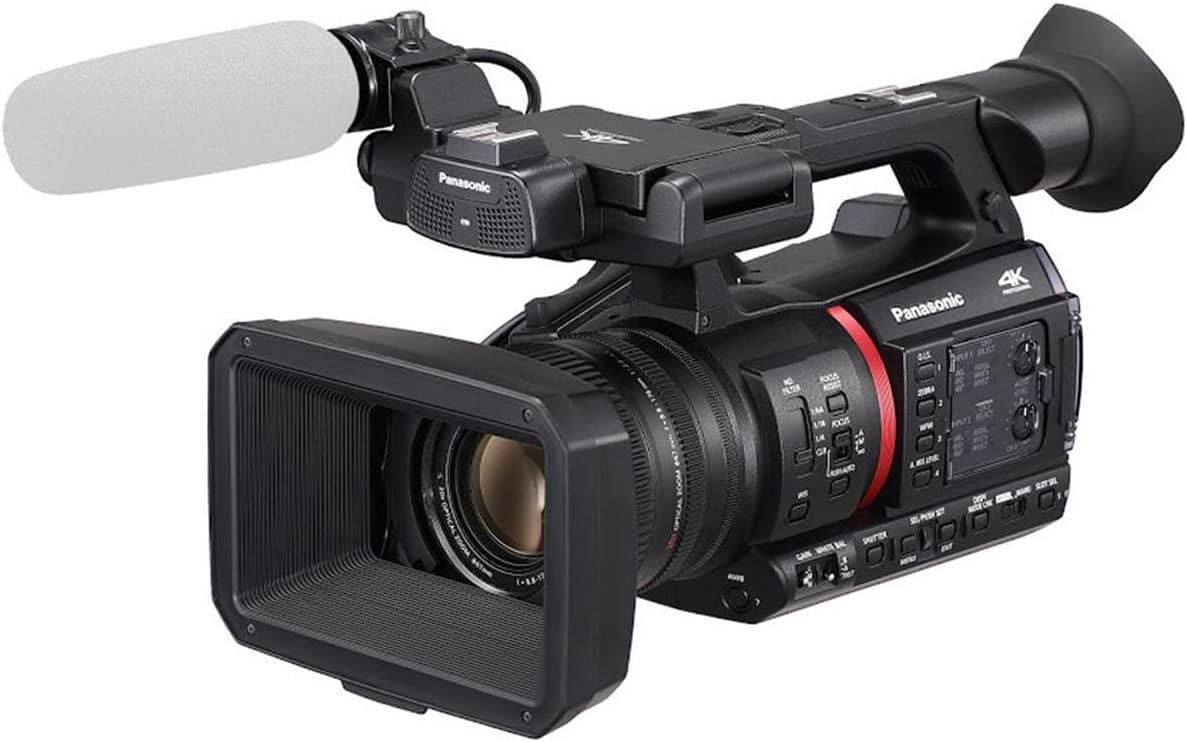
Figure 4.1: Main view of the Panasonic AG-CX350 4K Camcorder with a microphone attached, showcasing its professional design.
5. Setup
5.1 Battery Installation
- Ensure the camcorder is powered off.
- Locate the battery compartment on the rear of the camcorder.
- Slide the battery release latch and insert the battery until it clicks into place.

Figure 5.1: A close-up of the rear of the Panasonic AG-CX350 4K Camcorder, showing the battery compartment and various ports.
5.2 SD Card Insertion
- Open the SD card slot cover.
- Insert the SD card into the designated slot until it locks.
- Close the SD card slot cover securely.
5.3 Attaching Accessories
Attach the lens hood by aligning it with the lens and twisting until it locks. Other accessories like external microphones can be mounted on the cold shoe mount and connected to the appropriate audio input jacks.
6. Operating the Camcorder
6.1 Power On/Off
To power on the camcorder, open the LCD monitor. To power off, close the LCD monitor or use the power switch if available.

Figure 6.1: The Panasonic AG-CX350 4K Camcorder with its LCD screen flipped open, displaying the user interface.
6.2 Recording and Playback
- Press the REC START/STOP button to begin or end recording.
- Use the MENU button to access recording settings and playback options.
6.3 Zoom Control
The camcorder features a 20x optical zoom and 32x intelligent zoom. Use the zoom rocker on the handle or the zoom ring on the lens to adjust the focal length.
6.4 Focus Adjustment
The AG-CX350 offers both auto and manual focus modes. Switch between modes using the AF/MF button. In manual mode, rotate the focus ring on the lens for precise adjustment.
6.5 Exposure Settings
Adjust exposure using the iris ring, gain settings, and built-in ND filters (1/4, 1/16, 1/64). These controls allow for optimal image brightness in various lighting conditions.
6.6 Connectivity
The camcorder supports various output options:
- HDMI Out: For connecting to external monitors or recorders.
- 3G-SDI: For professional video workflows.
- TC In/Out: For timecode synchronization with other devices.
- NDI|HX: Preinstalled for IP-based video transmission.
7. Maintenance
7.1 Cleaning the Camcorder
- Use a soft, dry cloth to clean the exterior of the camcorder.
- For the lens, use a lens brush or a microfiber cloth with a specialized lens cleaning solution.
- Never use abrasive cleaners or solvents.
7.2 Storage
When not in use, store the camcorder in a cool, dry place, away from direct sunlight and excessive humidity. Remove the battery if storing for an extended period.
8. Troubleshooting
If you encounter issues with your AG-CX350, refer to the following general troubleshooting tips:
- No Power: Check battery charge, ensure battery is correctly inserted, or connect to AC power.
- Recording Issues: Verify SD card is inserted and has sufficient free space. Check recording settings.
- Image Unclear: Ensure lens is clean and focus is properly adjusted. Check ND filter settings if shooting in bright conditions.
- No Audio: Confirm external microphone is connected and powered on, and audio input levels are set correctly.
For more complex issues, consult the full owner's manual available on the Panasonic support website or contact customer support.
9. Specifications
| Feature | Detail |
|---|---|
| Product Dimensions | 7.09 x 6.81 x 12.24 inches |
| Item Weight | 10.4 ounces |
| Item Model Number | AG-CX350 |
| Batteries | 1 Lithium Ion batteries required (included) |
| Photo Sensor Technology | MOS |
| Video Capture Resolution | 4K |
| Maximum Focal Length | 176 Millimeters |
| Maximum Aperture | 1.8 f |
| Flash Memory Type | SD |
| Video Capture Format | AVCHD |
| Screen Size | 1 Inches |
| Connectivity Technology | HDMI |
| Color | Black |
10. Warranty and Support
Your Panasonic AG-CX350 4K Camcorder comes with a manufacturer's warranty. Please refer to the warranty card included in your package for specific terms and conditions. For technical support, service, or additional information, visit the official Panasonic support website or contact their customer service department.


