
Introduction
This manual provides essential information for the safe and effective use of your Exerpeutic 2000XL Bluetooth Smart Cloud Fitness Elliptical Trainer. Please read all instructions carefully before assembly and operation. Retain this manual for future reference.

Figure 1: Exerpeutic 2000XL Bluetooth Smart Cloud Fitness Elliptical Trainer.
Safety Information
- Consult your physician before starting any exercise program.
- Keep children and pets away from the equipment during use.
- Place the elliptical on a solid, level surface with adequate clearance around it.
- Ensure all bolts and nuts are securely tightened before each use.
- The maximum user weight capacity for this elliptical is 300 lbs (136 kg).
- Wear appropriate exercise attire and footwear.
- Stop exercising immediately if you feel faint, dizzy, or experience pain.
- Do not attempt to adjust the resistance while standing on the pedals.
Product Features
- Bluetooth Smart Cloud Fitness: Connects to the free MyCloudFitness app (iOS and Android) for workout tracking.
- Goal Settings: Set workout goals for time, distance, and calories burned via the MyCloudFitness app.
- Magnetic Tension System: 8 levels of adjustable magnetic resistance for varied workout intensity.
- LCD Display: A 3.4-inch large window LCD shows distance, calories burned, time, speed, pulse, and scan.
- Dual Action Workout Arms: Engages upper body for a full-body workout.
- Hand Pulse Sensors: Integrated into stationary handlebars to monitor heart rate.
- Large Ribbed Pedals: Designed to prevent foot slippage during exercise.
- Dual Direction Flywheel: Allows for both forward and backward workout capabilities.
- Heavy-Duty Steel Frame: Provides stability and durability.
- Transportation Wheels: Built-in wheels for easy relocation and storage.
Setup
Unpacking and Assembly
Carefully remove all components from the packaging. It is recommended to have two people for assembly. Follow the detailed assembly instructions provided in the separate assembly guide included with your product. Ensure all parts are accounted for and correctly installed before proceeding.
Placement
Choose a location with sufficient space (minimum 21 inches above the tallest user's head for ceiling clearance) and a stable, level floor. Avoid placing the elliptical in direct sunlight or near heat sources.
Operating Instructions
Powering On
The LCD display will activate automatically when you begin pedaling or press any button.
Adjusting Resistance
The elliptical features 8 levels of magnetic tension resistance. To adjust, turn the tension control knob located on the main frame. Turn clockwise for higher resistance, and counter-clockwise for lower resistance. Adjust resistance only when not actively pedaling to prevent damage or injury.

Figure 2: Adjusting the tension control knob.
Using the LCD Display
The 3.4-inch LCD display provides real-time workout data:
- MODE: Press to cycle through display functions (Time, Speed, Distance, Calories, Pulse, Scan).
- RESET: Press and hold to clear all workout data.
- SCAN: Automatically rotates through all functions every few seconds.
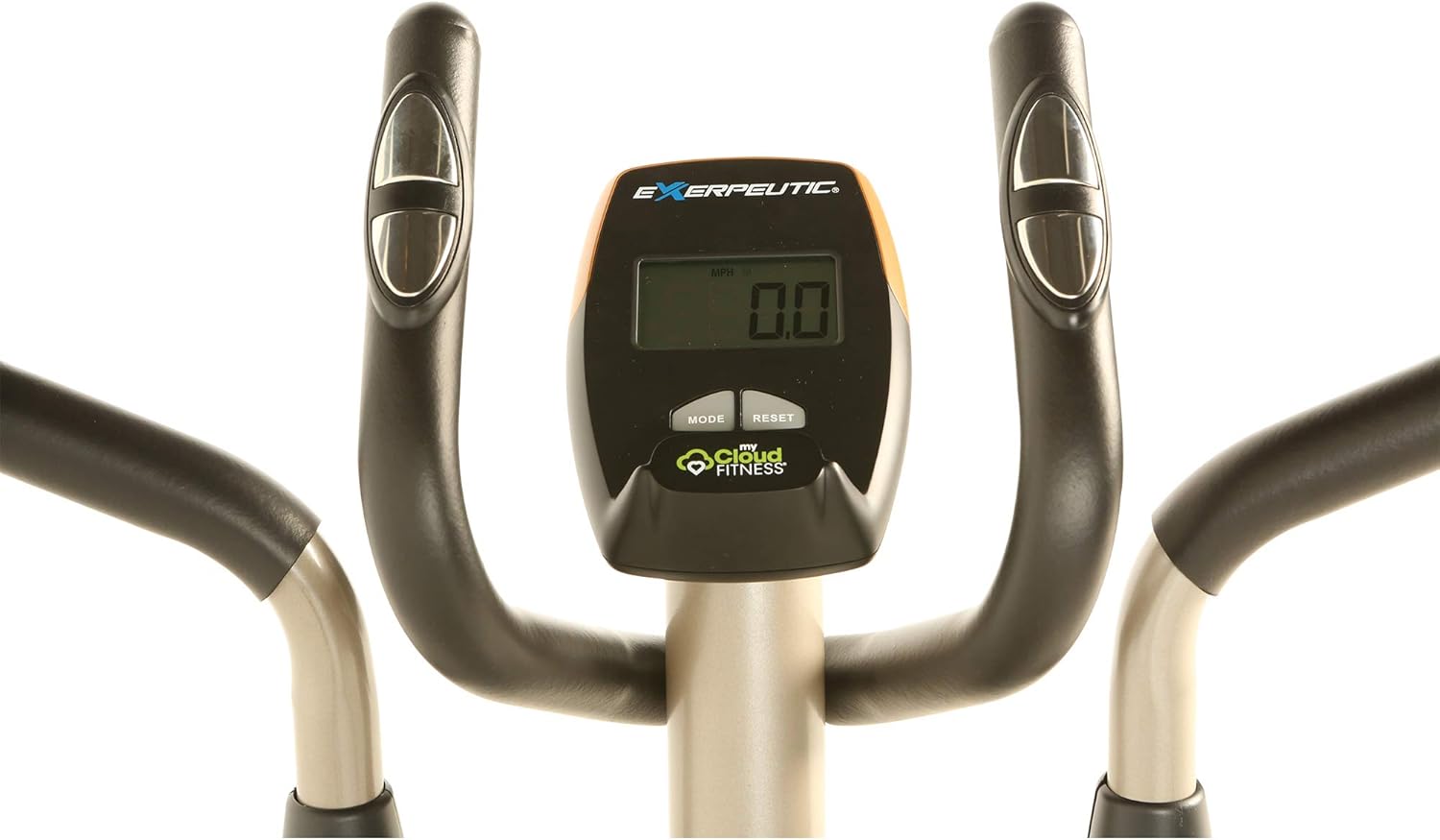
Figure 3: Close-up of the LCD display and control buttons.
Heart Rate Monitoring
Grasp the hand pulse sensors on the stationary handlebars to display your heart rate on the LCD. Ensure both hands are firmly on the sensors for an accurate reading.
Forward and Backward Motion
The elliptical supports both forward and backward pedaling. This allows for targeting different muscle groups and adding variety to your workout.
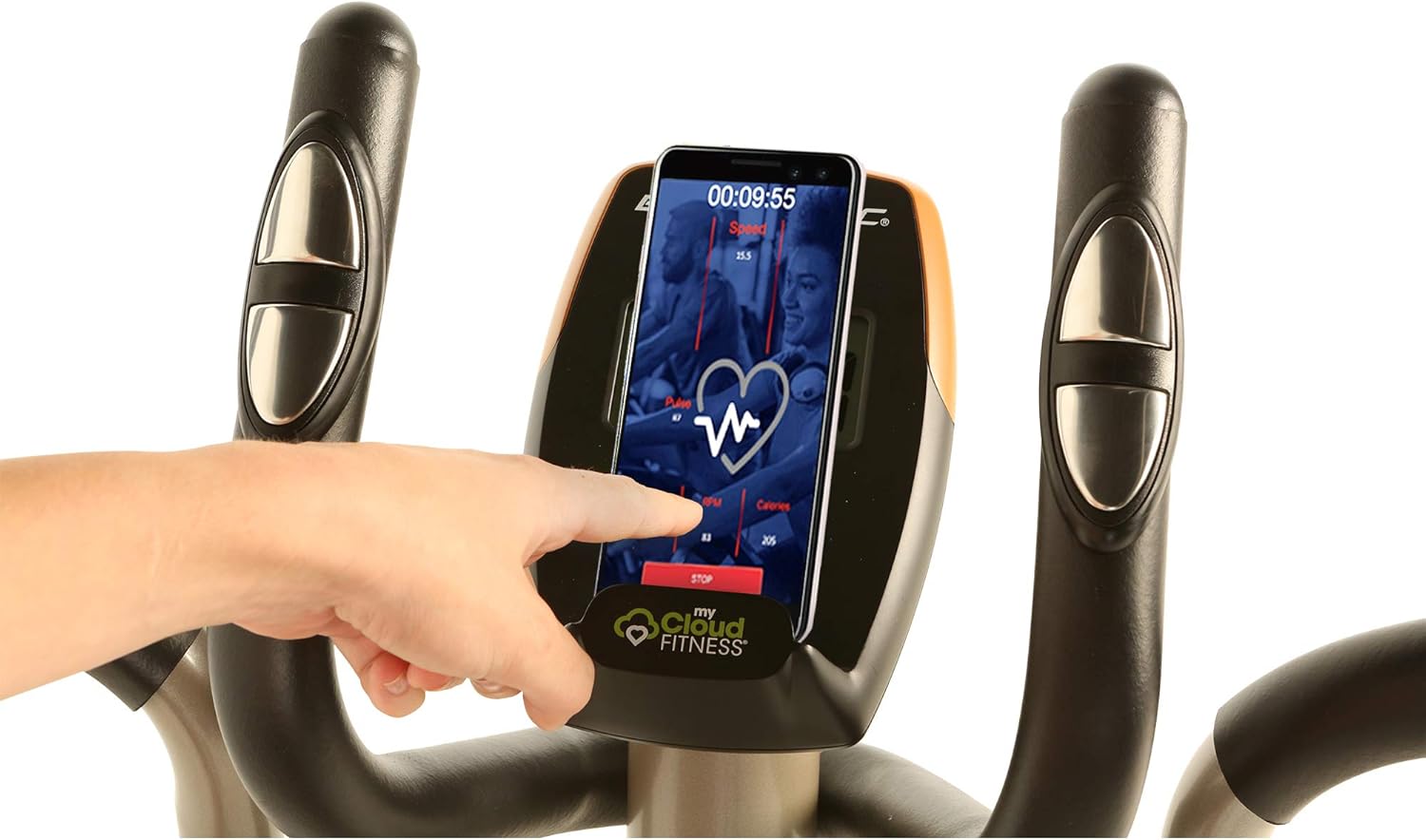
Figure 4: Large ribbed pedals for secure footing.
MyCloudFitness App
The Exerpeutic 2000XL is compatible with the free MyCloudFitness app, available for download on iOS and Android devices. This app allows you to track your workouts and set personalized goals.
Connecting to the App
- Download the MyCloudFitness app from your device's app store.
- Enable Bluetooth on your mobile device.
- Open the MyCloudFitness app and follow the on-screen instructions to pair with your Exerpeutic 2000XL elliptical.
App Features
- Workout Tracking: View real-time stats such as distance, calories burned, time, speed, and pulse.
- Goal Setting: Set specific goals for time, distance, or calories burned for each workout.
- Activity Reports: Access historical data and progress reports.

Figure 5: MyCloudFitness app displaying workout data.
Maintenance
- Cleaning: Wipe down the elliptical with a damp cloth after each use to remove sweat and dust. Avoid abrasive cleaners.
- Inspection: Regularly check all bolts, nuts, and moving parts for tightness and wear. Tighten any loose fasteners.
- Lubrication: Refer to the assembly guide for specific lubrication points and recommended lubricants, if any.
- Storage: When not in use, store the elliptical in a clean, dry environment. Use the built-in transportation wheels to move it carefully.
Troubleshooting
| Problem | Possible Cause | Solution |
|---|---|---|
| Display not working | Batteries are low or incorrectly installed. | Replace batteries or ensure correct polarity. |
| No resistance change | Tension cable disconnected or damaged. | Inspect the tension cable connection. Refer to assembly guide for re-connection. |
| Squeaking or unusual noises | Loose bolts or parts needing lubrication. | Check and tighten all bolts. Lubricate moving joints as per assembly guide. |
| Difficulty with assembly (e.g., bolt not fitting) | Misalignment of parts or manufacturing defect. | Double-check alignment. If a bolt is too tight, try loosening adjacent brackets to allow for better alignment. Contact customer support if parts are defective. |
| Bluetooth connection issues | Bluetooth off on device, app not updated, or interference. | Ensure Bluetooth is enabled. Restart app and device. Check for app updates. Move closer to the elliptical. |
Specifications
| Feature | Detail |
|---|---|
| Model Name | 2000XL |
| Model Number | 4318 |
| Brand | Exerpeutic |
| Product Dimensions | 54"D x 23"W x 63"H (137cm D x 58cm W x 160cm H) |
| Item Weight | 74.5 lbs (33.8 kg) |
| Material | Alloy Steel |
| Maximum Weight Recommendation | 300 Pounds (136 kg) |
| Resistance Mechanism | Magnetic |
| Number of Resistance Levels | 8 |
| Display Size | 3.4 Inches |
| Maximum Stride Length | 18 Inches |
| Included Components | Elliptical |
| UPC | 888115043187 |
Official Product Video
Video 1: Overview of the Exerpeutic 2000XL Elliptical Trainer's features and benefits. This video demonstrates the elliptical in use, highlights the MyCloudFitness app integration, adjustable tension levels, and dual-action handlebars.
Warranty and Support
The Exerpeutic 2000XL Elliptical Trainer comes with a 1-Year Limited Warranty. For warranty claims, technical support, or replacement parts, please refer to the contact information provided in your product packaging or visit the official Exerpeutic website. Keep your purchase receipt as proof of purchase.
For customer support, you may also visit the Exerpeutic Store on Amazon.
