
Introduction
This manual provides essential instructions for the safe and efficient use of your BAHCO BCL1B2 Electronic Large Battery. Please read this manual thoroughly before operation and retain it for future reference. Proper understanding and adherence to these instructions will ensure optimal performance and longevity of the product.
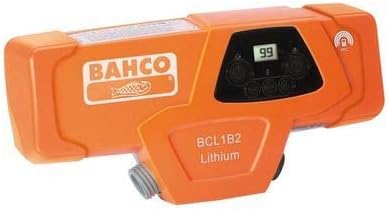
Figure 1: BAHCO BCL1B2 Electronic Large Battery. This image displays the orange-colored battery unit with the BAHCO logo and "BCL1B2 Lithium" text visible on its casing. A small digital display showing "99" is also visible on the top surface.
Safety Information
Always observe the following safety precautions to prevent injury or damage to the product:
- Do not expose the battery to water or excessive moisture.
- Avoid dropping or subjecting the battery to severe impacts.
- Do not attempt to open, disassemble, or modify the battery.
- Use only the specified charger for this battery.
- Store the battery in a cool, dry place away from direct sunlight and extreme temperatures.
- Keep out of reach of children.
Product Overview
The BAHCO BCL1B2 is an electronic large battery designed for specific power tools. It operates at 43 Volts and is intended for use with compatible corded electric devices.
Key Components:
- Battery Casing: Durable outer shell protecting internal components.
- Digital Display: Shows battery status or charge level (e.g., "99" as seen in Figure 1).
- Connection Port: For connecting to compatible tools or chargers.
Setup
Initial Charging:
- Ensure the battery is at room temperature before charging.
- Connect the appropriate charger (sold separately) to a power outlet.
- Align the battery with the charger and firmly insert it until it clicks into place.
- Allow the battery to charge fully. The digital display on the battery or the charger's indicator lights will show the charging status.
- Once fully charged, disconnect the battery from the charger.
Attaching to a Tool:
- Ensure the tool is powered off and disconnected from any power source.
- Align the battery's connection port with the tool's battery receptacle.
- Push the battery firmly into the tool until it locks securely.
- Verify the battery is securely attached before operating the tool.
Operating Instructions
Powering On/Off:
The battery itself does not have a power on/off switch. It provides power to the connected tool when properly installed. Refer to your tool's instruction manual for specific power on/off procedures.
Checking Battery Level:
The digital display on the battery (as shown in Figure 1) indicates the remaining charge level. A reading of "99" typically signifies a full charge. Consult your tool's manual or the battery's specific documentation for detailed interpretations of display readings.
Usage Tips:
- Avoid completely draining the battery before recharging to prolong its lifespan.
- If the battery becomes excessively hot during operation, discontinue use and allow it to cool down.
- Always use the battery within its specified operating temperature range.
Maintenance
Cleaning:
- Wipe the battery casing with a clean, dry, or slightly damp cloth.
- Do not use harsh chemicals, solvents, or abrasive cleaners.
- Ensure the connection terminals are clean and free of debris.
Storage:
- Store the battery in a cool, dry environment, ideally between 5°C and 25°C (41°F and 77°F).
- For long-term storage, charge the battery to approximately 50-70% capacity.
- Avoid storing the battery in direct sunlight or near heat sources.
Troubleshooting
| Problem | Possible Cause | Solution |
|---|---|---|
| Battery not charging | Charger not connected; Faulty charger; Battery too hot/cold | Ensure charger is properly connected; Try a different charger; Allow battery to reach room temperature. |
| Tool not powering on with battery | Battery not fully charged; Battery not securely attached; Faulty tool connection | Charge battery fully; Re-attach battery securely; Inspect tool's battery receptacle for damage. |
| Short operating time | Battery not fully charged; Battery degradation; Heavy tool usage | Ensure full charge; Consider battery replacement if old; Reduce continuous heavy load. |
If troubleshooting steps do not resolve the issue, contact BAHCO customer support.
Specifications
- Model: BCL1B2
- Part Number: 2101018
- Brand: Bahco
- Voltage: 43 Volts
- Power Source: Corded Electric (for charging, battery powers cordless tools)
- Batteries Included: No (This refers to the product itself, the BCL1B2 is the battery)
- First Available: February 1, 2019
Disposal and Recycling
Do not dispose of the battery with household waste. This product contains a lithium battery and should be recycled or disposed of according to local regulations. Contact your local waste management authority for information on proper disposal and recycling options.