
Introduction
This manual provides detailed instructions for the setup, operation, and maintenance of your Texas Hunter TH70 12-Volt Game Feeder System. This system is designed to convert almost any hopper into an automatic game feeder, ensuring reliable and precise feeding schedules. It includes the TH70 feeder unit, a 12-volt battery (Model BT12), and a solar charger (Model SP12).
Please read these instructions carefully before installation and use to ensure optimal performance and longevity of your feeder system.
Product Features
- Converts most hoppers into a precision automatic feeder.
- Constructed from tough 18 gauge steel with a rust-resistant powder-coated finish.
- Features a centrifugal-actuated stainless steel spinner plate for consistent feed distribution.
- Includes mounting hardware, a metal cone, and an installation template for easy setup.
- Pre-wired for the included SP12 solar charger.
- Comes with a BT12 12-volt heavy-duty rechargeable battery.
- Equipped with an EZ Set Digital Timer for simple programming.
- Premium 12-volt high torque motor for reliable operation.
- Smart "Lift and Stay" door allows easy access to internal components.
- Ever-lock captive screw door latch for secure closure.
Components Included
Your Texas Hunter TH70 Game Feeder System package includes the following items:
- Texas Hunter TH70 Feeder Unit with EZ Set Digital Timer
- BT12 12-Volt Heavy-Duty Rechargeable Battery
- SP12 Solar Charger
- Mounting Hardware
- Metal Cone
- Installation Template
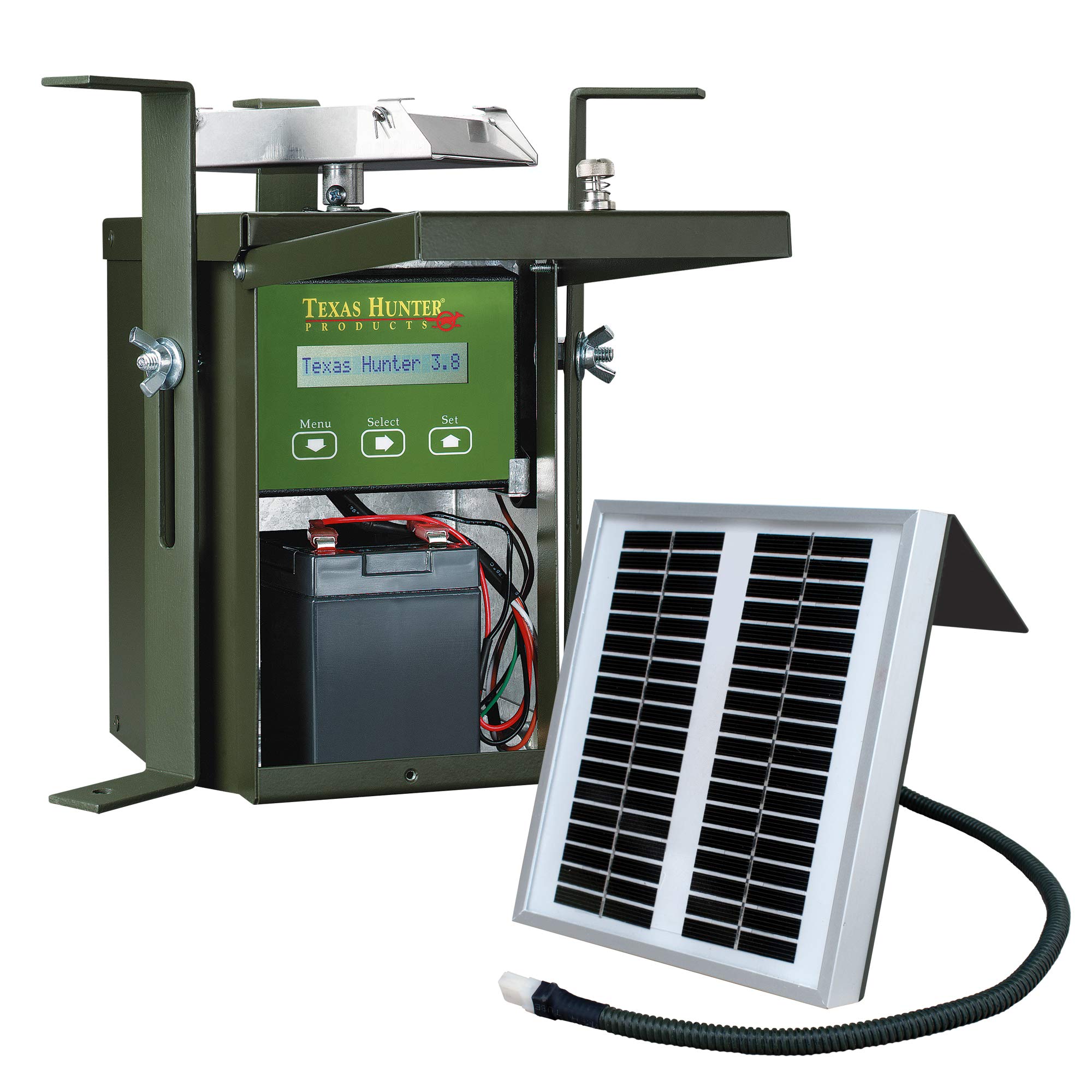
Image: The complete Texas Hunter TH70 12-Volt Game Feeder System, showing the main unit, internal battery, and digital timer.

Image: The packaging for the Texas Hunter Game Feeder Kit, highlighting key features and components.
Setup Instructions
- Prepare the Hopper: Ensure your existing hopper is clean and ready for installation. The TH70 system is designed to attach to the bottom of most hoppers.
- Mount the Feeder Unit: Use the provided mounting hardware and installation template to securely attach the TH70 feeder unit to the bottom of your hopper. Ensure the unit is level and the spinner plate has clear clearance for feed distribution. The metal cone should be positioned inside the hopper to guide feed towards the feeder unit.
- Install the Battery: Open the access door on the TH70 unit. Connect the included BT12 12-volt battery to the pre-wired terminals inside the unit. Ensure correct polarity (red to positive, black to negative).
- Connect the Solar Charger: The TH70 unit is pre-wired for the SP12 solar charger. Connect the solar charger's universal adapter to the designated port on the feeder unit. Mount the SP12 solar charger in a location that receives maximum direct sunlight throughout the day to ensure continuous battery charging.
- Fill the Hopper: Once the feeder unit is securely mounted and the battery and solar charger are connected, fill your hopper with the desired game feed.

Image: The BT12 12-Volt Heavy-Duty Rechargeable Battery, included with the system.

Image: The SP12 Solar Charger, designed to maintain the battery charge.
For visual guidance on setting up your Texas Hunter products, please watch the following video:
Video: An overview of Texas Hunter Outdoor Products, demonstrating the use and benefits of their game feeder systems and blinds.
Operating Instructions (EZ Set Digital Timer)
The EZ Set Digital Timer is designed for straightforward programming. Follow these steps to set your feeding schedule:

Image: Close-up of the EZ Set Digital Timer display, showing feed settings.
- Accessing the Menu: Press the "Menu" button (down arrow) to cycle through the programming options.
- Setting Feed Times: The timer allows you to set 1 to 9 feed times per day. When the display shows a feed time option (e.g., "Feed 1"), use the "Select" button (right arrow) to adjust the hour and minute. Use the "Set" button (up arrow) to confirm and move to the next setting.
- Setting Run Time: For each feed time, you can set the duration from 1 to 60 seconds. Use the "Select" button to adjust the seconds and "Set" to confirm.
- Test Run: The timer includes a test run feature (1 to 60 seconds). This allows you to manually activate the feeder for a short duration to verify operation and feed spread.
- Battery Tester: The built-in battery tester displays battery strength as Good, Fair, or Poor. Regularly check this to ensure your battery is adequately charged.
- Solar Charger Indicator: The display flashes to indicate that the optional solar charger is working properly and charging the battery.
- Memory Chip: The timer features a memory chip that saves all your feed settings, even if the battery is disconnected.
Maintenance
- Battery Care: The included BT12 12-volt rechargeable battery is designed for long service. Ensure the solar charger is connected and positioned correctly to maintain the battery charge. If the feeder is stored for an extended period, disconnect the battery and store it in a cool, dry place, ensuring it is fully charged before storage and periodically recharged if stored for many months.
- Cleaning: Periodically inspect the feeder unit, especially the spinner plate and motor housing, for any debris, dust, or feed residue buildup. Clean as necessary to prevent obstructions and ensure smooth operation.
- Solar Panel: Keep the SP12 solar panel clean and free of dirt, leaves, or other obstructions that could block sunlight and reduce charging efficiency.
- General Inspection: Regularly check all mounting hardware for tightness and ensure the feeder unit remains securely attached to the hopper. Inspect wiring for any signs of wear or damage.
Troubleshooting
- Feeder Not Dispensing:
- Check if the hopper is empty.
- Verify battery charge using the EZ Set Digital Timer's built-in tester. Recharge or replace the battery if low.
- Inspect the spinner plate for obstructions (e.g., large feed chunks, debris).
- Ensure the motor wires are securely connected.
- Timer Not Displaying or Functioning:
- Check battery connections and charge level.
- Ensure the battery is properly installed and providing power.
- Solar Charger Indicator Not Flashing:
- Ensure the solar panel is clean and receiving direct sunlight.
- Check the connection between the solar charger and the feeder unit.
- Verify the solar panel itself is not damaged.
- Inconsistent Feed Distribution:
- Check for obstructions on or around the spinner plate.
- Ensure the feeder unit is mounted level.
- Verify the feed type is suitable for automatic feeders and not clumping.
Specifications
| Feature | Detail |
|---|---|
| Brand | Texas Hunter Products |
| Model | TH70 |
| Power Source | Battery Powered (12V) |
| Battery Included | Yes (BT12 12-Volt) |
| Solar Charger Included | Yes (SP12) |
| Material | 18 Gauge Alloy Steel, Metal, Stainless Steel |
| Special Feature | Rust Resistant |
| Mounting Type | Tree Mount (or suitable hopper mount) |
| Product Dimensions | 10"L x 10"W x 14"H |
| Item Weight | 15 Pounds |
| UPC | 762987003299 |

Image: The Texas Hunter TH70 Game Feeder System with its primary dimensions indicated.
Warranty and Support
Texas Hunter Products stands behind the quality of its products. For specific warranty information regarding your TH70 12-Volt Game Feeder System, please refer to the warranty card included with your purchase or visit the official Texas Hunter Products website.
If you require technical assistance, have questions about installation, operation, or need to report a defect, please contact Texas Hunter Products customer support. Contact details can typically be found on the product packaging, the official website, or by searching for "Texas Hunter Products customer service" online.
When contacting support, please have your product model (TH70) and UPC (762987003299) readily available to expedite the service process.