
BRONDI 10275074
Brondi Président Gold 10275074 User Manual
Model: 10275074
Introduction
This manual provides essential instructions for the proper use and maintenance of your Brondi Président Gold clamshell feature phone. Please read this manual thoroughly before operating the device to ensure optimal performance and longevity.

Image: The Brondi Président Gold phone in its closed, clamshell state. The front panel features a sleek gold finish with a vertical black strip displaying illuminated icons for incoming calls (green phone), new messages (green envelope), and battery status (red battery).
Setup
1. Battery Installation and Charging
- Open the Phone: Gently open the clamshell phone.
- Remove Back Cover: Locate the notch on the back cover and carefully pry it open to remove.
- Insert Battery: Align the contacts of the Lithium-ion battery with the terminals inside the battery compartment and press down gently until it clicks into place.
- Replace Back Cover: Place the back cover over the battery compartment and press firmly until it snaps securely.
- Charge Battery: Connect the Micro USB charging cable to the phone's charging port and plug the other end into a power adapter. Allow the phone to charge fully before initial use. The battery indicator on the front display will show charging status.
2. SIM Card and Micro SD Card Installation
The Brondi Président Gold supports dual SIM cards and a Micro SD card for expandable memory up to 32GB.
- Access Card Slots: With the back cover removed (as described in battery installation), locate the SIM card slots and the Micro SD card slot.
- Insert SIM Cards: Carefully slide your SIM cards into the designated slots with the gold contacts facing down. Ensure they are fully seated.
- Insert Micro SD Card: Slide the Micro SD card into its slot until it locks into place.
- Replace Back Cover: Reattach the back cover securely.
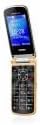
Image: A side profile of the Brondi Président Gold phone, highlighting the Micro USB port at the bottom for charging and data transfer, and the volume control buttons located on the side.
3. Powering On/Off
- To Power On: Press and hold the Power/End Call button (usually red) until the screen illuminates.
- To Power Off: Press and hold the Power/End Call button until the power-off options appear, then select 'Power Off'.
Operating Instructions
1. Basic Navigation and Keypad
The Brondi Président Gold features a 3-inch display and a physical keypad for navigation and input.


Image: Left, the Brondi Président Gold phone opened, revealing its 3-inch screen displaying numerical input and the full physical keypad below. Right, a close-up of the phone's keypad, showing clearly labeled numeric and function keys.
- Navigation Keys: Use the directional pad (up, down, left, right) to navigate through menus and options. The center key typically acts as a 'Select' or 'Confirm' button.
- Call Key: Press the green call key to initiate a call or answer an incoming call.
- End Call/Power Key: Press the red key to end a call or return to the home screen. Long press to power the device on or off.
- Numeric Keypad: Use the numeric keys (0-9, *, #) for dialing numbers and entering text.
2. Making and Receiving Calls
- Making a Call: Enter the phone number using the keypad and press the green call key.
- Answering a Call: When the phone rings, press the green call key to answer.
- Ending a Call: Press the red end call key.
3. Messaging
- Navigate to the 'Messages' menu.
- Select 'New Message' or 'Create SMS'.
- Enter the recipient's number and type your message using the keypad.
- Press 'Send'.
4. Camera Function
The phone is equipped with a 1.3 Megapixel camera.
- Navigate to the 'Camera' application from the main menu.
- Frame your shot using the display.
- Press the designated camera button (or center navigation key) to capture the image.
- Images are saved to the phone's memory or the inserted Micro SD card.
5. Bluetooth Connectivity
The Brondi Président Gold supports Bluetooth for wireless connections.
- Go to 'Settings' > 'Connectivity' > 'Bluetooth'.
- Turn Bluetooth 'On'.
- Select 'Search for devices' to find other Bluetooth-enabled devices.
- Select the desired device from the list and follow the on-screen prompts to pair.
Maintenance
- Cleaning: Use a soft, dry cloth to clean the phone's exterior. Avoid liquid cleaners or abrasive materials.
- Battery Care: To prolong battery life, avoid exposing the phone to extreme temperatures. Do not leave the battery fully discharged for extended periods.
- Storage: Store the phone in a cool, dry place away from direct sunlight and moisture.
- Handling: Handle the phone with care. Avoid dropping it or subjecting it to strong impacts.
Troubleshooting
- Phone does not power on: Ensure the battery is correctly installed and sufficiently charged. Connect the charger and try again.
- Cannot make/receive calls: Check if the SIM card is properly inserted and activated. Verify network signal strength.
- Poor audio quality: Ensure the speaker and microphone are not obstructed. Adjust volume settings.
- Bluetooth pairing issues: Ensure both devices have Bluetooth enabled and are within range. Try restarting both devices.
- Memory card not detected: Ensure the Micro SD card is correctly inserted. Try reinserting it or using a different card to check for card malfunction.
Specifications
| Feature | Detail |
|---|---|
| Brand | BRONDI |
| Model Name | Président Gold |
| Model Number | 10275074 |
| Operating System | Linux (Proprietary) |
| Display Size | 3 Inches |
| Camera Resolution | 1.3 Megapixels |
| Memory Expansion | Up to 32GB Micro SD |
| Connectivity | Bluetooth, Micro USB |
| Cellular Technology | GSM (Dual SIM) |
| Battery Type | Lithium-ion (1 A) |
| Color | Gold |
Warranty and Support
For warranty information and technical support, please refer to the documentation included with your purchase or visit the official Brondi website. Keep your proof of purchase for warranty claims.
Ask a question about this manual
Ask about setup, troubleshooting, compatibility, parts, safety, or missing instructions. Manuals+ will review the question and use this page’s manual context to help answer it.