
Serounder RC-1168
Serounder RC-1168 Remote Control Instruction Manual
Model: RC-1168
Introduction
This manual provides comprehensive instructions for the setup, operation, and maintenance of your Serounder RC-1168 Remote Control. This remote is designed as a replacement or spare for various Denon AVR receiver models, including AVR1613, AVR1713, AVR1912, AVR1911, AVR2312, and AVR3312. Please read this manual carefully to ensure proper use and longevity of your device.
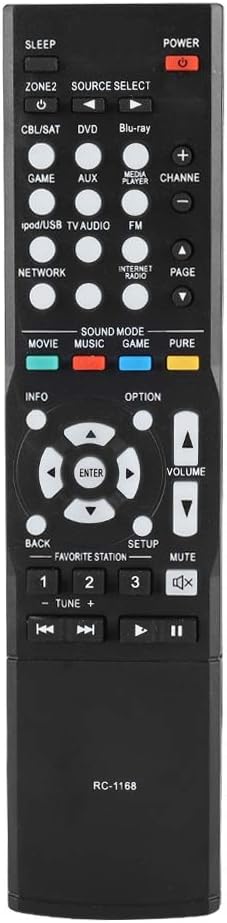
Figure 1: Serounder RC-1168 Remote Control
The image above displays the front view of the Serounder RC-1168 remote control, showcasing its ergonomic design and button layout. This remote is a direct replacement for compatible Denon AVR receivers.
Setup
Battery Installation
The RC-1168 remote control requires two (2) AA batteries for operation. Batteries are not included with the remote control.
- Locate the battery compartment on the back of the remote control.
- Press down on the latch and slide the battery cover downwards to open it.
- Insert two AA batteries, ensuring the positive (+) and negative (-) terminals align correctly with the markings inside the compartment.
- Slide the battery cover back into place until it clicks securely.

Figure 2: Battery Compartment
This image shows the rear of the RC-1168 remote control with the battery cover removed, illustrating the correct orientation for inserting two AA batteries into the compartment.
Once batteries are installed, the remote control is ready for use with compatible Denon AVR receivers. No programming is typically required for this replacement remote.
Operating Instructions
The RC-1168 remote control provides full functionality for your compatible Denon AVR receiver. Below is a guide to the main button functions.
General Functions
- POWER: Turns the receiver on or off.
- SLEEP: Sets the sleep timer for the receiver.
- ZONE2: Controls the second audio zone of the receiver.
- SOURCE SELECT: Cycles through available input sources (e.g., CBL/SAT, DVD, Blu-ray, Game, AUX, iPod/USB TV Audio, FM, Network, Internet Radio).
- VOLUME +/-: Adjusts the master volume level.
- MUTE: Toggles audio mute on/off.
- CHANNEL +/-: Changes channels on compatible tuners or navigates menus.
- PAGE +/-: Navigates through pages in menus or lists.
Navigation and Menu Controls
- INFO: Displays information about the current source or content.
- Directional Arrows (Up, Down, Left, Right): Navigates through menus and options.
- ENTER: Confirms selections in menus.
- BACK: Returns to the previous menu or screen.
- SETUP: Accesses the receiver's main setup menu.
- OPTION: Displays context-sensitive options.
Sound Mode Buttons
- MOVIE: Activates sound modes optimized for movies.
- MUSIC: Activates sound modes optimized for music.
- GAME: Activates sound modes optimized for gaming.
- PURE: Activates Pure Direct mode for uncolored audio playback.
Playback and Tuner Controls
- Number Buttons (1-3): Direct input for channels or menu selections.
- FAVORITE STATION: Recalls preset radio stations.
- TUNE +/-: Adjusts radio frequency.
- Playback Controls (Rewind, Play/Pause, Fast Forward, Stop, Previous Track, Next Track): Controls playback of connected media devices.

Figure 3: Detailed Button Layout
This close-up image highlights the various buttons on the RC-1168 remote control, including source selection, volume, navigation, and sound mode controls, providing a clear visual reference for operation.

Figure 4: Remote Control Distance
The image illustrates the effective operational range of the RC-1168 remote control. The control distance is typically over 8 meters (approximately 26 feet), though actual distance may vary depending on the specific receiver model and environmental factors.
Maintenance
Cleaning
To maintain the appearance and functionality of your remote control:
- Wipe the surface with a soft, dry cloth.
- For stubborn dirt, slightly dampen the cloth with water or a mild, non-abrasive cleaner. Do not use harsh chemicals or abrasive materials.
- Avoid getting moisture into the button gaps or battery compartment.
Battery Replacement
Replace batteries when the remote control's response becomes sluggish or it stops functioning. Always replace both batteries at the same time with new ones of the same type (AA). Remove batteries if the remote will not be used for an extended period to prevent leakage.
Troubleshooting
| Problem | Possible Cause | Solution |
|---|---|---|
| Remote control does not work. |
|
|
| Limited control distance. |
|
|
| Certain buttons do not respond. |
|
|
Specifications
- Model: RC-1168
- Shell Material: ABS
- Control Distance: > 8 meters (315 inches)
- Battery Type: 2 x AA Batteries (not included)
- Dimensions (Approx.): 210 x 50 x 20 mm (8.3 x 2.0 x 0.8 inches)
- Weight (Approx.): 73g (2.46 ounces)
- Compatible Devices: Denon AVR1613, AVR1713, AVR1912, AVR1911, AVR2312, AVR3312 Receivers
Warranty and Support
This product is designed for reliable performance. For any issues or inquiries, please refer to the seller's return policy or contact Serounder customer support through the platform where the product was purchased. Standard return policies typically allow for returns or replacements within 30 days of purchase.
For more information about Serounder products, you may visit the official Serounder Store on Amazon.
Ask a question about this manual
Ask about setup, troubleshooting, compatibility, parts, safety, or missing instructions. Manuals+ will review the question and use this page’s manual context to help answer it.