
1. Product Overview
The Gigastone 128GB Gaming Plus MicroSDXC Memory Card is designed for high-performance storage in various compatible devices. It features A1 specification for fast app performance, UHS-I U3 V30 C10 speed ratings, and read/write speeds up to 100/50 MB/s, making it suitable for 4K video recording and gaming.
This memory card is built to withstand challenging environments, offering waterproof, shockproof, temperature-proof, and X-Ray proof protection for your data.

Image 1.1: Front view of the Gigastone 128GB Gaming Plus MicroSDXC Memory Card, showing its capacity and speed ratings.
2. Setup and Installation
To install your Gigastone MicroSDXC card, locate the memory card slot on your device. Gently insert the card until it clicks into place. If your device requires an SD adapter, insert the MicroSDXC card into the adapter first, then insert the adapter into your device's SD card slot.
2.1. Formatting the Micro SD Card
For optimal performance and compatibility, especially with new cards or when switching between devices, formatting the Micro SD card is recommended. Always back up any important data before formatting, as this process will erase all content on the card.
- For 64GB or above capacity cards: The default file system should be exFAT.
- For 32GB or below capacity cards: The default file system should be FAT32.
If your device only supports FAT32, and your card is 64GB or above, you may need to format it to FAT32 using a computer. Refer to your device's user manual for specific formatting instructions.
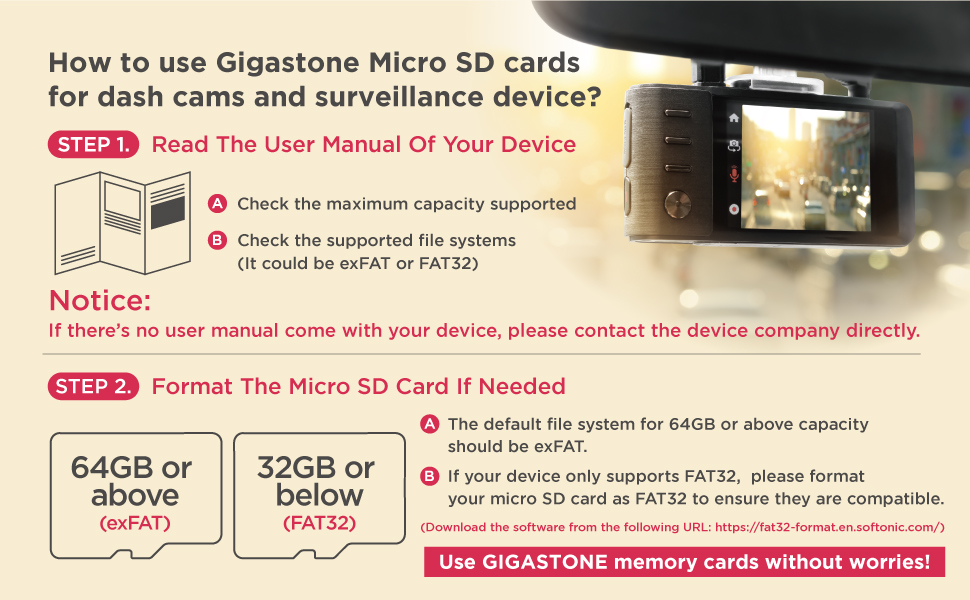
Image 2.1: Guide for formatting Gigastone Micro SD cards for dash cams and surveillance devices, indicating file system requirements based on capacity.
2.2. Using the Included Adapter
The MicroSDXC card comes with a standard SD adapter. This adapter allows you to use your MicroSDXC card in devices that only accept full-size SD cards, such as some cameras or laptops. Simply insert the MicroSDXC card into the adapter, then insert the adapter into the device.

Image 2.2: Illustration of two standard Gigastone Micro SD to SD adapter designs, both functioning identically for conversion.
3. Operating Instructions
Once installed and formatted, the Gigastone MicroSDXC card functions as an extended storage medium for your compatible device. You can save games, applications, photos, videos, and other files directly to the card.
- Saving Data: Most devices will automatically detect the card and allow you to select it as a storage location. Refer to your device's settings for managing storage preferences.
- Transferring Data: To transfer files to or from the card using a computer, insert the card (or adapter) into a compatible card reader connected to your computer. The card will appear as a removable drive.
- Ejecting Safely: Always safely eject the memory card from your device or computer before physically removing it to prevent data corruption.

Image 3.1: Visual representation of the Micro SD card's high-speed performance, indicating reduced data transfer times for gaming applications.
4. Compatibility
This Gigastone MicroSDXC card is compatible with a wide range of devices requiring Micro SDXC storage. Key compatible devices include:
- Gaming Consoles (e.g., Nintendo Switch 1, Nintendo Switch Lite, Nintendo Switch OLED, Steam Deck)
- Laptops and Tablets
- Smartphones
- Cameras (including 4K video recording)
- e-Readers
- Dash Cams and Security Cameras
4.1. Nintendo Switch Compatibility
The Gigastone 128GB Gaming Plus MicroSDXC card is fully compatible with the Nintendo Switch 1 (including Lite and OLED models) for gaming and media storage. However, it is not compatible for gaming with Nintendo Switch 2. For Nintendo Switch 2, only SD 7.1 Micro SD Express cards are compatible for gaming, while other card types may still be used for photo/video storage.

Image 4.1: Visual warning indicating compatibility with Nintendo Switch 1 and non-compatibility with Nintendo Switch 2 for gaming.

Image 4.2: Comprehensive table detailing Micro SD card compatibility for Nintendo Switch 1 and Switch 2 across different card specifications and applications (game, photo/video).
5. Performance Specifications
| Feature | Specification |
|---|---|
| Memory Storage Capacity | 128 GB |
| Flash Memory Type | Micro SDXC |
| Read Speed | Up to 100 MB/s |
| Write Speed | Up to 50 MB/s |
| Secure Digital Association Speed Class | Class 10 |
| UHS Speed Class | U3 |
| Video Speed Class | V30 |
| Application Performance Class | A1 (1500 IOPS Read, 500 IOPS Write) |
| Special Features | Waterproof, Shockproof, Temperature-proof, X-Ray proof |
| Product Dimensions | 5.47 x 3.43 x 0.04 inches |
| Item Weight | 0.352 ounces |
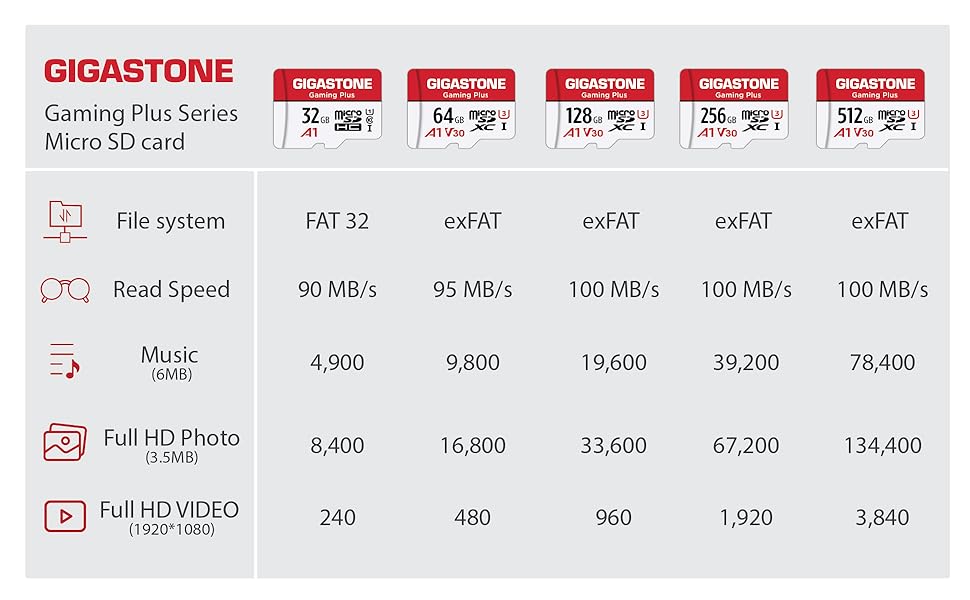
Image 5.1: Detailed table outlining specifications for the Gigastone Gaming Plus Micro SD card series, including file system, read speed, and estimated storage for music, photos, and videos across different capacities.

Image 5.2: Illustration of A1 App Performance, showing 1500 IOPS Read and 500 IOPS Write for faster and smoother application execution.
6. Maintenance and Care
To ensure the longevity and reliable performance of your Gigastone MicroSDXC card, follow these maintenance guidelines:
- Physical Protection: Avoid bending, dropping, or applying excessive force to the card. Store it in a protective case when not in use.
- Environmental Resistance: The card is designed to be waterproof, shockproof, temperature-proof, and X-Ray proof. However, prolonged exposure to extreme conditions should be avoided.
- Cleaning: If necessary, gently clean the metal contacts with a soft, dry, lint-free cloth. Do not use liquids or abrasive materials.
- Data Backup: Regularly back up important data from your memory card to another storage device to prevent data loss.
6.1. Understanding Buffer Memory
Micro SD cards reserve a portion of their capacity for buffer memory, firmware, applications, and software. A larger buffer memory generally contributes to a longer lifespan for the card. This means the usable capacity will be slightly less than the advertised capacity.
- For a 128GB Micro SD card, the usable capacity is approximately 116GB to 119GB.
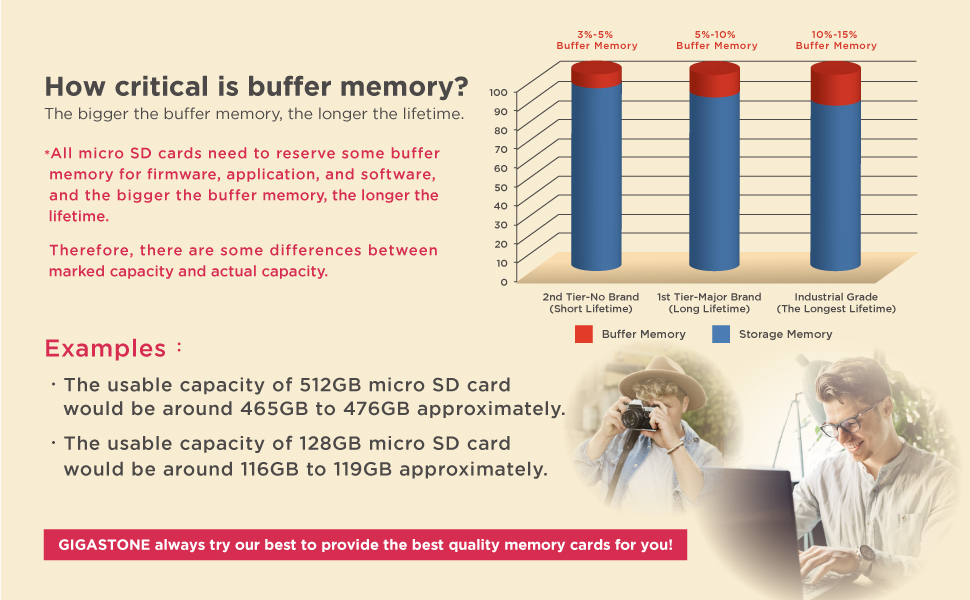
Image 6.1: Chart illustrating the concept of buffer memory in Micro SD cards and its relation to card lifetime and usable storage capacity.
7. Troubleshooting
- Card Not Detected:
- Ensure the card is fully inserted into the slot.
- Try the card in another compatible device to rule out a device issue.
- If using an adapter, ensure the MicroSDXC card is correctly seated in the adapter and the adapter's lock switch is in the "unlocked" position.
- Clean the card's metal contacts with a soft, dry cloth.
- Read/Write Errors or Slow Performance:
- Ensure your device supports the card's speed class (UHS-I U3 V30 A1). Older devices may not fully utilize its speed.
- Format the card (after backing up data) to resolve potential file system corruption.
- Check if the card is nearly full, as this can impact performance.
- Incompatible File System:
- If your device reports an incompatible file system, format the card to the correct format (exFAT for 64GB+ or FAT32 for 32GB-). Some older devices may only support FAT32.
8. Warranty and Support
The Gigastone 128GB Gaming Plus MicroSDXC Memory Card comes with a 5-year limited warranty. For warranty claims, technical support, or further assistance, please contact Gigastone customer service through their official channels.
Refer to the official Gigastone website or your purchase documentation for detailed warranty terms and contact information.