
1. Introduction
The PROEL MQ6 is a compact 6-channel mixer designed for various sound reinforcement applications. It offers a high input density, essential features, and superior audio quality in a durable, ultra-rugged case. This manual provides detailed instructions for the proper setup, operation, and maintenance of your MQ6 mixer.
2. Safety Information
- Power Supply: Use only the specified power adapter. Ensure the voltage matches your local power supply.
- Moisture: Do not expose the unit to rain or moisture. Avoid placing liquids near the mixer.
- Ventilation: Ensure adequate ventilation. Do not block ventilation openings.
- Heat: Keep the unit away from heat sources such as radiators, heat registers, stoves, or other apparatus that produce heat.
- Servicing: Do not attempt to service this product yourself. Refer all servicing to qualified service personnel.
- Cables: Protect power cords from being walked on or pinched, particularly at plugs, convenience receptacles, and the point where they exit from the apparatus.
- Cleaning: Clean only with a dry cloth.
3. Product Overview
The PROEL MQ6 is a 6-channel compact mixer featuring 2 mono MIC/LINE inputs, 2 stereo LINE inputs, 3-band EQ on mono channels, 2-band EQ on stereo channels, and electronically balanced main outputs.

Figure 3.1: Top view of the PROEL MQ6 Compact 6-Channel Mixer, showing all controls and inputs.

Figure 3.2: Angled view of the PROEL MQ6 mixer, highlighting the compact design and control layout.
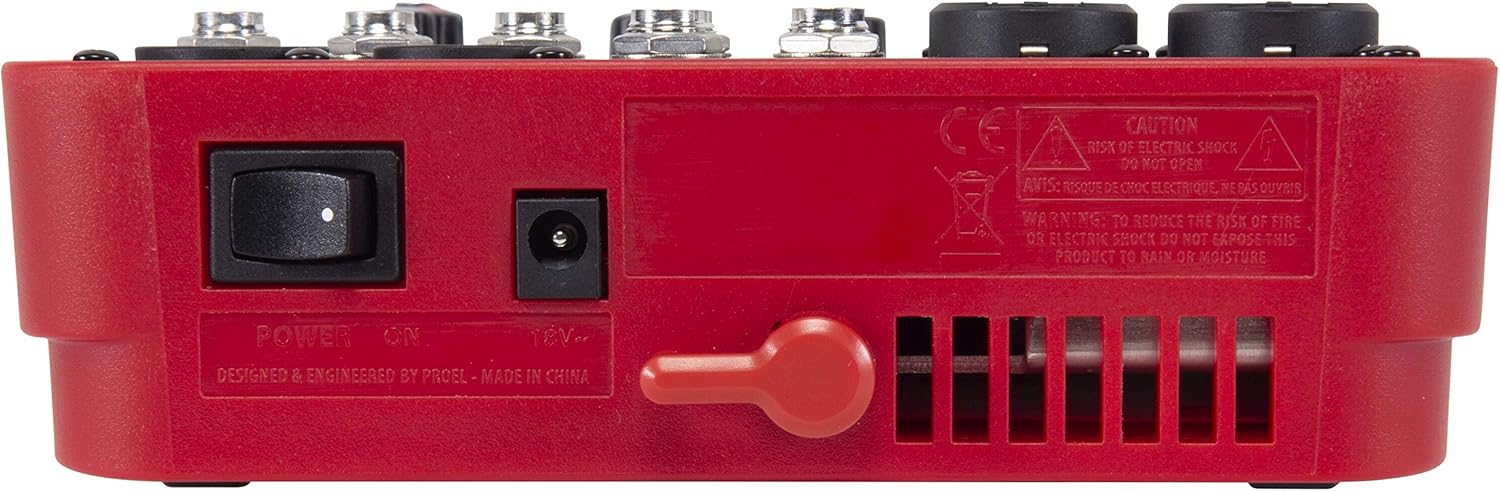
Figure 3.3: Rear view of the PROEL MQ6 mixer, showing the power switch and DC input.
Product Features:
- 2 Mono MIC/LINE inputs with XLR/TRS combo jacks.
- 2 Stereo LINE inputs (3/4, 5/6) with TRS jacks.
- 3-Band EQ on mono channels for precise tone shaping.
- 2-Band EQ on stereo channels.
- Low-noise, high-headroom microphone preamps.
- Electronically balanced XLR MAIN MIX outputs.
- Phantom Power (+48V) for condenser microphones.
- Headphone output with dedicated level control.
PROEL MQ Series Overview Video
This video provides an overview of the PROEL MQ Series compact mixers. Please note that some features shown, such as digital effects, compressors, and USB connectivity, are available on other models within the MQ series (e.g., MQ6FX, MQ12USB, MQ16USB) and not on the MQ6 model specifically.
4. Setup
4.1 Unpacking and Inspection
Carefully unpack the mixer and check for any signs of damage. Ensure all components listed in the packaging are present. If any items are missing or damaged, contact your dealer immediately.
4.2 Power Connection
- Ensure the mixer's power switch is in the OFF position.
- Connect the provided power adapter to the DC input jack on the rear of the mixer.
- Plug the power adapter into a suitable AC power outlet.
4.3 Input Connections
The MQ6 features two types of input channels:
- Mono MIC/LINE Inputs (Channels 1-2): Use XLR cables for microphones or 1/4" TRS cables for line-level instruments (e.g., keyboards, guitars with preamps).
- Stereo LINE Inputs (Channels 3/4, 5/6): Use 1/4" TRS cables for stereo line-level sources. If connecting a mono source, use the L/MONO input.
4.4 Output Connections
- MAIN MIX Outputs: Connect your main speakers or power amplifier to the XLR MAIN MIX L and R outputs. These outputs are electronically balanced.
- PHONES Output: Connect your headphones to the 1/4" PHONES jack for monitoring.
5. Operating Instructions
5.1 Powering On/Off
- Before powering on, ensure all channel GAIN and MIX level knobs are set to their minimum position.
- Turn on the mixer using the power switch on the rear panel.
- When powering off, first turn down all output levels, then switch off the mixer.
5.2 Channel Controls (Mono Channels 1-2)
- MIC/LINE Input: Combo jack for XLR microphones or 1/4" TRS line-level sources.
- LO CUT (75 Hz): Engages a high-pass filter at 75 Hz to remove unwanted low-frequency rumble.
- GAIN: Adjusts the input sensitivity for the connected microphone or line source. Set this to achieve a strong signal without clipping (indicated by the PEAK LED).
- HI (12 kHz): Adjusts the high-frequency (treble) content of the channel.
- LOW (80 Hz): Adjusts the low-frequency (bass) content of the channel.
- PEAK LED: Illuminates when the input signal is too high, indicating potential clipping. Reduce the GAIN if this LED lights up frequently.
- Level Knob: Controls the channel's contribution to the main mix.
5.3 Channel Controls (Stereo Channels 3/4, 5/6)
- L/MONO, R LINE Inputs: 1/4" TRS jacks for stereo line-level sources. Use L/MONO for mono sources.
- HI (12 kHz): Adjusts the high-frequency (treble) content of the channel.
- LOW (80 Hz): Adjusts the low-frequency (bass) content of the channel.
- Level Knob: Controls the channel's contribution to the main mix.
5.4 Main Mix Section
- PHANTOM POWER ON/OFF: Activates +48V phantom power for condenser microphones connected to the XLR inputs. Ensure condenser microphones are connected before activating phantom power.
- Level Meters: Displays the output level of the main mix. Aim for levels around 0 dB to avoid clipping.
- MIX Level Knob: Controls the overall output volume of the main mix.
- PHONES Level Knob: Adjusts the volume for the headphone output.
6. Maintenance
- Cleaning: Use a soft, dry cloth to clean the mixer's surface. Do not use abrasive cleaners, solvents, or waxes.
- Storage: When not in use for extended periods, store the mixer in a dry, dust-free environment.
- Cable Care: Regularly inspect all cables for damage. Replace frayed or damaged cables to prevent electrical hazards and ensure optimal performance.
- Ventilation: Ensure the ventilation slots are clear of dust and debris to prevent overheating.
7. Troubleshooting
| Problem | Possible Cause | Solution |
|---|---|---|
| No sound output |
|
|
| Distorted sound |
|
|
| No microphone signal |
|
|
| Hum or noise |
|
|
8. Specifications
| Feature | Detail |
|---|---|
| Brand | PROEL |
| Model | MQ6 |
| Number of Channels | 6 |
| Audio Inputs | 2 x MIC/LINE (XLR/TRS Combo), 2 x Stereo LINE (TRS) |
| Connectivity Technology | XLR, TRS |
| EQ (Mono Channels) | 3-Band (HI, LOW, LO CUT) |
| EQ (Stereo Channels) | 2-Band (HI, LOW) |
| Phantom Power | +48V |
| Main Outputs | XLR (Electronically Balanced) |
| Headphone Output | 1/4" TRS |
9. Warranty
PROEL offers its customers a minimum of 24 (twenty-four) months warranty from the date of purchase for sound systems products. Please retain your proof of purchase for warranty claims. For detailed warranty terms and conditions, please refer to the official PROEL website or contact their customer support.
10. Support
For technical assistance, product inquiries, or service requests, please visit the official PROEL website or contact your authorized PROEL dealer. You may also find additional resources and FAQs on their support pages.


