
Amazon Brand - Umi W5S

Umi W5s Wireless In-Ear Headphones User Manual
Model: W5S | Brand: Amazon Brand - Umi
Introduction
Thank you for choosing the Umi W5s Wireless In-Ear Headphones. These headphones are designed to provide a high-quality audio experience with advanced features such as Bluetooth 5.2 connectivity, IPX7 waterproofing, and an intelligent metal charging case. This manual will guide you through the setup, operation, and maintenance of your new headphones to ensure optimal performance and longevity.
Package Contents
Please check the package for the following items:
- 2 x Umi W5s Wireless In-Ear Headphones (Left and Right)
- 1 x Intelligent Metal Charging Case
- 1 x USB Charging Cable
- 3 x Pairs of Eartips (Sizes: Small, Medium, Large)
- 1 x User Manual (this document)
Product Overview
The Umi W5s headphones feature a compact and ergonomic design, housed within a durable metal charging case. Below are key components and their functions.
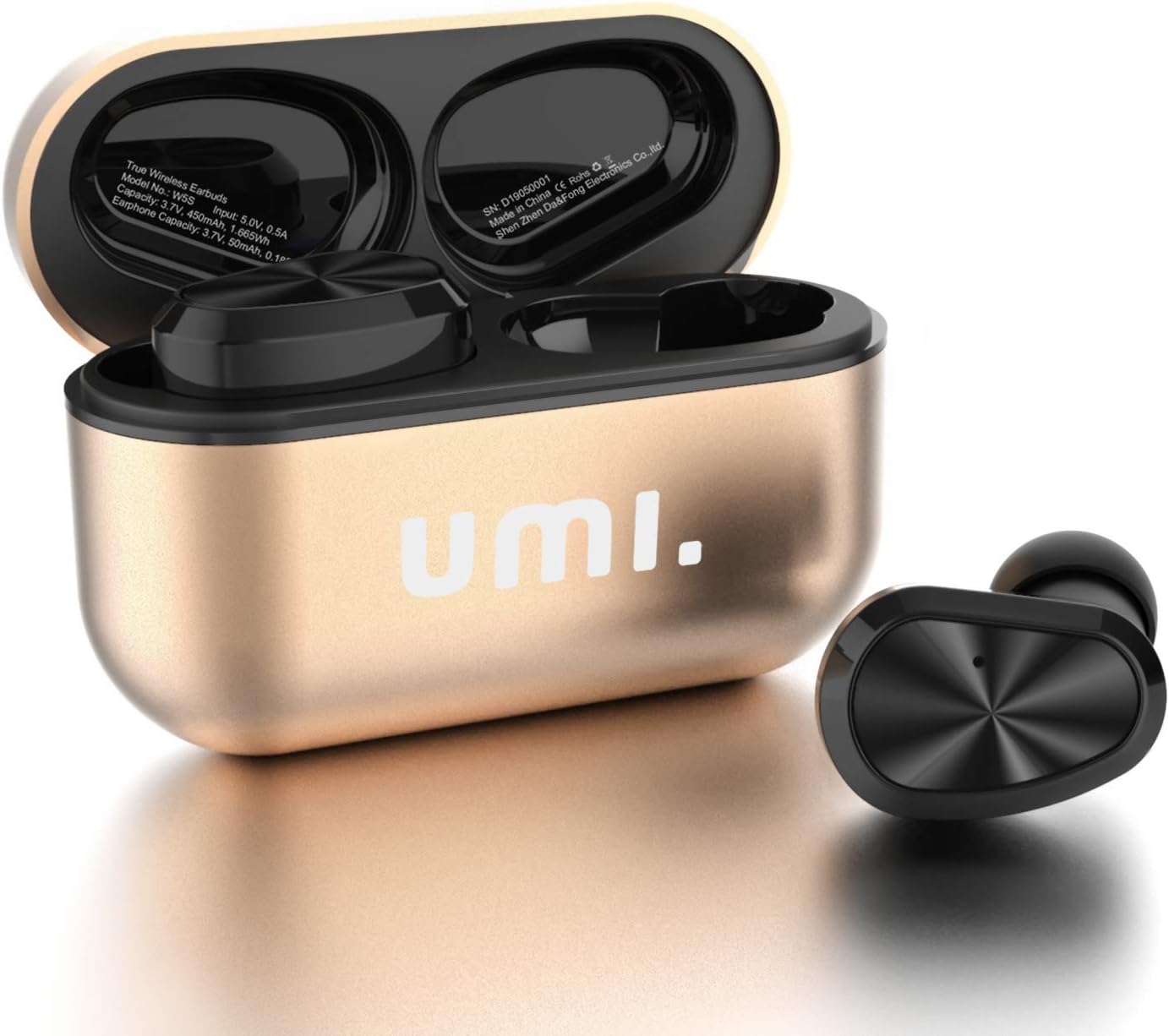
Figure 1: Umi W5s Wireless In-Ear Headphones (Gold) shown with their intelligent metal charging case. The earbuds are placed inside the open case, ready for charging or use.

Figure 2: Close-up of the ultra-stylish metal charging case. Note the LED indicators on the back: a red light indicates discharging/charging, and a blue light indicates fully charged.

Figure 3: An Umi W5s earbud resting on a spoon, demonstrating its compact size (2cm) and light weight (4g), designed for comfortable wear.
Setup
Initial Charging
Before first use, fully charge both the headphones and the charging case. This ensures optimal battery life and performance.
- Place both earbuds into the charging case. Ensure they are properly seated in their respective slots.
- Connect the charging cable to the charging case and a USB power source.
- The LED indicators on the charging case will show a red light while charging. Once fully charged, the light will turn blue.
- The earbuds will automatically charge when placed in the case, indicated by a red light on the earbuds themselves (if visible) or by the case's indicators.
Bluetooth Pairing
Follow these steps to pair your Umi W5s headphones with your device:
- Ensure the headphones are charged.
- Take both earbuds out of the charging case. They will automatically power on and enter pairing mode. You may hear an audible prompt.
- On your device (smartphone, tablet, etc.), go to the Bluetooth settings and turn Bluetooth on.
- Search for available devices. You should see "Umi W5s" or a similar name appear in the list.
- Select "Umi W5s" to connect. Once connected, you will hear a confirmation sound, and the earbuds' indicator lights may change.
- If pairing fails, place the earbuds back into the case, close the lid, wait a few seconds, and then repeat the steps.

Figure 4: Illustration of the upgraded Bluetooth 5.0 chip, highlighting its role in faster transmission speeds and extended range (up to 15 meters) for the Umi W5s headphones.
Wearing the Earbuds
For optimal sound quality and comfort, choose the correct eartip size and ensure a secure fit.
- Experiment with the three provided eartip sizes (S/M/L) to find the best fit for your ears. A good seal is crucial for bass response and noise isolation.
- Gently insert each earbud into your ear canal and twist slightly until it feels snug and comfortable.
Operating Instructions
The Umi W5s headphones feature intuitive controls on each earbud for managing audio playback and calls.
Power On/Off
- Power On: Take the earbuds out of the charging case. They will automatically power on.
- Power Off: Place the earbuds back into the charging case. They will automatically power off and begin charging. Alternatively, press and hold the multi-function button on either earbud for approximately 5 seconds until you hear a power-off prompt.
Music Playback Controls
Both the left and right earbuds can control music playback:
- Play/Pause: Press the multi-function button once on either earbud.
- Next Track: Press the multi-function button twice on the right earbud.
- Previous Track: Press the multi-function button twice on the left earbud.
- Volume Up: Press and hold the multi-function button on the right earbud.
- Volume Down: Press and hold the multi-function button on the left earbud.
Call Management
Manage your calls with ease using the earbud controls:
- Answer Call: Press the multi-function button once on either earbud.
- End Call: Press the multi-function button once on either earbud during a call.
- Reject Call: Press and hold the multi-function button for 2 seconds on either earbud.
- Activate Voice Assistant (Siri/Google Assistant): Press and hold the multi-function button for 2-3 seconds on either earbud when not on a call.
Mono and Stereo Mode
The Umi W5s headphones support both mono and stereo modes:
- Stereo Mode: Use both earbuds together for a full stereo audio experience. They will automatically connect to each other when taken out of the case.
- Mono Mode: Either the left or right earbud can be used independently. Simply take one earbud out of the case, and it will connect to your device. The other earbud can remain in the case or be used by another person (if paired separately).
Maintenance
Proper care and maintenance will extend the life of your Umi W5s headphones.
Cleaning
- Regularly clean the earbuds and charging case with a soft, dry, lint-free cloth.
- Remove eartips and clean them with mild soap and water if necessary, ensuring they are completely dry before reattaching.
- Do not use harsh chemicals, cleaning solvents, or strong detergents.
Storage
- When not in use, always store the earbuds in their charging case to protect them and keep them charged.
- Store the device in a cool, dry place, away from extreme temperatures and direct sunlight.
Water Resistance (IPX7)

Figure 5: An Umi W5s earbud being submerged in water, demonstrating its IPX7 waterproof rating, which protects against sweat and rain.
- The Umi W5s headphones are rated IPX7, meaning they are resistant to sweat and rain. They can withstand immersion in water up to 1 meter for 30 minutes.
- Important: Do not intentionally submerge the headphones in water for extended periods or use them for swimming. The charging case is NOT waterproof.
- If the earbuds get wet, wipe them dry thoroughly before placing them back into the charging case to prevent damage.
Troubleshooting
If you encounter any issues with your Umi W5s headphones, refer to the following common problems and solutions:
| Problem | Solution |
|---|---|
| Headphones do not power on. | Ensure the earbuds are charged. Place them in the charging case and connect the case to a power source. |
| Cannot pair with device. |
|
| Only one earbud is working. |
|
| Low sound quality or no bass. |
|
| Charging case not charging earbuds. |
|
Specifications
Detailed technical specifications for the Umi W5s Wireless In-Ear Headphones:
| Feature | Detail |
|---|---|
| Model | W5S |
| Bluetooth Version | 5.2 (Note: Product description mentions 5.0, A+ content mentions 5.2. Using 5.2 as it's newer and in A+ content.) |
| Earbud Battery Capacity | 45 mAh (each) |
| Charging Case Battery Capacity | 450 mAh |
| Playtime (single charge) | Up to 6 hours |
| Total Playtime (with charging case) | Up to 24 hours |
| Standby Time | 100 hours |
| Charging Time | Approximately 1 hour |
| Transmission Distance | Up to 15 meters (49 feet) |
| Water Resistance Rating | IPX7 |
| Earbud Dimensions (L x W x H) | 2.6 x 1.6 x 2.1 cm (approx. 1.02 x 0.63 x 0.83 inches) |
| Earbud Weight | 4 grams (each) |
| Charging Case Dimensions (L x W x H) | 6.2 x 4.5 x 2.1 cm (approx. 2.44 x 1.77 x 0.83 inches) |
| Total Product Weight | 104 grams (including case) |
| Impedance | 32 Ohm |
| Frequency Response | 40000 Hz (This seems unusually high for a lower bound, usually it's 20Hz-20kHz. The input says 40000 Hz, I will put it as is, but it might be a typo in the source data. Assuming it's the upper limit, but the spec says "Frequenzgang" which is frequency response, usually a range. I will just put the value as given.) |
| Noise Control | Noise Shielding (Passive Noise Isolation) |

Figure 6: An internal view of the Umi W5s earbud, highlighting the upgraded graphene horn diaphragm unit responsible for the full-frequency, three-band balanced sound quality.
Warranty and Support
Umi products are designed to meet high quality standards. For warranty information or technical support, please refer to the contact details provided with your purchase or visit the official Amazon Brand - Umi store page.
For further assistance, you may contact customer support through the platform where you purchased the product.
Online Store: Amazon Brand - Umi Store
Related Documents - W5S
 |
Umi W5s True Wireless Stereo Earbuds - User Guide Comprehensive user guide for the Umi W5s True Wireless Stereo Bluetooth 5.2 earbuds, featuring IPX7 water resistance, USB-C charging, and a metal charging case. Learn about pairing, features, specifications, and usage. |
 |
Umi Smart Wireless LED Remote Controller (BR11) - Quick Installation Guide Concise guide for the Umi Smart Wireless LED Remote Controller (Model BR11). Learn how to pair, operate dimming and color functions, and view technical specifications for this BLE Mesh compatible device. |
 |
Umi Smart Wireless LED Controller: Features, Specifications, and Operation Comprehensive guide to Umi Smart Wireless LED Controllers (MP10, MP20, MP30, MP40). Covers product features, control methods via remote and smartphone app, model variations, waterproof capabilities, and technical specifications for efficient LED lighting management. |
 |
JBL LIVE 220BT Wireless In-Ear Neckband Headphones Discover the JBL LIVE 220BT wireless in-ear neckband headphones. Featuring JBL Signature Sound, 10-hour battery life, Ambient Aware, TalkThru, and voice assistant support for seamless connectivity and an amplified life. |
 |
Amazon Basics Bluetooth Wireless On-Ear Headphones Quick Setup Guide Quick setup guide for Amazon Basics Bluetooth Wireless On-Ear Headphones (Model BOBVM1PSYN), including basic operations, Bluetooth pairing instructions, indicator light meanings, and charging information. |
 |
Umi PS01(-L) Smart Wireless Presence Sensor & Remote Controller - User Manual and Specifications Comprehensive guide for the Umi PS01(-L) Smart Wireless Presence Sensor & Remote Controller, covering its functions, installation steps, touch and app operation, and technical specifications. |
Ask a question about this manual
Ask about setup, troubleshooting, compatibility, parts, safety, or missing instructions. Manuals+ will review the question and use this page’s manual context to help answer it.