
Introduction
This manual provides comprehensive instructions for the LAOPAO Stopwatch, model LP204. Please read this guide carefully to understand the functions and ensure proper use of your device. This stopwatch is designed for precision timing in various activities, offering multiple modes and features for athletes, coaches, and everyday use.
Product Features
- High-Quality Materials and Mute Function: Constructed from durable ABS material. Features a mute mode for silent operation, eliminating beeping sounds.
- 60-Lap Memory: Stores up to 60 lap times with 1/100 second accuracy, suitable for various sports activities.
- Multi-functional Stopwatch: Includes stopwatch, timer, alarm, clock, and metronome functions. Designed for coaches, referees, athletes, and runners.
- Large Display and Ergonomic Design: Large screen with clear, large digits for easy time viewing and data recording. Ergonomic design ensures comfortable button pressing.
- Includes Whistle: Comes with a high-quality whistle for immediate use.
Setup
Battery Installation
The stopwatch uses a standard button cell battery. To replace, open the convenient battery cover located on the back of the device. Ensure correct polarity when inserting the new battery.

Image: Rear view of the stopwatch, highlighting the easy-access battery compartment.
Initial Power On
The device should power on automatically after battery installation. If the display remains blank, press and hold the 'MODE' button for approximately three seconds to power it on.
Operating Instructions
Button Functions Overview
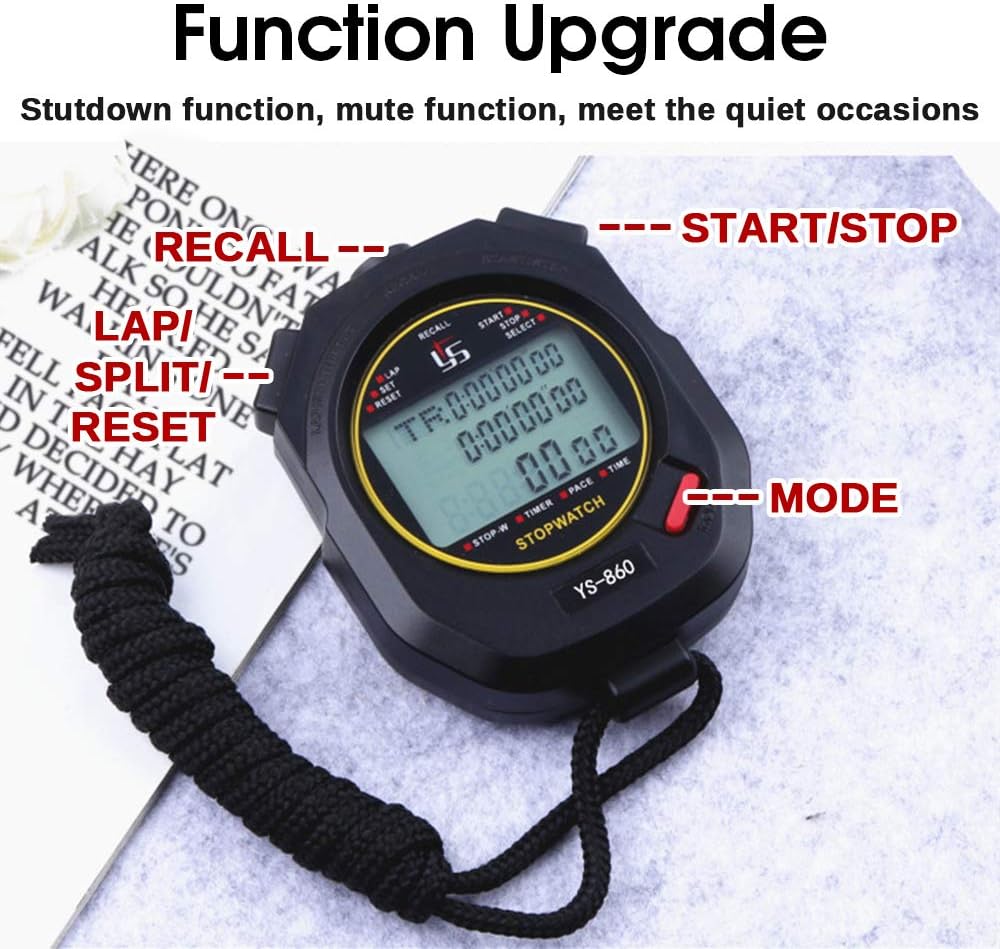
Image: The stopwatch with key buttons labeled for easy identification.
- MODE (M): Cycles through different operating modes (Clock, Stopwatch, Timer, Alarm, Metronome).
- START/STOP: Initiates or pauses timing, confirms settings, or activates/deactivates functions.
- LAP/SPLIT/RESET: Records lap/split times, resets the stopwatch/timer, or adjusts values during setting.
- RECALL: Views stored lap times in Stopwatch Mode.
Mode Navigation
Press the MODE button repeatedly to cycle through the following modes:
- Clock Mode
- Alarm Mode
- Stopwatch Mode
- Timer Mode
- Metronome Mode

Image: Visual representation of the different display modes: Clock, Alarm, Stopwatch, Timer, and Metronome.
1. Clock Mode
- Display: Shows hour, minute, second, day of week, month, and day.
- Setting Time/Date: In Clock Mode, press and hold the START/STOP button until the digits flash. Use LAP/SPLIT/RESET to adjust the value and MODE to move to the next setting (hours, minutes, date, etc.). Press START/STOP again to exit setting mode.
2. Stopwatch Mode
- Start Timing: From Stopwatch Mode, press START/STOP to begin timing.
- Record Lap/Split: While timing, press LAP/SPLIT/RESET to record a lap time. The display will momentarily show the lap time before returning to the running total.
- Pause/Resume: Press START/STOP to pause the stopwatch. Press again to resume.
- Reset: While the stopwatch is paused, press LAP/SPLIT/RESET to reset the time to zero.
- View Memory: While the stopwatch is stopped, press RECALL to view stored lap times. Use LAP/SPLIT/RESET to scroll through recorded laps.
3. Timer Mode
- Setting Countdown: From Timer Mode, press and hold START/STOP until the digits flash. Use LAP/SPLIT/RESET to adjust values and MODE to move between hours, minutes, and seconds.
- Start/Stop Countdown: Press START/STOP to begin the countdown. Press again to pause/resume. An alarm will sound when the timer reaches zero.
- Reset: While the timer is stopped, press LAP/SPLIT/RESET to reset the countdown time.
4. Alarm Mode
- Setting Alarm: From Alarm Mode, press and hold START/STOP until the digits flash. Use LAP/SPLIT/RESET to adjust the alarm time and MODE to switch between hours and minutes.
- Activate/Deactivate Alarm: Press START/STOP to toggle the alarm on or off. An alarm icon will appear when activated.
5. Metronome Mode
- Setting Pace: From Metronome Mode, press and hold START/STOP until the pace value flashes. Use LAP/SPLIT/RESET to adjust the beats per minute (BPM).
- Start/Stop Metronome: Press START/STOP to start or stop the metronome sound.
Mute Function
To enable or disable the mute function, navigate to Clock Mode. Press and hold the START/STOP button for three seconds. This will toggle the sound on or off, allowing for silent operation when desired.
Power Off Function
To power off the device, navigate to Clock Mode. Press and hold the MODE button for three seconds. To power it back on, press the MODE button again.
Maintenance
- Cleaning: Clean the stopwatch with a soft, dry cloth. Avoid using abrasive cleaners or harsh chemicals, which can damage the display or casing.
- Storage: Store the device in a cool, dry place away from direct sunlight and extreme temperatures.
- Battery Care: Replace the battery when the display dims or functions become erratic. If storing for an extended period, consider removing the battery to prevent leakage.
- Water Resistance: This stopwatch is designed for daily waterproof use, meaning it can withstand splashes or light rain. It is not suitable for swimming, showering, or submersion in water.

Image: The stopwatch demonstrating its daily waterproof capability.
Troubleshooting
- Display is blank:
- Check battery installation and ensure correct polarity.
- Replace the battery if it is depleted.
- Ensure the device is powered on by pressing and holding the 'MODE' button for 3 seconds. - Buttons unresponsive:
- Try resetting the device by removing and reinserting the battery.
- Ensure no debris is obstructing the buttons. - Incorrect time/date:
- Refer to the 'Clock Mode' section in Operating Instructions to reset the time and date. - No sound (alarm/beeps):
- Check if the mute function is activated. In Clock Mode, press and hold 'START/STOP' for 3 seconds to toggle the sound on or off.
Specifications

Image: Detailed product parameter description.
| Feature | Detail |
|---|---|
| Brand | LAOPAO |
| Model | LP204 |
| Material | ABS (Acrylonitrile Butadiene Styrene) |
| Accuracy | 1/100 second |
| Memory | 60 laps |
| Maximum Timing | 9 hours, 59 minutes, 59 seconds |
| Screen Size | 35mm x 23mm |
| Product Dimensions (L x W x H) | 7.5 cm x 7.5 cm x 2.3 cm |
| Item Weight | 100 grams |
| Water Resistance | Daily waterproof |
Warranty and Support
For warranty information or technical support, please contact your retailer or refer to the product packaging for manufacturer contact details. Keep your purchase receipt as proof of purchase.