
1. Important Safety Instructions
To reduce the risk of fire, electrical shock, or injury when using your appliance, follow these basic precautions:
- Read all instructions before using the appliance.
- Do not store or use gasoline or other flammable vapors and liquids in the vicinity of this or any other appliance.
- Before cleaning or performing any maintenance, ensure the unit is unplugged from the power outlet.
- Do not attempt to repair or replace any part of your appliance unless specifically recommended in this manual. All other servicing should be referred to a qualified technician.
- This appliance is not intended for use by persons (including children) with reduced physical, sensory or mental capabilities, or lack of experience and knowledge, unless they have been given supervision or instruction concerning use of the appliance by a person responsible for their safety.
- Children should be supervised to ensure that they do not play with the appliance.
- Ensure proper ventilation around the unit to prevent overheating.
- Do not damage the refrigerant circuit.
- Dispose of the appliance according to local regulations for flammable refrigerants and gases.
2. Product Overview
The Arctic King AWCA034ADB is a compact, freestanding wine cooler designed to store up to 34 standard wine bottles at optimal temperatures. It features a sleek black finish and an intuitive control panel.

Figure 2.1: Front view of the Arctic King AWCA034ADB Wine Cooler, showcasing its black finish and glass door.

Figure 2.2: The wine cooler with its door open, revealing the interior with multiple wire racks designed for bottle storage.
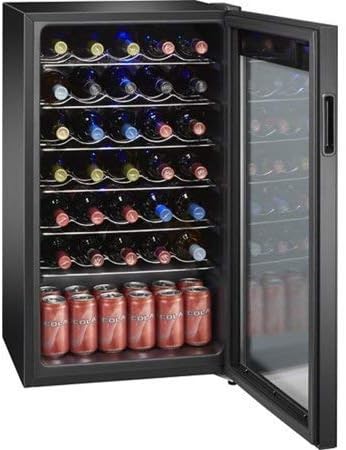
Figure 2.3: The wine cooler interior loaded with various wine bottles on the racks and beverage cans at the bottom.
Control Panel Features

Figure 2.4: A detailed view of the digital control panel located on the top of the wine cooler door.
- Temperature Display: Shows the current internal temperature.
- Temperature Adjustment Buttons (Up/Down): Used to increase or decrease the desired temperature.
- Light Button: Controls the interior LED light.
- Lock Button: Engages or disengages the control panel lock to prevent accidental changes.
3. Installation
Unpacking
- Remove all packaging materials, including the foam base and adhesive tape.
- Inspect the unit for any damage. Report any damage to the retailer immediately.
- Clean the interior and exterior surfaces with a soft cloth and mild detergent before use.
Location Requirements
- Place the wine cooler on a flat, level, and sturdy surface capable of supporting its weight when fully loaded.
- Allow at least 5 inches (12.7 cm) of space between the back and sides of the unit and any adjacent walls to ensure proper air circulation.
- Avoid placing the unit in direct sunlight or near heat sources such as ovens, radiators, or heating vents.
- Do not install in areas where the temperature can drop below 50°F (10°C) or rise above 90°F (32°C).
Electrical Connection
- Ensure the power outlet is properly grounded and provides the correct voltage (refer to the specifications section).
- Do not use an extension cord or adapter with this appliance.
- Plug the unit directly into a dedicated wall outlet.
Leveling the Unit
The wine cooler has adjustable leveling legs at the bottom. Turn the legs clockwise to raise the unit or counter-clockwise to lower it. Ensure the unit is level to prevent vibrations and ensure proper door sealing.
4. Operating Instructions
Initial Startup
After installation, allow the unit to stand upright for at least 2-4 hours before plugging it in. This allows the refrigerant to settle. Once plugged in, let the unit run empty for approximately 24 hours to reach its set temperature and stabilize.
Setting the Temperature
- The control panel display will show the current internal temperature.
- To adjust the temperature, press the 'Up' or 'Down' arrow buttons. The temperature range is typically between 40°F (5°C) and 65°F (18°C).
- The display may not light up continuously. Pressing any button will illuminate the display to show the current settings and allow adjustments.
- Once the desired temperature is set, the display will flash briefly and then return to showing the actual internal temperature.
Interior Light
Press the 'Light' button on the control panel to turn the interior LED light on or off. This light is for viewing the contents and should not be left on for extended periods as it can slightly affect internal temperature.
Control Panel Lock
To prevent accidental changes to settings, press and hold the 'Lock' button for a few seconds to engage or disengage the control panel lock. A lock icon will appear on the display when activated.
Loading the Wine Cooler
- Arrange bottles to allow for proper air circulation. Do not overload the shelves.
- Ensure bottles do not touch the back wall or block the internal fan (if present).
- The cooler is designed to hold up to 34 standard 750ml wine bottles. Larger or irregularly shaped bottles may reduce total capacity.
5. Maintenance and Cleaning
Cleaning the Interior
- Unplug the unit before cleaning.
- Wash the interior surfaces with a solution of warm water and baking soda (2 tablespoons of baking soda to 1 quart of water).
- Clean the shelves and racks with a mild detergent solution.
- Rinse and dry thoroughly before plugging the unit back in.
Cleaning the Exterior
- Wipe the exterior with a soft cloth and mild detergent.
- Do not use abrasive cleaners or harsh chemicals, as they can damage the finish.
- Clean the door gasket regularly to ensure a proper seal.
Power Interruption
In case of a power outage, the wine cooler will typically retain its temperature settings. However, prolonged outages may affect the internal temperature. Avoid opening the door frequently during an outage to preserve the internal temperature.
Vacation and Storage
- For short vacations, leave the cooler operating.
- For long periods of absence, unplug the unit, clean the interior, and leave the door slightly ajar to prevent odors and mold growth.
6. Troubleshooting
Review the following common issues and their potential solutions before contacting customer support.
| Problem | Possible Cause | Solution |
|---|---|---|
| Cooler does not operate. | No power; circuit breaker tripped; power cord not fully plugged in. | Check power supply; reset circuit breaker; ensure cord is securely plugged in. |
| Temperature is not cold enough. | Door not closed properly; excessive door openings; unit located near heat source; poor ventilation; temperature setting too high. | Ensure door is fully closed and sealed; reduce door openings; relocate unit; ensure adequate clearance; lower temperature setting. |
| Excessive humidity inside. | Door not sealing correctly; frequent door openings; high ambient humidity. | Inspect door gasket for damage or misalignment; ensure unit is level; reduce door openings. |
| Door does not close completely. | Unit not level; door gasket obstructed or damaged; shelves are out of position. | Adjust leveling legs; clear or replace door gasket; reposition shelves correctly. |
| Display is off until a button is pressed. | This is normal operation. | The display is designed to conserve energy by turning off when inactive. Press any button to activate it. |
| Vibrations or excessive noise. | Unit not level; loose components; unit touching a wall. | Adjust leveling legs; check for loose parts; ensure adequate clearance from walls. |
7. Specifications
| Model | AWCA034ADB |
| Brand | Arctic King |
| Capacity | 34 Wine Bottles (25.5 Liters) |
| Dimensions (W x D x H) | 17.3 x 19.3 x 33.2 inches |
| Installation Type | Freestanding |
| Color | Black |
| Number of Doors | 1 |
| Door Hinges | Not Reversible |
| Special Feature | Compact Design |
8. Warranty and Customer Support
For warranty information or technical assistance, please refer to the warranty card included with your product or contact Arctic King customer support. Keep your purchase receipt as proof of purchase for any warranty claims.
For further inquiries or support, please visit the official Arctic King website or contact their customer service line.

