
1. Important Safety Instructions
Please read and save these instructions before using your humidifier. Failure to follow these instructions may result in electric shock, fire, or serious injury.
- Always place the humidifier on a firm, flat, water-resistant surface at least 12 inches (30 cm) away from walls and appliances.
- Do not immerse the humidifier in water or other liquids.
- Unplug the humidifier before filling, cleaning, or moving it.
- Do not operate the humidifier with a damaged cord or plug.
- Keep out of reach of children and pets.
- Use only clean, cool tap water or distilled water. Do not use hot water.
- Do not add essential oils directly into the water tank. Use the designated aroma box.
2. Product Overview
Familiarize yourself with the components of your TTLIFE Humidifier.

Figure 2.1: Humidifier Components. This image illustrates the various parts of the humidifier, including the portable handle for easy transport, the large 5.5-liter water tank, the low water protection sensor, a child safety lock mechanism, the built-in water filter, and the included cleaning brush.
- Water Tank: 6-liter capacity for extended operation.
- Mist Nozzle: 360° rotatable for directing mist.
- Control Panel: LED touch display for settings and information.
- Aroma Box: For adding essential oils.
- Humidity Sensor: Detects ambient humidity for automatic mode.
- Remote Control: For convenient operation from a distance.
- Built-in Filter: Helps purify water.
3. Setup
3.1 Unpacking
- Remove all packaging materials from the humidifier and its accessories.
- Place the humidifier on a flat, stable surface.
- Inspect the unit for any damage. If damaged, do not operate and contact customer support.
3.2 Filling the Water Tank
- Ensure the humidifier is unplugged.
- Remove the water tank from the base.
- Unscrew the tank cap at the bottom of the tank.
- Fill the tank with clean, cool tap water or distilled water. Do not fill past the MAX line.
- Securely screw the tank cap back on.
- Place the filled water tank back onto the humidifier base, ensuring it is seated correctly.
4. Operation
Plug the humidifier into a standard 120V AC outlet. The LED display will illuminate.
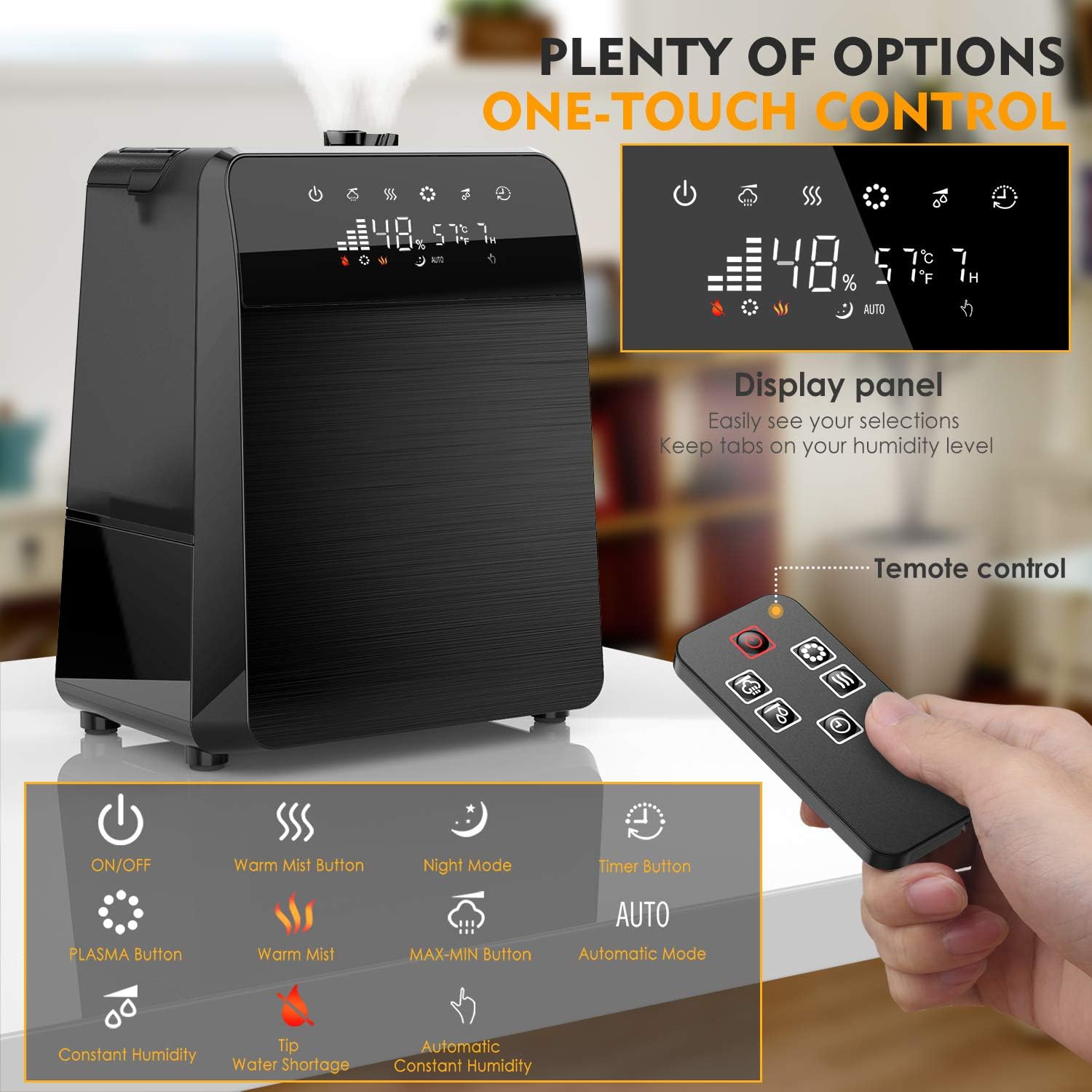
Figure 4.1: Control Panel and Remote Control. This image displays the humidifier's LED touch control panel and the accompanying remote control, highlighting buttons for power, mist settings, warm mist, night mode, timer, and automatic humidity control.
4.1 Power On/Off
- Press the Power button (
 ) on the control panel or remote to turn the unit on or off.
4.2 Mist Control

Figure 4.2: Warm and Cool Mist Functionality. This image highlights the humidifier's ability to produce both warm and cool mist, with a 360-degree rotatable nozzle for optimal mist direction.
- Mist Level: Press the Mist Level button (
 ) to cycle through low, medium, and high mist output settings.
 - Warm Mist: Press the Warm Mist button (
 ) to activate the warm mist function. Press again to turn off.
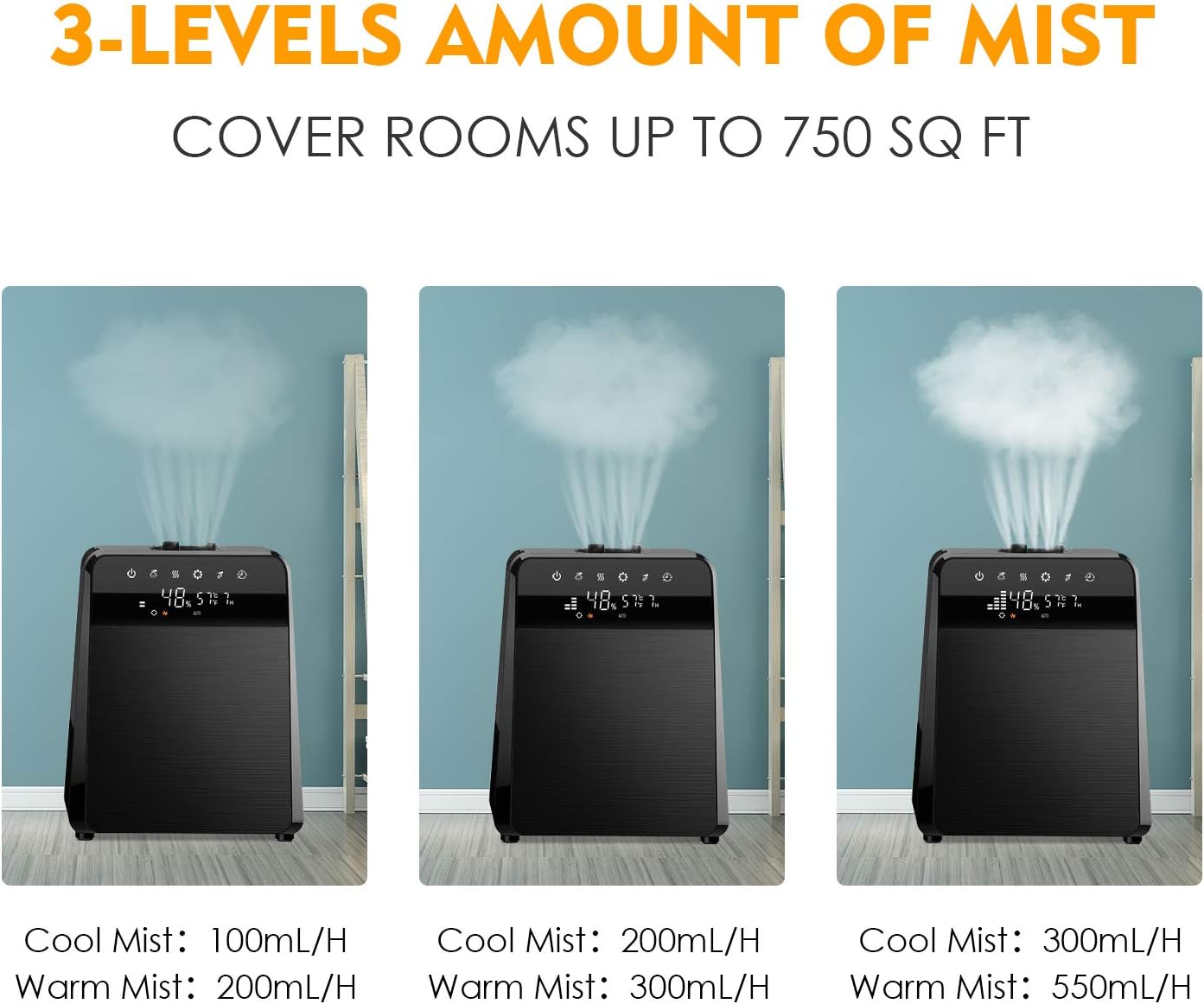
Figure 4.3: Mist Output Levels. This image shows the humidifier operating at three different mist output levels, indicating the varying rates for both cool mist (100mL/H, 200mL/H, 300mL/H) and warm mist (200mL/H, 300mL/H, 550mL/H).
4.3 Humidity Settings
- Auto Mode: Press the AUTO button (
 ) to enable automatic humidity control. The humidifier will adjust mist output to maintain a preset humidity level.
 - Customized Humidity: In manual mode, press the Humidity Setting button (
 ) to set your desired humidity level. The unit will operate until this level is reached.
4.4 Timer Function
- Press the Timer button (
 ) to set an operating time from 1 to 12 hours. The humidifier will automatically turn off after the set time.
4.5 Night Mode
- Press the Night Mode button (
 ) to dim the LED display and reduce operational noise for undisturbed sleep.
4.6 Essential Oil Diffuser

Figure 4.4: Adding Essential Oils. This image demonstrates how to add essential oils to the humidifier by placing drops onto the pad within the designated aroma box, located at the back of the unit.
- Pull out the aroma box located at the back of the humidifier.
- Add a few drops of your preferred essential oil onto the aroma pad.
- Slide the aroma box back into the unit. The mist will carry the fragrance into the air.
5. Maintenance
Regular cleaning is essential for optimal performance and hygiene.
5.1 Daily Maintenance
- Empty the water tank and base reservoir daily.
- Rinse the tank and reservoir with clean water.
- Wipe down the exterior of the unit with a soft, damp cloth.
5.2 Weekly Cleaning and Descaling
- Unplug the humidifier and remove the water tank.
- Pour 1 cup (240ml) of undiluted white vinegar into the base reservoir.
- Let it soak for 20 minutes.
- Use the included cleaning brush to gently clean the heating element and ultrasonic nebulizer.
- Rinse the base thoroughly with clean water until the vinegar smell is gone.
- For the water tank, add 1 cup of white vinegar and fill with water. Shake well and let it sit for 20 minutes.
- Empty and rinse the tank thoroughly.
5.3 Filter Maintenance
- The humidifier includes a built-in filter. Periodically rinse the filter under cool running water to remove any accumulated debris.
- Replace the filter every 6 months or as needed, depending on water hardness and usage.
6. Troubleshooting
| Problem | Possible Cause | Solution |
|---|---|---|
| No mist or low mist output | Low water level Mineral buildup Mist nozzle blocked | Refill water tank Clean the ultrasonic nebulizer and heating element Clear any obstructions from the mist nozzle |
| White dust around humidifier | Hard water used | Use distilled or demineralized water. Clean the unit regularly. |
| Unusual odor | New unit odor Dirty water/tank | Operate for a few days in a well-ventilated area Clean the water tank and base thoroughly |
| Water leakage | Tank cap not secured Tank not seated correctly Unit damaged | Ensure tank cap is tightly closed Reposition the water tank firmly on the base Contact customer support if damage is visible |
7. Specifications
| Feature | Detail |
|---|---|
| Brand | TTLIFE |
| Model Name | cool mist humidifiers |
| Item Model Number | 7544888128683 |
| Special Feature | Remote Control |
| Color | Black |
| Operation Mode | Ultrasonic, Vaporizer |
| Room Type | Living Room |
| Included Components | Remote Control |
| Voltage | 120 Volts |
| Product Dimensions | 24.8 x 19.69 x 14.96 inches |
| Item Weight | 6.93 pounds |
| Capacity | 6 Liters |
8. Warranty and Support
For warranty information or technical support, please refer to the product packaging or contact TTLIFE customer service directly. Keep your purchase receipt for warranty claims.