
1. Introduction
The YAVIS 125HZ RFID Access Control Keypad is a standalone single-door access control system designed to enhance security for various environments, including homes, offices, factories, and apartments. This device supports both RFID card and password access, offering a secure and convenient method for managing entry. It is an updated version incorporating modern, sensitive, and fast technology, capable of standalone operation without requiring a computer connection.

Figure 1: YAVIS 125HZ RFID Access Control Keypad
2. Product Overview and Package Contents
2.1 Key Features
- Standalone Operation: No computer connection required for programming or operation.
- High User Capacity: Supports up to 1000 RFID card users.
- Multiple Access Modes: Offers three door opening options: RFID card only, password only, or a combination of RFID card and password.
- Integrated Doorbell: Includes a doorbell function for visitor notification.
- Durable Construction: Made from ABS flame-retardant material, providing impact resistance and high-temperature stability.
- Versatile Application: Suitable for both outdoor and indoor installations in various settings.
2.2 Package Contents
Upon opening the package, please verify that all the following items are included:
- 1 x YAVIS RFID Access Control Keypad
- 10 x 125KHz RFID Keyfobs (5 blue, 5 yellow)
- 1 x User Manual (this document)
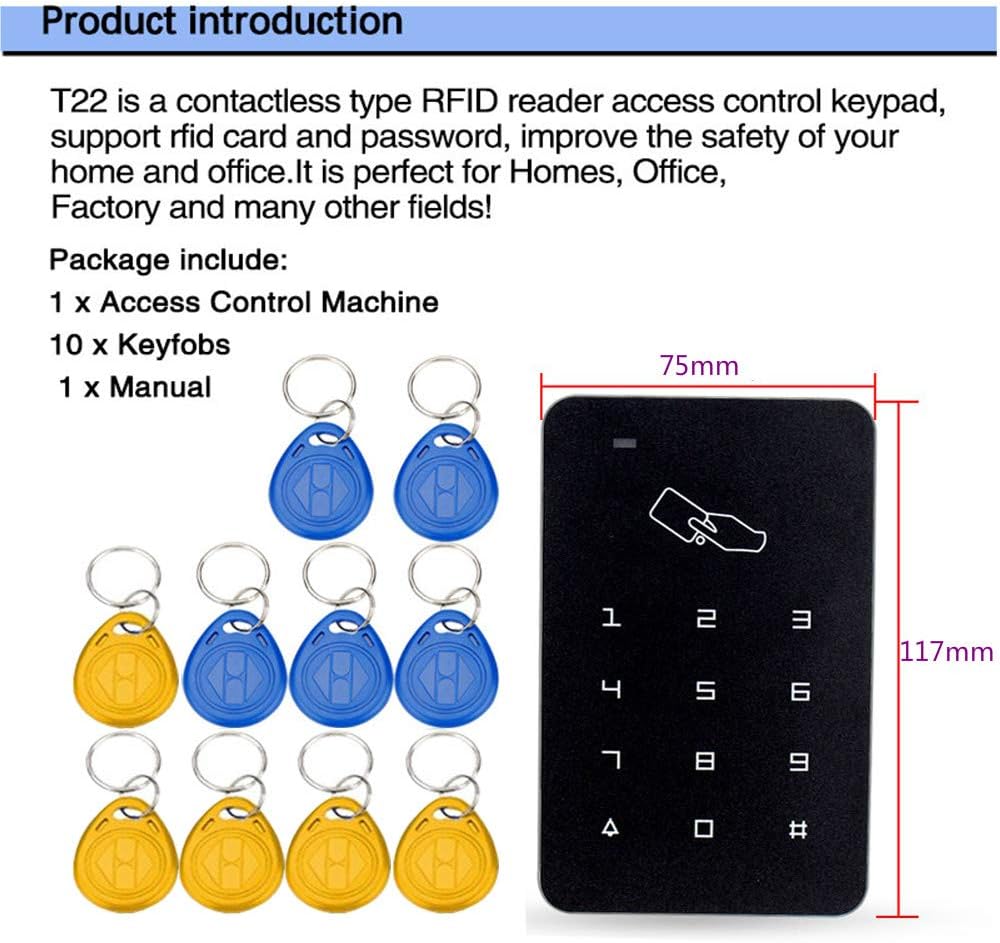
Figure 2: Package contents including keypad and keyfobs
3. Product Details and Components
The YAVIS Access Control Keypad features a sleek design with clearly defined functional areas. Understanding these components is essential for proper installation and operation.

Figure 3: Front view of the YAVIS Access Control Keypad
The keypad's internal components are designed for high precision and sensitive access control, ensuring fast and reliable performance.
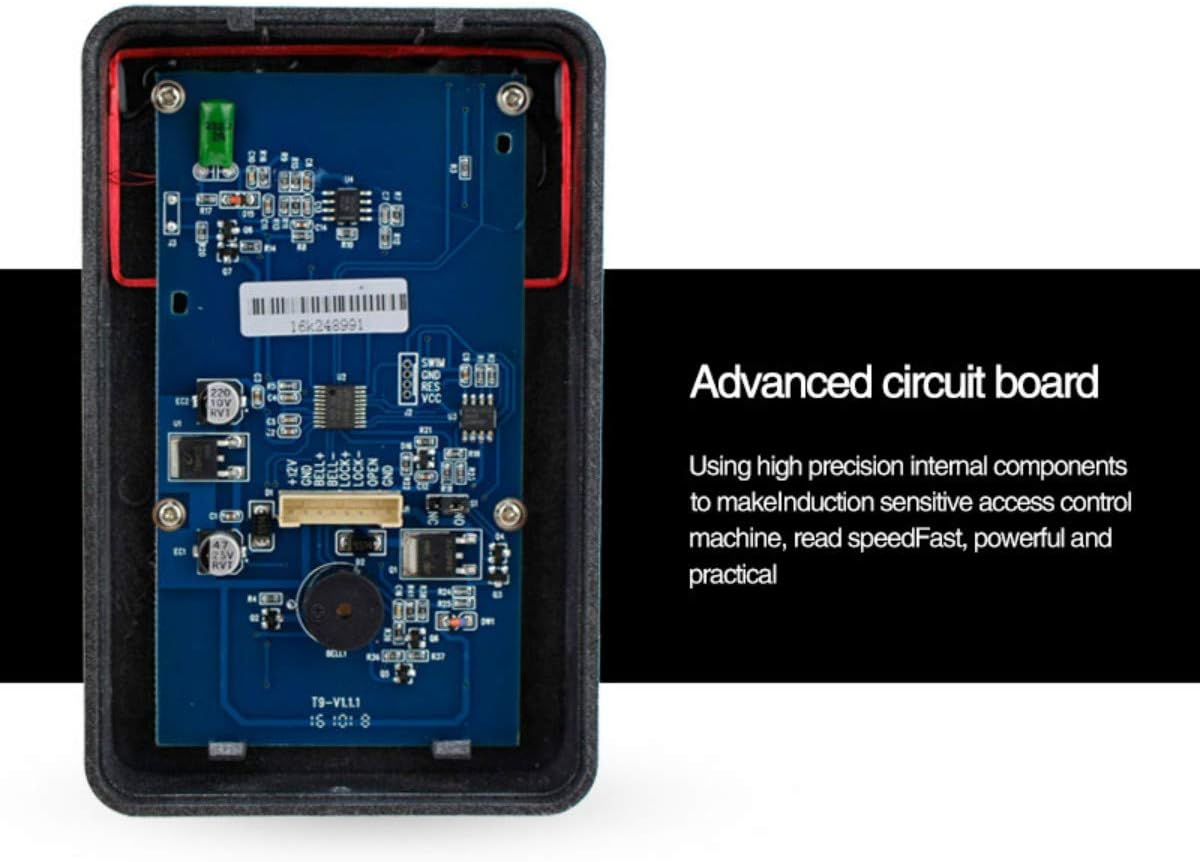
Figure 4: Advanced circuit board inside the keypad
Key functional areas of the keypad include:

Figure 5: Product analysis with labeled components
- Work Indicator: An LED light indicating the device's status (e.g., standby, access granted, programming mode).
- Card Area: The designated region where RFID cards or keyfobs are presented for access.
- Digital Buttons: Numeric keys (0-9) and special function keys (#, *) for password entry and programming.
- Doorbell Button: A dedicated button to activate the doorbell function.
4. Setup and Installation
Proper installation is crucial for the reliable operation of your access control system. This section provides an overview of the installation process and wiring connections.
4.1 Installation Example
The keypad can be integrated with various electric lock types and an exit button for comprehensive access control. Ensure all components are securely mounted and wired according to local electrical codes.

Figure 6: Example setup with an electric drop lock and exit button
4.2 Wiring Diagram
The following diagram illustrates the typical wiring connections for the YAVIS Access Control Keypad with a power supply, various electric locks (electric mortise lock, electronic lock, magnetic lock), and an exit button. It is important to note that this diagram focuses on the access control unit itself. For specific lock types, consult their respective manuals.
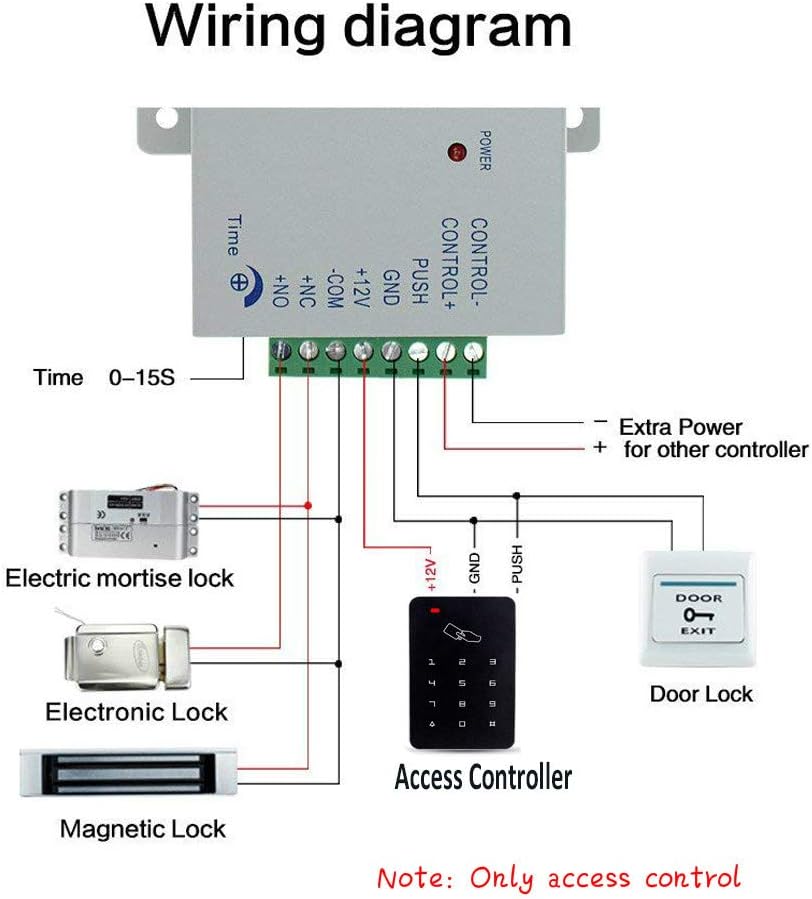
Figure 7: Wiring diagram for the access control system
Note:
- Ensure the power supply matches the keypad's voltage requirements (12 Volts).
- For connecting to a gate operator or other devices, an intermediate relay may be required.
- Always disconnect power before performing any wiring to prevent electrical shock or damage to the device.
5. Operating Instructions
The YAVIS Access Control Keypad allows for complete programming directly via the keypad. This section outlines the general operational principles. For detailed step-by-step programming instructions, please refer to the comprehensive user manual included in your package.
5.1 Programming Overview
Programming involves entering a master password to access the programming mode, then using specific key sequences to add or delete users, change passwords, and configure system settings. The keypad supports:
- Adding new RFID cards.
- Deleting existing RFID cards.
- Setting and changing user passwords.
- Configuring door opening modes.
Important: The initial master password should be changed immediately after installation for security purposes. Refer to the included manual for the default master password and detailed programming steps.
5.2 User Management
The system can store up to 1000 unique user credentials. Users can be added or removed individually or in batches, depending on the programming mode. Each user can be assigned an RFID card, a password, or both.
5.3 Door Opening Modes
The keypad supports three distinct modes for granting access:
- RFID Card Only: Present a registered RFID card or keyfob to the card area to unlock the door.
- Password Only: Enter a valid user password on the keypad to unlock the door.
- RFID Card + Password: Requires both a registered RFID card and its corresponding password to be entered for access. This mode offers enhanced security.
6. Maintenance
To ensure the longevity and optimal performance of your YAVIS Access Control Keypad, follow these maintenance guidelines:
- Cleaning: Use a soft, dry cloth to clean the keypad surface. Avoid abrasive cleaners, solvents, or excessive moisture, which can damage the touch panel and internal electronics.
- Environmental Conditions: While designed for outdoor use, protect the device from extreme weather conditions if possible. Ensure proper sealing during installation to prevent water ingress.
- Regular Checks: Periodically check all wiring connections for looseness or corrosion. Ensure the keypad is securely mounted.
- Backup Credentials: Keep a record of your master password and user IDs in a secure location.
7. Troubleshooting
If you encounter issues with your YAVIS Access Control Keypad, refer to the following common problems and solutions:
| Problem | Possible Cause | Solution |
|---|---|---|
| Keypad is unresponsive / No power indicator. | No power supply or faulty wiring. | Check power connections and ensure the power supply is active. Verify wiring according to the diagram. |
| RFID card not recognized. | Card not registered or damaged. Incorrect card type. | Ensure the card is registered in the system. Try a different, known-working card. Verify it's a 125KHz EM compatible card. |
| Door does not unlock after correct input. | Lock wiring issue. Lock malfunction. Incorrect access mode. | Check wiring to the electric lock. Test the lock independently if possible. Ensure the correct access mode (card, password, or both) is being used. |
| Cannot enter programming mode or add users. | Incorrect master password. Incorrect programming sequence. | Verify the master password. Refer to the included user manual for precise programming steps and sequences. |
| Doorbell function not working. | Doorbell wiring issue or internal fault. | Check doorbell connections. If the issue persists, contact support. |
If the problem persists after attempting these solutions, please consult the detailed troubleshooting section in the included user manual or contact customer support.
8. Specifications
| Feature | Specification |
|---|---|
| Model Number | 631517703193 |
| Operating Current | <120 mA |
| Proximity Frequency | 125 kHz |
| Compatible Cards | EM or EM compatible cards |
| External Reader Support | Not supported |
| Reading Distance | 3-12 cm |
| Dimensions (L x W x H) | 120 x 78 x 22 mm |
| Voltage | 12 Volts |
| Connectivity Technology | Wired |
| Control Method | Touch |
| Keyfob Material | Waterproof ABS plastic |
| Installation Type | Surface Mount (Einschrapped) |
9. Warranty and Support
Your YAVIS Access Control Keypad is backed by a standard return policy. For specific warranty details and duration, please refer to your purchase documentation or the seller's terms and conditions.
- Return Policy: Typically 30 days from the date of purchase for refunds or replacements.
- Manufacturer: T22
- Seller: YAVIS Official Store
For technical assistance, troubleshooting beyond this manual, or warranty claims, please contact the YAVIS Official Store directly through your purchase platform. Provide your model number (631517703193) and a detailed description of the issue to facilitate support.