
1. Overview
The Toshiba TY-CDV1 is a slim and stylish vertical CD radio cassette recorder designed for versatile audio playback. It combines a CD player, cassette recorder, and AM/FM radio into a compact unit, offering clear sound quality and simple operation.
- Slim and stylish vertical design.
- Simple operation with large dials.
- Convenient handle for portability.
- Large window for easy viewing of CD and cassette.
- Clear sound quality.
2. Setup
2.1 Unpacking
Carefully remove the unit from its packaging. Ensure all accessories, including the power cord and instruction manual with warranty, are present.
2.2 Power Supply
The TY-CDV1 can be powered by either AC power or batteries.
- AC Power: Connect the supplied power cord to the AC IN jack on the unit and then to a standard AC 100V 50/60Hz wall outlet.
- Battery Power: Open the battery compartment and insert six (6) D-size dry cell batteries (sold separately), ensuring correct polarity (+/-).
2.3 Antenna Setup
For optimal radio reception, extend the FM telescopic antenna fully. For AM reception, rotate the unit for the best signal, as it uses a built-in ferrite bar antenna.

Figure 2.1: Front view of the Toshiba TY-CDV1. This image shows the compact, vertical design of the unit, with the CD player on the left and the cassette deck on the right.

Figure 2.2: Top view of the Toshiba TY-CDV1 with its telescopic antenna extended. This view highlights the antenna's position and the overall slim profile of the device.
3. Operating Instructions
3.1 General Controls
- Power On/Off: Use the power button or function selector to turn the unit on or off.
- Volume Control: Adjust the volume dial located on the unit to your desired listening level.
- Function Selector: Switch between CD, Radio (AM/FM), and Tape functions using the dedicated selector.
3.2 CD Playback
- Open the CD compartment cover.
- Place a CD or CD-R/RW disc (recorded in CD-DA format) onto the spindle with the label side facing up.
- Close the CD compartment cover securely.
- Select the 'CD' function.
- Press the Play/Pause (►/▐▐) button to start playback.
- Use the Skip/Search (◀◀/►►) buttons to navigate between tracks or fast forward/rewind within a track.
- Press the Stop (■) button to stop playback.
3.3 Cassette Tape Operation
- Open the cassette compartment cover.
- Insert a compact cassette tape (recommended 90 minutes or less, Normal Type I).
- Close the cassette compartment cover.
- Select the 'Tape' function.
- Playback: Press the Play (►) button to start playback.
- Recording: To record from CD or Radio, press the Record (●) button simultaneously with the Play (►) button. Ensure the source (CD or Radio) is playing.
- Fast Forward/Rewind: Use the Fast Forward (►►) or Rewind (◀◀) buttons.
- Stop: Press the Stop/Eject (■/▲) button to stop playback or recording.
3.4 Radio Tuning
- Select the 'Radio' function.
- Use the AM/FM switch to select the desired band.
- Rotate the Tuning dial to find your desired radio station.
- Adjust the antenna for optimal reception.
3.5 External Input / Headphone Output
- Headphone Output: Connect 3.5mm stereo headphones to the headphone jack for private listening. Speakers will be muted automatically.
- External Input: Connect an external audio device (e.g., MP3 player) to the 3.5mm stereo mini jack input using an audio cable (not supplied). Select the appropriate function to play audio from the external device.
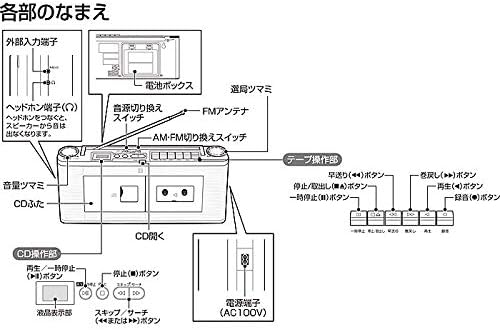
Figure 3.1: Detailed diagram illustrating the various parts and controls of the Toshiba TY-CDV1. This includes labels for the external input terminal, headphone jack, battery box, function switch, FM antenna, AM-FM switch, tuning knob, tape operation buttons (fast forward, rewind, stop/eject, play, pause, record), CD operation buttons (play/pause, stop, skip/search), CD lid, and power terminal.
4. Maintenance
4.1 Cleaning the Unit
Wipe the unit with a soft, dry cloth. For stubborn stains, use a cloth lightly dampened with a mild detergent solution, then wipe dry. Do not use abrasive cleaners, benzene, or thinners, as they may damage the surface.
4.2 CD Player Care
Keep the CD compartment clean. Avoid touching the lens. If the lens is dirty, use a commercially available CD lens cleaner.
4.3 Cassette Deck Care
Regularly clean the tape head, pinch roller, and capstan using a cotton swab lightly moistened with isopropyl alcohol. This helps maintain sound quality and prevents tape damage.
4.4 Battery Replacement
If using batteries, replace all six D-size batteries when the unit's performance degrades or when the battery indicator (if present) shows low power. Remove batteries if the unit will not be used for an extended period to prevent leakage.
5. Troubleshooting
| Problem | Possible Cause | Solution |
|---|---|---|
| No power | Power cord not connected; Batteries depleted or incorrectly inserted. | Check power cord connection; Replace batteries or ensure correct polarity. |
| No sound | Volume too low; Headphones connected; Incorrect function selected. | Increase volume; Disconnect headphones; Select correct function (CD, Tape, Radio). |
| CD skipping or not playing | Disc dirty or scratched; CD compartment open; Unit is vibrating. | Clean or replace disc; Close CD compartment securely; Place unit on a stable surface. |
| Poor radio reception | Antenna not extended; Unit position. | Extend FM antenna; Rotate unit for better AM reception. |
| Tape playback distorted or slow | Tape head dirty; Pinch roller/capstan dirty; Tape worn out. | Clean tape head and pinch roller/capstan; Try a different tape. |
6. Specifications
| Feature | Specification |
|---|---|
| Product Model Number | TY-CDV1-W |
| Brand | Toshiba (TOSHIBA) |
| Speaker Type | Active, φ5cm cone type (8Ω) x 2 |
| Practical Maximum Output | 1.2W + 1.2W |
| Power Source | Battery operated, Power cord operated (AC100V 50/60Hz) |
| Battery Life (Toshiba alkaline D-size batteries) | CD playback: approx. 10 hours; AM radio: approx. 50 hours; FM radio: approx. 45 hours; Tape playback: approx. 35 hours |
| Power Consumption | 13W |
| Connectivity Technology | AUX (φ3.5mm stereo mini jack for external input and headphone output) |
| Product Dimensions (LxWxH) | 370(W) x 148(H) x 88(D)mm (excluding protrusions) |
| Item Weight | Approx. 1.6kg (excluding dry cell batteries) |
| CD Player Channel Count | 2-channel stereo |
| CD Player Sampling Frequency | 44.1kHz |
| Playable Discs | CD, CD-R/RW (discs recorded in CD-DA format) |
| Cassette Track System | 4-track, 2-channel stereo |
| Cassette Recording Method | DC bias |
| Cassette Erase Method | Magnet erase |
| Cassette Fast Forward/Rewind Time | Approx. 140 seconds (for one side of a 60-minute tape) |
| Recommended Cassette Tape | Compact cassette tape 90 minutes or less, Normal tape TYPE1 |
| Radio Receiving Frequencies | FM: 76.0-108.0MHz, AM: 531-1,710kHz |
7. Warranty and Support
This product comes with a warranty. Please refer to the included instruction manual for detailed warranty information, terms, and conditions. For technical support or service inquiries, please contact Toshiba customer service as indicated in your documentation.
Always retain your proof of purchase for warranty claims.


