
1. Introduction
The QianLi ToolPlus iBridge is a specialized diagnostic tool designed to simplify the process of testing and repairing iPhone 7 Plus logic boards. It provides an extended connection point for FPC (Flexible Printed Circuit) connectors, allowing technicians to easily access individual pins for voltage and resistance measurements using a multimeter. This significantly reduces diagnostic time and improves accuracy by eliminating the need for microscopic examination of tiny FPC pins.
This manual provides comprehensive instructions for the setup, operation, and maintenance of your iBridge tool.

Figure 1.1: This image illustrates how the iBridge tool simplifies diagnostics by providing enlarged test points, reducing the need for high magnification typically required for intricate logic board work.
2. Package Contents
Verify that all the following components are included in your package:
- 1 x iBridge Connector for iPhone 7 Plus LCD
- 1 x iBridge Connector for iPhone 7 Plus Rear Camera
- 1 x iBridge Connector for iPhone 7 Plus Front Camera
- 1 x iBridge Connector for iPhone 7 Plus Charging Port (Tail Plug)
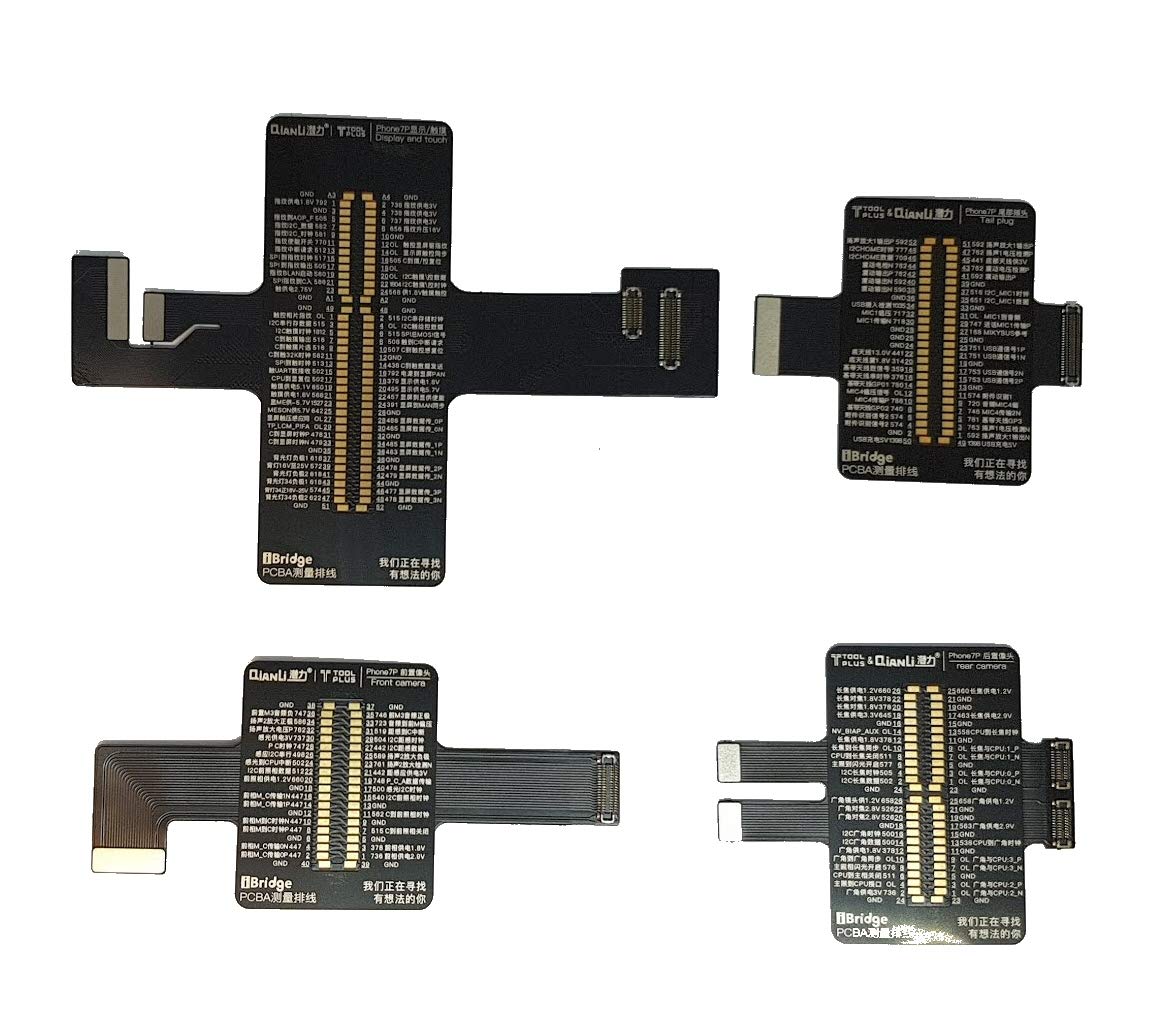
Figure 2.1: Overview of the QianLi ToolPlus iBridge flex cables included in the package. This image displays the various iBridge connectors designed for different components of the iPhone 7 Plus, such as the LCD, rear camera, front camera, and charging port.
3. Setup
Before using the iBridge tool, ensure you have the necessary equipment and follow these steps:
- Prepare the iPhone 7 Plus: Carefully disassemble the iPhone 7 Plus to access its logic board. Ensure the device is powered off and the battery is disconnected to prevent damage.
- Identify the Target FPC Connector: Locate the specific FPC connector on the iPhone 7 Plus logic board that corresponds to the component you wish to diagnose (e.g., LCD, camera, charging port).
- Connect the iBridge Flex Cable: Gently connect the appropriate iBridge flex cable to the corresponding FPC connector on the iPhone 7 Plus logic board. Ensure a secure and proper connection. The iBridge cable acts as an extension, providing larger, more accessible test points.
- Prepare Multimeter: Set your multimeter to the desired measurement mode (e.g., voltage, resistance, continuity).

Figure 3.1: An illustration showing the iBridge flex cables connected to an iPhone 7 Plus logic board and a connected screen. This demonstrates how the iBridge integrates with the device's internal components for diagnostic purposes.

Figure 3.2: An exploded diagram illustrating the connection of an iBridge flex cable to an iPhone's logic board. This visual aids in understanding the physical integration of the iBridge tool during setup.
4. Operating Instructions
The iBridge tool facilitates precise measurements on the iPhone 7 Plus logic board. Follow these steps for effective diagnosis:
- Power On (if required): For voltage measurements, the iPhone may need to be powered on. Exercise caution to avoid short circuits. For resistance or continuity tests, the device should remain powered off.
- Identify Test Points: The iBridge flex cables are designed with clearly labeled test points, often corresponding to specific pins of the FPC connector. Refer to the markings on the iBridge cable for pin identification.
- Perform Measurements:
- Voltage Measurement: Place the positive probe of your multimeter on the desired test point on the iBridge cable and the negative probe on a known ground point on the logic board. Read the voltage displayed on the multimeter.
- Resistance/Continuity Measurement: With the device powered off, place the multimeter probes on the desired test points to measure resistance or check for continuity.
- Record Readings: Document your measurements and compare them against known good values or schematics for the iPhone 7 Plus to identify discrepancies.

Figure 4.1: A close-up view demonstrating the use of multimeter probes on the extended test points of an iBridge flex cable. This highlights the ease of access for precise measurements.

Figure 4.2: A series of images demonstrating various measurements being taken using the iBridge tool and a multimeter. Examples include screen power supply, fingerprint boost, and bias power supply readings.

Figure 4.3: An iBridge flex cable displaying detailed pinout information and test points. This image illustrates how the iBridge provides clear access for multimeter probes, aiding in precise diagnostics.
5. Maintenance
To ensure the longevity and accuracy of your QianLi ToolPlus iBridge, follow these maintenance guidelines:
- Cleaning: Gently clean the flex cables and connectors with a soft, dry, lint-free cloth after each use. Avoid using harsh chemicals or abrasive materials.
- Storage: Store the iBridge cables in a clean, dry, and dust-free environment, preferably in their original packaging or a protective case, to prevent damage to the delicate flex circuits.
- Handling: Handle the flex cables with care. Avoid bending, twisting, or applying excessive force to the connectors, as this can cause permanent damage.
- Inspection: Periodically inspect the cables for any signs of wear, tear, or damage. Discontinue use if any damage is observed.
6. Troubleshooting
If you encounter issues while using the iBridge tool, consider the following:
- No Reading on Multimeter:
- Ensure the multimeter is set to the correct mode (voltage, resistance).
- Verify that the multimeter probes are making good contact with the iBridge test points and the ground.
- Check if the iBridge flex cable is securely connected to the iPhone logic board FPC connector.
- Confirm the iPhone is powered on if measuring voltage, or powered off if measuring resistance/continuity.
- Inconsistent Readings:
- Ensure stable contact with multimeter probes.
- Check for any debris or corrosion on the iBridge connectors or iPhone FPC connectors.
- Verify the multimeter's battery level.
- Physical Damage to iBridge Cable:
- If the flex cable appears bent, torn, or damaged, it may need replacement. Continued use of a damaged cable can lead to inaccurate readings or further damage to the iPhone.
7. Specifications
| Feature | Detail |
|---|---|
| Product Name | QianLi ToolPlus iBridge Logic Board Diagnostics Tool |
| Model Compatibility | iPhone 7 Plus |
| Function | Extends FPC connectors for multimeter voltage and resistance testing |
| Package Contents | iBridge Connectors for LCD, Rear Camera, Front Camera, Charging Port |
| Dimensions (Approximate, iBridge card) | 120mm x 80mm x 10.5mm (L x W x H) |

Figure 7.1: Diagram illustrating the approximate dimensions of the iBridge card, showing measurements of 120.00mm in length, 80.00mm in width, and 10.50mm in height.
8. Warranty and Support
Specific warranty details for the QianLi ToolPlus iBridge are typically provided at the point of purchase or by the seller. Please refer to your purchase documentation or contact your retailer for information regarding warranty coverage and terms.
For technical support or further assistance, please contact the manufacturer, QianLi, or your authorized reseller. Contact information can usually be found on the product packaging or the seller's website.