
1. Introduction
The TUMI Alpha Dual Access Expandable Carry-On Luggage is designed for professionals and frequent travelers, offering durability, functionality, and a streamlined aesthetic. Crafted from TUMI’s FXT Ballistic Nylon, this carry-on provides exceptional performance for every journey.
Key Features:
- Dual-Access Main Compartment: Offers both front-lid and split-case zip entry for versatile packing.
- Zipper Expansion: Provides up to two inches of additional packing space.
- Integrated TSA Combination Lock: Enhances security for your belongings.
- Built-in USB-C Charging Port: Allows for convenient charging of devices on the go (supports USB 4.0 cables, up to 240W power pass-through).
- FXT Ballistic Nylon Construction: Ensures maximum durability and lighter weight.
- Four Dual Outboard Wheels: Provides smooth and effortless maneuverability.
- Three-Stage Telescoping Handle: Offers comfortable handling and stability.
- Removable Garment Sleeve: Aids in organized packing for formal wear.
- AirTag Pocket: For tracking your luggage.
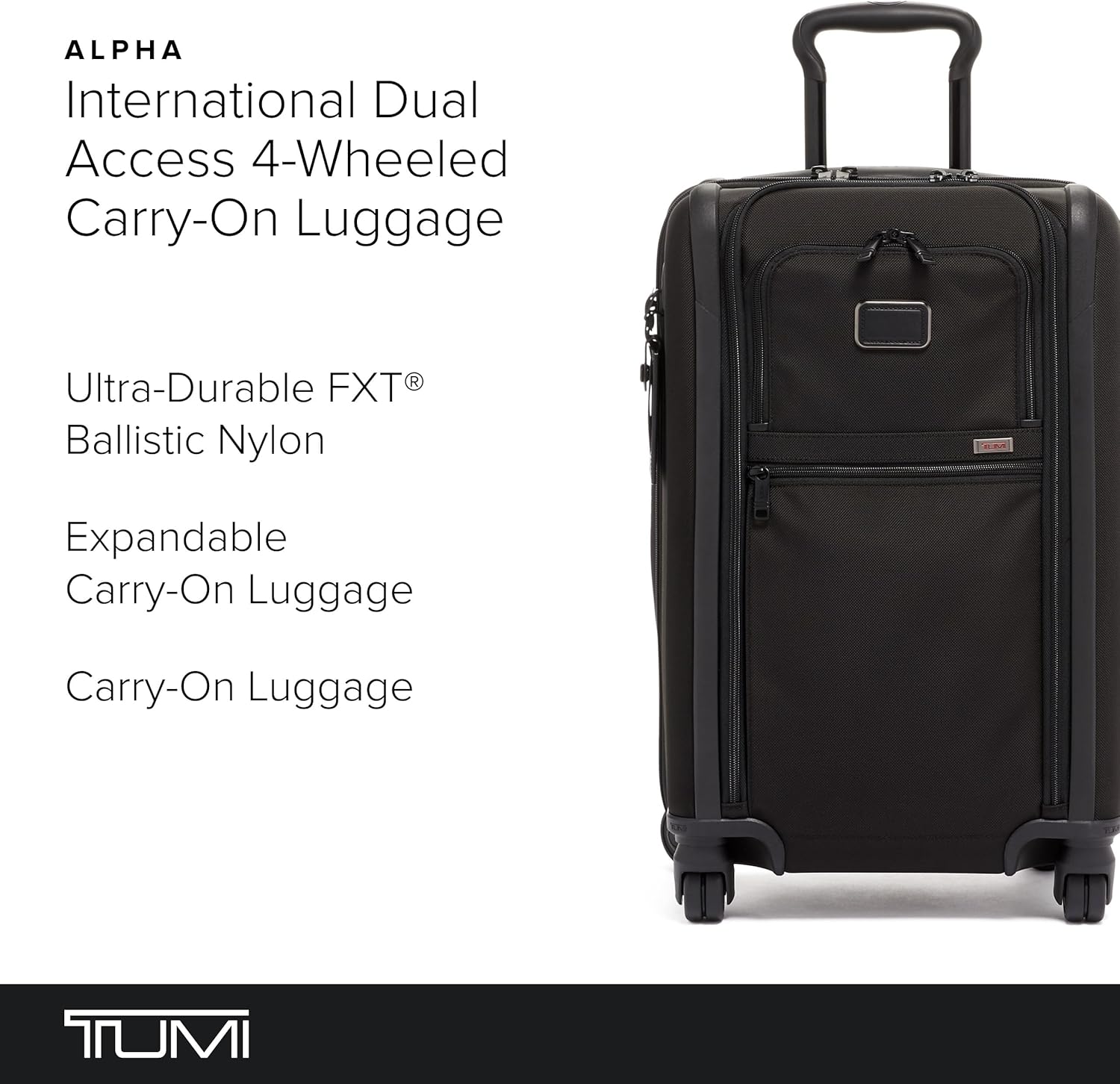
A full front view of the TUMI Alpha Dual Access Expandable 4-Wheeled Carry-On Luggage in black, showcasing its sleek design and front pockets.
2. Setup
2.1 Setting the TSA Combination Lock
Your TUMI carry-on features an integrated TSA combination lock for enhanced security. To set your personal combination:
- Ensure the lock is set to the factory default combination (usually 0-0-0).
- Locate the small reset button (often recessed and requiring a pen tip to press).
- Press and hold the reset button until you hear a click or feel it depress.
- While holding the reset button, set your desired three-digit combination by turning the dials.
- Release the reset button. Your new combination is now set.
- Test the new combination by scrambling the dials and then entering your set combination to open the lock.
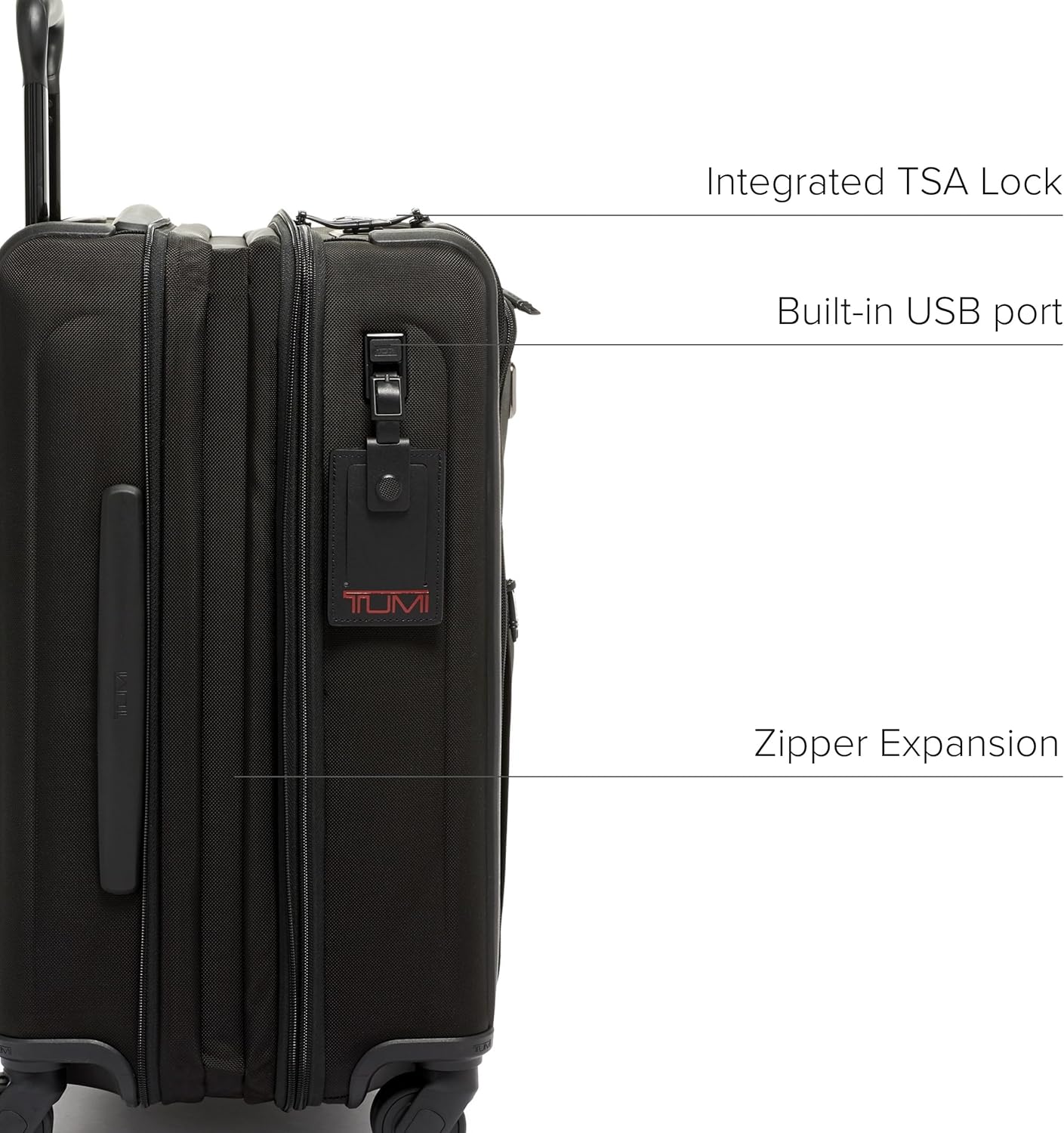
A close-up side view highlighting the integrated TSA combination lock, the built-in USB-C charging port, and the zipper for expansion.
2.2 Using the USB-C Charging Port
The built-in USB-C port allows you to charge your electronic devices. To use this feature:
- Locate the internal hanging mesh zipper pocket with the removable USB cable.
- Connect your portable power bank (not included) to the internal USB-C cable.
- Connect your device's charging cable to the external USB-C port on the luggage.
- Ensure your power bank is charged and turned on for your device to begin charging.
The port supports USB 4.0 cables with fast charging up to 240W and power pass-through without data transfer.
3. Operation
3.1 Dual Access Main Compartment
This carry-on offers two ways to access the main packing area:
- Front-Lid Entry: Ideal for quick access to items without fully opening the suitcase. Unzip the front U-zip pocket to access this entry point.
- Split-Case Entry: For full access to both sides of the main compartment, unzip the primary zipper that runs around the perimeter of the luggage.
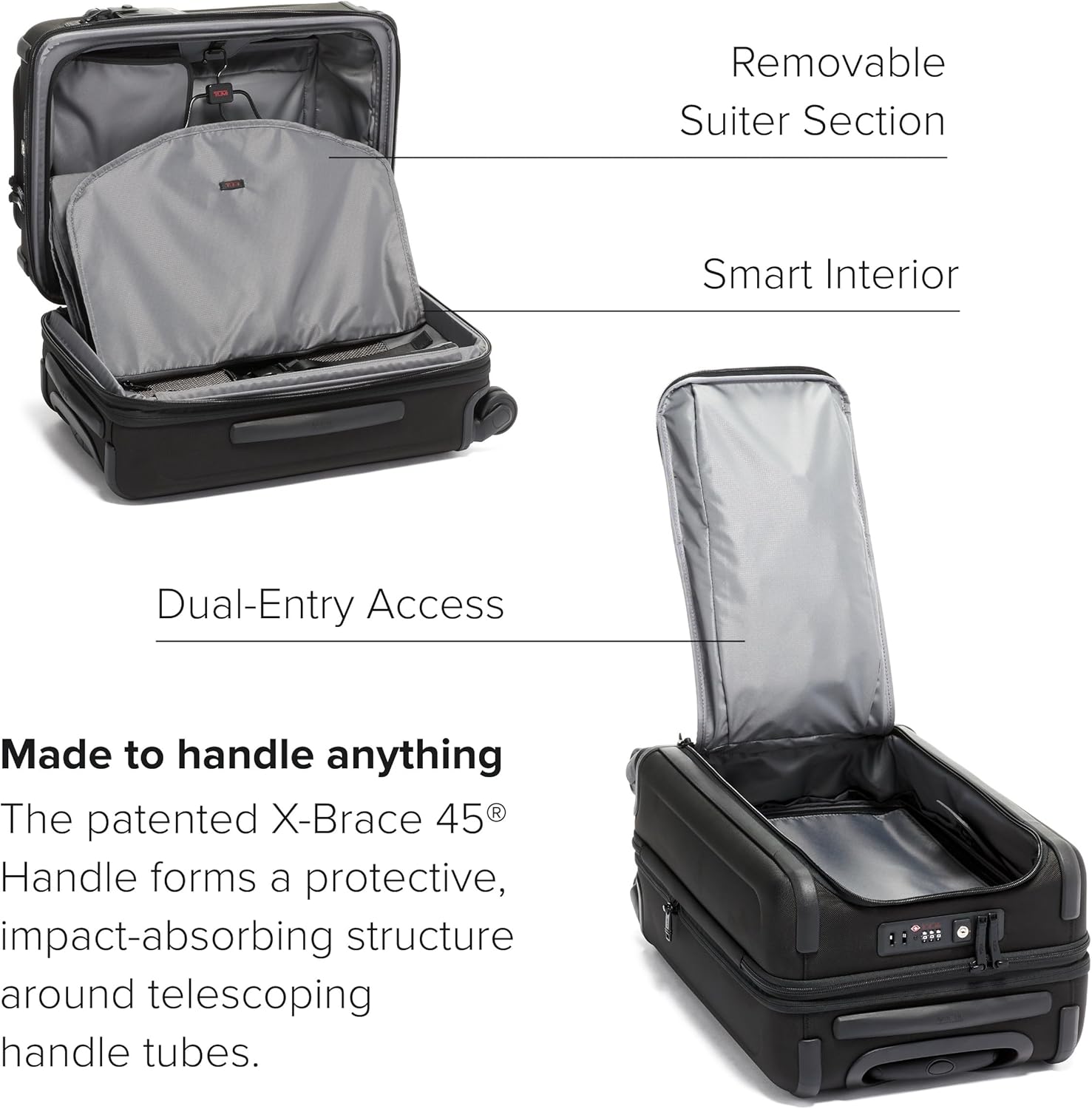
The main compartment of the luggage opened, revealing the spacious interior with mesh pockets and compression straps for organized packing.
3.2 Zipper Expansion
To increase your packing capacity, locate the secondary zipper running along the side of the luggage. Unzip this zipper to expand the depth of the main compartment by up to two inches, providing extra space for your belongings.

The luggage shown with its expansion zipper unzipped, demonstrating the additional packing capacity.
3.3 Maneuverability
The luggage is equipped with four dual outboard wheels for smooth, multi-directional rolling. The three-stage telescoping handle extends and retracts for comfortable pulling. Retractable top, side, and bottom grab handles are provided for easy lifting and carrying.
3.4 Removable Garment Sleeve
A removable garment sleeve is included to help keep your clothes wrinkle-free. Place your garments inside the sleeve and secure it within the main compartment.
3.5 AirTag Pocket
Utilize the dedicated AirTag pocket to insert your Apple AirTag (not included) for convenient tracking of your luggage.
4. Maintenance
4.1 Cleaning FXT Ballistic Nylon
To clean the FXT Ballistic Nylon exterior, gently wipe with a soft, damp cloth. For stubborn stains, a mild soap solution can be used, followed by wiping with a clean, damp cloth to remove any soap residue. Allow to air dry completely. Avoid harsh chemicals or abrasive cleaners.

A detailed view of the durable FXT Ballistic Nylon material, showcasing its texture and robust construction.
4.2 Wheel and Handle Care
Regularly inspect the wheels for any debris or hair that may impede smooth rolling. Clean as necessary. Ensure the telescoping handle extends and retracts smoothly; if it becomes stiff, a small amount of silicone lubricant can be applied to the telescoping tubes.
5. Troubleshooting
5.1 Lock Issues
- Forgotten Combination: If you forget your combination, TUMI customer support may be able to assist. Do not attempt to force the lock open, as this may damage it.
- Lock Not Engaging/Disengaging: Ensure the zippers are fully inserted into the lock mechanism. If the issue persists, re-enter your combination carefully.
5.2 USB-C Port Not Working
- No Power Output: Verify that your portable power bank is fully charged and correctly connected to the internal USB-C cable. Ensure the power bank is turned on.
- Slow Charging: Check if your device's charging cable and power bank support fast charging. The port itself supports up to 240W, but the actual charging speed depends on your connected accessories.
5.3 Zipper Malfunctions
- Stuck Zipper: Gently pull the fabric away from the zipper teeth and try to move the slider. Avoid excessive force.
- Misaligned Teeth: If zipper teeth are misaligned, try to gently realign them by moving the slider back and forth. If the issue persists, contact TUMI support.
6. Specifications
| Feature | Detail |
|---|---|
| Product Dimensions | 14.96 x 9 x 19.69 inches (L x W x H) |
| Expanded Depth | Up to 11 inches |
| Weight | 11.88 Pounds |
| Model Number | 117171-1009 |
| Fabric Type | FXT Ballistic Nylon |
| Department | Unisex |
| Manufacturer | TUMI |
| First Available | February 5, 2019 |

An image illustrating the luggage's dimensions (23" x 15" x 9", expandable to 11" depth) and weight (13.54 lbs), along with its 64L capacity.
7. Warranty and Support
7.1 Warranty Information
TUMI products from travel, business, or bags collections are covered by a five-year warranty. Wallets and accessories are covered for two years. This warranty covers manufacturing defects and workmanship under normal use.
7.2 Contact Support
For detailed warranty claims, product support, or any other inquiries, please visit the official TUMI website or contact their customer service directly. Retain your proof of purchase for warranty services.
8. Product Videos
TUMI Alpha Collection Overview
This video provides an overview of the TUMI Alpha Collection, highlighting various products and their features, including the durable construction and versatile functionality.