
Introduction
This manual provides essential instructions for the safe and efficient operation of your ELC T-5000+ 5000-Watt Step Up/Down Voltage Converter Transformer. Please read this manual thoroughly before use and retain it for future reference. This device is designed to convert voltage between 110V/120V and 220V/240V, allowing you to use appliances from different regions.
Safety Information
WARNING: Before switching on this unit, please select the correct input voltage and connect to the correct power voltage source.
- This converter is designed only for European/Asian 220V (Single Phase). It will not work with American 220V (Dual Phase).
- Do not recommend for high wattage heat producing items such as coffee makers, espresso machines, toasters, and welding equipment.
- Ensure the wattage of your appliance does not exceed the continuous use capacity of the converter (2500W for continuous use, 5000W for 30 minutes maximum). It is recommended to use a transformer with a wattage capacity at least twice that of your appliance.
- Always ensure the converter is placed on a stable, flat surface with adequate ventilation.
- Keep out of reach of children.
- For indoor use only.
Product Features
- Up to 5000 watt maximum capacity.
- Heavy duty step up/down voltage conversion (110/120V to 220/240V).
- Dual circuit breakers protection for each voltage (120V & 220V).
- Includes 1 x 110V socket and 1 x Universal 220V socket.
- CE Certified for safety.
Setup
Follow these steps to set up your ELC T-5000+ voltage converter:
- Unpack the Converter: Carefully remove the converter from its packaging. Inspect for any damage.
- Place the Converter: Position the converter on a stable, dry, and well-ventilated surface. Ensure there is enough space around it for heat dissipation.
- Identify Input Voltage: Locate the input voltage selection switch on the back of the unit. This switch allows you to select the voltage of the wall outlet you will be plugging the converter into (e.g., 110V for North America, 220V for Europe/Asia).
- Connect to Power Source: Plug the converter's power cord into the appropriate wall outlet.
- Select Output Voltage: On the front panel, identify the output sockets. There is typically one for 110-120V AC and another for 220-240V AC.
- Connect Appliance: Plug your appliance into the correct output socket on the converter. Ensure your appliance's voltage requirement matches the selected output.
- Power On: Flip the main power switch (usually located on the back or front) to the 'ON' position. A power indicator light (often red) on the front will illuminate.
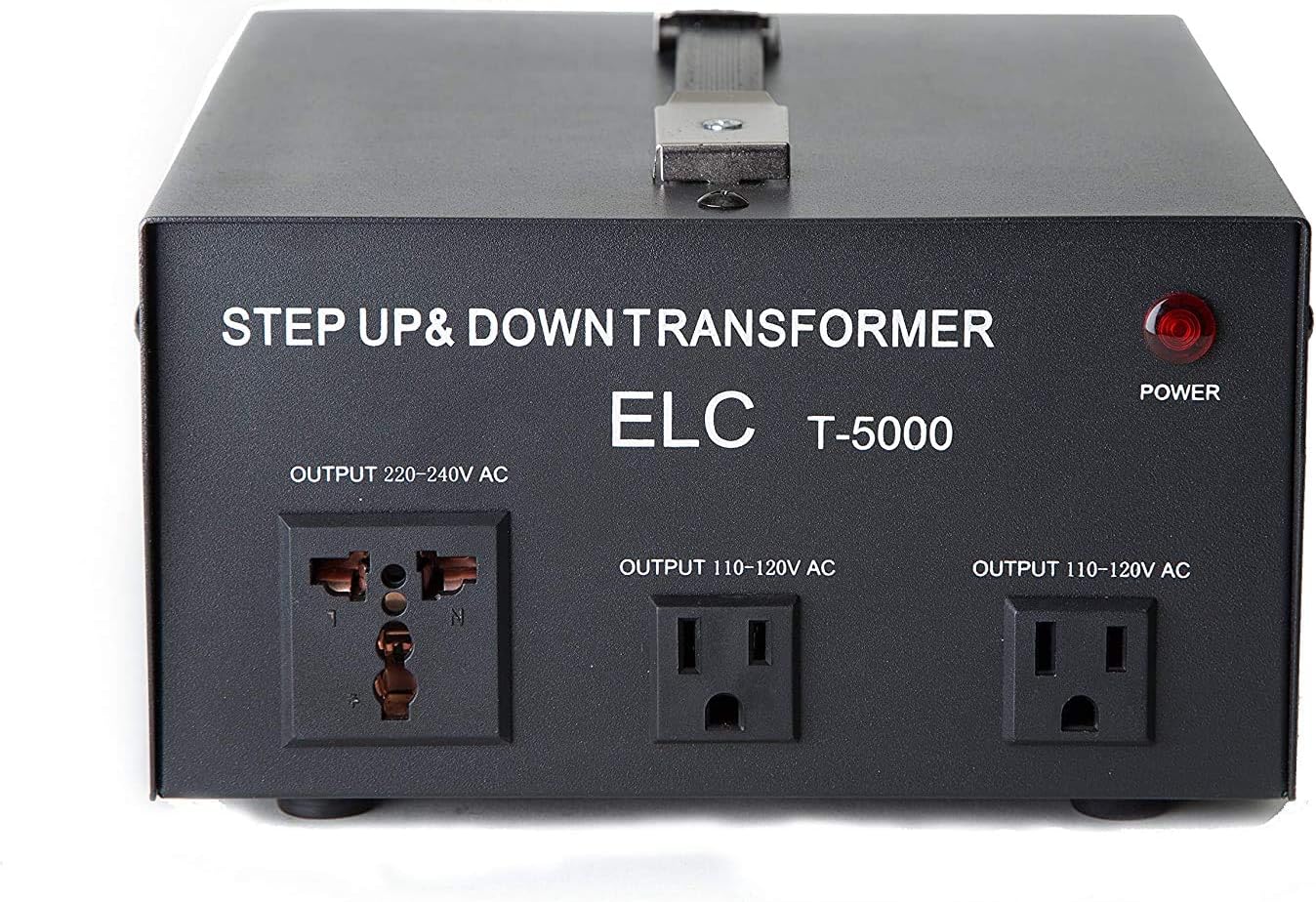
Image: ELC T-5000+ Voltage Converter Transformer, showing the overall unit with its handle and various ports.

Image: Rear view of the ELC T-5000+ converter, highlighting the input voltage selection switch and the main power switch.
Video: A demonstration of how to set up and use the step-up/down transformer, showing the connection process and power activation.
Operating Instructions
Once the converter is set up, operating it is straightforward:
- Voltage Conversion: The converter automatically adjusts the output voltage based on the input voltage selected and the output socket used. For example, if you plug the converter into a 110V wall outlet and select the 220V output, it will step up the voltage. Conversely, if you plug it into a 220V wall outlet and select the 110V output, it will step down the voltage.
- Circuit Breaker Protection: The unit features dual circuit breakers for both 120V and 220V outputs. In case of an overload, a circuit breaker will trip to protect the converter and your appliance. To reset, simply press the reset button for the corresponding voltage.
- Power Indicator: The red 'POWER' indicator light on the front panel confirms that the unit is receiving power and is operational.

Image: A close-up view of the dual circuit breaker protection buttons for 110-120V and 220-240V outputs.

Image: A standard US power plug, illustrating the type of plug used for 110-120V connections.
Video: A brief overview of the 1000-Watt Voltage Converter Transformer, demonstrating its basic functionality.
Video: A short clip showcasing the power voltage converter in operation.
Maintenance
- Keep the converter clean and free from dust. Use a dry, soft cloth for cleaning.
- Ensure ventilation openings are not blocked to prevent overheating.
- Store the converter in a cool, dry place when not in use.
- Do not attempt to open or repair the unit yourself. Refer to qualified service personnel.
Troubleshooting
- No Power Indicator Light: Check if the power cord is securely plugged into the wall outlet and the converter. Ensure the main power switch is in the 'ON' position. Verify the wall outlet is functional.
- Appliance Not Working: Confirm that your appliance is correctly plugged into the appropriate output socket on the converter. Check if the circuit breaker has tripped (press to reset). Ensure the input voltage selection switch is set correctly for your power source.
- Overheating: If the unit feels excessively hot, disconnect it immediately. Check for blocked ventilation and ensure the appliance's wattage does not exceed the converter's capacity. Allow the unit to cool down before resuming use.
Specifications
| Specification | Value |
|---|---|
| Brand | ELC |
| Model | T-5000UD |
| Power Source | Corded Electric |
| Product Dimensions | 10.25"D x 8"W x 4.5"H |
| Item Weight | 21 Pounds |
| Maximum Capacity | 5000 Watt (30 minutes use) |
| Continuous Use Capacity | 2500 Watt |
| Input Voltage | 110V/120V or 220V/240V |
| Output Voltage | 110V/120V and 220V/240V |
| Certification | CE |
| UPC | 856058008372 |
Warranty and Support
This ELC T-5000+ Voltage Converter Transformer comes with a 1-Year Manufacturer's Warranty. For technical support or warranty claims, please contact ELC customer service. ELC offers Lifetime ELC Tech Support.