
Aurabeam BN59-00942A-LE32B350-CN
Aurabeam Replacement TV Remote Control User Manual
Introduction
This manual provides instructions for the Aurabeam Replacement TV Remote Control, compatible with various Samsung TV models, including LE32B350. This remote is designed for immediate use without programming, requiring only the insertion of batteries.
Setup
1. Inserting Batteries
The remote control operates on standard AAA batteries (not included). Follow these steps to install them:
- Locate the battery compartment on the back of the remote control.
- Slide the battery cover downwards or press the latch to open it.
- Insert two AAA batteries, ensuring the positive (+) and negative (-) terminals align correctly with the indicators inside the compartment.
- Close the battery cover by sliding it back into place until it clicks securely.
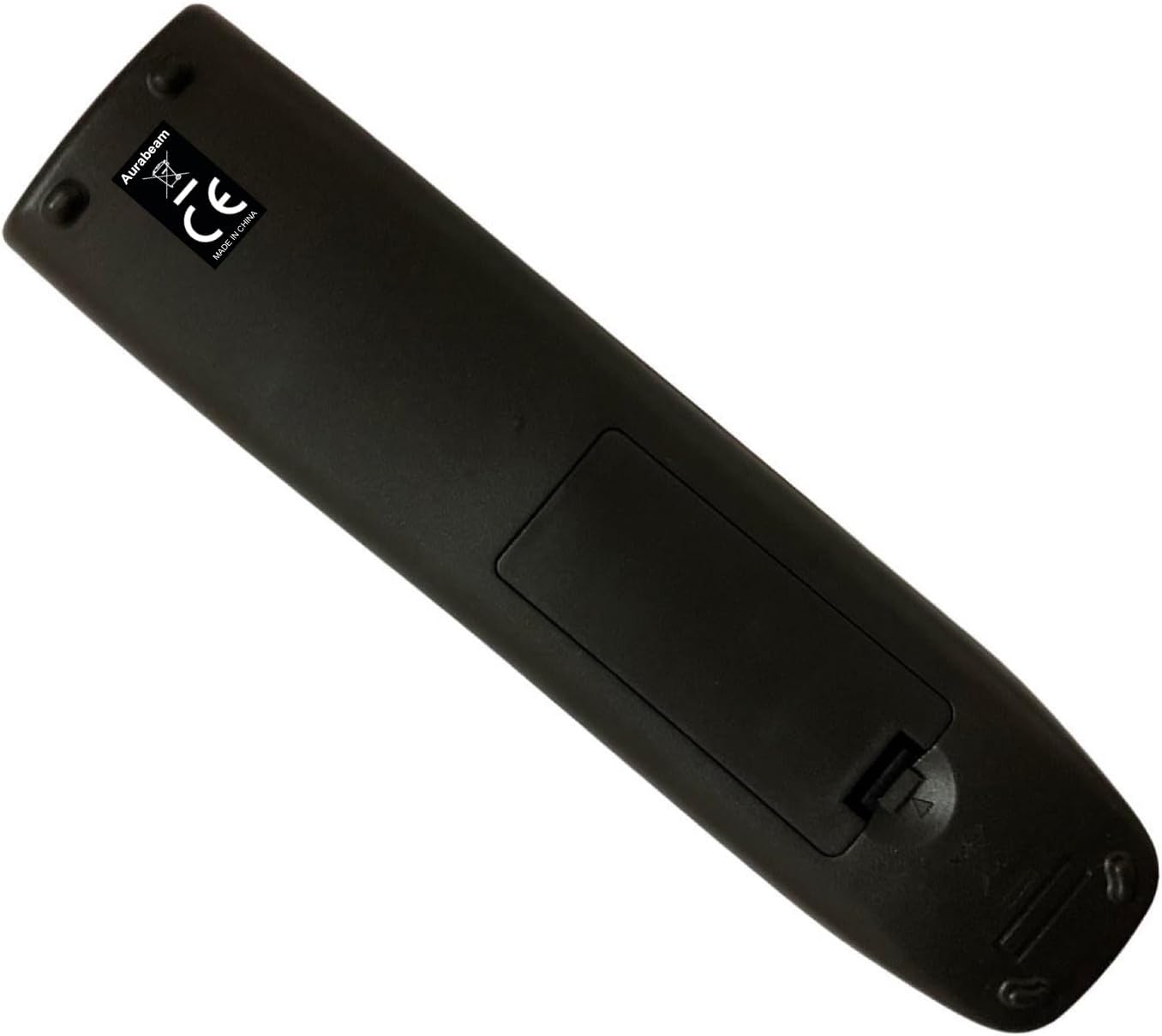
Image: Back view of the Aurabeam remote control, highlighting the battery compartment cover.
Once batteries are inserted, the remote is ready for use with compatible Samsung TV models without any additional programming.
Operating Instructions
This section details the functions of the various buttons on your Aurabeam replacement remote control.
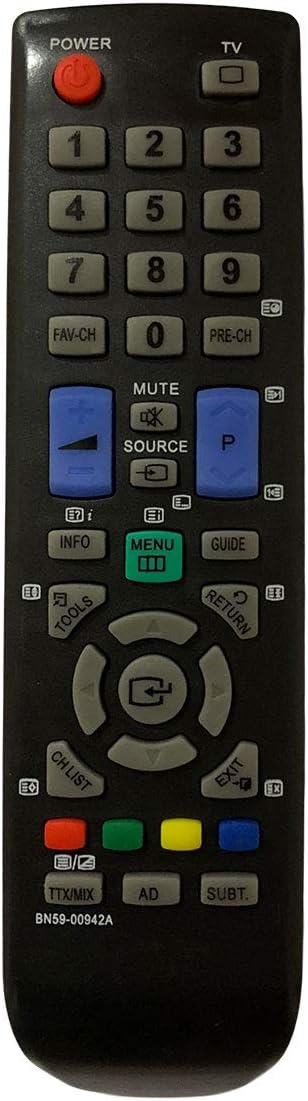
Image: Front view of the Aurabeam replacement TV remote control, showing all buttons.
Button Functions:
- POWER (Red Button): Turns the TV on or off.
- TV: Switches the input source to TV mode.
- Number Buttons (0-9): Directly select channels.
- FAV-CH: Accesses favorite channels list.
- PRE-CH: Returns to the previous channel.
- MUTE: Mutes or unmutes the TV sound.
- SOURCE: Cycles through available input sources (HDMI, AV, Component, etc.).
- Volume Up/Down (Blue Buttons): Adjusts the volume level.
- Channel Up/Down (Blue Buttons): Changes the TV channel.
- INFO: Displays information about the current program or input.
- MENU: Opens the TV's main menu.
- GUIDE: Displays the electronic program guide (EPG).
- TOOLS: Accesses quick settings or tools menu.
- RETURN: Returns to the previous screen or menu.
- Navigation Pad (Up, Down, Left, Right, Enter): Navigates through menus and confirms selections.
- CH. LIST: Displays the channel list.
- EXIT: Exits the current menu or function.
- Color Buttons (Red, Green, Yellow, Blue): Perform specific functions depending on the TV menu or application.
- TTX/MIX: Toggles Teletext or Mix mode.
- AD: Activates Audio Description (if available).
- SUBT.: Toggles subtitles on or off.
Maintenance
To ensure the longevity and optimal performance of your remote control, please follow these maintenance guidelines:
- Cleaning: Use a soft, dry cloth to wipe the remote control. For stubborn dirt, slightly dampen the cloth with water or a mild, non-abrasive cleaner. Do not use harsh chemicals or abrasive materials.
- Battery Replacement: Replace batteries when the remote's responsiveness decreases or it stops functioning. Always replace both batteries at the same time with new ones of the same type.
- Storage: Store the remote in a cool, dry place away from direct sunlight, extreme temperatures, and high humidity.
- Avoid Drops: Protect the remote from physical shocks and drops, which can damage internal components.
- Liquid Exposure: Keep the remote away from liquids. If it gets wet, remove the batteries immediately and allow it to dry completely before reinserting them.
Troubleshooting
If you experience issues with your Aurabeam replacement remote control, refer to the following common problems and solutions:
| Problem | Possible Cause | Solution |
|---|---|---|
| Remote is not responding. | Dead or incorrectly inserted batteries. Obstruction between remote and TV. Remote out of range. | Replace batteries, ensuring correct polarity. Remove any objects blocking the signal path. Move closer to the TV. |
| Some buttons are not working. | Dirt or debris under the buttons. Internal circuit damage. | Clean the remote surface. If cleaning doesn't help, the remote may be damaged and require replacement. |
| Remote works intermittently. | Low battery power. Interference from other devices. | Replace batteries. Ensure no strong light sources (like direct sunlight) are interfering with the TV's IR receiver. |
| Remote does not control the TV. | Incompatible TV model. TV's IR receiver is faulty. | Verify your TV model is listed as compatible. Test with another remote if possible to check the TV's receiver. |
Specifications
- Brand: Aurabeam
- Model Number: BN59-00942A-LE32B350-CN
- Connectivity Technology: Infrared
- Compatible Devices: Television (various Samsung models including LE32B350-CN, 19LE19B350, 22LE22B350, 26LE26B350, 32LE32B350, 42PS42B430, 50PS50B430, etc. - refer to product description for full list)
- Controller Type: Button Control
- Maximum Range: 10 Meters
- Batteries Required: AAA (not included)
- ASIN: B07MMJQN42
- UPC: 686170147044, 745062650168
Warranty Information
This Aurabeam replacement remote control comes with a 1-year warranty from the date of purchase. This warranty covers manufacturing defects and ensures the product functions as intended under normal use. Please retain your proof of purchase for warranty claims.
Support
For further assistance, technical support, or warranty claims, please contact the seller or refer to the product listing on Amazon.com.be for contact information.
You can also visit the Aurabeam brand page on Amazon for more products and information.
Ask a question about this manual
Ask about setup, troubleshooting, compatibility, parts, safety, or missing instructions. Manuals+ will review the question and use this page’s manual context to help answer it.