
Introduction
This manual provides essential instructions for the proper installation, operation, and maintenance of your Standard Horizon GX1850 Fixed Mount VHF Radio. Please read this manual thoroughly before using the radio to ensure safe and efficient communication on the water. The GX1850 is a robust marine VHF radio designed for reliable communication and safety features, including NMEA 2000 connectivity and Digital Selective Calling (DSC).
Setup and Installation
Mounting the Radio
The GX1850 is designed for flexible installation in various marine environments. It features an ultra-compact design with a slim rear-case, allowing for greater flexibility in tight spaces. The unit can be flush-mounted or bracket-mounted. A flush mounting kit and dust cover are typically sold separately.

Image Description: This image displays the detailed dimensions of the Standard Horizon GX1850 Fixed Mount VHF radio from various angles (top, front, side). Measurements are provided in both inches and millimeters, illustrating the compact size and slim rear-case design, which aids in installation within confined areas on a vessel.
Electrical Connections
Connect the radio to a 12V DC power source. Ensure proper polarity. The GX1850 supports NMEA 2000 and NMEA 0183 interfaces for connecting to external GPS devices and chart plotters.
GPS Connectivity
The GX1850 features a built-in integrated 66-channel GPS receiver. This internal GPS data is crucial for DSC calling, position sharing, and other navigation functions. For optimal performance, ensure the radio has a clear view of the sky or is connected to an external GPS antenna or chart plotter via NMEA 2000 or NMEA 0183 if the internal GPS signal is obstructed.
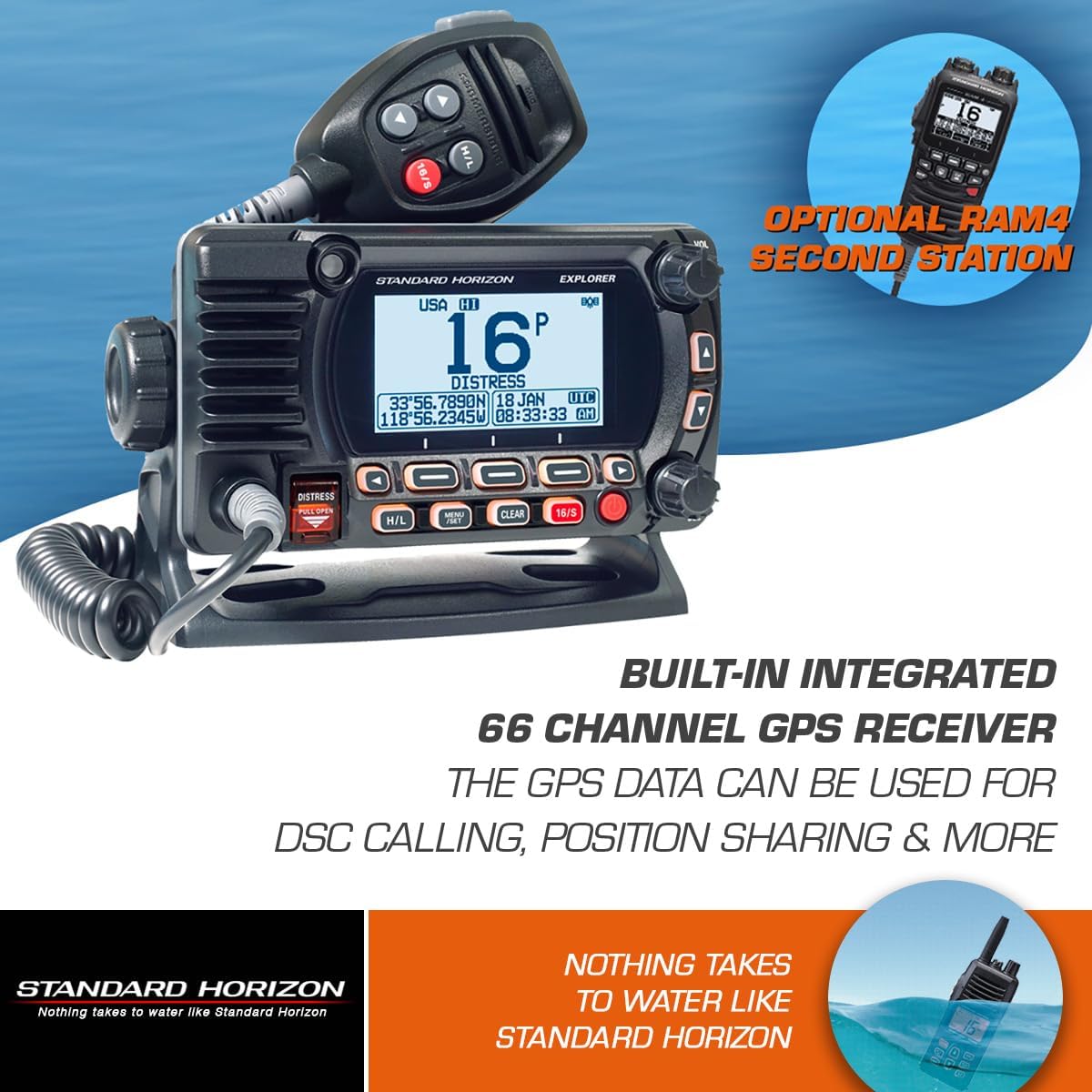
Image Description: This image shows the Standard Horizon GX1850 Fixed Mount VHF radio, emphasizing its built-in integrated 66-channel GPS receiver. The text overlay explains that GPS data is used for DSC calling, position sharing, and other functions, indicating its importance for marine safety and communication.
MMSI Registration
To utilize the Digital Selective Calling (DSC) features, you must obtain and program a Maritime Mobile Service Identity (MMSI) number into your radio. This number is unique to your vessel and is essential for distress calls and other DSC functions. Contact your national telecommunications authority or a recognized organization (e.g., BoatUS in the United States) for MMSI registration.
Operating Instructions
Basic Operation
Turn the radio on using the power button. Adjust the volume and squelch controls for clear reception. The GX1850 features an oversized full-dot matrix display for wide and bold information display, making it easy to read in various conditions.
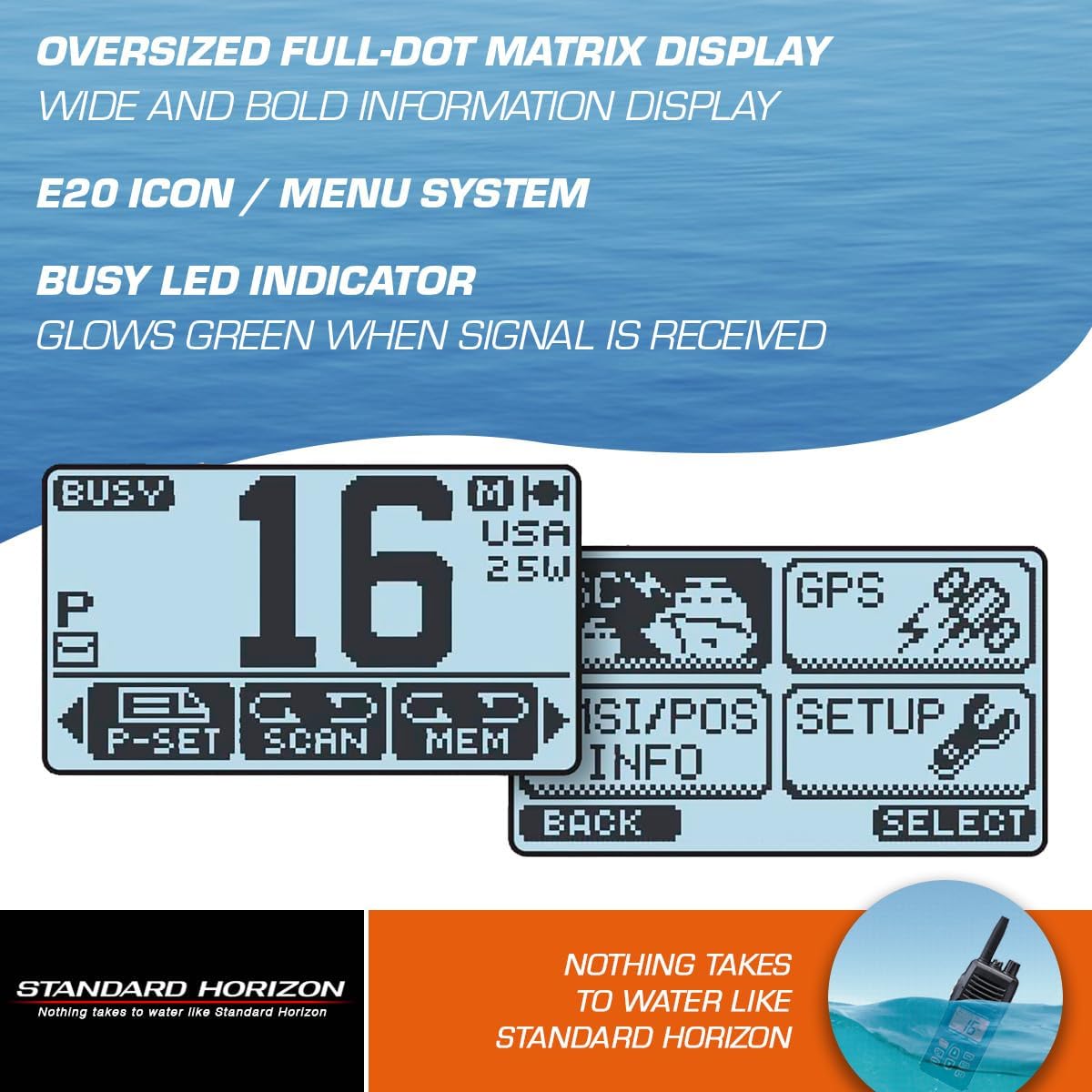
Image Description: This image highlights the oversized full-dot matrix display of the GX1850, showing a clear view of channel 16, country setting (USA), and transmit power (25W). It also illustrates the E20 icon/menu system and the busy LED indicator, which glows green when a signal is received, enhancing user interface clarity.
Channel Selection and Transmission
Use the channel selector knob or buttons to select the desired VHF channel. Press the Push-To-Talk (PTT) button on the microphone to transmit. The microphone includes a speaker to assist in hearing communications in noisy environments. The radio supports weather channels and monitors Channel 16 for distress and hailing.
Menu System (E2O)
The GX1850 utilizes an E2O (Easy to Operate) icon and menu system for intuitive navigation through settings and features. This includes accessing GPS status, waypoint navigation, and compass displays. A selectable Night Mode Display is available for improved visibility in low-light conditions.
Advanced Features
- Digital Selective Calling (DSC): The GX1850 is a Class D DSC transceiver, enabling automated distress calls, individual calls, and position requests.
- Intercom Feature: Communicate between the main radio unit and an optional second station, such as the RAM4 SSM-70H or RAM4X SSM-72H remote access microphones.
- GPS Status: View your current GPS position, course, and speed directly on the radio display.

Image Description: This image provides a comprehensive overview of the GX1850's key features. It highlights the 3-year warranty, ClearVoice Noise Reduction Technology, Intercom capability, E2O (Easy to Operate) menu system, Class D DSC transceiver, Waypoint Navigation & Compass displays, Night Mode, 66-channel GPS receiver, and IPX8 submersible rating, showcasing the radio's advanced functionalities.
Maintenance
Cleaning
The GX1850 features IPX8 submersible construction, meaning it is waterproof to 1.5 meters (5 feet) for 30 minutes. This makes it highly resistant to marine environments. To clean the radio, wipe it with a soft, damp cloth. Do not use abrasive cleaners or solvents.

Image Description: This image depicts the Standard Horizon GX1850 radio partially submerged in water, visually demonstrating its IPX8 submersible construction. The text confirms its water resistance rating of 5 feet (1.5 meters) for 30 minutes, highlighting its durability in marine conditions.
General Care
Regularly inspect all cables and connections for signs of wear or corrosion. Ensure the antenna connection is secure. Store the radio in a dry, protected area when not in use for extended periods, although its robust construction is designed for continuous marine exposure.
Troubleshooting
- No Power: Check power connections, fuses, and the vessel's battery. Ensure the power cable is securely connected to the radio.
- No Audio/Poor Audio: Verify volume and squelch settings. Check speaker connections and ensure the microphone is properly connected.
- Cannot Transmit: Ensure the antenna is properly connected. Check the selected channel and transmit power setting.
- Internal GPS No Signal: The GX1850 relies on an external GPS signal if its internal receiver is obstructed. If the internal GPS does not acquire a signal, ensure the radio has a clear view of the sky. Alternatively, connect the radio to an external GPS antenna or a chart plotter via NMEA 2000 or NMEA 0183 for GPS data input. The unit does not have an internal GPS that functions without line of sight or external input.
- DSC Not Functioning: Confirm that an MMSI number has been correctly programmed into the radio. Ensure GPS data is being received by the radio.
Specifications
| Feature | Specification |
|---|---|
| Model Name | GX1850 |
| Brand | STANDARD HORIZON |
| Color | Black |
| Number of Channels | 16 (US, International, Canadian) |
| Special Feature | Submersible (IPX8) |
| Frequency Range | 156-174 MHz |
| Talking Range Maximum | 36 Miles (line of sight dependent) |
| Water Resistance Level | Waterproof (IPX8: 1.5m for 30 min) |
| Item Weight | 1 Pound |
| Item Dimensions (LxWxH) | 10 x 7 x 4 inches |
| Compatible Devices | CT-100, SSM-70H, RAM4 Wired Remote Access Microphone |
| GPS Receiver | Built-in Integrated 66 Channel GPS receiver |
| NMEA Connectivity | NMEA 2000, NMEA 0183 |
| DSC Class | Class D |
Warranty Information
The Standard Horizon GX1850 Fixed Mount VHF Radio comes with a 3-year warranty. For detailed terms and conditions, please refer to the warranty documentation included with your product or visit the official Standard Horizon website. This warranty covers manufacturing defects and ensures reliable performance under normal operating conditions.
Support and Contact
For technical assistance, service, or further inquiries regarding your Standard Horizon GX1850 VHF Radio, please contact Standard Horizon customer support. Refer to the contact information provided in your product packaging or visit the official Standard Horizon website for the most up-to-date support resources.
- Manufacturer: Standard Horizon
- Website: www.standardhorizon.com (Please verify the exact URL as it may vary)