
1. Introduction
This manual provides essential information for setting up, operating, and maintaining your Insignia 24-inch 720p HD Smart LED TV - Fire TV Edition. This television integrates the Fire TV experience, offering access to a wide range of streaming content and smart features, including voice control with Alexa.
The Insignia Fire TV Edition delivers 720p picture quality with deep blacks and rich colors. With the Fire TV experience built-in, you can enjoy thousands of channels, apps, and Alexa skills. Watch your favorite content from services like Netflix, Crave, CTV, and Prime Video. The Fire TV Edition seamlessly integrates live over-the-air TV and streaming channels on a unified home screen (HD antenna required).

Figure 1.1: Insignia 24-inch Fire TV Edition Smart TV with Fire TV interface.
2. Important Safety Information
Please read all instructions before operating your TV and retain them for future reference. Follow all warnings and instructions marked on the product.
- Power Source: Operate the TV only from the type of power source indicated on the marking label.
- Ventilation: Slots and openings in the cabinet are provided for ventilation. Do not block or cover these openings.
- Water and Moisture: Do not use this product near water, such as a bathtub, washbowl, kitchen sink, or laundry tub.
- Cleaning: Unplug this product from the wall outlet before cleaning. Use a damp cloth for cleaning. Do not use liquid cleaners or aerosol cleaners.
- Attachments: Do not use attachments not recommended by the product manufacturer as they may cause hazards.
- Lightning: For added protection during a lightning storm, or when it is left unattended and unused for long periods, unplug it from the wall outlet and disconnect the antenna or cable system.
- Servicing: Do not attempt to service this product yourself as opening or removing covers may expose you to dangerous voltage or other hazards. Refer all servicing to qualified service personnel.
3. Package Contents
Ensure all items are present in the package:
- Insignia 24-inch 720p HD Smart LED TV
- Voice Remote with Alexa
- TV Stand (2 pieces)
- Screws for TV Stand
- Power Cord
- Quick Setup Guide (this manual)
- AAA Batteries (2) for remote

Figure 3.1: Insignia Voice Remote with Alexa.
4. Setup
4.1 Attaching the TV Stand
- Carefully place your TV face-down on a clean, cushioned surface to prevent damage.
- Align the TV stand pieces with the screw holes on the bottom of the TV.
- Secure each stand piece with the provided screws. Ensure they are tightened firmly.
Alternatively, you can wall-mount your TV. Refer to your wall mount's instructions for proper installation. The TV has a VESA configuration of 200 x 100 mm.
4.2 Making Connections
Before connecting any cables, ensure your TV and all connected devices are powered off and unplugged from the wall outlet.
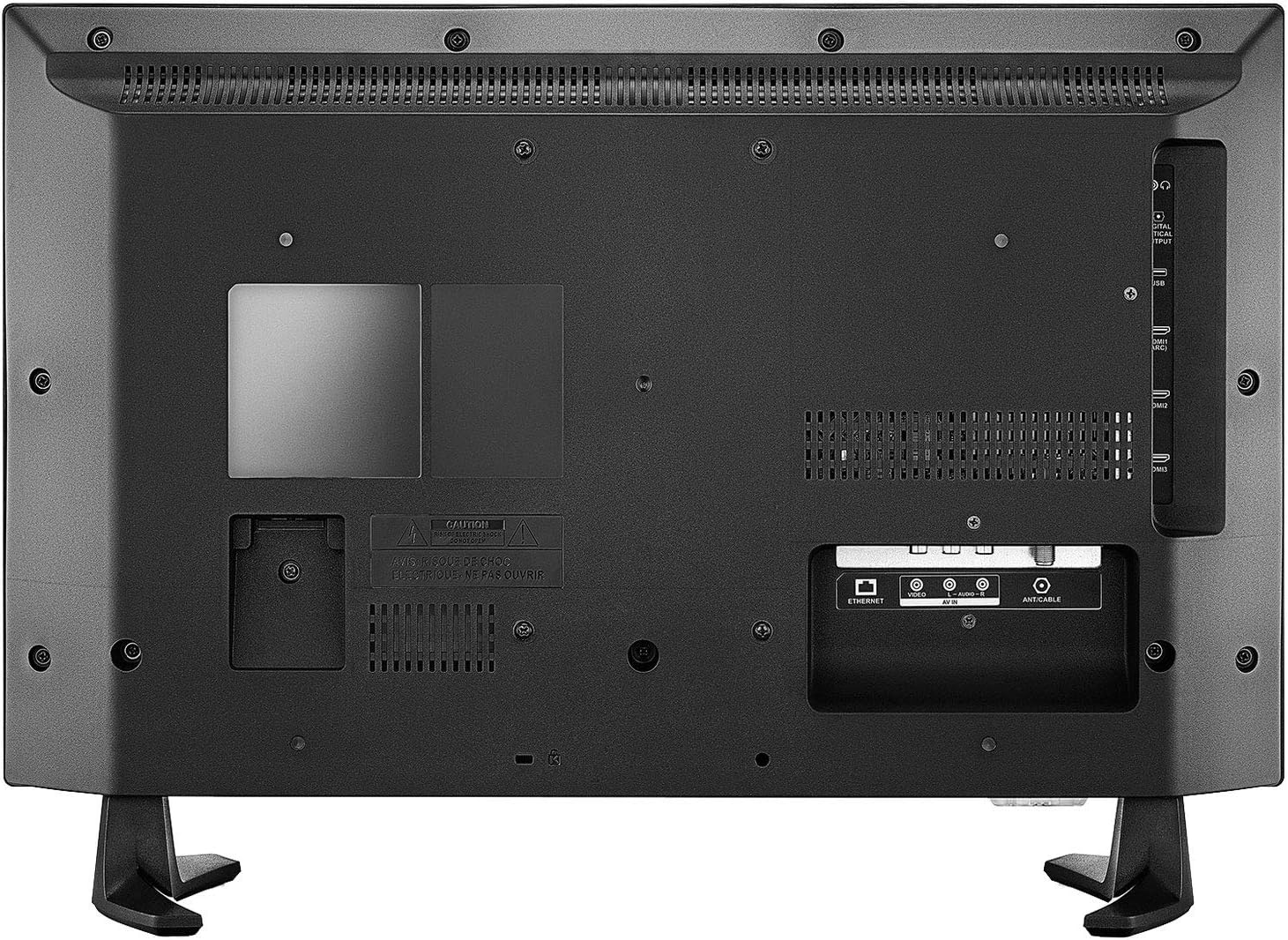
Figure 4.1: Rear panel connectivity ports.

Figure 4.2: Side and back connectivity ports detail.
- HDMI (3 ports, including 1 with ARC): Connect Blu-ray players, game consoles, cable/satellite boxes, or other HDMI devices. HDMI 1 supports Audio Return Channel (ARC) for simplified audio connections to compatible sound systems.
- USB (1 port): Connect USB storage devices for media playback.
- Composite Input (AV): Connect older devices using RCA cables (yellow for video, red/white for audio).
- Antenna/Cable Input: Connect an HD antenna for over-the-air broadcasts or a coaxial cable for cable TV.
- Digital Optical Audio Output: Connect to a soundbar or home theater system for digital audio.
- Audio Output (3.5mm): Connect headphones or external speakers.
- Ethernet: Connect an Ethernet cable for a wired internet connection.
4.3 Initial Power On and Network Setup
- After making all necessary connections, plug the TV's power cord into a wall outlet.
- Insert the two AAA batteries into the Voice Remote with Alexa.
- Press the Power button on the remote to turn on the TV.
- Follow the on-screen instructions to complete the initial setup, including selecting your language, connecting to a Wi-Fi network (or using Ethernet), and signing in to your Amazon account.
- The TV will guide you through pairing the Voice Remote with Alexa.
5. Operating the TV
5.1 Voice Remote with Alexa
The included Voice Remote with Alexa allows you to control your TV using voice commands. Press and hold the Microphone button and speak your command. You can launch apps, search for titles, play music, switch inputs, and control smart home devices.
5.2 Fire TV Interface
The Fire TV interface provides a unified home screen for all your content. It features:
- Home: Access your favorite apps, recently watched content, and personalized recommendations.
- Live: View live over-the-air TV channels (with an antenna) and integrated streaming channels.
- Your Videos: Access your purchased or rented content from Amazon Prime Video.
- Movies/TV Shows: Browse a vast library of movies and TV shows from various streaming services.
- Apps: Download and manage your streaming applications.
- Settings: Adjust TV settings, network connections, and account information.

Figure 5.1: Fire TV interface on the Insignia Smart TV.
5.3 Streaming Applications
Your TV comes with popular streaming apps pre-installed, such as Netflix, Prime Video, YouTube, and Disney+. You can download additional apps from the Amazon Appstore.
5.4 Live TV (Antenna)
To watch live over-the-air broadcasts, connect an HD antenna to the ANT/CABLE input. Use the 'Live' section of the Fire TV interface to scan for channels and access the program guide.
5.5 Input Selection
To switch between connected devices (e.g., game console, Blu-ray player), navigate to the 'Inputs' section on the Fire TV home screen or use the dedicated input button on your remote.
6. Maintenance
6.1 Cleaning Your TV
- Always unplug the TV before cleaning.
- Use a soft, dry cloth to wipe the screen and cabinet.
- For stubborn marks on the screen, lightly dampen a microfiber cloth with water or a specialized screen cleaner (ensure it's safe for LED screens) and gently wipe.
- Never use abrasive cleaners, waxes, or solvents.
6.2 Software Updates
Your Insignia Fire TV Edition Smart TV will periodically receive software updates to improve performance and add new features. Ensure your TV is connected to the internet for automatic updates. You can also manually check for updates in the Settings menu.
7. Troubleshooting
If you encounter issues with your TV, refer to the following common solutions:
| Problem | Possible Solution |
|---|---|
| No power | Ensure the power cord is securely plugged into the TV and a working electrical outlet. Try a different outlet. |
| No picture, but sound is present | Check input source. Ensure all video cables are securely connected. Try a different HDMI port. |
| No sound, but picture is present | Check volume level and mute status. Ensure audio cables are connected correctly. If using external audio, check its power and input. |
| Remote control not working | Replace batteries. Ensure there are no obstructions between the remote and the TV. Re-pair the remote if necessary (hold Home button for 10 seconds). |
| Cannot connect to Wi-Fi | Ensure your Wi-Fi router is on and working. Re-enter the Wi-Fi password carefully. Try restarting your router and TV. |
| Apps are slow or freezing | Restart the TV. Check your internet connection speed. Clear app cache in Settings. |
8. Specifications
| Feature | Detail |
|---|---|
| Model | NS-24DF310CA19 |
| Screen Size | 24 Inches |
| Display Technology | LED |
| Resolution | 720p (1366x768) |
| Operating System | FireOS |
| Aspect Ratio | 16:9 |
| Image Contrast Ratio | 1000:1 |
| Connectivity | Ethernet, HDMI (3, 1x ARC), USB (1), Composite, Antenna/Cable, Digital Optical Audio Out, 3.5mm Audio Out |
| Wireless Standard | Bluetooth, Wi-Fi |
| Remote Control Technology | Bluetooth (Voice Remote with Alexa) |
| Mounting Type | Table Mount (VESA 200x100mm compatible) |
| Product Dimensions (without stand) | 55 x 34 x 7 cm (W x H x D) |
| Product Dimensions (with stand) | 55 x 38 x 17 cm (W x H x D) |
| Weight | 5.06 kg |
| Power Source | AC |
| Batteries (Remote) | 2 AAA batteries (included) |
9. Warranty and Support
For warranty information, please refer to the warranty card included with your product or visit the official Insignia website. For technical support, troubleshooting assistance beyond this manual, or service inquiries, please contact Insignia customer support.
You can typically find support contact details on the Insignia official website or within the TV's 'Help' or 'Support' section in the Settings menu.