
Pro Breeze PB-AC02-EU
Pro Breeze 5L Evaporative Air Cooler
Model: PB-AC02-EU
Introduction
Thank you for choosing the Pro Breeze 5L Evaporative Air Cooler. This manual provides important information regarding the safe operation, setup, maintenance, and troubleshooting of your new air cooler. Please read this manual thoroughly before use and retain it for future reference.
Important Safety Instructions
Always follow basic safety precautions when using electrical appliances to reduce the risk of fire, electric shock, and injury to persons.
- Read all instructions before using this appliance.
- Ensure the power supply matches the voltage specified on the rating label.
- Do not operate the appliance with a damaged cord or plug.
- Do not immerse the appliance, cord, or plug in water or other liquids.
- Unplug from the outlet when not in use, before moving, and before cleaning.
- Keep the appliance out of reach of children.
- Do not block air inlets or outlets.
- Use only on a flat, stable surface.
- Do not use outdoors.
- Do not use near water or in damp locations.
Product Overview
The Pro Breeze 5L Evaporative Air Cooler is designed to provide efficient cooling and air circulation for your home or office. It features a compact design with castor wheels for easy portability.

Image: The Pro Breeze 5L Evaporative Air Cooler, a tall white unit with a front grille, shown next to its remote control.
Components:
- Air Cooler Unit
- Remote Control
- 2 x Ice Packs
- 5L Water Tank (integrated)
- Castor Wheels (pre-assembled)

Image: Diagram showing the dimensions of the air cooler: Height 70cm, Width 26.5cm, Depth 28cm. It also highlights the castor wheels and handle for portability.
Setup
- Unpacking: Carefully remove the air cooler from its packaging. Ensure all components are present.
- Positioning: Place the air cooler on a flat, stable surface. The pre-assembled castor wheels allow for easy movement. Ensure there is adequate space around the unit for proper airflow.
- Filling the Water Tank:
- Locate the 5L water tank at the bottom of the unit.
- Pull out the water tank gently.
- Fill the tank with clean, cold water. Do not exceed the maximum fill line.
- For enhanced cooling, place the included ice packs (after freezing them) into the water tank.
- Carefully slide the water tank back into the unit until it clicks into place.

Image: A close-up view of the removable water tank with two "Air Cooler" branded ice packs inside, demonstrating how to add them for enhanced cooling.
- Power Connection: Plug the power cord into a suitable electrical outlet.
Operating Instructions
The Pro Breeze Evaporative Air Cooler can be operated using the control panel on top of the unit or the included remote control.

Image: A close-up of the air cooler's LED control panel with various function icons (Cooler, Oscillation, Timer, Mode, Speed, On/Off) and a hand holding the remote control, indicating wireless operation.
Control Panel & Remote Functions:
- ON/OFF Button: Press to turn the unit on or off.
- SPEED Button: Cycles through 3 fan speeds: Low, Medium, High.

Image: An exploded view diagram of the air cooler's internal components, illustrating how warm air is drawn in, passes over a honeycomb ice cascade, and is then cooled and dispersed. It also shows the three fan speed options: Low, Medium, and High.
- MODE Button: Selects one of 4 operating modes:
- Normal: Constant airflow at selected speed.
- Natural: Simulates natural breeze by varying fan speed.
- Sleep/Night: Gradually reduces fan speed and light intensity for quiet operation.

Image: A child sleeping peacefully next to the air cooler, with a bar chart illustrating the low noise level of the Pro Breeze air cooler (56dB) compared to other sounds like rustling leaves, hair dryers, jet planes, and fireworks.
- Cooling (Evaporative): Activates the evaporative cooling function, using water from the tank.

Image: A collage showing the four operating modes: Cooling (air conditioner), Fan Only (metal fan), Natural (person relaxing), and Night Mode (person sleeping). This highlights the versatility of the unit.
- TIMER Button: Sets the auto-off timer for up to 7 hours. Press repeatedly to cycle through 1, 2, 4, and 7-hour settings.
- OSC (Oscillation) Button: Activates or deactivates the automatic 60-degree oscillation function, distributing air across a wider area.
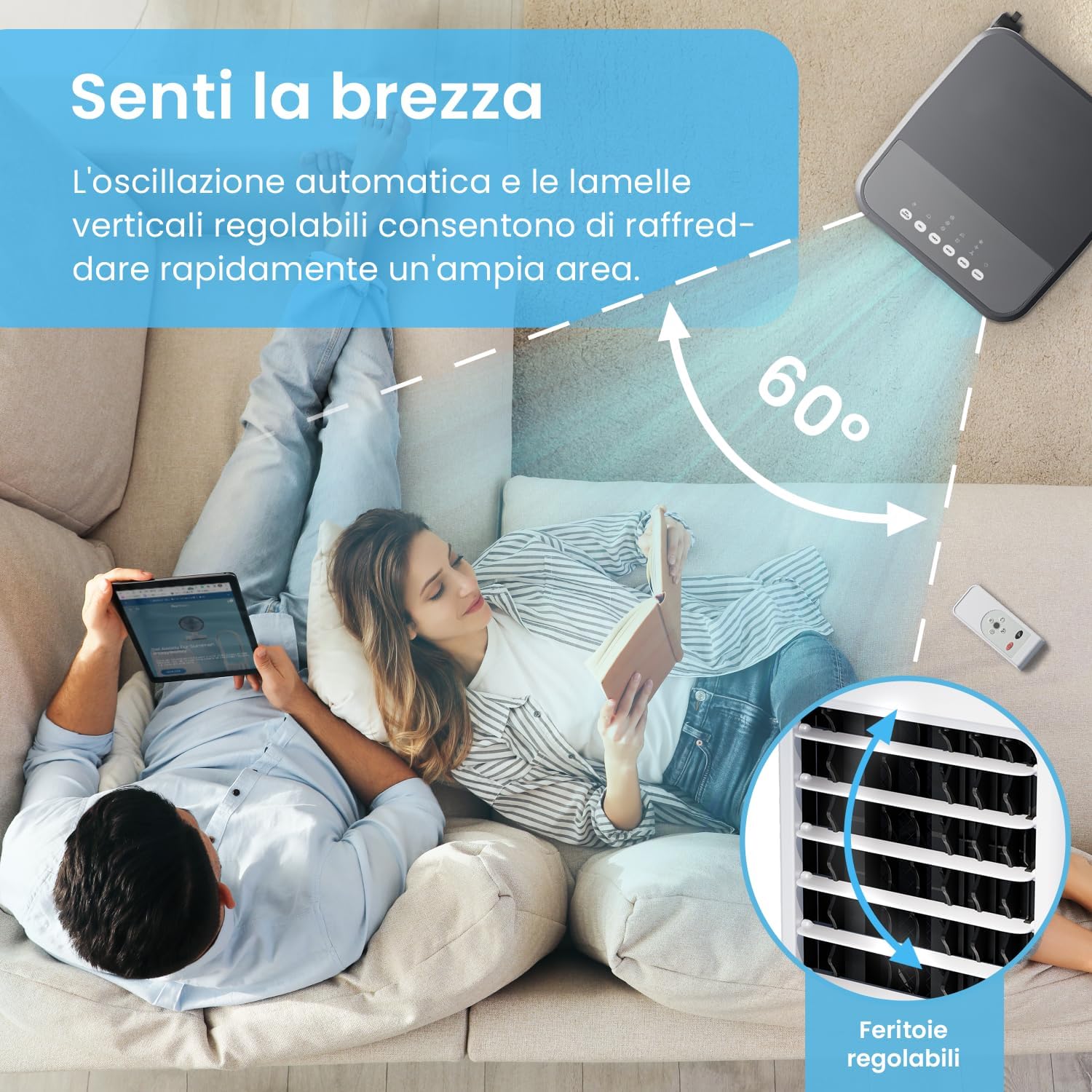
Image: Two people relaxing on a sofa with the air cooler in the foreground, illustrating the 60-degree automatic oscillation feature. An inset shows the adjustable vertical louvers for manual airflow direction.
Maintenance
Regular cleaning and maintenance will ensure the longevity and optimal performance of your air cooler.
Cleaning the Exterior:
- Always unplug the unit before cleaning.
- Wipe the exterior surfaces with a soft, damp cloth. Do not use abrasive cleaners or solvents.
Cleaning the Water Tank:
- Empty the water tank regularly, especially if the unit will not be used for an extended period.
- Remove the water tank as described in the "Setup" section.
- Clean the tank with mild soap and water. Rinse thoroughly to remove any residue.
- Allow the tank to air dry completely before reinserting it.
Cleaning the Honeycomb Cooling Pad:
- The honeycomb cooling pad should be cleaned periodically to prevent mineral buildup and maintain efficiency.
- Refer to the product diagram to locate and carefully remove the cooling pad.
- Rinse the pad under clean running water. For stubborn deposits, soak in a mild descaling solution (e.g., vinegar and water) before rinsing.
- Allow the pad to dry completely before reinserting.
Troubleshooting
| Problem | Possible Cause | Solution |
|---|---|---|
| Unit does not turn on. | No power supply. | Check if the power cord is securely plugged into a working outlet. |
| No cool air/weak airflow. | Water tank empty or low. Honeycomb pad clogged. Fan speed too low. | Fill the water tank. Clean the honeycomb cooling pad. Increase fan speed. |
| Unpleasant odor. | Stagnant water or dirty tank/pad. | Empty and clean the water tank. Clean the honeycomb pad. Use fresh water. |
| Unit is noisy. | Unit not on a flat surface. Obstruction in fan. | Ensure the unit is on a stable, flat surface. Turn off and unplug, then check for obstructions. |
Specifications
| Brand | Pro Breeze |
| Model Name | PB-AC02-EU |
| Capacity | 5 Liters |
| Dimensions | 26.5 x 28 x 70 cm |
| Weight | 1.81 Kilograms |
| Voltage | 3 Volt |
| Noise Level | 56 dB |
| Airflow Capacity | 408 CMPH (Cubic Meters Per Hour) |
| Special Features | Timer, Portable, Remote Control, Oscillation |
Warranty and Support
Pro Breeze products come with a standard manufacturer's warranty. For detailed warranty information, please refer to the warranty card included with your purchase or visit the official Pro Breeze website.
If you encounter any issues or have questions regarding your Pro Breeze 5L Evaporative Air Cooler, please contact Pro Breeze customer support. Contact details can typically be found on the product packaging or the official website.
When contacting support, please have your model number (PB-AC02-EU) and purchase date ready.
Related Documents - PB-AC02-EU
 |
ProBreeze PB-12 Cool/Warm Ultrasonic Humidifier Instruction Manual This manual provides detailed instructions for operating, maintaining, and troubleshooting the ProBreeze PB-12 Cool/Warm Ultrasonic Humidifier. It covers safety guidelines, specifications, parts, controls, operation, maintenance, troubleshooting, and recycling information. |
 |
ProBreeze Ultrasonic Humidifier 3.8L Instruction Manual Comprehensive instruction manual for the ProBreeze Ultrasonic Humidifier 3.8L (Model PB-07-UK/EU), covering features, specifications, operation, cleaning, and safety guidelines. |
 |
ProBreeze PB-07 3.8L Ultrasonic Humidifier: Instruction Manual & Safety Guide Comprehensive instruction manual and safety guide for the ProBreeze PB-07 3.8L Ultrasonic Humidifier. Learn about setup, operation, cleaning, maintenance, and safety precautions. |
 |
ProBreeze PB-12 Cool/Warm Ultrasonic Humidifier Manual Instruction manual for the ProBreeze PB-12 Cool/Warm Ultrasonic Humidifier. Includes safety warnings, specifications, parts, controls, getting started guide, essential oils usage, filter replacement, cleaning, maintenance, storage, and troubleshooting. |
 |
Pro Breeze Bladeless Tower Fan Model PB-F-22 User Manual Comprehensive user manual for the Pro Breeze Bladeless Tower Fan (Model PB-F-22), covering safety instructions, assembly, operation, and maintenance. |
 |
ProBreeze 3.8L Ultrasonic Humidifier Model PB-07 Instruction Manual Comprehensive instruction manual for the ProBreeze 3.8L Ultrasonic Humidifier, Model PB-07. Includes safety instructions, specifications, features, setup, maintenance, and disposal information. |
Ask a question about this manual
Ask about setup, troubleshooting, compatibility, parts, safety, or missing instructions. Manuals+ will review the question and use this page’s manual context to help answer it.