
Product Overview
The Xtrasaver TY-49B is a replacement remote control for select Westinghouse LED HD DVD Combo TV models. It offers full functionality for controlling your television and its integrated DVD player without requiring any programming. This remote is designed to provide a direct replacement experience for your original remote.
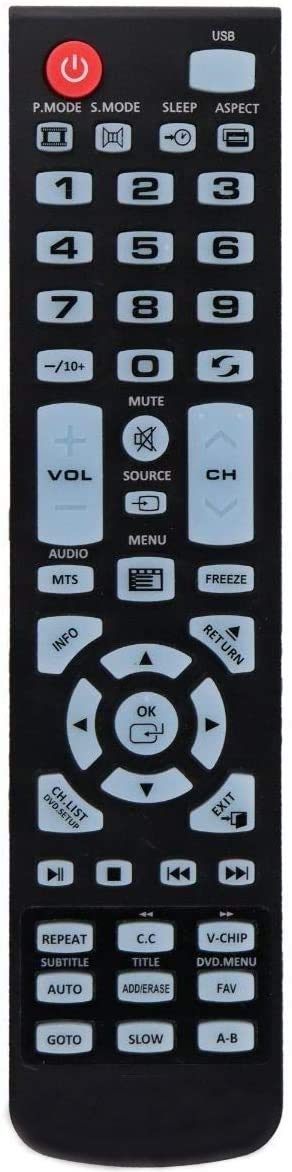
Image of the Xtrasaver TY-49B Replacement Remote Control, showing its black casing and button layout.
Compatibility
This remote control is compatible with the following Westinghouse LED HD DVD Combo TV models:
- WD24HB6101 (24 inch)
- WD32HKB1001 (32 inch)
- WD49FB1018
- WD40HB1170
- WD32HB1120
- WD32HB1390
- WD24HAB101
- WD19HN1108
Setup
Inserting Batteries
The remote control requires two AAA batteries (not included).
- Locate the battery compartment on the back of the remote control.
- Slide the battery cover downwards to open.
- Insert two AAA batteries, ensuring the positive (+) and negative (-) terminals align correctly with the markings inside the compartment.
- Slide the battery cover back into place until it clicks securely.
The remote is ready for use immediately after battery insertion; no programming is required.
Operating Instructions
The Xtrasaver TY-49B remote provides access to all standard functions of your compatible Westinghouse TV and DVD player.
Basic Functions
| Button | Function |
|---|---|
| POWER | Turns the TV on or off. |
| INPUT / SOURCE | Cycles through available input sources (e.g., HDMI, AV, DVD). |
| VOL +/- | Adjusts the volume level. |
| CH +/- | Changes the television channel. |
| MUTE | Mutes or unmutes the TV audio. |
| MENU | Accesses the TV's main menu. |
| NAVIGATION BUTTONS (Up, Down, Left, Right, OK/ENTER) | Used to navigate menus and confirm selections. |
| DVD CONTROLS (PLAY, PAUSE, STOP, FF, REW, NEXT, PREV) | Controls DVD playback functions when using the integrated DVD player. |
| NUMBER BUTTONS (0-9) | Directly selects channels or enters numerical values. |
Maintenance
Cleaning
To clean the remote control, wipe it with a soft, dry cloth. Do not use liquid cleaners or abrasive materials, as these can damage the remote.
Battery Replacement
Replace batteries when the remote's response becomes inconsistent or stops working. Always replace both batteries at the same time with new AAA batteries. Do not mix old and new batteries or different types of batteries.
Troubleshooting
| Problem | Possible Solution |
|---|---|
| Remote not responding. | Check if batteries are inserted correctly with correct polarity. Replace batteries if they are old or depleted. Ensure there are no obstructions between the remote and the TV's IR sensor. |
| Specific buttons not working. | Clean the remote surface and buttons. If the issue persists, replace batteries. If still unresolved, the remote may be faulty. |
| TV not turning on/off. | Ensure the TV is plugged into a power outlet and is not in standby mode. Point the remote directly at the TV's IR sensor. |
Specifications
- Model: TY-49B
- Compatible Devices: Westinghouse LED HD DVD Combo Televisions
- Power Source: 2 x AAA Batteries (not included)
- Color: Black
- Dimensions: Approximately 7.8 x 1.89 x 0.87 inches (20 x 4.8 x 2.2 cm)
- Weight: Approximately 8 ounces (227 grams) (without batteries)
- Special Feature: Ergonomic design
- Item Model Number: 689405000831