
Introduction
Thank you for purchasing the Mark Feldstein Limited Edition 20th Anniversary Singing Bird Clock. This 13-inch clock features a matte green finish, 12 authentic bird recordings, and a smart light sensor for convenient operation. This manual provides essential information for setting up, operating, and maintaining your clock to ensure correct sound reproduction each hour.

Image: The Mark Feldstein Limited Edition 20th Anniversary Singing Bird Clock, featuring a green frame and a dial with various bird illustrations.
Package Contents
Please verify that your package contains the following items:
- 1 x Mark Feldstein Limited Edition 20th Anniversary Singing Bird Clock
- 1 x Quick Reference Guide (integrated into the manual page)
Note: 3 AA batteries are required for operation and are not included in the package.
Setup Instructions
Follow these steps to set up your clock:
- Remove Batteries: If any batteries are present, remove them before proceeding to set the time.
- Set Time: Turn the hand set knob located on the rear of the clock counter-clockwise to 12:00. Then, turn the knob clockwise to set the desired current time.
- Insert Batteries: Insert 3 "AA" size batteries (not included) into the battery compartments on the back of the clock. Ensure the battery polarity (+/-) is correct as indicated.
- Final Time Adjustment: Use the hand set knob to make any final adjustments to the time.
Important: The following instructions must be followed precisely to ensure that the correct bird sound is heard on each hour.

Image: The back of the clock showing the battery compartment, hand set knob, and test button, as detailed in the operations manual.
Operating Instructions
Your clock is designed to play a unique bird song every hour. Here's how to interact with its features:
- Advance Bird Sounds: Each time the red button on the back is pressed, the clock advances to the next bird sound. This can be used to test the sounds or re-synchronize them if needed.
- View Clock Without Sound: To view the clock without activating the hourly bird sounds, simply remove the batteries.
Hourly Bird Sounds
The clock features 12 distinct bird recordings, each playing at the top of its respective hour:
| Hour | Bird Species |
|---|---|
| 1:00 | American Robin |
| 2:00 | American Goldfinch |
| 3:00 | Pileated Woodpecker |
| 4:00 | Black-capped Chickadee |
| 5:00 | Blue Jay |
| 6:00 | Common Loon |
| 7:00 | Baltimore Oriole |
| 8:00 | Purple Martin |
| 9:00 | Eastern Screech-Owl |
| 10:00 | Northern Cardinal |
| 11:00 | White-breasted Nuthatch |
| 12:00 | Bald Eagle |
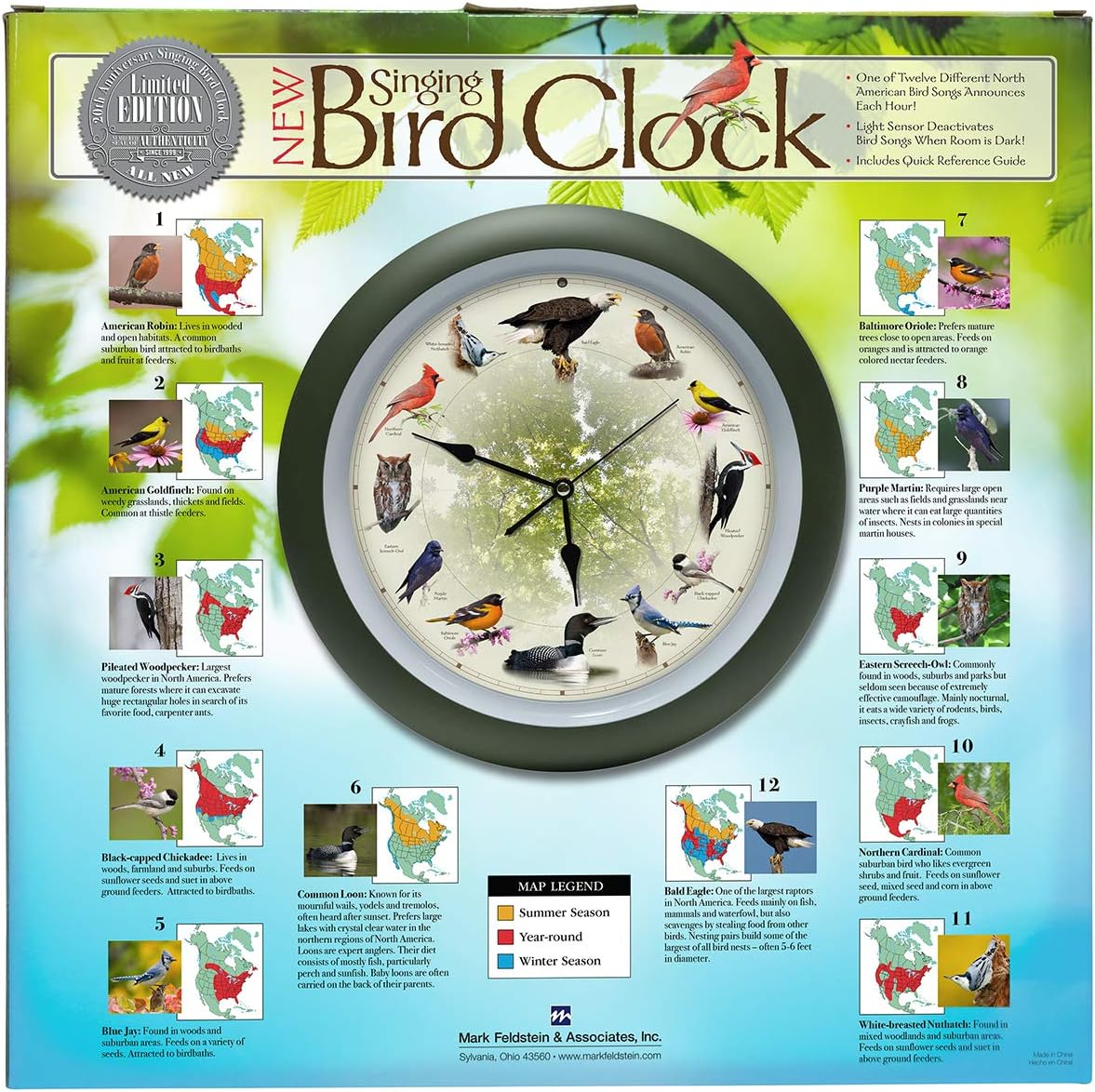
Image: The clock face displaying the 12 different bird species, each corresponding to an hour, along with a small map indicating their seasonal regions.
Light Sensor Operation
This clock is equipped with a light sensor, positioned above the 12 o'clock position on the clock face. The light sensor automatically controls the sound functionality:
- In dark conditions, the light sensor automatically deactivates the bird songs.
- In light conditions, the bird songs are activated.
If the sounds are low or not playing, ensure the clock is in a brightly lit area.
Maintenance
Proper care will ensure the longevity and performance of your clock:
- Cleaning: To clean the outside surface, use a clean, dry, soft cloth. Do not use any solvents, abrasive cleaners, or polish, as these may damage the finish.
- Battery Notice: For best results, use alkaline, standard (carbon zinc), or rechargeable (Nickel Cadmium) batteries. Do not mix old and new batteries. Replace all batteries at one time. Dispose of used batteries properly according to local guidelines. If the clock will not be used for an extended period, remove the batteries to prevent leakage and damage.
Troubleshooting
If you encounter issues with your clock, refer to the following common solutions:
- Bird Sounds Are Out of Sync: If the bird sounds do not match the correct hour, press the red button on the back of the clock repeatedly until the correct bird sound plays for the current hour.
- No Sound: Ensure the clock is in a well-lit area, as the light sensor deactivates sounds in the dark. Check that the batteries are correctly inserted and are not depleted. Replace all batteries if necessary.
- Sound is Too Loud: This model does not feature a volume control. Some users have reported success in dampening the sound by placing a small piece of tape over the speaker opening on the back of the clock. This is a user-suggested modification and not an official solution.
- Clock Hands Are Stuck or Not Moving: Check if the clock hands are bent or obstructed. If the pin where the hands are attached appears bent, this may indicate a manufacturing defect. Contact customer support for assistance.
Specifications
| Feature | Detail |
|---|---|
| Brand | Mark Feldstein & Associates |
| Model Number | BIRD13 |
| Dimensions | 13.86"W x 13.86"H |
| Power Source | Battery Powered (3 AA batteries required, not included) |
| Material | Plastic |
| Special Features | Hourly Chime, Smart Light Sensor, Sound Clock |
| Display Type | Analog |
| Indoor/Outdoor Usage | Indoor |
| UPC | 789683061200 |

Image: The Mark Feldstein Singing Bird Clock with clear labels indicating its 13-inch diameter.
Warranty and Support
For any questions, concerns, or support regarding your Mark Feldstein Limited Edition 20th Anniversary Singing Bird Clock, please contact Mark Feldstein & Associates directly. While specific warranty details are not provided in this manual, the manufacturer is committed to customer satisfaction.
You can visit the official Mark Feldstein & Associates Store for more information or to reach out for assistance.
FCC Compliance
This device complies with Part 15 of the FCC Rules. Operation is subject to the following two conditions: (1) This device may not cause harmful interference, and (2) this device must accept any interference received, including interference that may cause undesired operation.