
1. Introduction
This manual provides essential instructions for the safe and efficient setup, operation, and maintenance of your Middle Atlantic BGR-25SA32MDK-DS AV Rack. This product is designed for professional audio and video equipment installations, offering a robust and organized solution for housing various components. Please read this manual thoroughly before installation and retain it for future reference.
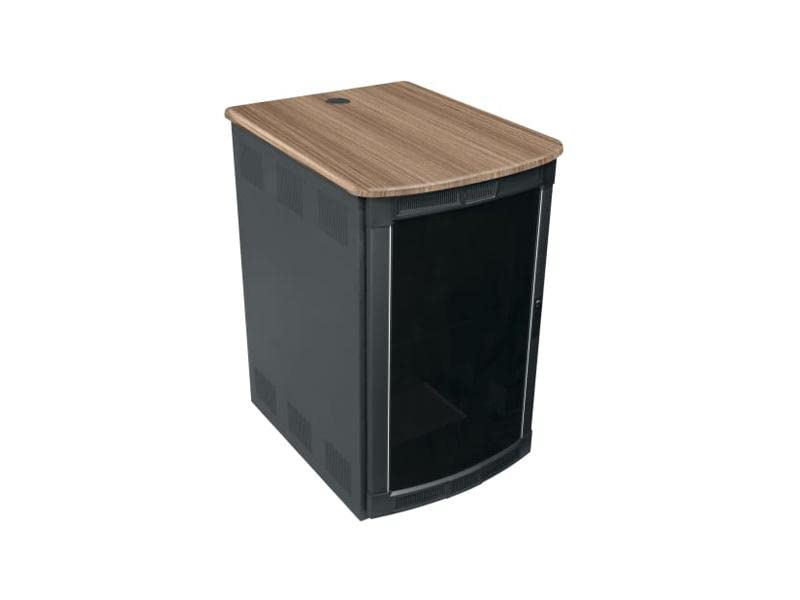
Figure 1: Middle Atlantic BGR-25SA32MDK-DS AV Rack. This image displays the front view of the rack, highlighting its structure and the curved plexi front door.
2. Setup and Installation
Proper installation is crucial for the stability and longevity of your AV rack and the equipment housed within it. Always ensure the rack is placed on a level, stable surface capable of supporting its weight plus the weight of all installed equipment.
2.1 Unpacking
- Carefully remove all components from the packaging.
- Inspect all parts for any signs of damage during transit. Contact your supplier immediately if damage is found.
- Verify that all listed components are present according to the packing list.
2.2 Assembly (if required)
While many Middle Atlantic racks are shipped pre-assembled, some configurations may require minor assembly. Refer to the specific assembly instructions included with your product for detailed steps. Ensure all fasteners are securely tightened.
2.3 Placement and Leveling
- Position the rack in its intended location, ensuring adequate clearance for ventilation and access to the front and rear.
- Use a spirit level to ensure the rack is perfectly level. Adjust leveling feet or casters as necessary to prevent instability.
- Consider seismic bracing or wall anchoring for enhanced stability, especially in areas prone to seismic activity or for very heavy installations.
3. Operating and Equipment Loading
This section covers best practices for loading equipment into your rack and managing cables to ensure optimal performance and accessibility.
3.1 Equipment Installation
- Install heavier equipment at the bottom of the rack to maintain a low center of gravity and improve stability.
- Use appropriate rack screws and cage nuts to secure all equipment firmly to the rack rails.
- Ensure adequate spacing between heat-generating components to allow for proper airflow.
3.2 Cable Management
- Utilize cable management accessories (e.g., cable ties, lacing bars, vertical cable managers) to organize power and data cables.
- Separate power cables from data cables to minimize electromagnetic interference.
- Leave service loops for cables to allow for future adjustments or equipment changes without disconnecting entire runs.
- Ensure cables do not obstruct airflow or door operation.
3.3 Ventilation
- The BGR-25SA32MDK-DS is designed with ventilation in mind. Ensure that the front door and any rear panels are not blocked.
- If necessary, consider installing optional fan panels or thermal management accessories to maintain optimal operating temperatures for your equipment.
4. Maintenance
Regular maintenance ensures the continued performance and appearance of your Middle Atlantic AV rack.
- Cleaning: Use a soft, damp cloth to clean exterior surfaces. Avoid abrasive cleaners or solvents that could damage the finish. For the plexi door, use a specialized plastic cleaner and a soft cloth to prevent scratching.
- Inspection: Periodically check all fasteners (screws, nuts) to ensure they remain tight. Verify that equipment is securely mounted and cables are properly managed.
- Ventilation: Ensure that ventilation openings are free from dust and obstructions. Clean any fan filters if installed.
5. Troubleshooting
This section addresses common issues that may arise with AV rack installations.
5.1 Rack Instability
- Issue: Rack wobbles or feels unstable.
- Solution: Ensure the rack is on a level surface. Adjust leveling feet. Verify all assembly bolts are tightened. Redistribute heavy equipment to the lower sections of the rack. Consider anchoring the rack to a wall or floor.
5.2 Overheating Equipment
- Issue: Equipment inside the rack is running hot.
- Solution: Check that all ventilation openings are clear. Ensure proper spacing between heat-generating components. Improve cable management to prevent airflow obstruction. Consider adding active cooling solutions like fan panels.
5.3 Difficulty Accessing Equipment/Cables
- Issue: Cables are tangled, or equipment is hard to reach.
- Solution: Re-evaluate cable management. Use more cable management accessories. Ensure service loops are present. Consider using sliding shelves or pull-out racks for frequently accessed equipment.
6. Specifications
| Feature | Detail |
|---|---|
| Model Number | BGR-25SA32MDK-DS |
| Brand | Middle Atlantic |
| Product Name | 25SP, 32DP W/CURVED PLEXI FD, CB (AV Rack) |
| Package Dimensions | 56 x 36 x 26 inches |
| Item Weight | 196 pounds |
| ASIN | B07MDY2H13 |
| Manufacturer | Middle Atlantic Products |
| Date First Available | February 22, 2019 |
7. Warranty Information
Middle Atlantic Products provides a limited warranty for its products. Specific warranty terms and conditions, including duration and coverage, may vary by product and region. For detailed warranty information pertaining to your BGR-25SA32MDK-DS AV Rack, please refer to the warranty card included with your purchase or visit the official Middle Atlantic Products website. Retain your proof of purchase for warranty claims.
8. Customer Support
If you require assistance with your Middle Atlantic BGR-25SA32MDK-DS AV Rack, please contact Middle Atlantic Products customer support. Have your model number (BGR-25SA32MDK-DS) and proof of purchase ready when contacting support.
- Online Resources: Visit the official Middle Atlantic Products website for FAQs, product documentation, and support contact information.
- Technical Support: For technical inquiries or troubleshooting assistance beyond this manual, contact their dedicated technical support team.