
1. Introduction
This manual provides instructions for the HCDZ Replacement Remote Control, designed for use with various Sony Mini HI-FI Component Systems, including models MHC-GPX7G, HCD-GPX7, and MHC-GPX7. This remote control offers a straightforward solution for operating your compatible audio system.
Package Contents:
- 1 x HCDZ Replacement Remote Control
Note: Batteries and additional instructions are not included in the package. This remote control operates using infrared (IR) technology.
2. Setup
2.1 Battery Installation
The remote control requires two AAA batteries (not included). Follow these steps to install them:
- Locate the battery compartment cover on the back of the remote control.
- Press down on the tab and slide the cover off.
- Insert two AAA batteries, ensuring the positive (+) and negative (-) terminals align correctly with the markings inside the compartment.
- Slide the battery compartment cover back into place until it clicks securely.
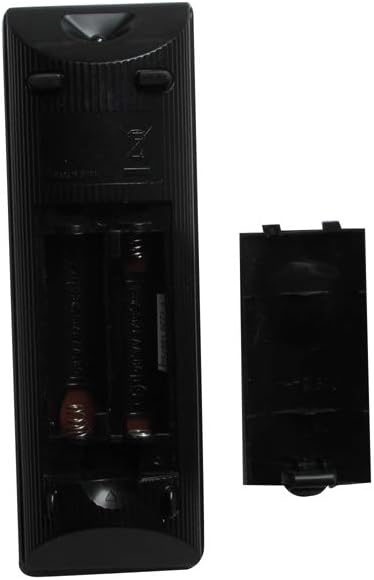
Figure 1: Battery compartment with cover removed, illustrating battery placement.
2.2 Initial Use
This HCDZ replacement remote control requires no programming. Once fresh batteries are correctly installed, it will function immediately with compatible Sony Mini HI-FI Component Systems.
3. Operating Instructions
Point the remote control directly at the infrared sensor on your Sony Mini HI-FI Component System. Ensure there are no obstructions between the remote and the system.

Figure 2: Front view of the remote control.
3.1 Key Functions Overview
The remote control features standard buttons for operating your audio system. Refer to the image above for button layout.
- Power Button (I/O): Turns the system on or off.
- Function Buttons (CD, USB, FUNCTION, MUSIC, MOVIE/GAME, FOOTBALL): Selects the desired input source or sound mode.
- Volume Control (+/-): Adjusts the audio volume.
- Navigation Buttons (Up, Down, Left, Right, Enter): Used for menu navigation and selection.
- Play Mode, Repeat/FM Mode, Display: Controls playback options and display information.
- Tuning/Track Control (|<, >>|, <<, >>): Used for tuning radio stations or skipping tracks.
- Play/Pause (|>): Starts or pauses playback.
- Stop (■): Stops playback.
- Clear: Clears selections or entries.
- DJ Effect (FLANGER, ISOLATOR, PAN, WAH): Activates various DJ sound effects.
- LED Control (LED COLOR, LED PATTERN, SLEEP): Controls LED lighting effects and sleep timer.
For detailed functionality of specific buttons, please refer to the original user manual of your Sony Mini HI-FI Component System.
4. Maintenance
4.1 Battery Replacement
If the remote control's range decreases or it becomes unresponsive, replace both AAA batteries with new ones. Always replace both batteries at the same time and ensure correct polarity.
4.2 Cleaning
To clean the remote control, wipe it gently with a soft, dry cloth. Do not use liquid cleaners, abrasive pads, or chemical solvents, as these can damage the remote's surface or internal components.
4.3 Storage
When not in use for extended periods, remove the batteries to prevent leakage, which can damage the remote control.
5. Troubleshooting
- Remote not responding:
- Ensure fresh batteries are installed correctly (check polarity).
- Verify there are no obstructions between the remote and the audio system's IR sensor.
- Confirm the remote is pointed directly at the system.
- Test the remote with a camera (most smartphone cameras can detect IR light; point the remote at the camera and press a button – you should see a light flash on the screen).
- Specific functions not working:
- Ensure your Sony Mini HI-FI Component System is powered on and in the correct mode for the function you are trying to use.
- This remote is a replacement and may not support all advanced features of the original remote if they are not standard IR commands.
6. Specifications
- Brand: HCDZ
- Model: Replacement Remote Control
- Compatible Devices: Sony MHC-GPX7G, HCD-GPX7, MHC-GPX7, HCD-GPX7G Mini HI-FI Component Systems
- Connectivity Technology: Infrared (IR)
- Max Number of Supported Devices: 1
- Special Feature: No programming needed
- Batteries Required: 2 x AAA (not included)
7. Warranty and Support
This HCDZ replacement remote control is typically covered by a standard return policy. For specific warranty details or support inquiries, please refer to your purchase documentation or contact the seller directly.
Return Policy: Generally, a 30-day return/replacement policy applies from the date of purchase. Please check with your retailer for exact terms.
Manufacturer: HCDZ