
1. Introduction
This manual provides instructions for the setup, operation, and maintenance of the Aastra 6731i IP Phone. The 6731i is designed for business communication, featuring essential functions for daily productivity, including programmable buttons, a multi-line LCD display, and Power over Ethernet (PoE) capability.
2. Package Contents
Verify that all items are present in your package:
- Aastra 6731i IP Phone Unit
- Handset
- Handset Cord
- Ethernet Cable
- Power Supply (if not using Power over Ethernet)
3. Product Overview
The Aastra 6731i IP Phone (A6731-0131-10-01) is equipped with various features to enhance your communication experience.
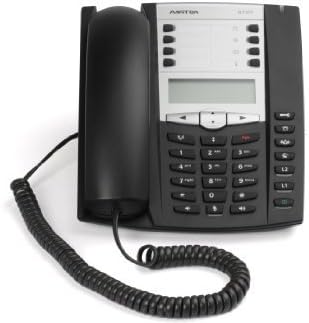
An image showing the Aastra 6731i IP Phone. The phone is black with a silver-grey control panel. The handset rests on the left side, connected by a coiled cord. The main unit features a multi-line LCD display, a numeric keypad, and various function buttons.
3.1 Front Panel Features
- Multi-line LCD Display: Shows call information, menu options, and status.
- Programmable Buttons (8): Customizable for speed dial, line appearances, or feature access.
- Fixed Feature Keys (10): Dedicated buttons for common functions like Hold, Transfer, Speaker, Mute, Volume.
- Navigational Keys (4): Used to scroll through menus and options on the display.
- Numeric Keypad: For dialing numbers and entering text.
- Full Duplex Speakerphone: Allows hands-free communication.
3.2 Rear Panel Connections
- LAN Port: Connects to your network switch or router (supports Power over Ethernet).
- PC Port: Connects to a computer, allowing the phone to act as a network pass-through.
- Handset Port: Connects the coiled handset cord.
- Power Port: Connects the external power supply (if PoE is not used).
4. Setup
4.1 Connecting the Phone
- Connect one end of the handset cord to the handset and the other end to the handset port on the rear of the phone.
- Connect one end of the Ethernet cable to the LAN port on the rear of the phone and the other end to a network switch or router. If your network provides Power over Ethernet (PoE), no separate power supply is needed.
- If PoE is not available, connect the power supply to the power port on the rear of the phone and plug it into a power outlet.
- The phone will power on and begin its boot sequence. Follow any on-screen prompts for initial configuration, which may be handled automatically by your network administrator.
5. Operating Instructions
5.1 Making a Call
- Lift the handset, or press the Speaker button.
- Dial the desired phone number using the numeric keypad.
- Press the Dial softkey (if available) or wait for the call to connect automatically.
5.2 Answering a Call
- When the phone rings, lift the handset, or press the flashing line button, or press the Speaker button to answer hands-free.
5.3 Using Speakerphone
To use the speakerphone, press the Speaker button. The speakerphone indicator will illuminate. To switch back to the handset, simply lift the handset. To end a speakerphone call, press the Speaker button again or the End Call softkey.
5.4 Hold Function
During an active call, press the Hold button. The call will be placed on hold, and the line button may flash. To retrieve the call, press the flashing line button again.
5.5 Transferring a Call
During an active call, press the Transfer button. Dial the number of the party you wish to transfer the call to. You can either perform a blind transfer (hang up before the other party answers) or an attended transfer (wait for the other party to answer, announce the call, then press Transfer again).
5.6 Conference Calls
The Aastra 6731i supports 3-way conference calls. During an active call, press the Conference button. Dial the number of the third party. Once connected, press the Conference button again to join all parties.
5.7 Programmable Buttons
The eight programmable buttons can be configured by your system administrator for various functions such as speed dials, line appearances, or access to specific features. Consult your administrator for details on their specific assignments.
6. Maintenance
To ensure the longevity and proper functioning of your Aastra 6731i IP Phone, follow these maintenance guidelines:
- Cleaning: Use a soft, dry, lint-free cloth to clean the phone's exterior. For stubborn marks, slightly dampen the cloth with water. Avoid using harsh chemicals, abrasive cleaners, or solvents, as these can damage the phone's finish.
- Environment: Keep the phone in a clean, dry environment, away from direct sunlight, excessive heat, and moisture.
- Cords: Periodically check all cords for any signs of damage or fraying. Replace damaged cords immediately.
7. Troubleshooting
If you encounter issues with your Aastra 6731i IP Phone, refer to the following common problems and solutions:
7.1 No Dial Tone
- Ensure the Ethernet cable is securely connected to both the phone's LAN port and the network switch/router.
- If not using PoE, verify that the power supply is correctly connected and plugged into a working power outlet.
- Check your network connection and ensure the network is operational.
- Restart the phone by disconnecting and reconnecting the power/Ethernet cable.
7.2 Cannot Make or Receive Calls
- Verify that the phone is registered with your VoIP system (check the display for registration status).
- Ensure your network connection is active and stable.
- Confirm that your account is active and not experiencing service interruptions.
- Contact your network administrator or VoIP service provider for assistance.
7.3 Display Issues
- If the display is blank, check power and network connections.
- If the display is frozen, restart the phone.
- Adjust display contrast or brightness settings if available in the phone's menu.
8. Specifications
| Model | Aastra 6731i (A6731-0131-10-01) |
| Telephone Type | Corded IP Phone |
| Power Source | Power over Ethernet (PoE) or Corded Electric |
| Multiline Operation | Multi-Line Operation |
| Conference Call Capability | 3-way |
| Answering System Type | Digital (system dependent) |
| Product Dimensions (L x W x H) | 13 x 12 x 3 inches (33 x 30.5 x 7.6 cm) |
| Item Weight | 2.95 pounds (1.34 kg) |
| UPC | 034722774796 |
9. Warranty and Support
This Aastra 6731i IP Phone is sold in an as-is condition. All units have been tested and are confirmed to be fully functional prior to sale. For any operational issues or technical support, please contact your vendor or the system administrator who provided the phone. Specific warranty terms, if any, are provided by the seller at the time of purchase.