
Product Overview
What's in the Box
- Silicone Stand
Product Features
- Premium silicone material for stability and scratch protection.
- Designed for convenient charging and display.
- Supports Apple Watch Nightstand Mode.
- Integrated cable management.
- Compact and lightweight design.
Setup Instructions
1. Unpacking
Carefully remove the silicone charging dock from its packaging.
2. Inserting the Apple Watch Charger
The AhaStyle Silicone Charging Dock is designed to work exclusively with original Apple Watch magnetic charging cables.
- Locate the circular opening on the top of the stand and the cable channel on the side/bottom.
- Insert your original Apple Watch magnetic charging cable's puck into the circular opening from the top, ensuring it sits flush.
- Route the charging cable through the designated channel on the underside of the stand to keep it tidy and secure.
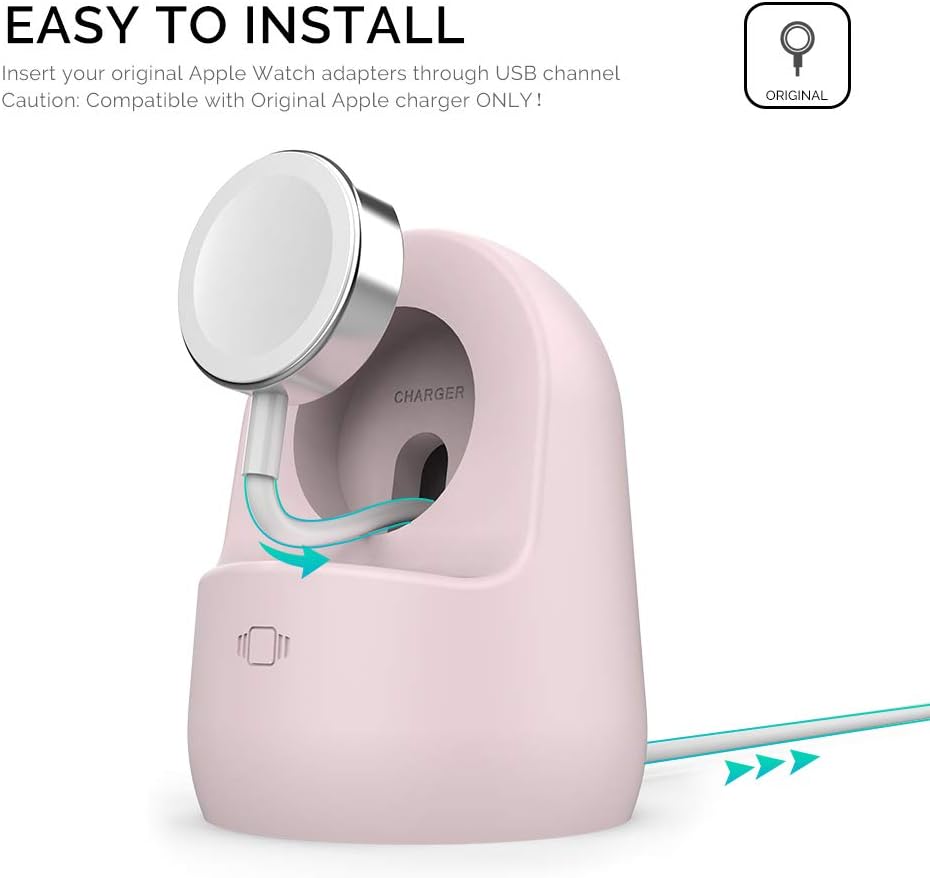
This image illustrates the process of inserting the Apple Watch magnetic charging puck into the stand and guiding the cable through the integrated channel for neat cable management.

This image demonstrates the internal cable management system, where the charging cable can be coiled to maintain a tidy setup.
Operating Instructions
1. Placing Your Apple Watch
Once the charging cable is installed, simply place your Apple Watch onto the magnetic charging puck within the stand. The stand's design ensures the watch is held securely in an optimal viewing angle.

This image shows an Apple Watch securely placed on the charging stand, indicating it is charging and ready for use in Nightstand Mode.
2. Nightstand Mode
The stand supports Apple Watch's Nightstand Mode, allowing your watch to display time, date, and alarm information horizontally while charging. This makes it ideal for use on a bedside table or desk.

This image depicts the Apple Watch stand in use on a nightstand, showcasing its compatibility with Nightstand Mode for easy viewing of time and alarms.

This image illustrates the stand's versatility, showing it on a desk setup, providing a convenient charging and display solution for your Apple Watch.
Compatibility
The AhaStyle Silicone Charging Dock Holder is compatible with a wide range of Apple Watch models and sizes. It is designed to work with original Apple Watch magnetic charging cables.
Supported Apple Watch Models:
- Apple Watch Ultra 3, Ultra 2, Ultra (49mm)
- Apple Watch SE 3, SE 2, SE (44mm, 40mm)
- Apple Watch Series 11, 10, 9, 8, 7 (45mm, 41mm)
- Apple Watch Series 6, 5, 4 (44mm, 40mm)
- Apple Watch Series 3, 2, 1 (42mm, 38mm)
The stand accommodates all listed sizes: 49mm, 46mm, 45mm, 44mm, 42mm, 41mm, 40mm, 38mm.

This chart visually confirms compatibility with all Apple Watch series and various charger types (metal, plastic, magnetic fast charger).
Maintenance
Cleaning
To clean your silicone charging dock, gently wipe it with a soft, damp cloth. Avoid using harsh chemicals or abrasive materials, as these may damage the silicone.
Storage
When not in use, store the stand in a cool, dry place away from direct sunlight. Its compact and lightweight design makes it suitable for travel.

This image demonstrates the compact and lightweight nature of the stand, making it easy to carry for travel or storage.
Troubleshooting
Watch Not Charging
- Check Charger Connection: Ensure your Apple Watch magnetic charging cable is properly seated within the stand and connected to a power source.
- Verify Cable: Confirm you are using an original Apple Watch magnetic charging cable. Third-party cables may not fit or function correctly.
- Watch Placement: Ensure your Apple Watch is correctly placed on the magnetic charging puck, making full contact.
Stand Instability
- Flat Surface: Place the stand on a flat, stable surface.
- Cable Routing: Ensure the charging cable is correctly routed through the designated channel to prevent unevenness.
Specifications
| Feature | Detail |
|---|---|
| Brand | AHASTYLE |
| Model | Silicone Charging Dock Holder (B07MCDXBFV) |
| Material | Premium Silicone |
| Color | Pink |
| Compatibility | Apple Watch Ultra 3/2/1, SE 3/2/1, Series 11/10/9/8/7/6/5/4/3/2/1 (all sizes) |
| Dimensions | 3.07 x 2.99 x 2.17 inches |
| Item Weight | 2.82 ounces |
| Special Features | Cable Management, Flexible, Compact, Lightweight |
| Included Components | Silicone Stand (Apple Watch and Charger NOT included) |
Warranty and Support
For warranty information or product support, please refer to the documentation provided with your purchase or contact AHASTYLE customer service directly through their official website or the retailer where the product was purchased.