
1. Product Overview
The Tokatuker Invisible Cabinet Lock (Model AZ001-3) is a hidden NFC and RFID-enabled latch system designed for securing various wooden furniture items such as drawers, lockers, cabinets, and sliding doors. It offers a discreet security solution without the need for visible keyholes or handles. The lock supports multiple unlock modes and includes an emergency USB backup power option.

Figure 1: NFC and RFID Functionality Overview
2. Package Contents
Verify that all components are present in the package:
- 1 x Lock Unit
- 1 x Hook/Latch Plate
- 1 x USB Cable for Backup Power
- 1 Set of Mounting Screws
- 3 x RFID Tags (13.56 MHz M1)
- 3 x RFID Cards (13.56 MHz M1)
Note: 4 x AAA 1.5V batteries are required and are NOT included. Please purchase them separately.

Figure 2: Product Components

Figure 3: Included Hardware
3. Specifications
| Feature | Description |
|---|---|
| Lock Type | Hidden RFID Cabinet Lock |
| Material | ABS Plastic (Lock Body), Stainless Steel (Latch) |
| Dimensions (L x W x H) | 2.99 x 2.99 x 1.18 inches (approx. 76 x 76 x 30 mm) |
| Item Weight | 5.6 ounces |
| Power Supply | 4 x AAA 1.5V Alkaline Batteries (not included) |
| Low Voltage Alarm | Activates when voltage is below 4.5V |
| Backup Power | 2.5mm socket for emergency USB power (cable included) |
| Connectivity Protocol | NFC, RFID (13.56MHz M1 Chip Cards) |
| Compatible Door Thickness | Within 1.2 inches (30mm) for lock, up to 1.5 inches (38mm) for card operation |
| Recommended Use | Wooden cabinets, drawers, lockers, sliding doors |

Figure 4: Product Dimensions
4. Setup and Installation
Before installation, ensure the lock functions correctly and all keys are programmed. This lock is designed for wooden doors and does not require drilling holes, preserving your furniture's appearance.
4.1. Battery Installation
- Locate the battery compartment on the back of the lock unit.
- Slide open the battery cover.
- Insert 4 x AAA 1.5V alkaline batteries, ensuring correct polarity.
- Close the battery cover securely.
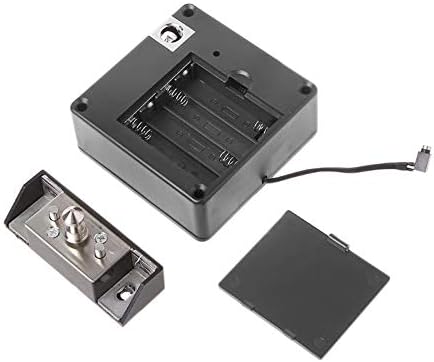
Figure 5: Battery Compartment
4.2. Key Programming (Initial Setup)
The keys are typically pre-programmed. However, if keys do not work or you need to add new ones:
- With the lock powered on, locate the 'SET' button on the lock unit (refer to Figure 6).
- Press the 'SET' button briefly. The lock will emit a beep.
- Immediately present the RFID card or tag you wish to program to the sensing area of the lock. A successful programming will be indicated by a confirmation beep.
- Repeat for all desired cards/tags. The first card/tag programmed will become the master key.
- Test all programmed keys before proceeding with mounting.

Figure 6: Lock Unit Features and SET Button Location
4.3. Mounting the Lock
This lock is suitable for wooden doors with a thickness of up to 1.2 inches (30mm). The RFID card can work through material up to 1.5 inches (38mm) thick.
- Determine the desired location for the lock unit and the hook/latch plate inside your cabinet or drawer. Ensure the lock unit is positioned so that its sensing area is accessible from the outside of the furniture.
- Secure the lock unit to the inside of the cabinet/drawer using the provided screws.
- Align the hook/latch plate with the lock unit. The hook can be installed vertically or horizontally. Mark the screw positions.
- Secure the hook/latch plate using the provided screws.
- Test the lock's operation thoroughly after mounting to ensure proper alignment and functionality.

Figure 7: Installation Examples
Video 1: Demonstration of NFC RFID Lock for Cabinet Drawer Closet by Tokatuker.
Video 2: Demonstration of the 03 Hidden Cabinet Lock by Tokatuker.
5. Operation
The Tokatuker Invisible Cabinet Lock features both RFID and NFC unlocking capabilities.
5.1. Unlocking with RFID Cards/Tags
To unlock, simply present a programmed RFID card or tag to the exterior surface of the cabinet/drawer where the lock's sensing area is located. The lock will beep and disengage, allowing you to open the furniture.
5.2. Unlocking with NFC (Android)
For Android devices, you can copy your RFID key to your smartphone's wallet via the NFC function. Once copied, you can use your phone to unlock the cabinet by tapping it against the sensing area.
Note for iOS Users: Due to Apple's limitations, direct copying of RFID keys to the Apple Wallet via NFC is not straightforward. It typically requires adding a China transit card with a China UnionPay debit card and then programming that transit card to the lock. This process is generally difficult for most users.
5.3. Master Card Functionality
One master card can be programmed to open several locks, allowing you to control multiple units with a single key.
6. Maintenance
6.1. Battery Life and Replacement
Under normal use, the 4 x AAA batteries can last approximately 8-12 months. When the battery voltage drops below 4.5V, the lock will emit a low voltage alert (a series of beeps) to indicate that batteries need replacement.
6.2. Emergency USB Backup Power
In case the batteries completely drain, preventing the lock from opening, you can use the included USB cable for emergency power. Connect the 2.5mm male jack of the USB cable to the 2.5mm female audio port on the lock unit (refer to Figure 6). You can then power it using a phone charger or power bank to temporarily unlock the cabinet.
Warning: Do NOT insert 4xAAA batteries and connect 5V DC backup power simultaneously for an extended period, as this may damage the lock.
7. Troubleshooting
- Lock does not open with programmed key:
Ensure batteries are correctly installed and not depleted. If the low voltage alert is active, use the USB backup power. Re-test the keys. If issues persist, re-program the keys following the steps in Section 4.2. - Lock remains locked after power outage/dead batteries:
The lock is designed to remain locked in case of total power loss for security. Use the emergency USB backup power cable to open it. - Difficulty in locking/unlocking after installation:
Check the alignment of the lock unit and the hook/latch plate. Minor adjustments may be needed to ensure smooth engagement. The lock mechanism requires sufficient clearance. - NFC not working with Android phone:
Ensure your phone's NFC function is enabled and the RFID key has been successfully copied to your phone's wallet.
8. Important Notes and Warnings
- Always test the keys and lock functionality before permanently mounting the unit.
- This lock is designed exclusively for wooden furniture.
- Avoid exposing the lock to extreme temperatures outside the working range of -30 ℃ to 60 ℃.
- Do not attempt to force the lock open, as this may cause damage to the unit or your furniture.
- The NFC function for this lock is available for units purchased after November 2021.
9. Warranty and Support
For warranty information, technical support, or any inquiries regarding your Tokatuker Invisible Cabinet Lock, please refer to the contact information provided at the point of purchase or visit the official Tokatuker website. Keep your purchase receipt as proof of purchase for warranty claims.