
wawpi RCA-30M
WAWPI Composite Audio Video Cable User Manual
Model: RCA-30M (100 ft variant)
Brand: WAWPI
1. Introduction
The WAWPI Composite Audio Video Cable is designed to connect various home entertainment devices, facilitating the transmission of audio and video signals. This 100 ft RCA cable features three male RCA connectors on each end, color-coded for easy identification and connection: yellow for video, white for left audio, and red for right audio.
This manual provides essential information for the proper setup, operation, and maintenance of your WAWPI Composite Audio Video Cable, ensuring reliable performance with your compatible equipment.

Image: The WAWPI 100 ft Composite Audio Video Cable, neatly coiled, showcasing its three color-coded RCA connectors on each end.
2. Product Features
- High-Quality Construction: Manufactured with flexible, high-quality PVC material that is oil-resistant, wear-resistant, acid-resistant, and alkali-resistant, contributing to an extended service life.
- Color-Coded Connectors: Features fully molded, color-coded connectors (Yellow for video, White for Left Audio, Red for Right Audio) for straightforward and accurate connection.
- Plug & Play Functionality: Designed for immediate use without the need for additional software or drivers.
- Versatile Use: The three individual cords can be separated and used independently; for example, the red and white audio cables can connect to speakers, while the yellow video cable connects to a display device.
- Enhanced Signal Quality: Equipped with 24K gold-plated connectors and a pure copper core with double shielding (AL-Foil and metal shield) to ensure stable and lossless audio and video transmission.

Image: Visual representation of key cable features including 24K Gold-Plated connectors, durable PVC jacket, anti-fracture design, and metal pure copper core.

Image: Cross-section diagram illustrating the cable's internal structure, highlighting the copper conductor, AL-Foil shielding, metal shield, and PVC outer jacket for reliable quality.
3. Setup Guide
Connecting your WAWPI Composite Audio Video Cable is a straightforward process. Follow these steps to ensure proper connection and functionality:
- Identify Ports: Locate the RCA input/output ports on your source device (e.g., DVD player, camcorder) and your display/audio device (e.g., TV, amplifier). These ports are typically color-coded: yellow for video, white for left audio, and red for right audio.
- Match Colors: Connect one end of the WAWPI RCA cable to the output ports of your source device, ensuring that the yellow connector goes into the yellow port, the white into the white port, and the red into the red port.
- Connect to Destination: Connect the other end of the WAWPI RCA cable to the corresponding input ports on your display or audio device, again matching the colors (yellow to yellow, white to white, red to red).
- Secure Connections: Gently push each connector firmly into its respective port to ensure a secure and stable connection. Avoid excessive force.
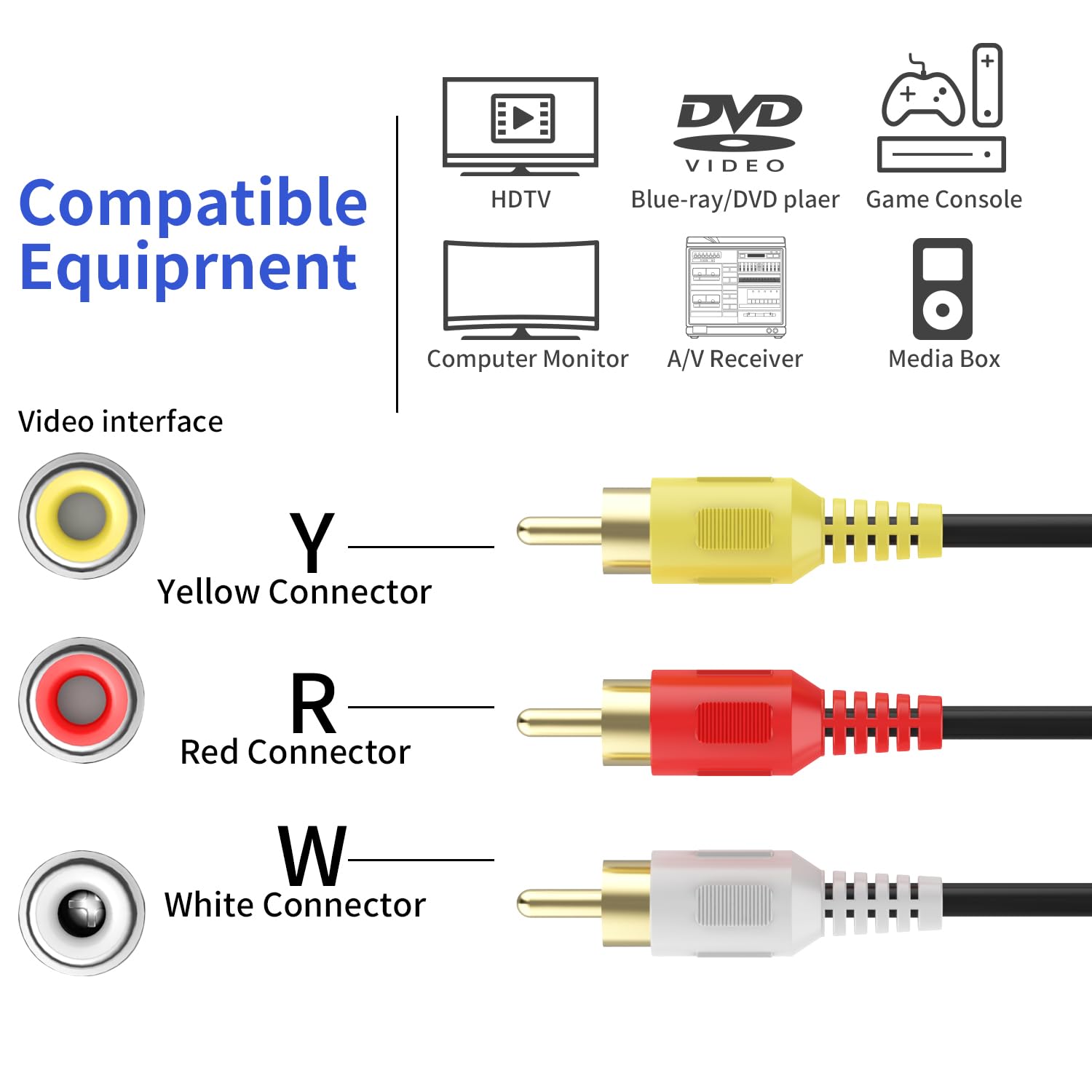
Image: Detailed view of RCA connector color coding: Yellow (Y) for Video, Red (R) for Right Audio, and White (W) for Left Audio, indicating their respective interfaces.

Image: Illustration of the 'Plug And Play' functionality, showing the color-coded RCA connectors securely inserted into the corresponding ports on a device, ensuring stable and lossless audio transmission.
4. Operating Instructions
Once the WAWPI Composite Audio Video Cable is correctly connected, its operation is seamless. The cable acts as a conduit for signals between your devices.
- Power On Devices: Ensure both your source device (e.g., DVD player) and your receiving device (e.g., TV) are powered on.
- Select Input: On your receiving device (TV, amplifier), select the correct input source that corresponds to the RCA connection you made. This is often labeled 'AV', 'Video 1', 'Input 1', or similar. Consult your device's manual if unsure.
- Playback: Begin playback on your source device. The audio and video signals will now be transmitted through the WAWPI cable to your receiving device.
- Separate Use: If you choose to separate the audio and video cables, ensure the audio (red and white) cables are connected to an audio receiver or speakers, and the video (yellow) cable is connected to a display device.
The WAWPI Composite Audio Video Cable is compatible with a wide range of devices that feature 3RCA interfaces, including:
- DVD/VCD Players
- TVs
- Camcorders
- Set-Top Boxes
- VCRs
- Amplifiers
- Speakers
- Audio Mixers
- TV Boxes
- Computer Monitors
- A/V Receivers
- Media Boxes
- Game Consoles

Image: A visual guide to compatible equipment, including DVD/VCD players, TVs, TV Boxes, Amplifiers, Speakers, and Audio Mixers, all featuring 3RCA interfaces.

Image: Collage of usage scenarios, demonstrating the versatility of the RCA cable in different environments such as concerts, home entertainment setups, and professional audio/video installations.
5. Maintenance
Proper care and maintenance will prolong the life and ensure the optimal performance of your WAWPI Composite Audio Video Cable.
- Storage: When not in use, coil the cable loosely. Avoid tight bends or kinks, especially near the connectors, as this can damage the internal wiring.
- Cleaning: Keep the connectors clean and free of dust or debris. Use a soft, dry cloth to wipe them if necessary. Avoid using liquid cleaners directly on the connectors.
- Handling: Always grasp the connector housing when plugging or unplugging the cable. Do not pull on the cable itself, as this can strain the connections and lead to damage.
- Environment: Store and use the cable in a dry environment, away from extreme temperatures and direct sunlight.
6. Troubleshooting
If you encounter issues with your WAWPI Composite Audio Video Cable, consider the following troubleshooting steps:
- No Video or Audio Signal:
- Verify that all RCA connectors are securely plugged into their respective ports on both the source and receiving devices.
- Ensure that the color-coding (yellow to yellow, white to white, red to red) is correctly matched on both ends.
- Check that the correct input source is selected on your TV or audio receiver.
- Test the cable with another set of compatible devices if possible, to rule out issues with the cable itself or the devices.
- Poor Audio or Video Quality (e.g., static, distorted image, humming noise):
- Ensure all connections are firm and fully inserted. Loose connections can cause signal degradation.
- Inspect the cable and its connectors for any visible damage, such as frayed wires, bent pins, or corrosion.
- Check for interference from other electronic devices or power cables. Try rerouting the RCA cable away from power cords.
- If using the cable in a long run, ensure the signal strength from the source device is adequate.
7. Specifications
| Attribute | Detail |
|---|---|
| Product Name | WAWPI Composite Audio Video Cord |
| Model Number | RCA-30M |
| Cable Length | 100 ft (approximately 30.5 meters) |
| Connector Type (End 1) | RCA Male x 3 (Yellow, White, Red) |
| Connector Type (End 2) | RCA Male x 3 (Yellow, White, Red) |
| Cable Material | High-quality PVC |
| Special Features | 24K Gold-Plated Connectors, Pure Copper Core, Double Shielding (AL-Foil, Metal Shield), Anti-Fracture Design |
| Product Dimensions | 8 x 7.7 x 2.3 inches |
| Item Weight | 2 Pounds |
| Manufacturer | JSJ |
| Date First Available | June 17, 2016 |
8. Warranty and Support
WAWPI stands behind the quality of its products. The WAWPI Composite Audio Video Cable comes with an unconditional Lifetime Warranty.
If you encounter any questions or issues with your Composite Audio Video Cable, please contact our customer service team. We are committed to resolving your concerns within 24 hours.
Customer Service: Available 24/7. Please refer to your product packaging or the WAWPI official website for specific contact details.
Ask a question about this manual
Ask about setup, troubleshooting, compatibility, parts, safety, or missing instructions. Manuals+ will review the question and use this page’s manual context to help answer it.