
1. Introduction
This manual provides detailed instructions for the installation, operation, and maintenance of your DS18 JBASS Shallow Subwoofer Unloaded 10-inch Enclosure Box. This enclosure is specifically designed for Jeep Wrangler JK, JKU, and JL models manufactured between 2007 and 2019, and is intended for tailgate mounting. Please read this manual thoroughly before attempting installation or operation to ensure proper use and safety.
2. Safety Information
- Always disconnect the vehicle's battery before beginning any electrical installation.
- Ensure all wiring is properly insulated and secured to prevent short circuits and damage.
- Use appropriate tools and wear safety glasses during installation.
- If you are unsure about any part of the installation process, seek assistance from a qualified professional.
- Do not expose the enclosure to excessive moisture or extreme temperatures.
3. Package Contents
The DS18 JBASS Subwoofer Enclosure package includes:
- 1 x DS18 JBASS Shallow Subwoofer Enclosure
- Owner's Manual
Note: Subwoofers are not included with this enclosure and must be purchased separately. The enclosure is designed to house two 10-inch shallow subwoofers.
4. Product Features
- Designed for Jeep Wrangler JK, JKU, and JL (2007-2019) tailgate installation.
- Accommodates two 10-inch shallow subwoofers.
- Mounting hole diameter: 234mm (9.21 inches).
- Includes 6-core 1.5m input wires for RGB lighting and woofer speakers.
- Durable polyethylene construction.
- Space-saving design.

Image 1: DS18 JBASS Subwoofer Enclosure highlighting UV protection, built-in RGB lights, and DS18 LED-BTC compatibility.

Image 2: Front view of the DS18 JBASS enclosure, showing the durable polyethylene box and indicating that subwoofers are not included.
5. Specifications
| Brand | DS18 |
| Model Name | JBASS |
| Model Number | 810005180788 |
| Speaker Type | Subwoofer Enclosure (Unloaded) |
| Subwoofer/Woofer Diameter | 10 Inches (for 2 subwoofers) |
| Mounting Hole Diameter | 234mm (9.21 inches) |
| Enclosure Material | Plastic (Polyethylene) |
| Mounting Type | Tailgate Mount |
| Compatible Vehicle Type | Jeep Wrangler JK, JKU, JL (2007-2019) |
| Item Dimensions (D x W x H) | 13.77"D x 28.74"W x 5.9"H (350mm x 730mm x 150mm) |
| Item Weight | 5.97 Kilograms |
| Color | Black |
| Connectivity Technology | Auxiliary, RCA |
| Audio Output Mode | Stereo |
| Number of Audio Channels | 2.0 |
| Power Source | Corded Electric |
| Is Waterproof | FALSE |

Image 3: Top view of the DS18 JBASS enclosure, showing its overall shape and design.
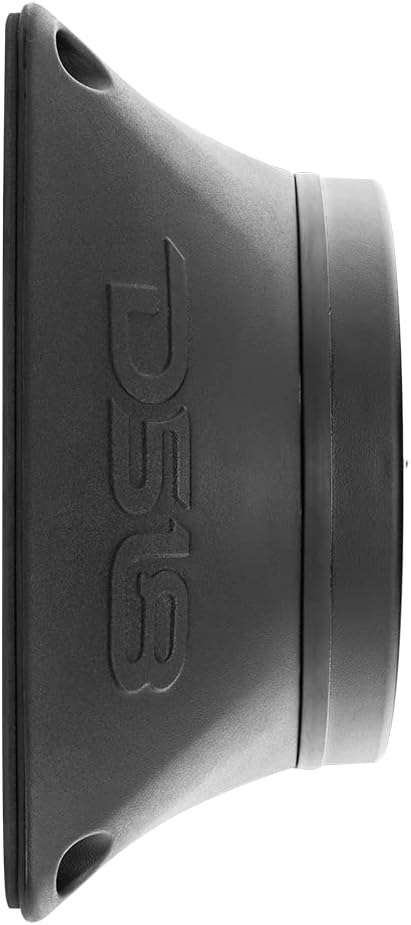
Image 4: Side profile of the DS18 JBASS enclosure, illustrating its shallow design.
6. Setup and Installation
6.1. Compatibility Check
The DS18 JBASS enclosure is designed for direct fitment on the tailgate of Jeep Wrangler JK, JKU, and JL models from 2007 to 2019. Verify your vehicle's model and year before proceeding with installation.

Image 5: The DS18 JBASS enclosure mounted on a Jeep Wrangler tailgate, demonstrating its intended fitment.
6.2. Subwoofer Installation into Enclosure
- Carefully unpack the DS18 JBASS enclosure.
- Select two 10-inch shallow subwoofers. DS18-SW10D4 10" subwoofers are recommended for optimal fit and performance. Ensure the subwoofer's mounting hole diameter matches the enclosure's 234mm (9.21 inches).
- Connect the subwoofer wires to the terminals on the enclosure, ensuring correct polarity (+ to + and - to -).
- Mount the subwoofers into the enclosure using appropriate screws, ensuring a secure and airtight seal. Do not overtighten.
6.3. Vehicle Mounting
- Identify the mounting location on your Jeep's tailgate. The enclosure is designed for a specific fit.
- Secure the enclosure to the tailgate using appropriate mounting hardware (not included, refer to vehicle-specific instructions or consult a professional). Ensure the enclosure is firmly attached to prevent movement during vehicle operation.
6.4. Wiring Connections
The enclosure includes 6-core 1.5m input wires for both the woofer speakers and RGB lighting. Proper wiring is crucial for functionality and safety.
- Woofer Wiring: Connect the woofer wires from the enclosure to your amplifier's subwoofer output channels. Ensure correct polarity.
- RGB Lighting Wiring: Connect the RGB wires to a compatible RGB controller (e.g., DS18 LED-BTC, sold separately) and then to a 12V power source. Follow the RGB controller's instructions for color and effect control.
Important: If you are unfamiliar with car audio wiring, it is highly recommended to have the installation performed by a certified car audio technician.

Image 6: The DS18 JBASS enclosure with active blue RGB lighting, demonstrating the visual effect of the integrated lighting feature.
7. Operation
Once the DS18 JBASS enclosure with subwoofers is correctly installed and wired to your amplifier and RGB controller:
- Audio Playback: Turn on your vehicle's audio system and amplifier. Adjust the amplifier's gain, crossover, and bass boost settings according to your preference and the specifications of your installed subwoofers. Start with low volume and gradually increase to avoid damage.
- RGB Lighting Control: Use your connected RGB controller (e.g., via a mobile app if using DS18 LED-BTC) to select desired colors, brightness, and lighting effects for the enclosure's integrated LEDs.
8. Maintenance
- Cleaning: Clean the enclosure with a soft, damp cloth. Avoid using harsh chemicals or abrasive cleaners that could damage the plastic material or finish.
- Inspection: Periodically check all wiring connections for tightness and signs of wear or corrosion. Ensure mounting hardware remains secure.
- Subwoofer Care: Follow the maintenance guidelines provided with your specific subwoofers.
9. Troubleshooting
9.1. No Sound from Subwoofers
- Check all wiring connections between the enclosure, subwoofers, and amplifier for proper seating and polarity.
- Verify the amplifier is powered on and receiving a signal from your head unit.
- Ensure the amplifier's settings (gain, crossover) are correctly configured for subwoofers.
- Inspect subwoofers for any visible damage.
9.2. RGB Lights Not Working
- Check the power connection to the RGB controller.
- Ensure the RGB wires from the enclosure are correctly connected to the controller.
- Verify the RGB controller is functioning and set to an active mode/color.
9.3. Distorted Sound
- Reduce the amplifier's gain setting.
- Check for loose wiring connections that could cause interference.
- Ensure the subwoofers are not over-powered or under-powered by the amplifier.
10. Warranty and Support
10.1. Warranty Information
DS18 provides a one-year limited manufacturer's warranty from the date of purchase for all DS18 products, covering manufacturing defects. Please retain your proof of purchase for warranty claims.
10.2. Customer Support
For technical assistance, troubleshooting, or warranty inquiries, please contact DS18 customer support. Refer to the official DS18 website for current contact information.


