
Pyle PPHP155ST
Pyle PPHP155ST Wireless Portable PA Speaker System Instruction Manual
Model: PPHP155ST
Introduction
Thank you for purchasing the Pyle PPHP155ST Wireless Portable PA Speaker System. This manual provides important information regarding the setup, operation, maintenance, and troubleshooting of your new PA system. Please read this manual thoroughly before use to ensure proper function and to maximize the lifespan of your product. Keep this manual for future reference.
Package Contents
Carefully unpack the box and ensure all items are present and in good condition. If any items are missing or damaged, contact your retailer immediately.
- Pyle PPHP155ST PA Speaker Unit
- Speaker Stand
- Wired Microphone
- Power Cable
- Audio Connection Cable
- Remote Control (if included)

Setup
1. Speaker Stand Assembly
- Unfold the legs of the speaker stand until they are fully extended and stable.
- Adjust the height of the stand to your desired level, ensuring the locking pin is securely inserted into one of the adjustment holes.
- Carefully lift the PPHP155ST speaker and place its 35mm mounting hole onto the top pole of the stand. Ensure it is seated firmly.

2. Power Connection
- Ensure the speaker's power switch is in the OFF position.
- Connect the provided power cable to the AC power input on the rear panel of the speaker.
- Plug the other end of the power cable into a standard electrical outlet (AC 110V/220V, 50/60Hz).
3. Initial Power-On
Once the speaker is securely placed and connected to power, switch the power button to the ON position. The digital LCD display on the rear panel should illuminate.

Operating Instructions
Control Panel Overview
The rear panel of the PPHP155ST features various inputs, outputs, and controls for managing audio. Familiarize yourself with these components:
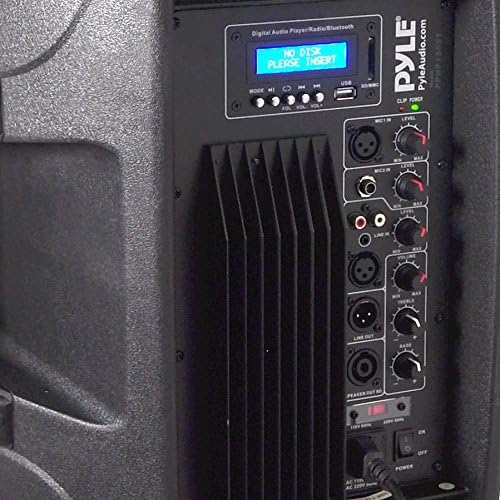

- Digital LCD Display: Shows current mode, track information, and other status indicators.
- USB/SD Card Slots: For playing MP3 audio files directly from USB drives or SD cards.
- Mode Button: Switches between input sources (Bluetooth, USB, SD, Line In).
- Rotary Controls: Adjust Master Volume, Microphone Volume, Treble, and Bass.
- XLR Microphone Input: For connecting a wired microphone.
- RCA Stereo Input: For connecting external audio devices (e.g., CD player, mixer).
- XLR Guitar Input: For connecting a guitar or other instrument.
- 1/4" SpeakOn Input: For additional speaker connection.
- Line Out: For connecting to another PA system or recording device.
1. Bluetooth Connectivity
The PPHP155ST features Bluetooth for wireless audio streaming.
- Turn on the speaker and press the 'Mode' button until 'Bluetooth' is selected on the LCD display.
- On your mobile device (smartphone, tablet, PC), enable Bluetooth and search for available devices.
- Select 'Pyle Audio' or 'Pyle PPHP155ST' from the list of devices.
- Once paired, you will hear a confirmation tone, and you can now stream audio wirelessly to the speaker.

2. USB/SD Card Playback
To play MP3 files from a USB drive or SD card:
- Insert a USB flash drive or SD card into the corresponding slot on the control panel.
- The speaker should automatically switch to USB/SD mode. If not, press the 'Mode' button to select it.
- Use the playback controls (Play/Pause, Next, Previous) on the control panel or remote control to manage your music.
3. Microphone Usage
Connect the included wired microphone or another compatible microphone to the XLR Microphone Input. Adjust the 'Mic In' level knob to control the microphone volume.
4. EQ Configuration
Use the 'Treble' and 'Bass' rotary controls on the rear panel to adjust the high and low frequencies of the audio output, allowing you to balance the sound to your preference.
Maintenance
Cleaning
To maintain the appearance and performance of your speaker system:
- Disconnect the power cable before cleaning.
- Use a soft, dry cloth to wipe down the exterior surfaces.
- For stubborn dirt, a slightly damp cloth with mild soap can be used, followed by a dry cloth.
- Do not use harsh chemicals, abrasive cleaners, or solvents, as these can damage the finish.
- Keep the speaker grilles free of dust and debris to ensure optimal sound quality.
Storage
When not in use for extended periods, store the speaker in a cool, dry place, away from direct sunlight and extreme temperatures. It is recommended to use the original packaging for protection during storage and transport.
Troubleshooting
| Problem | Possible Cause | Solution |
|---|---|---|
| No power | Power cable not connected; Power switch off; Outlet not working | Ensure power cable is securely connected; Turn power switch ON; Test outlet with another device |
| No sound output | Volume too low; Incorrect input selected; Audio cable faulty; Device not playing | Increase Master Volume; Select correct input mode; Check audio cables; Ensure connected device is playing audio |
| Bluetooth not connecting | Speaker not in Bluetooth mode; Device too far; Device already paired elsewhere | Press Mode button to select Bluetooth; Move device closer to speaker; Disconnect from other Bluetooth devices |
| Distorted sound | Volume too high; EQ settings incorrect; Faulty audio source | Reduce Master Volume or input levels; Adjust Treble/Bass controls; Test with a different audio source |
| Microphone not working | Microphone not connected; Mic volume too low; Microphone faulty | Ensure microphone is securely connected to XLR input; Increase 'Mic In' level; Test with another microphone |
Specifications
- Power Output: 1500 Watt Peak / 750 Watt RMS
- Subwoofer: 15-inch
- Tweeter: 1-inch Compression Driver with Titanium Diaphragm
- Impedance: 8 Ohm
- Connectivity: Bluetooth, USB, SD, RCA, XLR, 1/4'' SpeakOn
- Mounting Type: 35mm Speaker Stand Mount, Freestanding
- Material: Acrylonitrile Butadiene Styrene (ABS), Steel
- Item Weight: 40.7 pounds
- Package Dimensions: 30 x 20 x 16.5 inches
- Model Number: AZPPHP155ST
- UPC: 842893117218
- Power Source: Corded Electric
- Compatible Devices: Guitar, MP3 Player, Smartphone, Tablet
Warranty Information
Warranty details for the Pyle PPHP155ST are typically included with your product packaging or available on the official Pyle website. Please refer to these resources for specific terms and conditions regarding your product's warranty coverage.
Customer Support
For technical assistance, troubleshooting beyond this manual, or service inquiries, please refer to the contact information provided in your product's documentation or visit the official Pyle website for customer support resources.
Related documentsPPHP155ST


Ask a question about this manual
Ask about setup, troubleshooting, compatibility, parts, safety, or missing instructions. Manuals+ will review the question and use this page’s manual context to help answer it.