
KETOTEK KT-D132
KETOTEK Digital DC Voltmeter Ammeter
Model: KT-D132
Introduction
The KETOTEK Digital DC Voltmeter Ammeter is a versatile 4-in-1 multimeter designed to accurately measure voltage, current, active power, and energy consumption of DC electrical devices. Featuring a clear LCD display with backlight, this device is equipped with essential functions such as voltage alarm, energy reset, and power-off data saving, making it an indispensable tool for monitoring various DC power systems.

Front view of the KETOTEK Digital DC Voltmeter Ammeter, showing its clear LCD display.
Key Features
- 4-in-1 Multimeter: Measures voltage, current, active power, and energy.
- Measurement Range:
- Voltage: DC 6.5V to 100V
- Current: 0A to 20A
- Active Power: 0W to 2kW
- Energy: 0 to 9999kWh
- LCD Display: Large, clear LCD with blue backlight for easy readability.
- Voltage Alarm Function: Alerts when voltage exceeds set thresholds.
- Energy Reset Function: Allows resetting accumulated energy data.
- Power-off Data Saving: Retains measured data even when power is disconnected.
- Built-in Shunt: No external shunt required for 20A version.

Illustration of the measurement ranges for voltage, current, power, and energy.

Icons representing key functions: Backlight, Voltage Alarm, Reset Energy, and Power-off Data Saving.
Specifications
| Model Number | KT-D132 |
| Voltage Test Range | DC 6.5V - 100V |
| Current Test Range | 0 - 20A |
| Active Power Test Range | 0 - 2kW |
| Energy Test Range | 0 - 9999kWh |
| Display Type | LCD with Backlight |
| Product Dimensions | 8.46 x 4.96 x 2.44 cm (approx. 3.33 x 1.95 x 0.96 inches) |
| Item Weight | 100 Grams (approx. 0.22 lbs) |
| Power Source | Battery Powered (Self-powered from measured circuit) |
| Operating Environment | Indoor use only |

Detailed dimensions of the KETOTEK Digital DC Voltmeter Ammeter.
Setup and Wiring
Proper wiring is crucial for the safe and accurate operation of your KETOTEK multimeter. Please follow the diagram below carefully. Incorrect wiring can damage the product or prevent it from functioning.
Wiring Diagram:

Wiring diagram showing connections for power supply, load, and the meter. Ensure correct polarity.
Connection Steps:
- Connect the positive (+) terminal of your DC power supply to the DC input + terminal on the meter.
- Connect the negative (-) terminal of your DC power supply to the DC input - terminal on the meter.
- Connect the positive (+) terminal of your load (device to be measured) to the Load + terminal on the meter.
- Connect the negative (-) terminal of your load to the Load - terminal on the meter.
- Ensure all connections are secure and that the voltage and current of your load do not exceed the meter's rated parameters (DC 6.5-100V, 20A).
Important Note: For continuous operation with loads exceeding 15A, it is recommended to consider a higher amperage version of the meter (e.g., 50A or 100A) to prevent damage.
Operation
The KETOTEK multimeter is designed for straightforward operation. The single button on the right side of the display controls various functions.
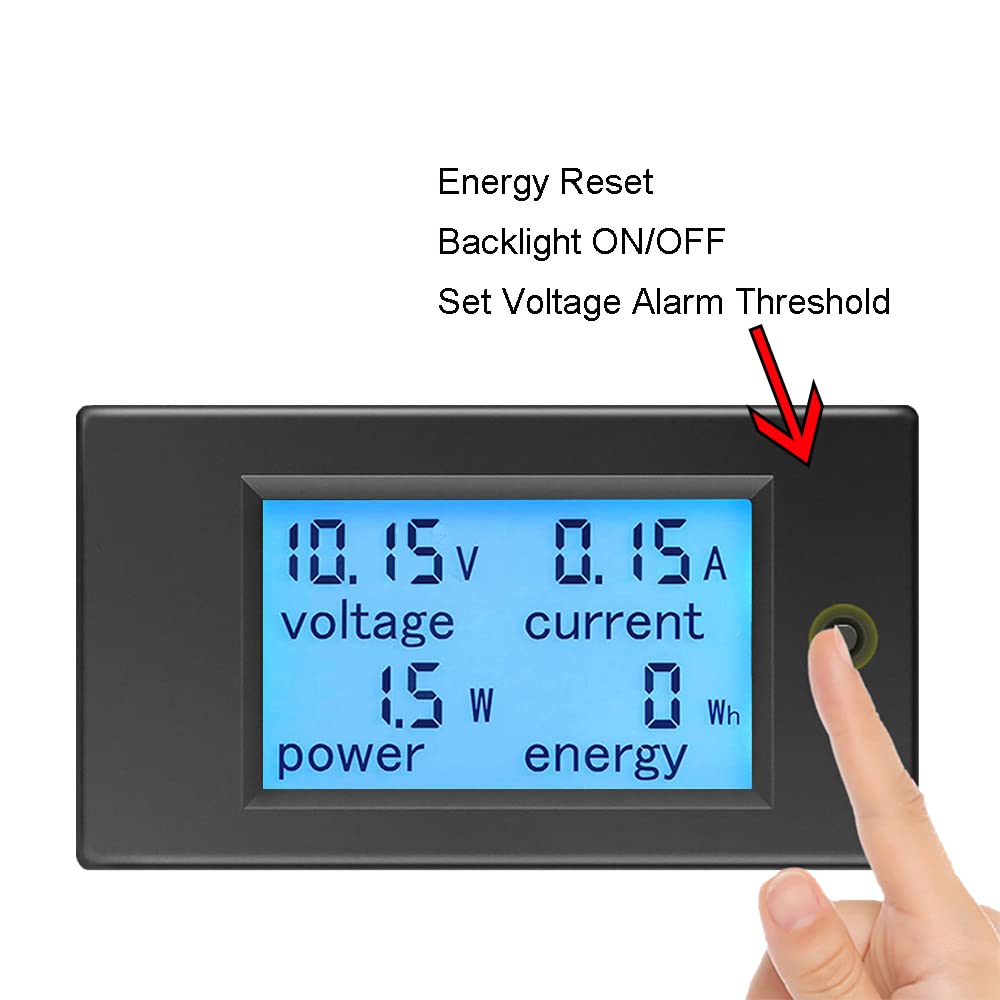
The single button on the right side of the meter controls various settings.
Button Functions:
- Short Press: Toggles the backlight ON/OFF.
- Long Press (3 seconds): Resets the energy (kWh) accumulation. The energy value will flash, then release the button to confirm reset.
- Setting Voltage Alarm Threshold:
- Press and hold the button for approximately 5 seconds until the voltage value flashes.
- Short press the button to adjust the voltage alarm threshold. Each short press increases the value.
- Long press the button again (3 seconds) to save the setting and exit.
Display Readings:
The LCD simultaneously displays four key parameters:
- Voltage (V): Current DC voltage.
- Current (A): Current DC amperage.
- Power (W): Instantaneous active power consumption.
- Energy (Wh/kWh): Accumulated energy consumption.
Maintenance
To ensure the longevity and accuracy of your KETOTEK Digital DC Voltmeter Ammeter, follow these simple maintenance guidelines:
- Cleaning: Use a soft, dry cloth to clean the display and casing. Do not use abrasive cleaners or solvents.
- Environment: This device is designed for indoor use only. Avoid exposure to moisture, extreme temperatures, and direct sunlight.
- Handling: Handle the meter with care to prevent physical damage. Avoid dropping or subjecting it to strong impacts.
- Storage: When not in use for extended periods, store the meter in a cool, dry place.
Troubleshooting
If you encounter issues with your KETOTEK multimeter, refer to the following common problems and solutions:
| Problem | Possible Cause | Solution |
|---|---|---|
| No display/Meter not turning on | No power supply; Incorrect wiring; Voltage too low. |
|
| Incorrect readings (Voltage/Current/Power/Energy) | Incorrect wiring; Overload; Damaged unit. |
|
| Energy (kWh) reading not resetting | Incorrect button press duration. | Press and hold the button for approximately 3 seconds until the energy value flashes, then release to confirm reset. |
| Backlight not turning on/off | Incorrect button press. | Perform a short press of the button to toggle the backlight. |
If you experience problems not listed here or if the solutions do not resolve the issue, please contact KETOTEK customer support for assistance.
Warranty and Support
KETOTEK products are designed for reliability and performance. This product is covered by the standard return policy of the retailer where it was purchased. For specific details regarding warranty coverage, returns, or technical support, please refer to the purchase platform's policies or contact KETOTEK directly.
For assistance, please visit the KETOTEK official website or contact their customer service through the platform where you purchased the product.
Ask a question about this manual
Ask about setup, troubleshooting, compatibility, parts, safety, or missing instructions. Manuals+ will review the question and use this page’s manual context to help answer it.