
1. Introduction
This manual provides essential instructions for the safe and efficient operation of your Toshiba TY-HRU30 Multi-Band FM/AM Radio with USB Player. Please read this manual thoroughly before using the device and retain it for future reference.
The Toshiba TY-HRU30 is a versatile portable radio featuring FM, AM, and multiple shortwave bands, along with a USB playback function for audio files. It is designed for clear reception and ease of use.
2. Safety Information
- Power Source: Use only the specified power adapter or appropriate batteries. Ensure the voltage matches the device requirements.
- Water and Moisture: Do not expose the radio to rain, moisture, or immerse it in water. Avoid placing objects filled with liquids, such as vases, on the radio.
- Ventilation: Do not block any ventilation openings. Ensure adequate space around the unit for proper airflow.
- Heat: Keep the radio away from heat sources such as radiators, heat registers, stoves, or other apparatus (including amplifiers) that produce heat.
- Cleaning: Unplug the radio from the power outlet before cleaning. Use a soft, dry cloth. Do not use liquid cleaners or aerosol cleaners.
- Servicing: Do not attempt to service this product yourself. Refer all servicing to qualified service personnel.
- Antenna: Handle the telescopic antenna with care to prevent damage.
3. Package Contents
Please check that all items are present:
- Toshiba TY-HRU30 Multi-Band Radio Unit
- Power Adapter
- User Manual (this document)
4. Product Overview
Familiarize yourself with the various parts and controls of your Toshiba TY-HRU30 radio.
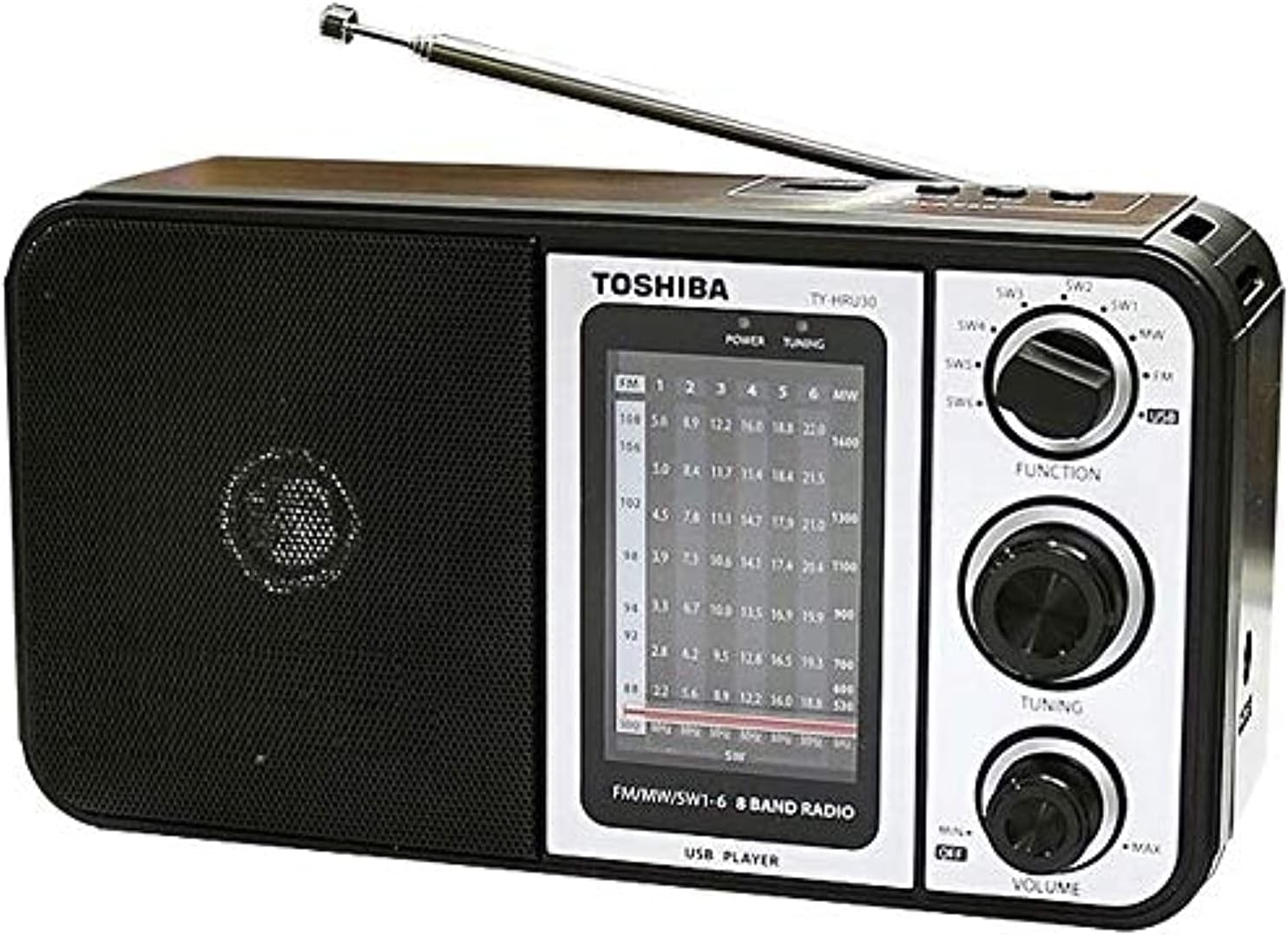
Figure 1: Front view of the Toshiba TY-HRU30 radio, showing the speaker grille on the left, the tuning display in the center, and the function, tuning, and volume knobs on the right side. A telescopic antenna is extended from the top.

Figure 2: Rear view of the Toshiba TY-HRU30 radio, highlighting the USB port and associated playback control buttons (REW, PLAY/PAUSE, FF).
Controls and Features:
- Telescopic Antenna: For FM and Shortwave reception.
- Speaker: Mono speaker for audio output.
- Tuning Display: Analog display showing frequency bands and tuning indicator.
- Function Knob: Selects radio bands (FM, MW, SW1-6) and USB mode.
- Tuning Knob: Adjusts the frequency to tune into radio stations.
- Volume Knob: Controls the audio output level.
- USB Port: For connecting USB storage devices for audio playback.
- USB Playback Controls: Rewind (REW), Play/Pause, Fast Forward (FF) for USB audio.
- Earphone Jack: For private listening (earphones not included).
5. Setup
5.1 Powering the Radio
The Toshiba TY-HRU30 can be powered by either the included AC power adapter or batteries (not included).
- AC Power: Connect the power adapter to the AC input jack on the radio and then plug it into a standard wall outlet.
- Battery Power: Open the battery compartment (usually on the back or bottom of the unit) and insert the required batteries, observing the correct polarity (+/-). Close the compartment securely.
5.2 Antenna Adjustment
- For FM and Shortwave reception, fully extend the telescopic antenna. Rotate and adjust its angle for optimal signal reception.
- For AM (MW) reception, the radio uses a built-in AM antenna. Rotate the entire radio unit for the best reception.
5.3 Earphone Connection
To listen privately, plug your earphones into the earphone jack. The internal speaker will automatically mute when earphones are connected.
6. Operating Instructions
6.1 Turning On/Off
Locate the power switch (often integrated with the volume knob or a separate button) and turn the unit ON. Turn OFF when not in use to conserve power.
6.2 Radio Operation
- Select Band: Rotate the Function Knob to select your desired radio band: FM, MW (AM), SW1, SW2, SW3, SW4, SW5, or SW6.
- Tune Station: Slowly rotate the Tuning Knob to scan for radio stations. Observe the tuning indicator on the display for signal strength.
- Adjust Volume: Rotate the Volume Knob to set the desired listening level.
6.3 USB Playback
- Insert USB Device: Insert a USB flash drive containing compatible audio files into the USB port on the radio.
- Select USB Mode: Rotate the Function Knob to the 'USB' position. The radio should automatically begin playing audio from the USB device.
- Control Playback: Use the REW (Rewind), PLAY/PAUSE, and FF (Fast Forward) buttons to control audio playback.
- Adjust Volume: Use the Volume Knob to control the audio level.
7. Maintenance
- Cleaning: Wipe the exterior of the radio with a soft, dry cloth. Do not use abrasive cleaners, waxes, or solvents.
- Battery Care: If using batteries, remove them if the radio will not be used for an extended period to prevent leakage.
- Storage: Store the radio in a cool, dry place away from direct sunlight and extreme temperatures.
8. Troubleshooting
| Problem | Possible Cause | Solution |
|---|---|---|
| No power | Power adapter not connected; Batteries depleted or incorrectly inserted. | Ensure power adapter is securely connected. Replace batteries or check polarity. |
| Poor radio reception | Antenna not extended/adjusted; Weak signal area; Interference. | Fully extend and adjust the telescopic antenna. Rotate the radio for AM reception. Move to a location with better signal. |
| No sound from speaker | Volume too low; Earphones connected; Mute function active. | Increase volume. Disconnect earphones. Check if any mute function is active. |
| USB playback not working | USB device not inserted correctly; Incompatible file format; USB mode not selected. | Ensure USB device is fully inserted. Check if audio files are in a compatible format. Select 'USB' mode with the Function Knob. |
9. Specifications

Figure 3: Front view of the Toshiba TY-HRU30 radio with approximate dimensions: 21cm (width), 17cm (height), 13cm (depth).
| Feature | Detail |
|---|---|
| Brand | Toshiba |
| Model | TY-HRU30 |
| Radio Bands Supported | AM, FM, Shortwave (SW1-6) |
| Tuner Technology | FM |
| Hardware Interface | USB |
| Audio Output Mode | Mono |
| Speakers Maximum Output Power | 10 Watts |
| Voltage | 220 Volts |
| Wattage | 10 watts |
| Power Source Type | Battery Powered (and AC Power Adapter) |
| Frequency | Up to 108 MHz (FM) |
| Total USB Ports | 1 |
| Compatible Devices | Earphone |
| Special Features | Built-In AM Antenna, High Sensitivity, Tuning Indicator |
| Product Dimensions (L x W x H) | 119 x 220 x 72 cm (approx. 22 x 11.9 x 7.2 cm); 730 g |
10. Warranty and Support
For warranty information and customer support, please refer to the warranty card included with your product or visit the official Toshiba website for your region. Keep your purchase receipt as proof of purchase for any warranty claims.
If you encounter issues not covered in the troubleshooting section, please contact Toshiba customer service for assistance.