
1. Introduction
The Paladone Pac Man Blinky Icon Light is a decorative LED light designed in the shape of the iconic Pac-Man ghost, Blinky. This light is suitable for indoor use and adds a retro gaming aesthetic to any room. It can be powered via USB or AAA batteries, offering versatile placement options.

Image 1.1: The Paladone Pac Man Blinky Icon Light in its unlit state, showcasing its pixelated design and black base.
2. Safety Information
Please read all safety instructions before using this product.
- For external use only.
- Avoid contact with eyes.
- Keep away from direct bare flame or heat sources.
- Do not immerse in water, despite being waterproof, to prevent damage to internal components.
- Dispose of batteries responsibly according to local regulations.
3. Package Contents
Ensure all items are present in the package:
- 1 x Blinky Icon Light
- 1 x USB Power Cable (may vary by region)
Note: AAA batteries are not included and must be purchased separately.
4. Setup
The Blinky Icon Light can be powered using either AAA batteries or a USB connection.
4.1 Battery Installation
- Locate the battery compartment on the underside of the light's base.
- Using a small screwdriver, carefully open the battery compartment cover.
- Insert 2 x AAA batteries, ensuring correct polarity (+/-).
- Replace the battery compartment cover and secure it with the screw.
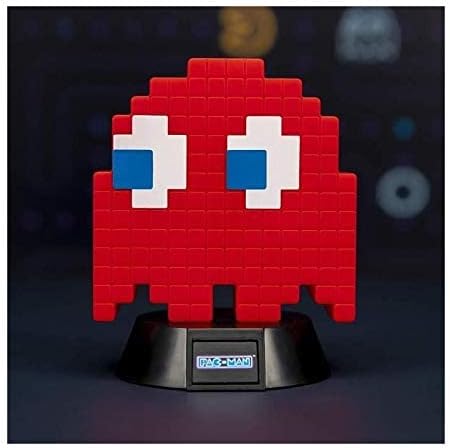
Image 4.1: The base of the Blinky Icon Light, where the battery compartment is located.
4.2 USB Power Connection
- Locate the USB port on the light's base.
- Connect the provided USB cable to the light.
- Plug the other end of the USB cable into a compatible USB power source (e.g., computer, USB wall adapter, power bank).
Note: When both batteries and USB power are connected, the light will typically draw power from the USB source.
5. Operating Instructions
The Blinky Icon Light features a push-button switch for basic operation and may include remote control functionality depending on the specific model variant.
5.1 Turning On/Off
- To turn the light ON, press the power button located on the base of the unit.
- To turn the light OFF, press the power button again.
5.2 Light Modes (if applicable)
Some models may offer different light modes (e.g., static, phasing, sound-reactive). Repeatedly pressing the power button or using the remote control (if included) may cycle through these modes. Refer to specific packaging for detailed mode information.

Image 5.1: The Blinky Icon Light illuminated, showcasing its red glow.
6. Maintenance
6.1 Cleaning
To clean the light, gently wipe it with a soft, dry cloth. Do not use abrasive cleaners or solvents, as these may damage the finish.
6.2 Battery Replacement
If the light dims or stops functioning when powered by batteries, replace the AAA batteries as described in Section 4.1. Always replace both batteries at the same time with new ones.
6.3 Water Resistance
The Blinky Icon Light is rated as waterproof. However, it is designed for indoor decorative use. Avoid prolonged exposure to moisture or submersion in water to ensure longevity.
7. Troubleshooting
| Problem | Possible Cause | Solution |
|---|---|---|
| Light does not turn on. | No power or depleted batteries. |
|
| Light is dim or flickers. | Low battery power. | Replace batteries or switch to USB power. |
| Remote control not working (if applicable). | Remote battery depleted or obstruction. |
|
8. Specifications
| Feature | Detail |
|---|---|
| Brand | Paladone |
| Model Number | PP4986PM |
| Product Dimensions | Approximately 59.06"D x 47.24"W x 39.37"H |
| Item Weight | 70 Grams (2.47 ounces) |
| Material | Plastic |
| Light Source Type | LED |
| Power Source | USB or 2 x AAA Batteries (not included) |
| Switch Type | Push Button, Remote (if applicable) |
| Water Resistance Level | Waterproof (for indoor decorative use) |
| Indoor/Outdoor Usage | Indoor |
Note on Dimensions: The provided product dimensions (59.06"D x 47.24"W x 39.37"H) appear to be unusually large for a small icon light and may refer to shipping package dimensions or a different product. Please refer to product packaging for accurate physical dimensions of the light itself.
9. Warranty and Support
Specific warranty information for the Paladone Pac Man Blinky Icon Light is not provided within this manual. For details regarding warranty coverage, returns, or technical support, please refer to the product packaging or contact Paladone customer service directly through their official website or the retailer where the product was purchased.
You can visit the Paladone store for more information: Paladone Store on Amazon