
NATNO HS04
NATNO HS03/HS04 Replacement Laptop Battery User Manual
Model: HS04
Introduction
This user manual provides essential information for the safe and effective use of your NATNO HS03/HS04 replacement laptop battery. It includes details on compatibility, installation, operation, maintenance, and troubleshooting to ensure optimal performance and longevity of your battery.
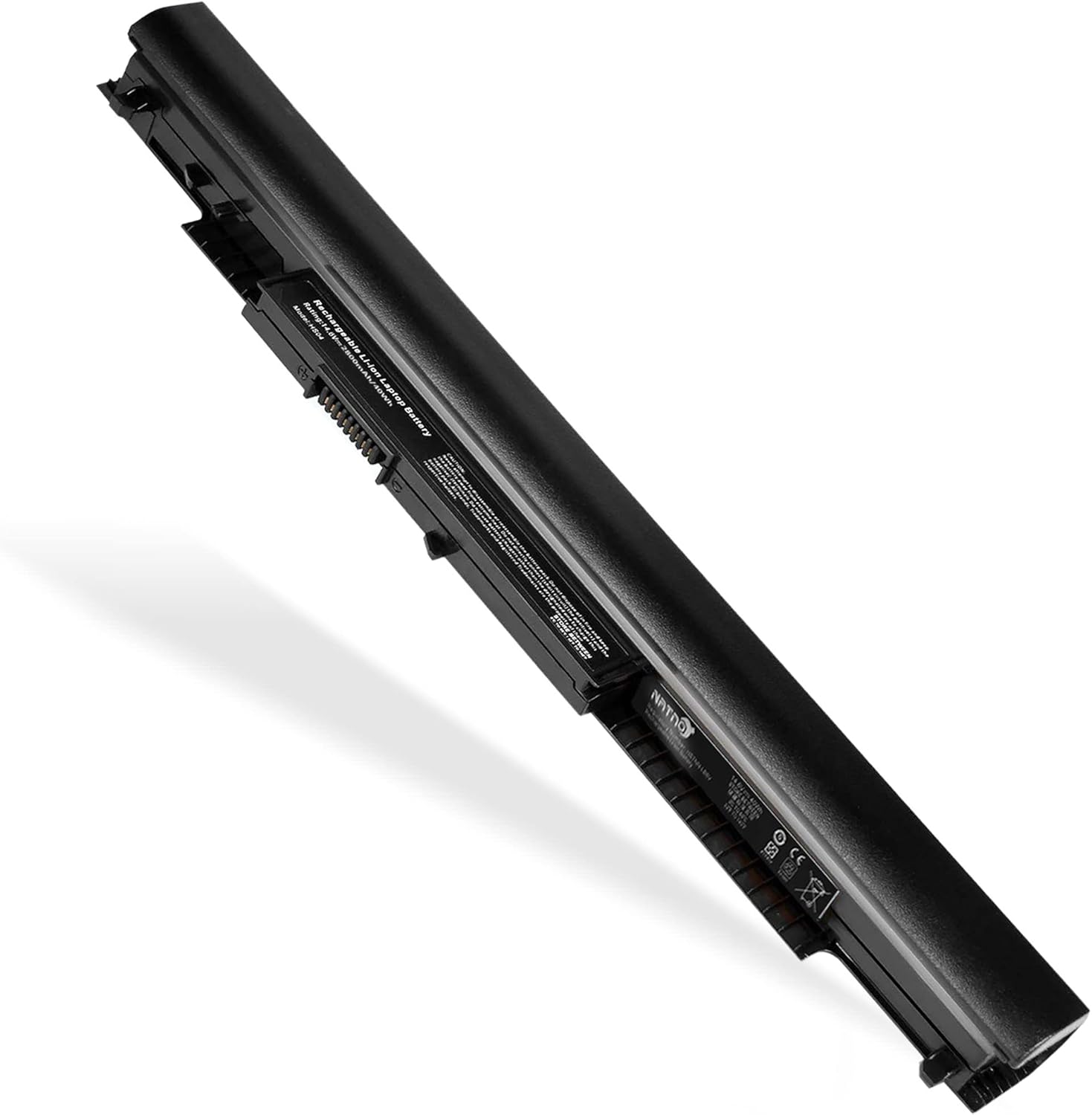
Image: The NATNO HS03/HS04 replacement laptop battery, designed for HP Pavilion series laptops.
Safety Information
Please read and follow all safety instructions carefully to prevent damage to the battery, your laptop, or personal injury.
- Do not disassemble, crush, or puncture the battery.
- Do not expose the battery to high temperatures (above 60°C/140°F) or direct sunlight.
- Keep the battery away from water or other liquids.
- Use only the original laptop charger or a compatible charger approved by the laptop manufacturer.
- Dispose of used batteries properly according to local regulations. Do not dispose of in household waste.
- The battery features built-in protections against overcharge, overvoltage, overcurrent, short-circuit, and overtemperature.

Image: Diagram illustrating the advanced safety features of the battery, including overcharge protection, temperature control, short circuit protection, and current stabilization.
Compatibility
The NATNO HS03/HS04 replacement battery is compatible with a wide range of HP laptop models and part numbers. Please verify your original battery's voltage and model number before purchase to ensure compatibility.

Image: Visual representation of compatible HP Pavilion series, including 15-AC, 15-AF, 15-AY, 15-BA, 17-X, 17-Y, 14-AC, 14-AF, 14-AM, and 14-AN series.
Compatible Laptop Models:
- HP 240 G4 Series, HP 245 G4 Series, HP 246 G4 Series
- HP 250 G4 Series, HP 255 G4 Series, HP 256 G4 Series
- HP Pavilion 15-ac series (e.g., 15-ac113cl, 15-ac187cl, 15-ac130ds)
- HP Pavilion 15-af series (e.g., 15-af113cl, 15-af131ca, 15-af112nr)
- HP Pavilion 15-ay series (e.g., 15-ay009dx, 15-ay014dx, 15-ay018nr)
- HP Pavilion 15-ba series (e.g., 15-ba009dx, 15-ba013cl, 15-ba079dx)
- HP Pavilion 15g-ad series, 15q-aj series, 15-bn series (e.g., 15-bn070wm)
- HP 14-ac series, 14-af series, 14-an series (e.g., 14-an013nr), 14-am series
- HP 14g-ad series, 14q-aj series
- HP 17-x series (e.g., 17-x114dx, 17-x061nr), 17-y series
Compatible Part Numbers:
- HS04, HS03, H504
- 807956-001, 807957-001, 807612-421, 807612-831, 807611-131, 807611-141, 807611-421
- TPN-W121, TPN-L119
- HSTNN-LB6U, HSTNN-LB6V, HSTNN-DB7J
- HS03031-CL, HS04041-CL, N2L85AA
Package Contents
Upon opening your package, please ensure all items listed below are present and in good condition:
- 1 x NATNO HS03/HS04 Replacement Laptop Battery (2600mAh)
- 1 x User Manual (this document)
- 1 x Sponge (for secure fitting, if applicable)
- 1 x Antistatic Bag (for safe handling and storage)
Image: Illustration showing the typical contents of the package: battery, sponge, antistatic bag, and user manual.
Setup and Installation
Follow these steps to properly install your new NATNO replacement battery.
1. Checking Your Laptop Model
Before installation, it is crucial to confirm your laptop's exact model to ensure compatibility. This can typically be done through your operating system:
- Step 1: Press the Windows key + R simultaneously to open the Run dialog box.
- Step 2: Type "msinfo32" into the Run dialog box and click OK.
- Step 3: In the System Information window that appears, locate "System Model" under the System Summary. This will display your laptop's model number.
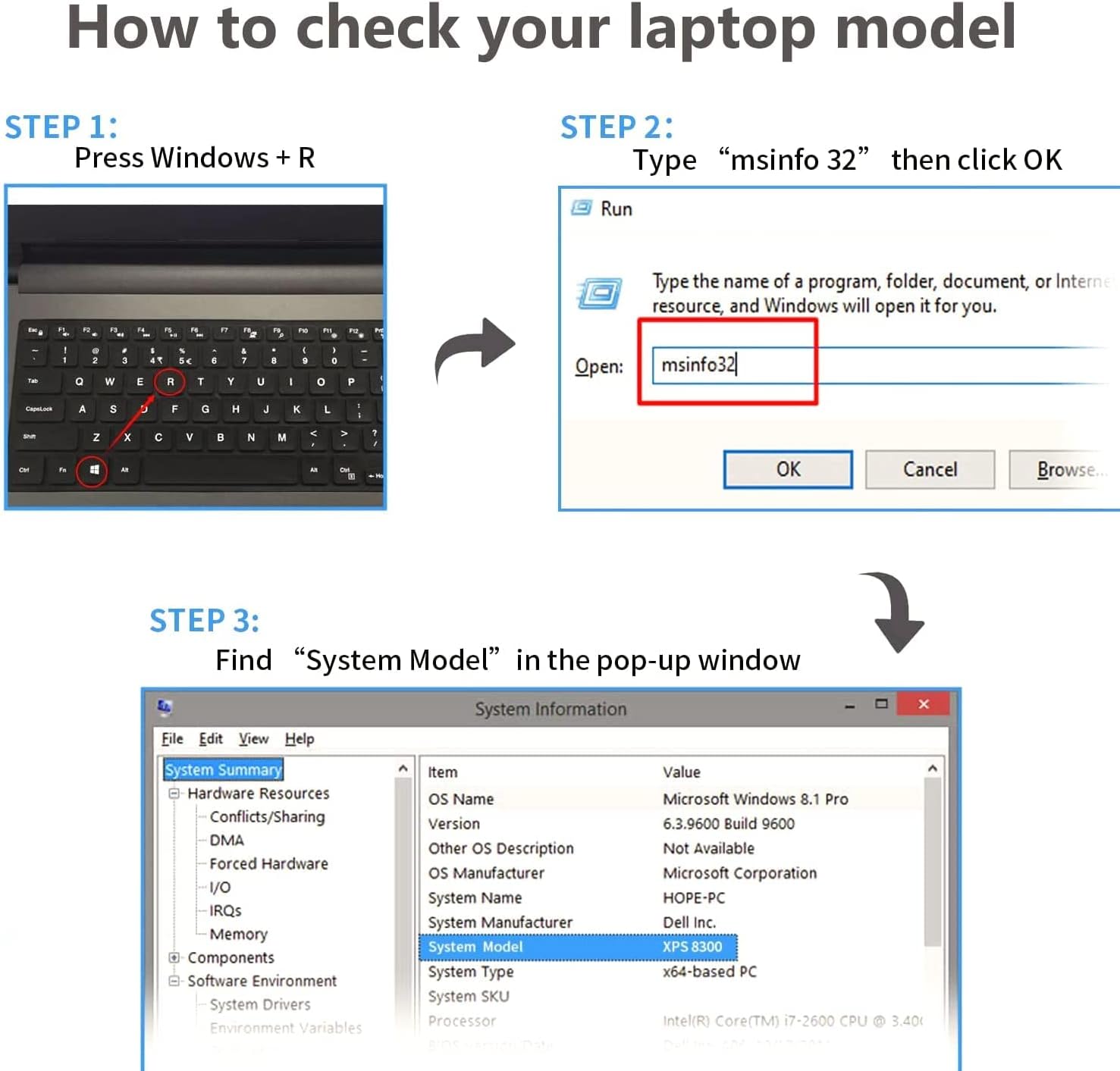
Image: Step-by-step guide on how to check your laptop model using the 'msinfo32' command in Windows.
2. Battery Installation
Ensure your laptop is powered off and disconnected from the AC adapter before proceeding.
- Power Off: Shut down your laptop completely, do not just put it to sleep.
- Disconnect Power: Unplug the AC adapter from the laptop.
- Remove Old Battery: Carefully turn the laptop over. Locate the battery release latches (usually two) and slide them to unlock the old battery. Gently remove the old battery from its compartment.
- Insert New Battery: Align the new NATNO battery with the battery compartment. Gently push the battery into place until it clicks securely. Ensure the latches return to their locked position.
- Reconnect Power: Turn the laptop back over and connect the AC adapter.
- Initial Charge: It is recommended to fully charge the new battery before its first use.
Operating Instructions
First Use
For the first use, fully charge the battery to 100% and then discharge it to about 5-10% before recharging. This helps calibrate the battery and optimize its performance.
Charging and Discharging
The battery is designed for optimal performance with regular use. Avoid frequently discharging the battery completely to 0% as this can reduce its lifespan. Similarly, avoid keeping the laptop constantly plugged in at 100% charge for extended periods if possible, as this can also affect battery health.

Image: A laptop with the NATNO battery installed, illustrating its capability to provide a long cycle life of up to 500 recharge cycles.
Maintenance and Care
Proper maintenance can significantly extend the life of your laptop battery:
- Regular Use: Use your laptop on battery power regularly rather than keeping it constantly plugged in.
- Optimal Charge Level: For long-term storage, charge the battery to about 50-60% and store it in a cool, dry place.
- Temperature Control: Avoid exposing the battery to extreme temperatures, both hot and cold, as this can degrade performance.
- Clean Contacts: Periodically clean the battery contacts on both the battery and the laptop with a dry, soft cloth to ensure good connection.
Troubleshooting
If you encounter issues with your NATNO replacement battery, try the following solutions:
| Problem | Possible Cause | Solution |
|---|---|---|
| Battery not charging | Loose connection, faulty charger, incorrect battery voltage, software issue. | Ensure battery is securely installed. Check AC adapter and charging port. Verify battery voltage matches original. Update or reinstall battery drivers in Device Manager. |
| Battery not recognized | Improper installation, driver issue, BIOS setting. | Reinstall the battery. Restart laptop. Check Device Manager for battery drivers. Update BIOS if necessary (consult laptop manufacturer's guide). |
| Short battery life | High power consumption, background processes, battery degradation. | Adjust power settings to optimize battery life. Close unnecessary applications. Ensure proper ventilation to prevent overheating. |
| Battery overheating | Poor ventilation, heavy workload, internal fault. | Ensure laptop vents are clear. Use laptop on a hard, flat surface. Reduce heavy workload. If overheating persists, discontinue use and contact support. |
Product Specifications
Key technical specifications for the NATNO HS03/HS04 Replacement Laptop Battery:
| Feature | Detail |
|---|---|
| Model Number | HS04 |
| Battery Type | Li-ion (Lithium Ion) |
| Voltage | 14.6V (also compatible with 14.4V, 14.8V systems) |
| Capacity | 2600mAh (38Wh) |
| Number of Cells | 4 cells |
| Dimensions | Approximately 10.8 x 0.8 x 0.6 inches |
| Item Weight | Approximately 9.6 ounces |
| Shell Material | Strong ABS+PC |

Image: Visual highlighting the battery's 2600mAh capacity, 38Wh energy, and 14.6V voltage, emphasizing safety and durability.

Image: Close-up view showing the battery's Grade A cells for stability, strong ABS+PC shell, and durable power interface.
Warranty and Support
Your NATNO replacement battery comes with a standard warranty. For specific warranty terms and conditions, please refer to the product listing or contact the seller directly. If you experience any issues or have questions not covered in this manual, please contact NATNO customer support for assistance.
Contact information for support is typically available on the product packaging or the seller's page where the product was purchased.
Ask a question about this manual
Ask about setup, troubleshooting, compatibility, parts, safety, or missing instructions. Manuals+ will review the question and use this page’s manual context to help answer it.