
1. Introduction
The OASE Bioplus Thermo 200 is an internal corner filter designed for medium-sized aquariums. It features an integrated heater, providing precise and uniform temperature levels while maintaining a discreet presence within your aquarium. This filter ensures effective water filtration through its 3-stage biological, mechanical, and chemical filtration system, promoting optimal living conditions for freshwater aquatic habitats. This manual provides essential information for the safe and efficient use of your Bioplus Thermo 200 filter.
2. Safety Information
- Always disconnect the power supply to the filter and any other electrical equipment in the aquarium before performing maintenance or handling the unit.
- Ensure the filter is fully submerged in water before connecting it to the power supply. Operating the pump dry can cause damage.
- Do not operate the filter if the power cord or plug is damaged. Contact qualified personnel for repair or replacement.
- This appliance is intended for indoor use only and for aquariums. Do not use it for other purposes.
- Keep out of reach of children.
- Ensure a drip loop is formed with the power cord to prevent water from traveling along the cord and reaching the electrical outlet.
3. Product Overview
The Bioplus Thermo 200 combines filtration and heating into a single, compact unit. Key features include:
- Integrated Heater: Provides consistent water temperature, reducing visible equipment in the aquarium.
- 3-Stage Filtration: Utilizes biological, mechanical, and chemical media for comprehensive water purification.
- Quiet Operation: Designed for minimal noise during circulation and filtration.
- Adjustable Diffuser: Allows for uniform surface movement and increased dissolved oxygen.
- Modular Media Baskets: Individually housed filtration media for easy cleaning and maintenance.
Included Components: Aquarium Filter with integrated heater, suction cups, diffuser, fittings, and power cable.

Image: The OASE Bioplus Thermo 200 internal corner filter, showcasing its compact design.
4. Setup Instructions
- Unpack and Inspect: Carefully remove all components from the packaging. Inspect for any damage.
- Install Heater (if not pre-installed): Gently insert the integrated heater into its designated slot within the filter unit. Ensure it is securely seated. The heater has a temperature adjustment dial at the top.
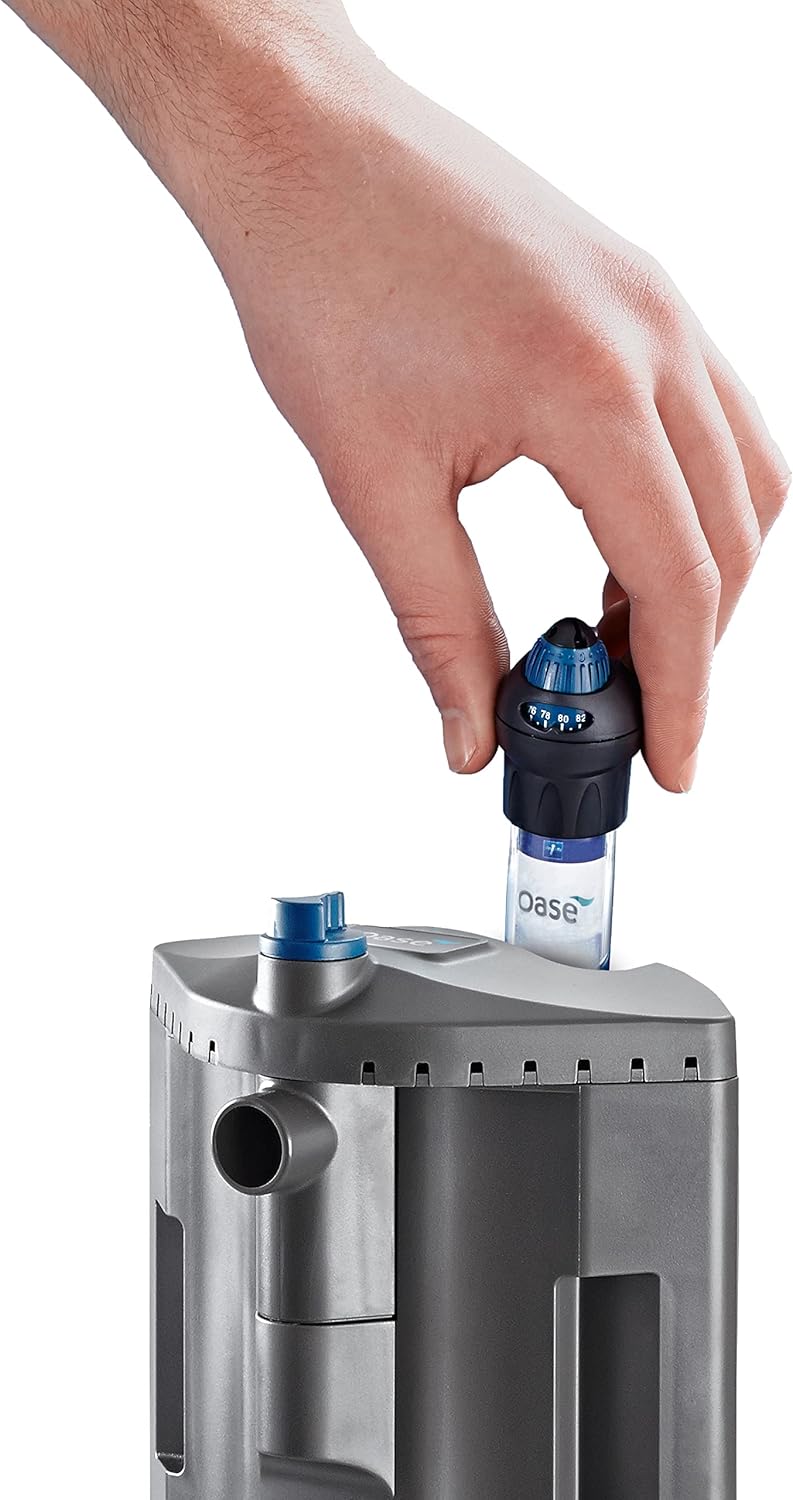
Image: A hand carefully inserting the heater module into the top of the filter unit.
- Prepare Filter Media: The filter comes with pre-installed media modules. Ensure they are correctly placed within the filter body.

Image: A hand placing a blue filter sponge into one of the modular filter baskets.
- Position in Aquarium: Place the filter in a corner of your aquarium. Use the provided suction cups to secure it firmly to the glass. Ensure the filter is fully submerged below the water line.

Image: The OASE Bioplus Thermo filter discreetly installed in the corner of an active aquarium.
- Adjust Flow Control: The diffuser and adjustable water flow nozzle are built into the filter. Adjust the blue knob at the top to control the water flow direction and intensity.

Image: A hand turning the blue knob on the filter's top to adjust water flow.
- Connect Power: Once the filter is securely installed and fully submerged, connect the power cable to a suitable electrical outlet.
5. Operating Instructions
The Bioplus Thermo 200 operates continuously to filter and heat your aquarium water. After initial setup, ensure the filter is running smoothly and quietly. The integrated heater will automatically maintain the set temperature. The adjustable diffuser allows you to customize surface movement, which helps prevent biofilm formation and provides additional dissolved oxygen to the water. Monitor your aquarium's water parameters regularly to ensure optimal conditions.
6. Maintenance
Regular maintenance is crucial for the longevity and efficiency of your filter and the health of your aquarium. The modular design simplifies this process.
- Disconnect Power: Always unplug the filter from the power outlet before any maintenance.
- Remove Filter Modules: The filtration media is housed in separate modules. These can be easily removed while the main filter bracket remains in place within the aquarium.

Image: A hand pulling out a filter media module from the top of the filter unit.
- Clean Filter Media: Rinse mechanical filter sponges (e.g., coarse sponges) in old aquarium water to preserve beneficial bacteria. Replace chemical media (e.g., carbon) as recommended by the manufacturer, typically every 2-4 weeks. Biological media should only be gently rinsed if heavily clogged.
- Clean Impeller and Housing: Periodically remove the impeller and clean its chamber to ensure smooth operation and prevent blockages.
- Reassemble and Restart: Reinsert the cleaned or new filter media modules, reassemble the filter, and plug it back into the power outlet. Ensure it is fully submerged before restarting.

Image: A hand lifting the entire filter unit out of the aquarium for thorough cleaning.
7. Troubleshooting
| Problem | Possible Cause | Solution |
|---|---|---|
| Filter not running or weak flow | Power disconnected, clogged impeller, clogged filter media, air in pump. | Check power connection. Disconnect power, clean impeller and housing. Clean or replace filter media. Ensure filter is fully submerged and free of air bubbles. |
| Heater not maintaining temperature | Insufficient water level, heater malfunction, incorrect temperature setting. | Ensure water level is sufficient to cover the heater completely. Verify temperature setting. If problem persists, contact support. |
| High flow rate | Diffuser/nozzle set to maximum flow. | Adjust the diffuser and water flow nozzle to reduce flow. For sensitive fish, consider directing the output between the two flow areas. |
| Unusual noise/vibration | Impeller obstruction, loose components, air in pump. | Disconnect power, check for any obstructions in the impeller or ensure all components are securely seated. Ensure filter is fully submerged and free of air. |
| Water cloudy despite filtration | Filter media saturated, insufficient biological filtration, overfeeding, new tank syndrome. | Clean or replace filter media. Perform partial water changes. Reduce feeding. Ensure proper tank cycling. |
8. Specifications
| Feature | Specification |
|---|---|
| Brand | OASE |
| Model Name | Bioplus Thermo 200 |
| Item Model Number | 55157 |
| Product Dimensions (LxWxH) | 4.7 x 4.3 x 13 inches |
| Item Weight | 1.7 pounds |
| Color | Black |
| Wattage | 208 watts |
| Voltage | 120 Volts |
| Maximum Flow Rate | 190 Gallons Per Minute |
| Mounting Type | Internal |
| Included Components | Aquarium Filter with integrated heater, suction cups, diffuser, fittings, and power cable |
| Age Range Description | All Life Stages |
| Specific Uses for Product | Indoor |
9. Warranty and Support
The OASE Bioplus Thermo 200 comes with a 3-year limited warranty. An additional 1-year warranty extension is available with online product registration. For warranty claims, technical assistance, or further inquiries, please refer to the contact information provided with your product packaging or visit the official OASE website.


