1. Introduction
This manual provides detailed instructions for the installation, operation, and maintenance of your BTF-LIGHTING WS2815 Individually Addressable RGB LED Flexible Strip Light. Please read this manual thoroughly before use to ensure proper functionality and safety. The WS2815 LED strip is an upgraded version of the WS2812B, featuring dual signal lines for enhanced reliability.

Image 1.1: BTF-LIGHTING WS2815 LED Strip Light, coiled.
2. Product Features
- Dual-Signal Redundancy: The WS2815 features a dual-signal design. If one pixel is damaged, the following LEDs on the strip will continue to function, ensuring signal break-point continuous transmission.
- Individually Addressable LEDs: Each 5050 SMD LED has a built-in WS2815 IC, allowing for individual control of color and brightness. This enables complex lighting effects such as static colors, chasing patterns, and other special effects.
- High Color Depth: Supports 256 brightness levels and 24-bit full-color display for vibrant and dynamic lighting.
- DC12V Operation: Designed for DC12V power supply, providing stable performance and maximum white brightness without significant voltage drops over its 16.4ft length. Do not use DC5V or DC24V power supplies.
- Cuttable and Linkable: The LED strip can be cut every 1 LED, allowing for customizable lengths to suit various DIY projects. It includes 4-Pin Male/Female Connectors for tool-free daisy-chaining and dual-end power wires to simplify wiring and reduce voltage drop.
- Robust Construction: Features pure gold wires for improved quality and longer lifespan. The IP65 silicone coating provides waterproof protection, making it suitable for various indoor and outdoor applications.
- Wide Controller Compatibility: Compatible with a range of controllers including WLED, Rasp Pi, ESP8266, ESP-32, and specific models like RB3+SP630E, SP611E, SP608E, SP602E, SP803E, DR03W, SP530E, SP511E for music synchronization and advanced control.

Image 2.1: Illustration of WS2815 dual signal break-point continuous transmission, where a defective LED does not stop the signal for subsequent LEDs.
3. Package Contents
The package typically includes the following components:
- BTF-LIGHTING WS2815 LED Strip (16.4ft / 5m, 150 LEDs)
- Upgraded Reel for easy storage and deployment
- Upgraded Connectors and General-Purpose Connectors for versatile connections
- One 4-pin male connector (additional power supply and controller are sold separately)
- User Manual

Image 3.1: Visual representation of the LED strip and included 4-pin male connector.
4. Specifications
| Feature | Specification |
|---|---|
| Model Number | HD-12V-WS2815-30L-B-IP65 |
| LED Type | WS2815 (Upgraded WS2812B) 5050 SMD RGB LED |
| LED Quantity | 150 Pixels (30 LEDs/meter) |
| Strip Length | 16.4ft (5 meters) |
| Operating Voltage | DC12V |
| Power Consumption | 45 watts (recommended DC12V 3A power supply) |
| Waterproof Rating | IP65 (Silicone Coating) |
| PCB Color | Black |
| Control Method | External Controller (not included) |
| Special Features | Individually Addressable, Dual Signal, Cuttable, Dimmable |
| Dimensions (L x W x H) | 5.91 x 3.94 x 0.59 inches (package) |
| Item Weight | 8.7 ounces |
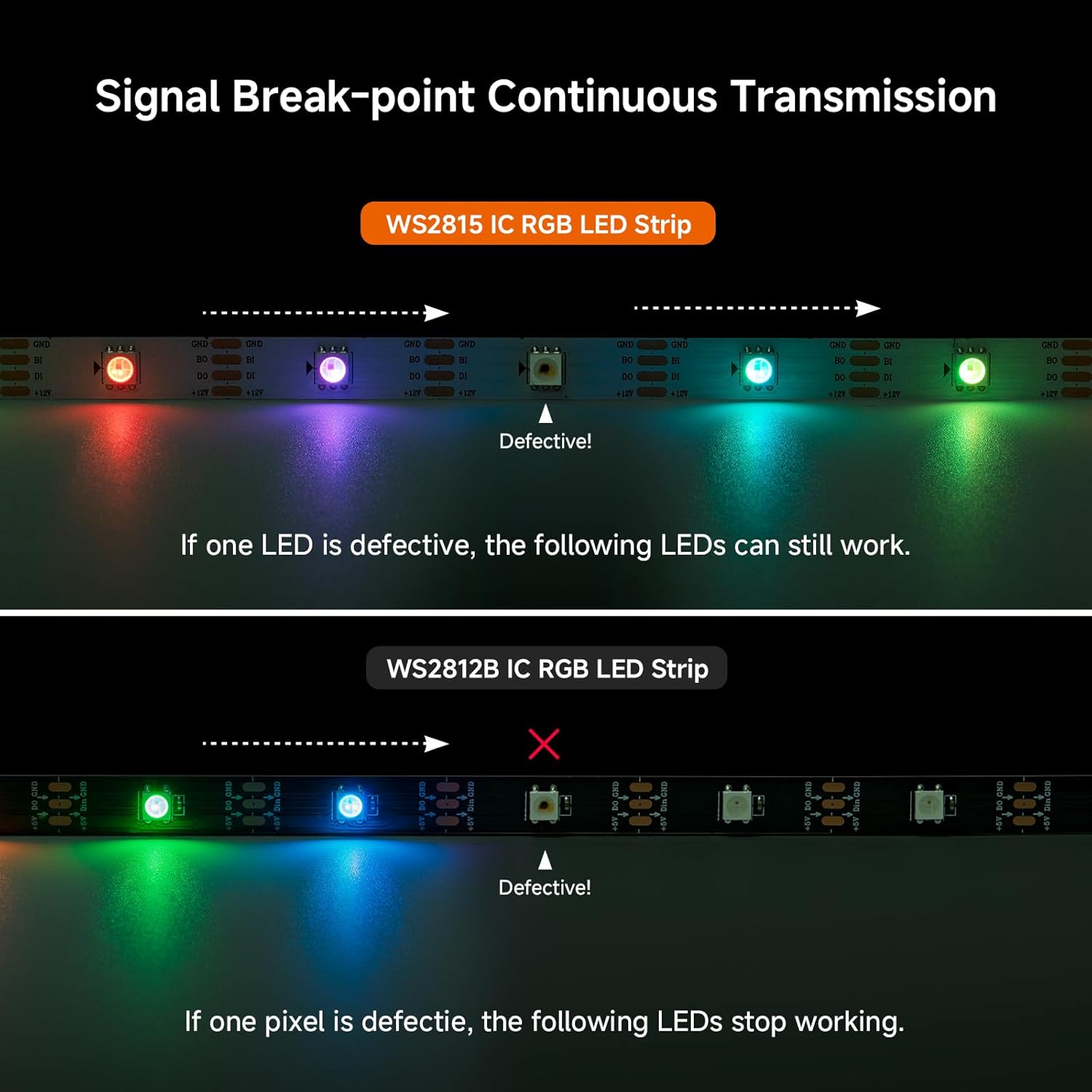
Image 4.1: Different IP ratings and dimensions for WS2815 LED strips.
5. Setup & Installation
5.1 Wiring Diagrams
Proper wiring is crucial for the functionality and longevity of your LED strip. Ensure all connections are secure and polarity is correct.
Series Connection:

Image 5.1: Diagram illustrating series connection of multiple LED strips to a single controller and power supply. Note that the output voltage of the power supply depends on the LED strip requirements.
Parallel Connection:

Image 5.2: Diagram illustrating parallel connection of multiple LED strips to a single controller and power supply, often utilizing a signal amplifier for longer runs.
5.2 Physical Installation
- Prepare the mounting surface by ensuring it is clean, dry, and smooth.
- If using mounting clips (not included), prepare screws and fix clips to the desired position.
- Remove the adhesive backing from the LED strip and carefully press the strip onto the surface. If using clips, secure the LED strip into the clips.
- Connect the LED strip to your DC12V power supply and compatible controller (both sold separately).
- Turn on the power supply to activate the LED strip.

Image 5.3: Step-by-step guide for installing the LED strip using clips.
6. Operating Instructions
The BTF-LIGHTING WS2815 LED strip requires an external controller (not included) to operate. The controller dictates the lighting effects, colors, and brightness. Refer to your specific controller's manual for detailed operating instructions.
6.1 Controller Compatibility
This LED strip is compatible with various controllers, including those supporting WLED, Rasp Pi, ESP8266, ESP-32, and specific models like SP611E, SP608E, SP602E, SP803E, DR03W, SP530E, SP511E. Ensure your chosen controller is designed for individually addressable LED strips and supports the WS2815 protocol.

Image 6.1: Examples of compatible Bluetooth, WiFi, and DIY controllers for the LED strip.
6.2 Power Supply
Always use a stable DC12V power supply. The recommended power supply for a 16.4ft (5m) strip with 30 LEDs/meter is DC12V 3A (36W). Using an incorrect voltage (e.g., DC5V or DC24V) can damage the LED strip. Ensure the power supply has sufficient wattage for the total length of the LED strips connected.

Image 6.2: Comparison showing the difference in maximum white brightness between WS2815 (DC12V) and WS2813 (DC5V) LED strips.

Image 6.3: Illustration demonstrating no voltage drop with sufficient power input for the WS2815 IC RGB LED Strip (5M/roll) when lighting up white at maximum brightness, compared to a strip experiencing voltage drop.
7. Maintenance
To ensure the longevity and optimal performance of your LED strip, follow these maintenance guidelines:
- Cleaning: Gently wipe the silicone coating with a soft, dry cloth to remove dust and debris. Avoid using harsh chemicals or abrasive materials.
- Inspection: Periodically check all connections for looseness or damage. Ensure the strip is securely mounted.
- Environmental Conditions: While the IP65 rating provides water resistance, avoid prolonged submersion or exposure to extreme temperatures outside the recommended operating range.
8. Troubleshooting
If you encounter issues with your LED strip, refer to the following common troubleshooting steps:
- No Light:
- Check if the DC12V power supply is correctly connected and functioning.
- Verify that the controller is properly connected to the LED strip and receiving power.
- Ensure the data input (DI) and ground (GND) connections are correct.
- Incorrect Colors or Flickering:
- Confirm that the controller settings match the WS2815 LED type.
- Check for loose data connections or damaged wires.
- Ensure the power supply is adequate for the length of the strip. Insufficient power can cause flickering or color inconsistencies.
- Only Part of the Strip Works:
- Thanks to the dual-signal feature, if a single LED is damaged, the rest of the strip should still function. Identify the damaged LED and consider replacing the segment if necessary.
- Check for cuts or breaks in the data line or power lines along the non-functioning section.
- Adhesive Not Sticking:
- Ensure the mounting surface was thoroughly cleaned and dried before application.
- For rough or uneven surfaces, use additional mounting clips or a stronger adhesive.
9. Safety Information
- Always disconnect power before installing, cutting, or performing any maintenance on the LED strip.
- Use only a DC12V power supply. Using higher voltages will damage the product and void the warranty.
- Do not bend the LED strip sharply, as this can damage the internal circuitry.
- Keep the LED strip away from flammable materials.
- Ensure proper ventilation, especially if the strip is installed in an enclosed space, to prevent overheating.
- If the silicone coating is damaged, the waterproof rating may be compromised.
10. Warranty & Support
This product is manufactured by BTF-LIGHTING Technology Co., Limited. For warranty information, technical support, or further inquiries, please refer to the contact information provided with your purchase or visit the official BTF-LIGHTING website. Please retain your proof of purchase for warranty claims.


