1. Introduction
This manual provides essential instructions for the setup, operation, maintenance, and troubleshooting of your Sennheiser XSW-D Instrument Base Set wireless system. Please read this manual thoroughly before using the product to ensure safe and optimal performance.
The Sennheiser XSW-D Instrument Base Set offers a reliable 2.4 GHz digital wireless connection, providing freedom from cables for your instrument. It features automatic channel allocation and interference management for ease of use.
2. Package Contents
Verify that all items listed below are included in your package:
- 1 x XSW-D Instrument TX (Transmitter with 6.3mm / 1/4" jack)
- 1 x XSW-D Instrument RX (Receiver with 6.3mm / 1/4" jack)
- 1 x Beltpack Clip
- 1 x Extension Cable (6.3mm / 1/4")
- 1 x USB-C Charging Cable
- 2 x Lithium Ion Batteries (pre-installed)

3. Setup
3.1 Charging the Units
Before initial use, fully charge both the transmitter (TX) and receiver (RX) units. Use the provided USB-C charging cable. A full charge provides approximately 5 hours of operation. A 1-hour charge can provide up to 50% battery life.
- Connect the USB-C charging cable to the charging port on each unit.
- Connect the other end of the USB-C cable to a compatible USB power source (e.g., computer USB port, USB wall adapter).
- The LED indicator on each unit will show charging status. It will typically turn off or change color when fully charged.
Note: Only one USB charging cable is supplied. You may need to charge the units sequentially or acquire an additional compatible USB-C cable for simultaneous charging.
3.2 Connecting the Transmitter (TX)
The XSW-D Instrument TX unit connects directly to your instrument's output jack.
- Plug the 6.3mm (1/4") jack of the XSW-D Instrument TX into your instrument's output.
- For instruments with recessed jacks or where direct connection is impractical, use the supplied 6.3mm (1/4") extension cable. Connect one end of the extension cable to your instrument and the other end to the XSW-D Instrument TX.
- The beltpack clip can be attached to the TX unit for securing it to a strap or clothing, especially when using the extension cable.
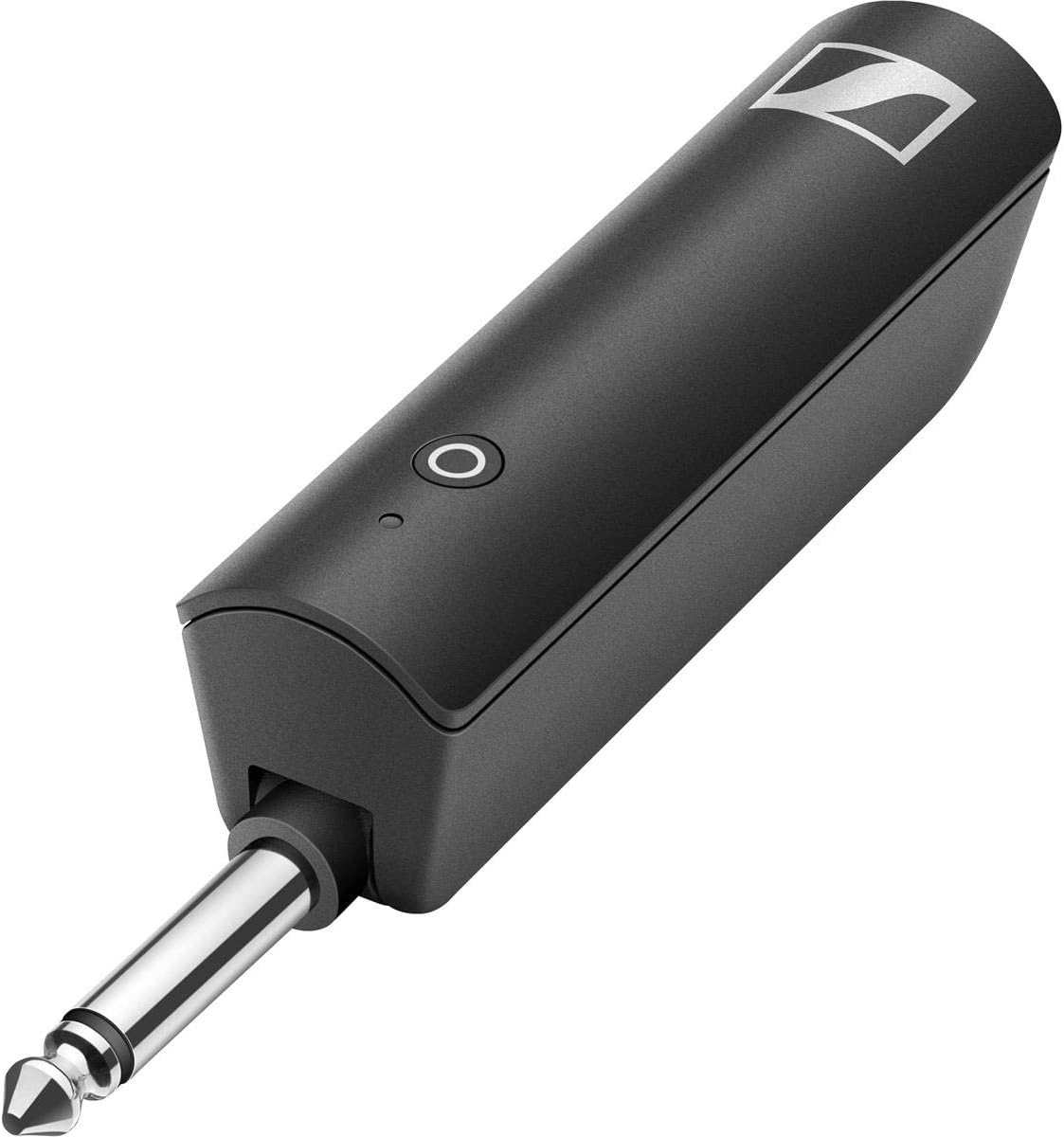
3.3 Connecting the Receiver (RX)
The XSW-D Instrument RX unit connects to the input of your amplifier, mixer, or audio interface.
- Plug the 6.3mm (1/4") jack of the XSW-D Instrument RX into the instrument input of your amplifier, mixer, or audio interface.
4. Operating Instructions
4.1 Powering On/Off and Pairing
The XSW-D system is designed for ease of use with automatic pairing.
- To Power On: Press and hold the button on both the TX and RX units simultaneously until their LEDs illuminate. The units will automatically search for and pair with each other. The LED will turn solid green when a connection is established.
- To Power Off: Press and hold the button on both the TX and RX units simultaneously until their LEDs turn off.
- Standby Mode: A short press of the button on either unit will put it into standby mode, temporarily muting the signal. Press again to resume operation.
The system operates on the license-free 2.4 GHz band, which is available worldwide. It features automatic channel allocation and interference management to maintain a stable connection.
4.2 Usage Considerations
- Range: The effective operating range can vary depending on environmental factors and obstacles. Optimal performance is typically achieved within 20 meters (approximately 65 feet) in line of sight.
- Battery Life: The internal Lithium Ion batteries provide up to 5 hours of continuous operation. It is possible to charge the units during operation or during breaks using the USB-C cable.
- Interference: While the system manages interference, strong Wi-Fi signals or other 2.4 GHz devices in close proximity may occasionally affect performance.
5. Maintenance
5.1 Cleaning
- Clean the units with a soft, dry cloth.
- Do not use liquid cleaners, solvents, or abrasive materials, as these can damage the housing or internal components.
5.2 Storage
- Store the units in a cool, dry place away from direct sunlight and extreme temperatures.
- For long-term storage, ensure the batteries are partially charged (around 50%) to prolong their lifespan. Avoid storing them fully charged or completely depleted.
6. Troubleshooting
| Problem | Possible Cause | Solution |
|---|---|---|
| No sound or intermittent signal |
|
|
| Short battery life |
|
|
| Static or unwanted noise |
|
|
| Units difficult to power on/off |
|
|
7. Specifications
| Feature | Detail |
|---|---|
| Model Name | XSW-D INSTRUMENT BASE SET |
| Item Model Number | 508493 |
| Brand | Sennheiser |
| Connectivity Technology | USB (for charging) |
| Wireless Frequency | 2.4 GHz (License-free worldwide) |
| Signal-to-Noise Ratio | 106 dB |
| Number of Channels | 1 |
| Power Source | Battery Powered |
| Batteries | 2 Lithium Ion batteries (included) |
| Battery Life | Up to 5 hours |
| Charging Time | 1 hour for 50% charge |
| Item Weight | 12 ounces (0.75 Pounds) |
| Product Dimensions (L x W x H) | 9.4 x 4.5 x 2.8 inches |
| Special Features | Automatic channel allocation, interference management, miniature design, belt clip |
8. Warranty and Support
Sennheiser products are manufactured to high-quality standards and come with a manufacturer's warranty. For specific warranty terms and conditions, please refer to the documentation included with your purchase or visit the official Sennheiser website.
For technical support, service, or further inquiries, please contact Sennheiser customer service directly. You can find contact information on the official Sennheiser website or through your local distributor.
Manufacturer: Sennheiser
Website: www.sennheiser.com