
1. Introduction
Thank you for choosing the Brondi Manta Cordless Phone. This manual provides essential information for setting up, operating, and maintaining your new phone. Please read it carefully to ensure proper use and to maximize the product's lifespan.
Package Contents:
- 1x Brondi Manta Handset
- 1x Brondi Manta Base Station
- 1x Power Adapter for Base Station
- 1x Telephone Line Cord
- User Manual (this document)
- (Batteries are not included and must be purchased separately: 2x AAA rechargeable batteries)
2. Safety Information
Please observe the following safety precautions to prevent damage to the product or injury to yourself:
- Use only the provided power adapter.
- Do not expose the phone to water or moisture.
- Avoid placing the phone near heat sources or direct sunlight.
- Do not attempt to open or repair the phone yourself. Refer all servicing to qualified personnel.
- Use only specified rechargeable AAA batteries. Non-rechargeable batteries may explode or leak.
- Keep out of reach of children.
3. Setup
3.1. Battery Installation
The Brondi Manta handset requires 2x AAA rechargeable batteries (not included). Ensure you use rechargeable batteries for proper operation and charging.
- Locate the battery compartment cover on the back of the handset.
- Slide the cover downwards and lift it off.
- Insert two AAA rechargeable batteries, observing the correct polarity (+ and - markings).
- Replace the battery compartment cover, sliding it upwards until it clicks into place.
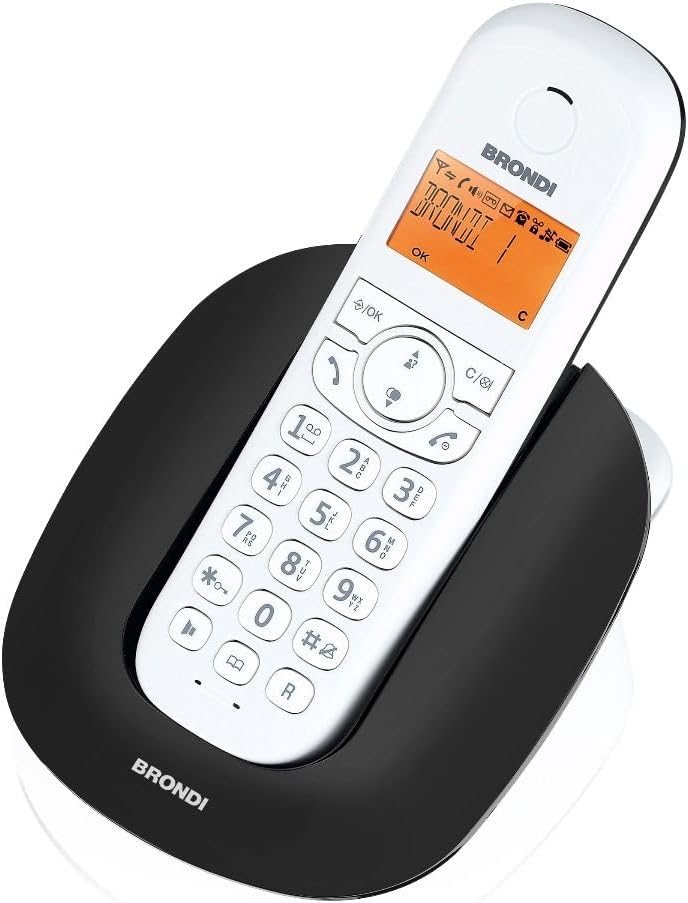
Image: The Brondi Manta cordless handset resting in its charging base. The handset features a white body with a black keypad and an orange-backlit display. The base is black and oval-shaped, with the Brondi logo visible.
3.2. Connecting the Base Station
The base station connects the cordless phone to your fixed telephone line and power supply.
- Connect one end of the telephone line cord to the LINE socket on the back of the base station.
- Connect the other end of the telephone line cord to your telephone wall socket.
- Connect the small plug of the power adapter to the DC IN socket on the back of the base station.
- Plug the power adapter into a standard electrical wall outlet.

Image: A top-down view of the Brondi Manta cordless phone base station. It is a sleek, black, oval-shaped unit with a central indentation designed to hold the handset. The Brondi logo is visible at the front.
3.3. Initial Charge
Place the handset on the base station. Ensure it is correctly seated and the charging indicator (if available) illuminates. For optimal battery performance, charge the handset for at least 12-15 hours before its first use, even if the display indicates a full charge sooner.
3.4. Handset Registration (if required)
Your handset should be pre-registered to the base station. If the handset displays "Unregistered" or similar, you may need to manually register it. Refer to the on-screen prompts or the full manual for specific registration steps, which typically involve pressing a button on the base station and then initiating registration from the handset menu.
4. Operating the Phone
4.1. Making Calls
- Press the TALK button (usually a green phone icon).
- Dial the desired phone number using the keypad.
- Press the TALK button again to end the call.
Alternatively, you can dial the number first and then press the TALK button to initiate the call.
4.2. Receiving Calls
When the phone rings, press the TALK button to answer the call. To end the call, press the END button (usually a red phone icon) or place the handset back on the base station.
4.3. Adjusting Volume
During a call, use the navigation buttons (up/down arrows) on the handset to adjust the earpiece volume.
4.4. Phonebook
The Brondi Manta allows you to store frequently called numbers. Consult the handset's menu for options to add, edit, or delete phonebook entries. Typically, you would navigate to the "Phonebook" or "Contacts" menu, select "Add New," enter the name and number, and save.
5. Maintenance
- Cleaning: Wipe the handset and base station with a soft, damp cloth. Do not use abrasive cleaners or solvents.
- Battery Care: To maintain battery life, allow the batteries to fully discharge occasionally before recharging. If the phone will not be used for an extended period, remove the batteries.
- Storage: Store the phone in a cool, dry place away from direct sunlight and extreme temperatures.
6. Troubleshooting
| Problem | Possible Cause / Solution |
|---|---|
| No dial tone / Cannot make or receive calls |
|
| Handset display is blank or shows "Unregistered" |
|
| Poor call quality / Static |
|
| Handset not charging |
|
7. Specifications
- Brand: Brondi
- Model: BRO-MANTABW
- Product Type: Cordless Phone
- Material: Acrylonitrile Butadiene Styrene (ABS)
- Power Source: Battery (2x AAA rechargeable batteries required, not included)
- Compatible Devices: Fixed Telephone Network
- Dimensions (Package): 16.8 x 14.2 x 6.6 cm
- Item Weight: 390 g
- Color: Black (Base), White (Handset)
8. Warranty and Support
Brondi products are designed for reliability and performance. For warranty information, please refer to the warranty card included in your product packaging or visit the official Brondi website. For technical support or service inquiries, please contact Brondi customer service through their official channels. Keep your proof of purchase for warranty claims.
For more information, visit the Brondi Store on Amazon.


