
Introduction
This manual provides essential instructions for the safe and effective use, assembly, and maintenance of your MOPEDIA Atlante RP520 Folding Aluminum Rollator. Please read this manual thoroughly before using the product to ensure proper operation and to prevent injury.
The MOPEDIA Atlante RP520 is a 4-wheel rollator designed to provide mobility assistance. It features a lightweight aluminum frame, a padded seat, a backrest, and a storage basket for convenience.
Safety Information
- Always ensure all parts are securely fastened before use.
- Do not exceed the maximum weight capacity of 136 kg (300 lbs).
- Engage the brakes when sitting on the rollator or when it is stationary.
- Use caution when navigating uneven surfaces or inclines.
- Regularly inspect the rollator for wear and tear, especially the wheels and brakes.
- Consult a healthcare professional to ensure this device is suitable for your specific mobility needs.
Package Contents
Upon unpacking, please verify that all components are present and undamaged:
- 1 x MOPEDIA Atlante RP520 Rollator (main frame with wheels, seat, and backrest)
- 1 x Storage Basket
- This User Manual
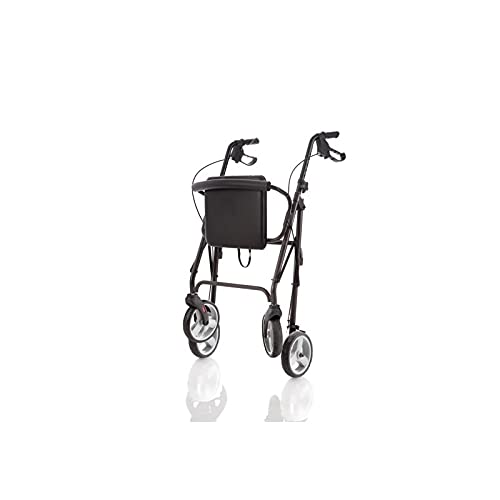
Image: The MOPEDIA Atlante RP520 Rollator, partially folded, showcasing its main components including the adjustable handles, padded seat, storage basket, and 4 wheels. This view helps in identifying the product and its primary features.
Setup
- Unfolding the Rollator: Carefully remove the rollator from its packaging. Place it on a flat, stable surface. Gently pull the sides of the frame outwards until it fully extends and locks into place. Ensure the locking mechanism is engaged.
- Attaching the Basket: Hook the storage basket onto the designated frame supports, typically located under the seat. Ensure it is securely attached and does not interfere with the folding mechanism.
- Adjusting Handle Height: Loosen the adjustment knobs on the handle posts. Adjust the handles to a comfortable height, ensuring your arms are slightly bent when standing upright with your hands on the grips. Tighten the adjustment knobs securely. Both handles should be at the same height.
- Checking Brakes: Before first use, test the brakes. Squeeze the brake levers to engage the brakes. Push down on the levers to lock the brakes for parking. Ensure both functions work correctly.
Operating Instructions
Walking with the Rollator
- Stand behind the rollator, holding both handles firmly.
- Push the rollator slightly forward, then step forward with one foot, followed by the other. Maintain a comfortable distance from the rollator.
- Use the rollator for balance and support, but do not lean heavily on it.
Using the Brakes
- To Slow Down or Stop: Gently squeeze both brake levers simultaneously. Release to continue moving.
- To Lock for Parking: Push the brake levers downwards until they click into the locked position. This prevents the rollator from moving. Always lock the brakes before sitting or standing.
- To Unlock: Pull the brake levers upwards until they release from the locked position.
Using the Seat
- Ensure the rollator is on a flat, stable surface.
- Always engage both parking brakes before sitting down.
- Turn around and slowly lower yourself onto the padded seat. Use the handles for support if needed.
- To stand up, lean forward, push off the seat and handles, and slowly rise. Unlock the brakes before moving.
Folding for Storage/Transport
- Remove any items from the storage basket.
- Lift the seat or pull the folding strap (if present) to collapse the frame inwards.
- Secure any locking mechanisms to keep the rollator in its folded position for easy transport or storage.
Maintenance
- Cleaning: Wipe the frame and seat with a damp cloth and mild detergent. Do not use abrasive cleaners. Dry thoroughly.
- Brakes: Regularly check the brake cables and levers for proper function and wear. Adjust if necessary (consult a professional if unsure).
- Wheels: Inspect wheels for damage or excessive wear. Ensure they rotate freely. Clean any debris from the wheel axles.
- Fasteners: Periodically check all screws, bolts, and nuts to ensure they are tight. Do not overtighten.
- Storage: Store the rollator in a dry, clean place away from extreme temperatures.
Troubleshooting
| Problem | Possible Cause | Solution |
|---|---|---|
| Rollator does not roll smoothly. | Debris in wheels, loose wheel axle, worn wheels. | Clean wheels, tighten axle bolts, replace worn wheels. |
| Brakes are not effective. | Brake cables loose, worn brake pads, improper adjustment. | Adjust brake cable tension, replace brake pads (consult professional). |
| Rollator feels unstable. | Loose frame components, uneven handle height. | Check and tighten all fasteners, ensure handles are at equal height. |
If you encounter issues not listed here or if solutions do not resolve the problem, please contact customer support.
Specifications
| Model | MOPEDIA Atlante RP520 |
| Material | Painted Aluminum Frame |
| Wheel Diameter | 20 cm (EVA) |
| Brakes | Dual-function rear wheel brakes (operating and parking) |
| Handle Height Adjustment | 84 - 99 cm |
| Seat Dimensions | 38 x 34 cm (Padded, PVC coating) |
| Overall Width | 64 cm |
| Overall Depth | 56 cm |
| Weight | 7.4 kg |
| Maximum User Weight | 136 kg |
| Features | Folding design, Padded backrest (EVA), Storage basket, Front swivel wheels with reflectors, Fixed rear wheels. |
Warranty Information
MOPEDIA products are manufactured to high-quality standards. This product comes with a standard manufacturer's warranty against defects in materials and workmanship. Please retain your proof of purchase for warranty claims.
For specific warranty terms and conditions, please refer to the warranty card included with your product or visit the official MOPEDIA website. The warranty typically covers manufacturing defects but does not cover normal wear and tear, misuse, or damage caused by improper assembly or maintenance.
Customer Support
If you have any questions, require assistance with assembly, operation, or maintenance, or need to report a defect, please contact MOPEDIA customer support.
- Manufacturer: MOPEDIA
- Model Number: RP520
- GTIN/UPC: 806808418296
Please refer to the official MOPEDIA website for support contact information. Have your model number (RP520) and proof of purchase ready when contacting support.