Introduction
The Bowers & Wilkins 702 S2 is a high-performance floorstanding speaker designed to deliver studio-quality sound. It features advanced technologies such as Aerofoil Profile bass drivers, a Continuum cone, and a Carbon Dome Tweeter, all housed in a sophisticated gloss black finish. This manual provides essential information for setting up, operating, and maintaining your speaker.
Key features include:
- Premium tower speaker with studio-grade technologies for immersive audio.
- Cleaner audio with superior bass thanks to (3) 6.5" Aerofoil Profile Cone Bass drivers and Flowport Technology.
- High-quality sound with sharp details from the 1" Decoupled Carbon Dome Tweeter with Solid Body Tweeter-On-Top design.
- Stellar midrange transparency provided by the Decoupled 6" Continuum Cone FST Midrange Driver.
- Designed to integrate seamlessly with other 700 Series speakers for a complete home theater system.
What's in the Box
Upon unpacking, please ensure all items are present:
- Bowers & Wilkins 702 S2 Floorstanding Speaker
- Literature Pack (User Manual, Warranty Information)
- Spikes & Feet (for stability and isolation)
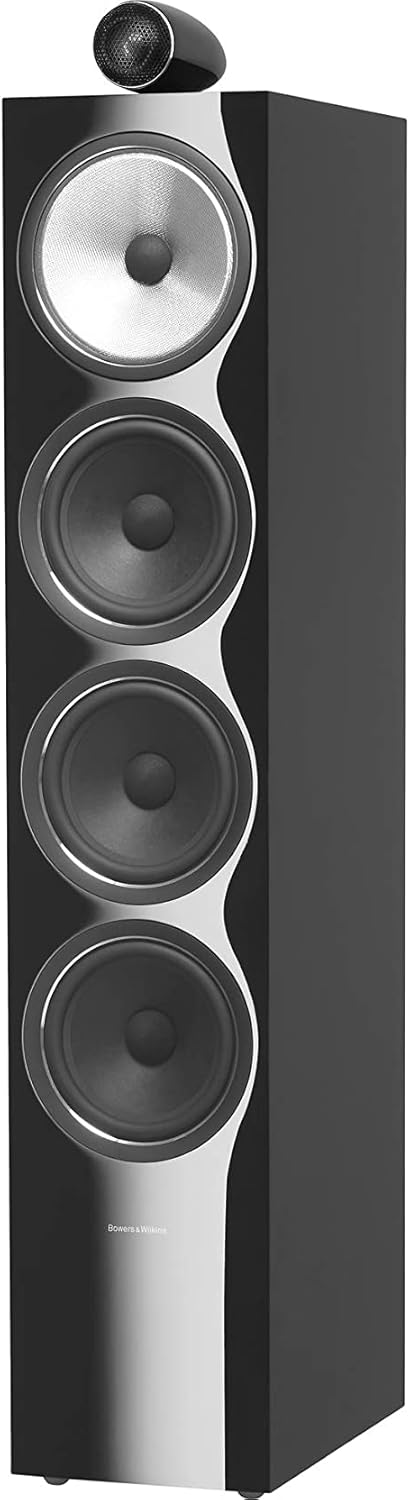
Image: Front view of the Bowers & Wilkins 702 S2 Floorstanding Speaker in Gloss Black, showcasing the tweeter-on-top design and multiple drivers.
Setup
Speaker Placement
Optimal speaker placement is crucial for sound quality. Position the speakers equidistant from your primary listening position, forming an equilateral triangle. Keep them away from corners and walls to avoid excessive bass resonance. Experiment with toe-in (angling speakers towards the listener) for best imaging.

Image: A diagram illustrating the ideal placement of floorstanding speakers in a room for optimal sound dispersion and listening experience.
Connecting to Your Amplifier
Ensure your amplifier is turned off before making any connections. Use high-quality speaker cables. Connect the positive (+) terminal on the speaker to the positive (+) terminal on your amplifier, and the negative (-) terminal on the speaker to the negative (-) terminal on your amplifier. For bi-wiring or bi-amping, refer to your amplifier's manual and remove the jumper links on the speaker terminals.

Image: Rear view of the Bowers & Wilkins 702 S2 speaker, highlighting the Flowport and the dual speaker terminal connections for amplifier hookup.
Attaching Spikes and Feet
The included spikes and feet provide stability and decouple the speaker from the floor, reducing unwanted vibrations. Screw the spikes into the threaded inserts at the base of the speaker. If placing on a hard surface, use the protective feet under the spikes. Adjust the height of each spike to ensure the speaker is level and stable.
Operating
Once connected, ensure your amplifier is powered on and the correct input source is selected. Start with a low volume level and gradually increase it to your desired listening level. These speakers are designed for high-fidelity audio reproduction and will benefit from a 'break-in' period of approximately 50-100 hours of normal use to achieve their full sonic potential.
The 702 S2 speakers are passive and require an external amplifier or receiver for operation. They are compatible with a wide range of audio sources including smartphones, tablets, MP3 players, desktops, televisions, projectors, and laptops when connected through an appropriate amplifier.
Maintenance
To maintain the appearance and performance of your speakers:
- Cleaning: Gently wipe the cabinet surfaces with a soft, dry, lint-free cloth. Avoid using abrasive cleaners, solvents, or polishes as they may damage the finish.
- Grilles: The speaker grilles can be removed for cleaning or for a different aesthetic. Handle them carefully to avoid damage.
- Drivers: Do not touch the speaker drivers (cones and tweeters) as this can cause damage.
- Placement: Avoid placing speakers in direct sunlight or near heat sources, which can affect the cabinet finish and driver materials over time.
Troubleshooting
| Problem | Possible Cause | Solution |
|---|---|---|
| No sound from speaker | Loose speaker cable connection; Amplifier not powered on or wrong input selected; Speaker protection circuit activated. | Check all speaker cable connections at both the speaker and amplifier. Ensure amplifier is on and correct input is chosen. Turn off amplifier, wait a few minutes, then restart. |
| Distorted or unclear sound | Damaged speaker cable; Overdriving the amplifier/speakers; Incorrect speaker placement; Room acoustics. | Inspect speaker cables for damage. Reduce volume. Adjust speaker placement. Consider room acoustic treatments. |
| Weak or no bass | Incorrect speaker polarity; Speakers too far from walls/corners; Foam plug inserted in Flowport. | Verify positive (+) and negative (-) connections are consistent. Experiment with moving speakers closer to walls (but not too close). Remove foam plug if present. |
Specifications
| Model Name | 702 S2 Gloss Black |
| Speaker Type | Tower |
| Product Dimensions (D x W x H) | 14.3"D x 7.9"W x 42.8"H |
| Item Weight | 84.4 pounds |
| Woofer Diameter | 6.5 Inches (Aerofoil Profile Bass Cones) |
| Tweeter | 1" Decoupled Carbon Dome Tweeter |
| Midrange Driver | 6" Continuum Cone FST Midrange Driver |
| Speaker Maximum Output Power | 300 Watts |
| Connectivity Technology | HDMI, USB, or 3.5mm jack (via amplifier) |
| Audio Output Mode | Stereo, Surround |
| Manufacturer | Bowers & Wilkins |
| ASIN | B07LD6VR34 |
| UPC | 714346329458 |

Image: A visual representation of the Bowers & Wilkins 702 S2 speaker with its key dimensions: 42.8 inches height, 7.9 inches width, and 14.3 inches depth.
Warranty and Support
The Bowers & Wilkins 702 S2 Floorstanding Speaker comes with a Limited Warranty. Please refer to the included Literature Pack for detailed terms and conditions of your warranty. Retain your proof of purchase for warranty claims.
For technical support, service, or further inquiries, please visit the official Bowers & Wilkins website or contact their customer support directly. You can also visit the Bowers & Wilkins Store on Amazon for more information.


