
Introduction
Thank you for choosing the G.K KZ SKS Bluetooth Wireless Earbuds. This manual provides detailed instructions for setting up, operating, and maintaining your earbuds to ensure optimal performance and longevity. Please read this manual carefully before use.
What's in the Box
The package includes the following items:
- KZ SKS Wireless Earbuds (Left and Right)
- Charging Case
- USB-C Charging Cable
- User Manual
- Product Warranty Card
- Multiple sizes of silicone ear tips

Image: KZ SKS Earbuds and accessories laid out, showing the earbuds, charging case, USB-C cable, and instruction manual.
Video: Unboxing the KZ SKS Bluetooth Wireless Earbuds, showing all included components and packaging.
Product Overview
The KZ SKS earbuds feature a hybrid driver design for high-fidelity sound and touch controls for easy operation.

Image: Detailed exploded view illustrating the internal components of the KZ SKS earbud, highlighting the hybrid driver system with a 30019 Balanced Armature and a 10mm Dynamic Driver for HD sound quality.
Touch Controls
Each earbud is equipped with a touch-sensitive surface for controlling various functions:
- Power: On/Off
- Calls: Answer/End/Reject
- Music: Play/Pause/Skip
- Volume: Up/Down
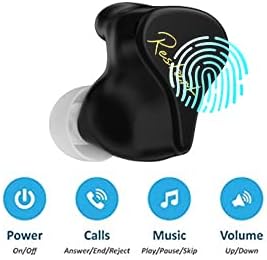
Image: Close-up of a KZ SKS earbud with icons indicating its touch control functionalities for power, managing calls, music playback, and volume adjustment.
Setup
Initial Use: Remove Insulation Sticker
Before first use, ensure you remove the protective insulation stickers from the charging contacts on both earbuds. Failure to do so will prevent the earbuds from charging.

Image: A diagram illustrating the location of the insulation sticker on the earbud's charging contacts and the process of removing it before initial use.
Video: Demonstrates removing the insulation sticker from the earbuds and the Bluetooth pairing process.
Bluetooth Pairing
- Remove both earbuds from the charging case. They will automatically enter pairing mode.
- On your mobile device, enable Bluetooth and search for available devices.
- Select "SKS" from the list of devices to connect.
- Once connected, you will hear a confirmation prompt.

Image: Visual guide for the first two steps of Bluetooth pairing, showing earbuds being removed from the case and the phone's Bluetooth settings screen.
Wearing the Earbuds
For optimal sound quality and comfort, ensure the earbuds are correctly inserted into your ears.
- Identify the Left (L) and Right (R) earbuds.
- Gently insert each earbud into the corresponding ear canal.
- Adjust the earbud until it fits snugly and comfortably, creating a good seal for sound isolation.

Image: A diagram demonstrating the proper insertion and adjustment of the earbuds into the ear for correct and comfortable wearing.
Operating Instructions
Music Control
- Play/Pause: Click the touch key on either earbud once.
- Next Song: Double-click the touch key on the right earbud.
- Previous Song: Double-click the touch key on the left earbud.
Call Control
- Answer/End Call: Click the touch key on either earbud once.
- Reject Call: Long press the touch key on either earbud for 2 seconds.
Voice Assistant (Siri)
- Activate Voice Assistant: Long press the touch key on either earbud for 2 seconds.
Game Mode
- Activate High-Performance Mode: Triple-click the touch key on either earbud.

Image: A visual representation of the touch control functions for the SKS True Wireless Earbuds, detailing single, double, triple clicks, and long presses for various operations.
Charging
To charge your KZ SKS earbuds and charging case:
- Place the earbuds into their respective slots in the charging case. Ensure the charging contacts align.
- Connect the USB-C charging cable to the charging port on the case and to a power source.
- The indicator light on the case will show the charging status. When the earbuds are placed in the charging case, the indicator light will be always on, indicating they are in the charging state.

Image: Two KZ SKS charging cases, one black and one blue, shown open with the earbuds inside, illustrating how they are placed for charging.
Maintenance
To ensure consistent performance and charging, regularly clean the charging contacts on both the earbuds and inside the charging case. Use a dry cotton swab to gently wipe any dust or debris.
Video: Demonstrates how to clean the earbud charging contacts with a cotton swab to resolve poor contact issues.
Troubleshooting: How to Reset the SKS
If you experience connectivity problems or function issues, you can try resetting your earbuds:
- On your mobile phone, cancel the connected "SKS" device and then turn off Bluetooth.
- Place both earbuds into the charging case. Ensure they are charging (indicator light on).
- Press and hold the touch buttons on both earbuds simultaneously for 10 seconds. The indicator lights will flash red and blue.
- Double-click the touch button on both earbuds. The red and blue lights will flash alternately 4 times, then shut down and enter the charging state. The reset is successful.
- Turn on Bluetooth on your phone and re-pair the earbuds.
Video: Detailed steps on how to reset the KZ SKS earbuds to resolve connectivity or functional issues.
Specifications
| Feature | Detail |
|---|---|
| Wireless Communication Technology | Bluetooth |
| Bluetooth Version | 5.2 |
| Control Type | Touch Control |
| Ear Placement | In Ear |
| Noise Control | Sound Isolation |
| Water Resistance Level | Waterproof |
| Item Weight | 4.6 ounces |
| Product Dimensions | 3.3 x 1.8 x 4.5 inches |
| Batteries | 1 Lithium Polymer batteries required (included) |
Warranty and Support
Your KZ SKS earbuds come with a product warranty. Please refer to the included Product Warranty Card for details regarding warranty coverage and terms. For further assistance or support, please contact G.K customer service.

Image: The Product Warranty Card for KZ SKS earbuds, providing information on warranty terms and manufacturer details.