1. Introduction
Welcome to the Ink Machines Stingray X2 Rotary Tattoo Machine user manual. This document provides essential information for the safe and effective operation, maintenance, and troubleshooting of your new tattoo machine. Please read this manual thoroughly before initial use to ensure optimal performance and longevity of your device.
The Stingray X2 is engineered for precision and reliability, designed to meet the demands of professional tattoo artists for both lining and color packing applications.
2. Safety Instructions
- Always ensure the machine is disconnected from the power supply before cleaning, maintenance, or changing components.
- Use only sterile needles and tubes. Follow all local and national health regulations for tattooing procedures.
- Wear appropriate personal protective equipment (PPE), including gloves, during operation.
- Keep the machine dry and away from liquids. Do not immerse the machine in water or cleaning solutions.
- Store the machine in a clean, dry, and secure location when not in use.
- This device is intended for professional use only.
3. Components Overview
The Stingray X2 Rotary Tattoo Machine consists of several key components designed for precise and consistent performance. Understanding these parts is crucial for proper setup and maintenance.

Figure 3.1: Exploded view diagram showing the various components of the Stingray tattoo machine, including the piston, needlebar, motor, and adjustment screws. Each part is numbered for identification.
Key components include the motor, cam, piston, needlebar retainer, and various adjustment screws. Refer to Figure 3.1 for a detailed breakdown of all parts.
4. Setup
Follow these steps for the initial setup of your Stingray X2 machine:
- Unpacking: Carefully remove the machine from its packaging. Inspect for any visible damage.
- Sterilization: Ensure all components that will come into contact with the client (e.g., grip, needle, tube) are properly sterilized according to industry standards.
- Attach Grip: Securely attach your preferred grip to the machine's tube vice.
- Insert Needle: Carefully insert a sterile tattoo needle into the tube and ensure it is properly seated and aligned.
- Connect Power: Connect the RCA cord to the machine's RCA contact point and then to a compatible power supply. Ensure the power supply is off before connecting.
- Adjust Needle Depth: Adjust the needle depth by rotating the grip or using the machine's adjustment mechanism, depending on your setup.

Figure 4.1: The Stingray X2 Rotary Tattoo Machine, ready for setup.

Figure 4.2: The Stingray X2 machine with a grip and needle installed, illustrating a typical setup configuration.
5. Operating the Stingray X2
The Stingray X2 is versatile, suitable for both precise lining and efficient color packing. Its design allows for consistent performance across various tattooing styles.
- Power On: Once all connections are secure, turn on your power supply.
- Voltage Adjustment: Start with a lower voltage setting and gradually increase it to find the optimal speed and power for your specific needle configuration and tattooing technique. Recommended voltage ranges can vary based on needle grouping and desired effect.
- Lining: For crisp lines, typically use a slightly higher speed and ensure consistent hand movement.
- Color Packing/Shading: For smooth color saturation and shading, a slightly lower speed and controlled, even passes are often preferred.
- Needle Depth: Continuously monitor and adjust needle depth as needed during the tattooing process.

Figure 5.1: The Stingray X2 is designed for versatility in both lining and color packing.
6. Maintenance
Regular maintenance ensures the longevity and optimal performance of your Stingray X2 machine.
- Cleaning: After each use, disconnect the machine from power. Wipe down the exterior surfaces with a suitable disinfectant spray or wipe. Avoid getting liquids into the motor housing.
- Lubrication: Periodically apply a small amount of high-quality machine lubricant to moving parts as indicated in the component diagram (Figure 3.1), particularly the cam and piston areas. Do not over-lubricate.
- Inspection: Regularly inspect the RCA connection, springs, and other visible parts for wear or damage. Replace worn components as necessary.
- Storage: Store the machine in a clean, dry, and dust-free environment.
7. Troubleshooting
This section addresses common issues you might encounter with your Stingray X2 machine.
| Problem | Possible Cause | Solution |
|---|---|---|
| Machine not starting | Loose power connection, faulty power supply, motor issue. | Check RCA cable connection. Test with a different power supply. If issue persists, contact support. |
| Inconsistent needle movement | Worn cam, insufficient lubrication, bent needlebar. | Inspect cam and lubricate. Replace needlebar if bent. |
| Excessive vibration or noise | Loose components, lack of lubrication, motor wear. | Tighten all screws. Apply lubricant. If noise persists, motor may require service. |
| Machine overheating | Prolonged use at high voltage, motor strain. | Reduce voltage or take breaks. Ensure proper ventilation around the machine. |
8. Specifications
Key technical specifications for the Ink Machines Stingray X2 Rotary Tattoo Machine:
- Model: Stingray X2
- Brand: Ink Machines
- UPC: 644287731761
- ASIN: B07LD1QRR3
- GTIN: 644287731761
- Application: Designed for Lining and Color Packing
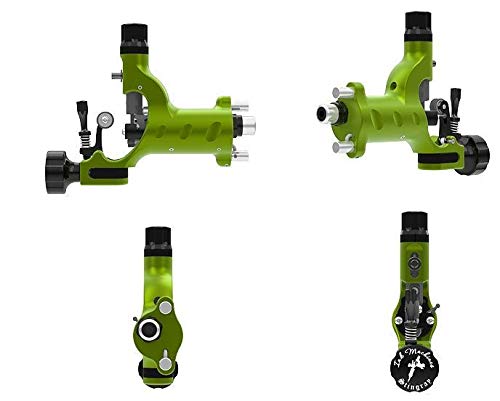
Figure 8.1: Multiple views of the Stingray X2 machine.
9. Warranty and Support
Ink Machines products are manufactured to high standards. For information regarding warranty coverage, terms, and conditions, please refer to the official Ink Machines website or contact your authorized dealer.
For technical support, spare parts, or service inquiries, please contact Ink Machines customer service through their official channels. Providing your product's model number (Stingray X2) and serial number (if applicable) will help expedite your support request.