Product Overview
The DJI Mavic 2 Enterprise Advanced Fly More Kit is an essential accessory package designed to extend the operational capabilities of your Mavic 2 Enterprise Advanced drone. This kit provides critical components to ensure longer flight times, efficient charging, and convenient transport, allowing users to maximize their drone's utility in various missions.
Key Features
- Backup Batteries: Includes two intelligent self-heating flight batteries for extended mission durations.
- Flexible Charging: Features a vehicle-mounted charger for on-the-go power replenishment.
- Safe Travels: Comes with a single-shoulder bag specifically designed for secure storage and transport of the Mavic 2 Enterprise Advanced and its accessories.
- Bulk Charge: A battery manager is included, capable of recharging up to four batteries by prioritizing one at a time.
- Spare Propellers: Provides two sets of low-noise propellers as replacements to prevent operational downtime.
What's in the Box
- 2 x DJI Intelligent Self-Heating Flight Battery for Mavic 2 Enterprise
- 1 x DJI Car Charger for Mavic 2 Pro/Zoom/Enterprise Batteries
- 1 x DJI Battery Charging Hub for Mavic 2 Pro/Zoom/Enterprise Batteries (Battery Manager)
- 1 x DJI Battery to Power Bank Adapter for Mavic 2 Pro/Zoom/Enterprise Batteries (Battery-charger converter)
- 2 x DJI Low-Noise Propellers for Mavic 2 Pro/Zoom/Enterprise (One Pair each)
- 1 x DJI Shoulder Bag for Mavic 2 Pro/Zoom/Enterprise
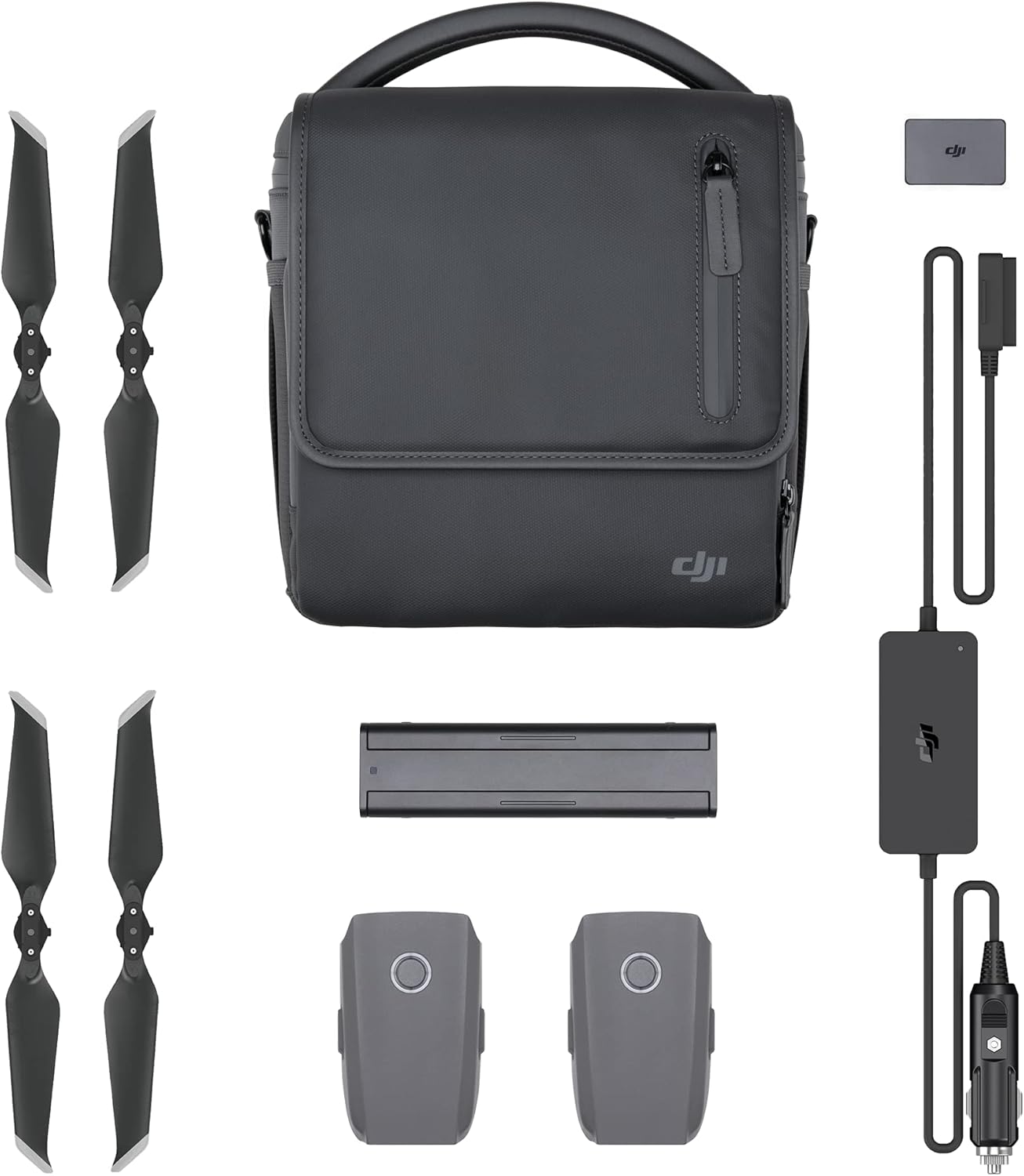
Figure 1: All components included in the DJI Mavic 2 Enterprise Advanced Fly More Kit. This image displays the shoulder bag, two intelligent flight batteries, two pairs of propellers, a car charger, and a battery manager.
Setup Guide
This section provides instructions for setting up the components of your Fly More Kit for optimal use.
1. Charging Intelligent Flight Batteries
The kit includes two intelligent self-heating flight batteries. Before first use, ensure batteries are fully charged.
- Using the Battery Manager (Charging Hub):
Connect the battery manager to a compatible power source (e.g., the standard DJI charger that came with your drone, not included in this kit). Insert up to four intelligent flight batteries into the slots. The battery manager will charge batteries sequentially, prioritizing the battery with the highest charge level first, then moving to the next.

Figure 2: The DJI Battery Manager, used for charging multiple intelligent flight batteries efficiently.
- Using the Vehicle-Mounted Charger (Car Charger):
Plug the vehicle-mounted charger into your vehicle's 12V power outlet (cigarette lighter socket). Connect an intelligent flight battery to the charger. The charger will begin charging the battery. Ensure your vehicle's engine is running for optimal charging performance and to prevent draining the vehicle's battery.

Figure 3: The DJI Car Charger, designed for charging intelligent flight batteries from a vehicle's power outlet.

Figure 4: Two Intelligent Flight Batteries, essential for extended drone operation.
2. Installing Propellers
The kit includes two pairs of low-noise propellers. These are replacement propellers for your Mavic 2 Enterprise Advanced drone.
- Identify the correct propeller type (clockwise and counter-clockwise) by checking the markings on the propeller base.
- Match the propeller type to the corresponding motor on the drone.
- Press down on the propeller and twist in the direction indicated on the propeller base until it locks securely into place.
- Ensure all propellers are firmly attached before flight.
3. Organizing the Single-Shoulder Bag
The single-shoulder bag is designed to securely hold your Mavic 2 Enterprise Advanced drone and its accessories.

Figure 5: The DJI Single-Shoulder Bag, providing secure and convenient transport for your drone and accessories.
- Utilize the padded compartments and dividers within the bag to snugly fit the drone, intelligent flight batteries, battery manager, car charger, and spare propellers.
- Ensure all items are placed securely to prevent movement and potential damage during transport.
- Adjust the shoulder strap for comfortable carrying.
Operation
This section details the operational aspects of the components within the Fly More Kit.
Intelligent Flight Batteries
- Self-Heating Function: These batteries feature a self-heating function, which automatically activates in low-temperature environments to bring the battery to an optimal operating temperature. This ensures reliable performance even in cold conditions.
- Battery Level Check: Press the power button once on the battery to check the current charge level via the LED indicators.
- Powering On/Off: Press the power button once, then press and hold for two seconds to power the battery on or off.
Battery Manager (Charging Hub)
- The battery manager intelligently manages the charging process for multiple batteries. It will charge batteries one by one, starting with the battery that has the highest remaining charge, until all connected batteries are fully charged.
- Monitor the charging status via the LED indicators on each battery.
Vehicle-Mounted Charger (Car Charger)
- Designed for convenient charging while traveling. Connect to a 12V vehicle power outlet.
- Ensure a stable power supply from the vehicle for efficient charging.
Battery to Power Bank Adapter
- This adapter allows you to use your intelligent flight battery as a power bank to charge other USB-powered devices, such as your remote controller or mobile phone.
- Connect the adapter to a charged intelligent flight battery, then connect your USB device to the adapter.
Maintenance and Care
Proper maintenance extends the lifespan and ensures the reliability of your Fly More Kit components.
Intelligent Flight Batteries
- Storage: Store batteries in a cool, dry place away from direct sunlight and extreme temperatures. For long-term storage, ensure batteries are charged to approximately 50-60% to maintain battery health.
- Charging Cycles: Avoid overcharging or completely discharging batteries. Follow recommended charging practices.
- Cleaning: Keep battery terminals clean and free of dust or debris. Use a dry, soft cloth for cleaning.
- Inspection: Regularly inspect batteries for any signs of swelling, damage, or leakage. Discontinue use immediately if any issues are observed.
Propellers
- Inspection: Before each flight, inspect propellers for cracks, bends, nicks, or any other damage. Damaged propellers can affect flight stability and safety.
- Replacement: Replace damaged propellers immediately with new ones from the kit. Ensure correct propeller type is installed on the corresponding motor.
- Cleaning: Keep propellers clean from dirt or debris that might accumulate during operation.
Chargers and Bag
- Chargers: Keep the battery manager and car charger clean and dry. Avoid exposing them to moisture or extreme temperatures. Store them in a safe place when not in use.
- Shoulder Bag: Clean the bag with a damp cloth as needed. Ensure it is dry before storing equipment. Avoid overloading the bag to prevent damage to zippers or seams.
Troubleshooting
This section addresses common issues you might encounter with your Fly More Kit components.
Battery Not Charging or Charging Slowly
- Check Connections: Ensure all cables are securely connected to the battery, charger, and power source. Loose connections can prevent charging or lead to slow charging.
- Power Source: Verify that the power outlet (wall or vehicle) is functional and providing adequate power. For car chargers, ensure the vehicle's engine is running.
- Charger Functionality: If using the battery manager, ensure it is properly powered. If using the car charger, check its indicator lights (if any) to confirm it's receiving power.
- Battery Temperature: Intelligent batteries may not charge if they are too hot or too cold. Allow them to reach room temperature. The self-heating function will activate if too cold, but charging will only begin once an optimal temperature is reached.
- Battery Health: Over time, battery capacity can degrade. If a battery consistently fails to charge or holds very little charge, it may need replacement.
Propeller Issues
- Vibration/Unstable Flight: This is often caused by damaged, unbalanced, or incorrectly installed propellers. Inspect all propellers for damage and ensure they are securely attached to the correct motors. Replace any damaged propellers.
- Unusual Noise: Similar to vibration, unusual noises during drone operation can indicate a damaged or loose propeller.
General Component Malfunction
- If any component (charger, battery manager) is not functioning as expected, first ensure it is clean, dry, and properly connected.
- If issues persist, refer to the warranty information or contact DJI support.
Specifications
Detailed technical specifications for the DJI Mavic 2 Enterprise Advanced Fly More Kit components.
| Attribute | Value |
|---|---|
| Product Dimensions | 5 x 4.02 x 4.02 inches (Kit packaging) |
| Item Weight | 10.5 ounces (Total kit) |
| Item Model Number | CP.EN.00000074.01 |
| Batteries Included | 2 x Lithium Polymer (Intelligent Flight Batteries) |
| Manufacturer | DJI |
| Date First Available | December 12, 2018 |
Warranty and Support
Information regarding product warranty and how to obtain support.
Warranty Information
- Intelligent Self-Heating Flight Batteries: Limited 6-Month Warranty.
- Vehicle-Mounted Charger: Limited 3-Month Warranty.
- Battery Charging Hub: Limited 3-Month Warranty.
- Battery to Power Bank Adapter: Limited 3-Month Warranty.
- Low-Noise Propellers: No specific warranty period mentioned, typically considered consumables.
- Shoulder Bag: Limited 3-Month Warranty.
Please note: Warranty periods are subject to change and may vary by region. Always refer to the official DJI warranty policy provided with your product or on the official DJI website for the most accurate and up-to-date information.
Customer Support
For technical assistance, troubleshooting beyond this manual, or warranty claims, please contact DJI Customer Support through their official website. Have your product model number (CP.EN.00000074.01) and purchase details ready when contacting support.
You can find more information and support resources by visiting the official DJI website: www.dji.com


