
1. Introduction
1.1 Product Overview
The Alba Urmet E7CM is a 7-inch LCD color video phone monitor designed for indoor use within home security systems. This advanced monitor provides a clear visual interface for monitoring and communication, enhancing the security of your premises.
Key features include:
- High-resolution 7-inch LCD color display.
- Two-way hands-free duplex audio for clear communication.
- Integrated door lock open function.
- Door open status indicator for enhanced security awareness.
- Ability to monitor CCTV input.
- Built-in auto selector switch for managing two door cameras.
- Soft touch buttons for intuitive control.
- Built-in memory to store 2 images per call, totaling 50 images in 50 groups, with date/time stamp and OSD menu control.
- Additional SD card slot for video recording (SD card not included).
- Built-in SMPS power supply.
1.2 Package Contents
Please check the package for the following items:
- Alba Urmet E7CM 7-inch Monitor
- Mounting Bracket
- Mounting Screws and Wall Plugs
- Connection Cables (specific to installation needs)
- User Manual (this document)
If any items are missing or damaged, please contact your supplier immediately.
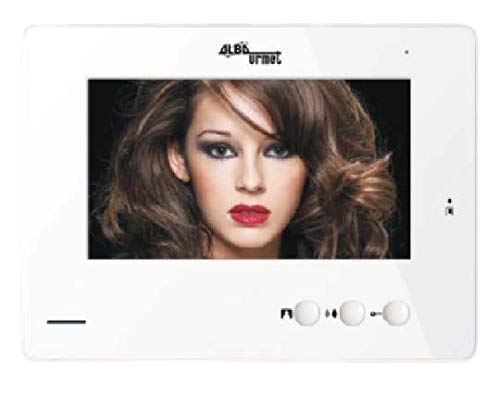
Figure 1: Alba Urmet E7CM 7-inch Monitor. This image displays the front view of the monitor, highlighting its 7-inch screen and soft touch buttons.
2. Safety Information
Read all safety instructions carefully before installing or operating the device. Keep this manual for future reference.
- Electrical Safety: Installation should only be performed by qualified personnel. Ensure power is disconnected before any wiring.
- Environment: Do not expose the monitor to extreme temperatures, humidity, dust, or direct sunlight. Operate within specified environmental conditions.
- Cleaning: Use a soft, dry cloth for cleaning. Do not use liquid or aerosol cleaners.
- Ventilation: Ensure proper ventilation around the unit to prevent overheating. Do not block ventilation openings.
- Damage: If the unit is damaged, do not attempt to repair it yourself. Contact qualified service personnel.
3. Setup & Installation
3.1 Mounting the Monitor
The E7CM monitor is designed for surface mounting. Choose a suitable indoor location, away from direct heat sources or moisture.
- Mark the desired mounting position on the wall. The surface mount dimensions are (W-220 x H-160 x D-40)mm.
- Drill holes for the mounting bracket according to the template (if provided) or the bracket itself.
- Secure the mounting bracket to the wall using the provided screws and wall plugs.
- Ensure the bracket is firmly attached and level.
3.2 Wiring Connections
Before making any connections, ensure the main power supply is OFF. Refer to the wiring diagram (not provided in this manual, typically found in a separate installation guide or on the unit itself) for specific connection points.
- Door Camera Connection: Connect the door camera(s) to the designated input terminals. The monitor features a built-in auto selector switch for two door cameras.
- CCTV Input: If integrating with an existing CCTV system, connect the CCTV video output to the monitor's CCTV input terminal.
- Door Lock Control: Connect the door lock mechanism to the monitor's door lock output terminals. Ensure correct polarity.
- Power Supply: The monitor has a built-in SMPS power supply. Connect the AC power input cable to a suitable power outlet.
After all connections are made, carefully mount the E7CM monitor onto the secured bracket.
4. Operating Instructions
4.1 Basic Operation
Once powered on, the monitor will display a standby screen. When a visitor presses the call button on the door camera, the monitor will activate.
- Answering a Call: When a call comes in, the monitor will display the visitor's image and ring. Press the Answer button (refer to button icons on your device) to establish two-way hands-free duplex audio communication.
- Viewing Live Feed: At any time, you can press the Monitor button to view the live feed from the connected door camera(s) or CCTV input. The auto selector switch will cycle through available cameras.
- Opening the Door: During a call or while monitoring, press the Door Lock button to activate the connected door lock mechanism. The door open status indicator will illuminate to confirm the door is unlocked.
- Ending a Call: Press the End Call button to terminate communication.
4.2 Memory Function and SD Card Recording
The E7CM monitor includes a built-in memory and an SD card slot for recording.
- Built-in Memory: The monitor automatically stores 2 images per call, up to a total of 50 images in 50 groups. Each stored image includes a date and time stamp.
- Accessing Stored Images: Use the OSD (On-Screen Display) menu control via the soft touch buttons to navigate and view stored images.
- SD Card Slot: Insert an SD card (not supplied) into the designated slot for video recording. Refer to the OSD menu for options to initiate and manage video recordings. Ensure the SD card is formatted correctly (FAT32 recommended).
4.3 OSD Menu Control
The soft touch buttons allow navigation through the On-Screen Display (OSD) menu to adjust settings, view logs, and manage recordings.
- Menu Button: Press to enter or exit the OSD menu.
- Navigation Buttons: Use the arrow buttons (Up/Down/Left/Right) to navigate through menu options.
- Confirm Button: Press to select an option or confirm a setting.
Detailed OSD menu options and their functions are typically described within the OSD itself or in a more advanced technical manual.
5. Maintenance
5.1 Cleaning
To maintain the appearance and functionality of your E7CM monitor:
- Gently wipe the screen and exterior surfaces with a soft, dry, lint-free cloth.
- Do not use abrasive cleaners, waxes, or solvents as these can damage the finish and screen.
- Avoid spraying liquids directly onto the monitor.
5.2 General Care
- Ensure the monitor is not exposed to excessive heat, cold, or humidity.
- Periodically check all cable connections to ensure they are secure.
- Avoid placing heavy objects on top of the monitor.
6. Troubleshooting
If you encounter issues with your Alba Urmet E7CM monitor, refer to the following common problems and solutions:
| Problem | Possible Cause | Solution |
|---|---|---|
| No power/Monitor not turning on | Power cable disconnected; No power from outlet; Internal fault. | Check power cable connection. Verify power outlet is functional. If problem persists, contact support. |
| No video from door camera/CCTV | Camera cable disconnected/damaged; Camera not powered; Incorrect input selected. | Check camera connections. Ensure cameras are powered. Use the monitor button to cycle through inputs. |
| No audio during call | Microphone/speaker issue; Volume too low; Connection issue. | Check volume settings in OSD. Verify audio connections. |
| Door lock not activating | Door lock wiring issue; Lock mechanism fault; Insufficient power to lock. | Check door lock wiring. Ensure the lock mechanism is functional. Consult an electrician if necessary. |
| Cannot store images/record video | Built-in memory full; SD card not inserted/formatted; SD card faulty. | Delete old images from memory. Insert a compatible, formatted SD card. Try a different SD card. |
If the problem persists after attempting these solutions, please contact customer support.
7. Specifications
The following are the technical specifications for the Alba Urmet E7CM Monitor:
| Feature | Detail |
|---|---|
| Model Number | E7CM |
| Display | 7-inch LCD Color |
| Audio | 2-way Hands-free Duplex Audio |
| Door Lock Function | Yes, with Door Open Status Indicator |
| Camera Inputs | CCTV Input, Built-in Auto Selector for Two Door Cameras |
| Control Interface | Soft Touch Buttons, OSD Menu Control |
| Memory | Built-in, stores 2 images/call (max 50 images in 50 groups) with Date/Time Stamp |
| Storage Expansion | Additional SD Card Slot for Video Recording |
| Power Supply | Built-in SMPS |
| Mounting Type | Surface Mount |
| Dimensions (W x H x D) | 220 x 160 x 40 mm |
| Color | Gloss White |
| Primary Material | Metal |
| Manufacturer | Alba Urmet |
8. Warranty & Support
8.1 Warranty Information
This product comes with a standard manufacturer's warranty. Please refer to the warranty card included with your purchase or contact your retailer for specific warranty terms and conditions. The warranty typically covers defects in materials and workmanship under normal use.
8.2 Customer Support
For technical assistance, troubleshooting, or service inquiries, please contact your authorized Alba Urmet dealer or the customer support provided by your point of purchase. When contacting support, please have your product model number (E7CM) and purchase details ready.