
XRONG B07LBFN4ST
XRONG Bluetooth Audio Receiver Instruction Manual
Model: B07LBFN4ST
1. Introduction
This manual provides detailed instructions for the operation and maintenance of your XRONG Bluetooth Audio Receiver. Please read this manual thoroughly before using the device to ensure proper functionality and safety.
2. Product Overview and Components
The XRONG Bluetooth Audio Receiver is a versatile digital player designed to enhance your audio experience in various settings, including vehicles and home audio systems. It features Bluetooth connectivity, FM radio, MP3 playback from USB and SD cards, and a 4-digit LED display.

Image: The XRONG Bluetooth Audio Receiver unit with its various accessories, including audio cables, USB charging cable, IR remote control, and magnetic stand.
2.1 Package Contents:
- XRONG Bluetooth Audio Receiver Unit
- IR Remote Control
- Magnetic Device Holder Mount
- 3.5mm Audio Cables (2x)
- USB Charging Cable
- 3.5mm Female to 2 RCA Male Cable
- FM Antenna
2.2 Device Features:
- Bluetooth 4.2 for wireless audio streaming and hands-free calling.
- Integrated FM Radio (87.5MHz-108MHz).
- MP3 Digital Player with support for USB disk and TF (Micro SD) card playback.
- 4-Digital LED Display for status indication.
- 3.5mm Audio Output for connection to external audio systems.
- Dual Port 2.1A USB Car Charger (included separately).
- Infrared Remote Control for convenient operation.
- Built-in microphone for hands-free calls with CVC Noise Cancellation.
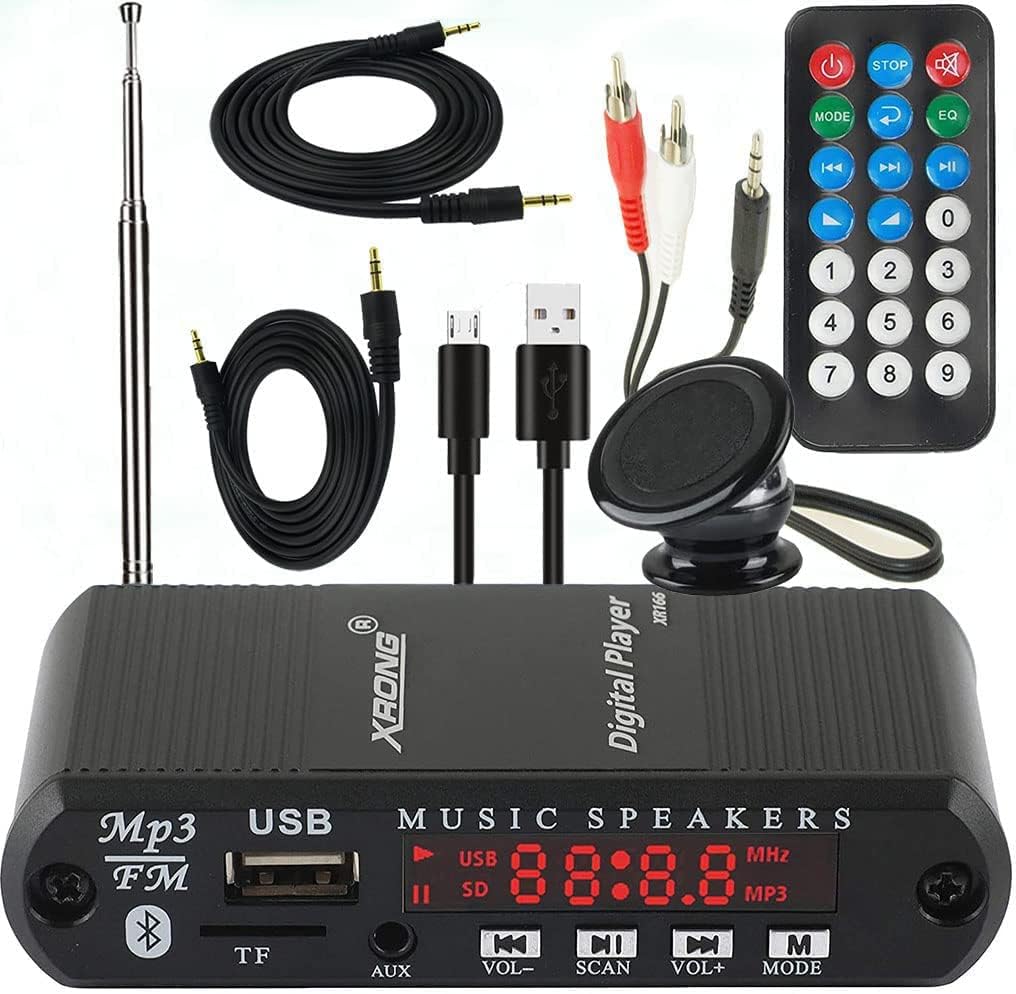
Image: A detailed view of the XRONG Bluetooth Audio Receiver showing the front panel with USB port, TF card slot, AUX input, LED display, and control buttons.
3. Setup
3.1 Powering the Device:
- Connect the USB charging cable to the device's power input.
- Plug the other end of the USB cable into a compatible USB power source (e.g., the included dual-port car charger, a USB wall adapter, or a car's USB port).
- The device will automatically power on when connected to a power source.
3.2 Mounting the Device:
The included Magnetic Device Holder Mount can be used to secure the receiver in your vehicle or other desired location.

Image: A close-up of the 3M VHB adhesive, indicating its use for secure and residue-free mounting of the device.
- Clean the desired mounting surface thoroughly.
- Peel off the protective film from the 3M VHB adhesive on the magnetic mount.
- Press the mount firmly onto the surface for several seconds to ensure a strong bond.
- Attach the XRONG receiver to the magnetic mount.
3.3 Connecting to Audio System:
Use the provided 3.5mm audio cables to connect the receiver's 3.5mm audio output to your car stereo's AUX input or a home audio system's input.

Image: The XRONG Bluetooth Audio Receiver connected to a home stereo system, with a smartphone streaming music wirelessly to the receiver.
4. Operating Instructions
4.1 Power On/Off:
The device powers on automatically when connected to a power source. To turn off, disconnect from power.
4.2 Mode Selection:
Press the "MODE" button on the device or remote control to switch between available modes: Bluetooth, FM Radio, USB Playback, SD Card Playback, and AUX Input.
4.3 Bluetooth Pairing:
- Ensure the device is in Bluetooth mode (LED display will show "BLUE").
- On your smartphone or Bluetooth-enabled device, enable Bluetooth and search for available devices.
- Select "XRONG" from the list of devices to pair.
- Once paired, the device will automatically connect to the last paired phone when powered on (ensure phone's Bluetooth is active).

Image: The XRONG Bluetooth Audio Receiver installed in a car dashboard, demonstrating its hands-free calling capability with a smartphone displaying an incoming call.
4.4 Hands-Free Calling:
When connected via Bluetooth, you can make and receive calls through your car's audio system.
- Answer/End Call: Short press the "Play/Pause" button on the device or the "Answer" button on the remote.
- Reject Call: Long press the "Play/Pause" button on the device or the "Reject" button on the remote.
- The built-in microphone with CVC Noise Cancellation ensures clear communication.

Image: A visual representation highlighting the CVC Noise Cancellation technology and the built-in high-sensitivity microphone for superior hands-free call quality.
4.5 FM Radio Operation:
- Switch to FM Radio mode.
- Use the "SCAN" button to automatically scan and save available FM stations.
- Use the "Previous" and "Next" buttons (|<>|) to navigate between saved stations.
4.6 USB/SD Card Playback:
- Insert a USB disk or TF (Micro SD) card containing MP3 audio files into the respective slot.
- The device will automatically switch to USB or SD card mode and begin playback.
- Use the "Play/Pause", "Previous", and "Next" buttons to control playback.

Image: A close-up view of the XRONG Digital Player, clearly showing the TF (Micro SD) card slot and the USB disk port for media playback.
4.7 Equalizer (EQ) Settings:
The device offers 7 selectable EQ settings to customize your audio experience.

Image: A graphic illustrating the seven selectable equalizer (EQ) settings available on the device: Normal, Pop, Rock, Jazz, Classic, Country, and Low-Bass.
Press the "EQ" button on the remote control to cycle through the following modes:
- Normal
- Pop
- Rock
- Jazz
- Classic
- Country
- Low-Bass
4.8 Remote Control Usage:
The infrared remote control provides full functionality for operating the device from a distance.

Image: A hand holding the infrared remote control, demonstrating its use to operate the XRONG Bluetooth Audio Receiver mounted on a car dashboard.
Ensure there is a clear line of sight between the remote and the device's IR receiver for optimal performance.
5. Maintenance
- Keep the device dry. Moisture can damage electronic components.
- Clean the device with a soft, dry cloth. Do not use abrasive cleaners or solvents.
- Avoid exposing the device to extreme temperatures or direct sunlight for prolonged periods.
- Do not disassemble the device. Repairs should only be performed by qualified personnel.
6. Troubleshooting
| Problem | Possible Cause | Solution |
|---|---|---|
| No power | Not connected to power source; faulty cable/adapter. | Ensure power cable is securely connected. Try a different USB port or power adapter. |
| Cannot pair Bluetooth | Device not in Bluetooth mode; phone's Bluetooth off; device already paired to another phone. | Switch device to Bluetooth mode. Ensure phone's Bluetooth is on. Disconnect from other devices. |
| No audio output | Volume too low; incorrect audio cable connection; wrong input selected on car/home stereo. | Increase volume on both receiver and connected audio system. Check 3.5mm cable connection. Select correct AUX input on your stereo. |
| USB/SD card not playing | Unsupported file format; corrupted media; card/drive not inserted correctly. | Ensure files are in MP3 format. Reinsert media. Try a different USB drive or SD card. |
| Remote control not working | Battery depleted; no line of sight; IR receiver blocked. | Replace remote battery. Ensure direct line of sight to the device. Remove any obstructions. |
7. Specifications
| Feature | Detail |
|---|---|
| Model | B07LBFN4ST |
| Bluetooth Version | 4.2 |
| FM Frequency Range | 87.5MHz - 108MHz |
| Supported Audio Formats | MP3 (from USB disk/TF card) |
| Connectivity | Bluetooth, USB, TF Card, 3.5mm AUX Output |
| Display | 4-Digital LED Display |
| Power Source | Corded Electric (via USB) |
| Product Dimensions | 6.69 x 1.97 x 0.98 inches |
| Item Weight | 8.8 ounces (0.25 Kilograms) |
| Manufacturer | XRONG |
8. Warranty and Support
This product comes with a one-year quality guarantee. In case of quality problems within one year from the date of purchase, a free replacement will be provided.
For technical support or warranty claims, please contact XRONG customer service through the retailer where the product was purchased or visit the official XRONG store on Amazon: XRONG Amazon Store.
Ask a question about this manual
Ask about setup, troubleshooting, compatibility, parts, safety, or missing instructions. Manuals+ will review the question and use this page’s manual context to help answer it.