
Product Overview
This manual provides detailed instructions for the safe and efficient operation, installation, and maintenance of your Global Industrial Portable Heavy Duty Commercial Dehumidifier, Model 246687. This unit is designed to effectively remove moisture from the air in areas up to 540 square feet, making it suitable for various commercial and industrial settings. Please read this manual thoroughly before operating the unit and retain it for future reference.

Figure 1: Front-left view of the Global Industrial Portable Heavy Duty Commercial Dehumidifier, showcasing its robust design with wheels and handle for mobility.
Setup Instructions
1. Unpacking and Placement
- Carefully remove the dehumidifier from its packaging.
- Place the unit on a firm, level surface in the desired location. Ensure there is at least 12 inches of air space on all sides of the unit for proper air circulation.
- The unit features 8" x 2" pneumatic rubber wheels and a sturdy handle for easy maneuverability.

Figure 2: Side view of the dehumidifier, illustrating its compact design and robust wheels for transport.
2. Power Connection
- Ensure the power cord is free from damage.
- Plug the unit into a grounded 115V electrical outlet.

Figure 3: Rear view of the dehumidifier, showing the power cord neatly coiled and ready for connection.
3. Drainage Options
The dehumidifier offers two methods for water collection:
A. Removable Water Bucket
- The unit includes a removable 11.6-pint bucket for manual emptying.
- When the bucket is full, the unit will automatically shut off, and an indicator light on the control panel will illuminate.
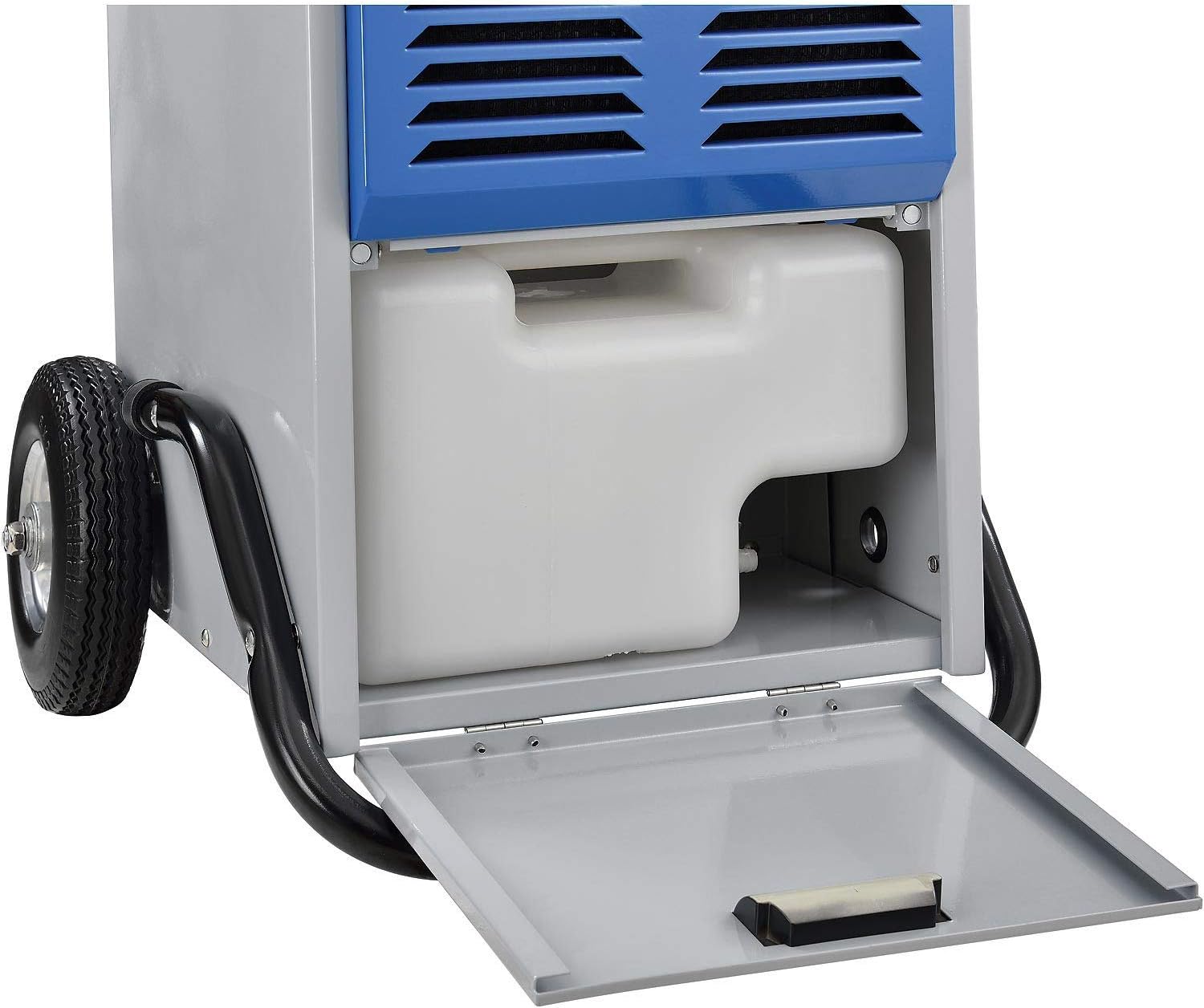
Figure 4: The removable 11.6-pint water collection bucket, easily accessible for manual emptying.
B. Continuous Drainage
- For continuous operation without manual emptying, connect the included 20-foot drainage hose to the designated drain port on the unit.
- Route the hose to a suitable drain, ensuring it is sloped downwards to allow gravity to drain the water.

Figure 5: The included 20-foot drainage hose for continuous water removal.
Operating Instructions
1. Control Panel Overview
The dehumidifier features an intuitive LED display and control panel for easy operation.

Figure 6: Close-up view of the LED control panel, showing the digital display and various function buttons.
2. Basic Operation
- Power On/Off: Press the 'Power' button to turn the unit on or off.
- Setting Humidity: Use the 'ADD' and 'MINUS' buttons to set your desired humidity level. The humidistat will maintain this level automatically.
- Fan Speed: Adjust the fan speed using the dedicated fan button. Higher speeds provide faster dehumidification.
- Timer Function: The 'TIMER' button allows you to set a delayed start or stop time for the unit.
- Auto Shut-off: The unit will automatically shut off when the water collection bucket is full or if the continuous drain hose is blocked. A 'FULL' indicator light will illuminate.
- Defrost Function: The unit is equipped with an automatic defrost function to prevent ice buildup on the coils in low-temperature environments. A 'DEFROST' indicator light will illuminate during this cycle.
Video 1: This video demonstrates the key features of a similar Keystone dehumidifier model, including easy maneuverability, quiet operation, and auto shut-off functionality. It highlights the user-friendly control panel and continuous drainage option.
Maintenance
1. Emptying the Water Bucket
- When the 'FULL' indicator light illuminates, carefully remove the water bucket from the front of the unit.
- Empty the collected water into a sink or drain.
- Replace the bucket securely into the unit. Ensure it is properly seated to allow the unit to resume operation.
2. Cleaning the Air Filter
- The dehumidifier includes washable air filters. Regular cleaning is essential for optimal performance.
- To clean, gently pull out the filter from its slot on the front panel.
- Wash the filter with warm, soapy water. Rinse thoroughly and allow it to air dry completely before reinserting.
- Clean the filter at least once every two weeks, or more frequently depending on usage and air quality.
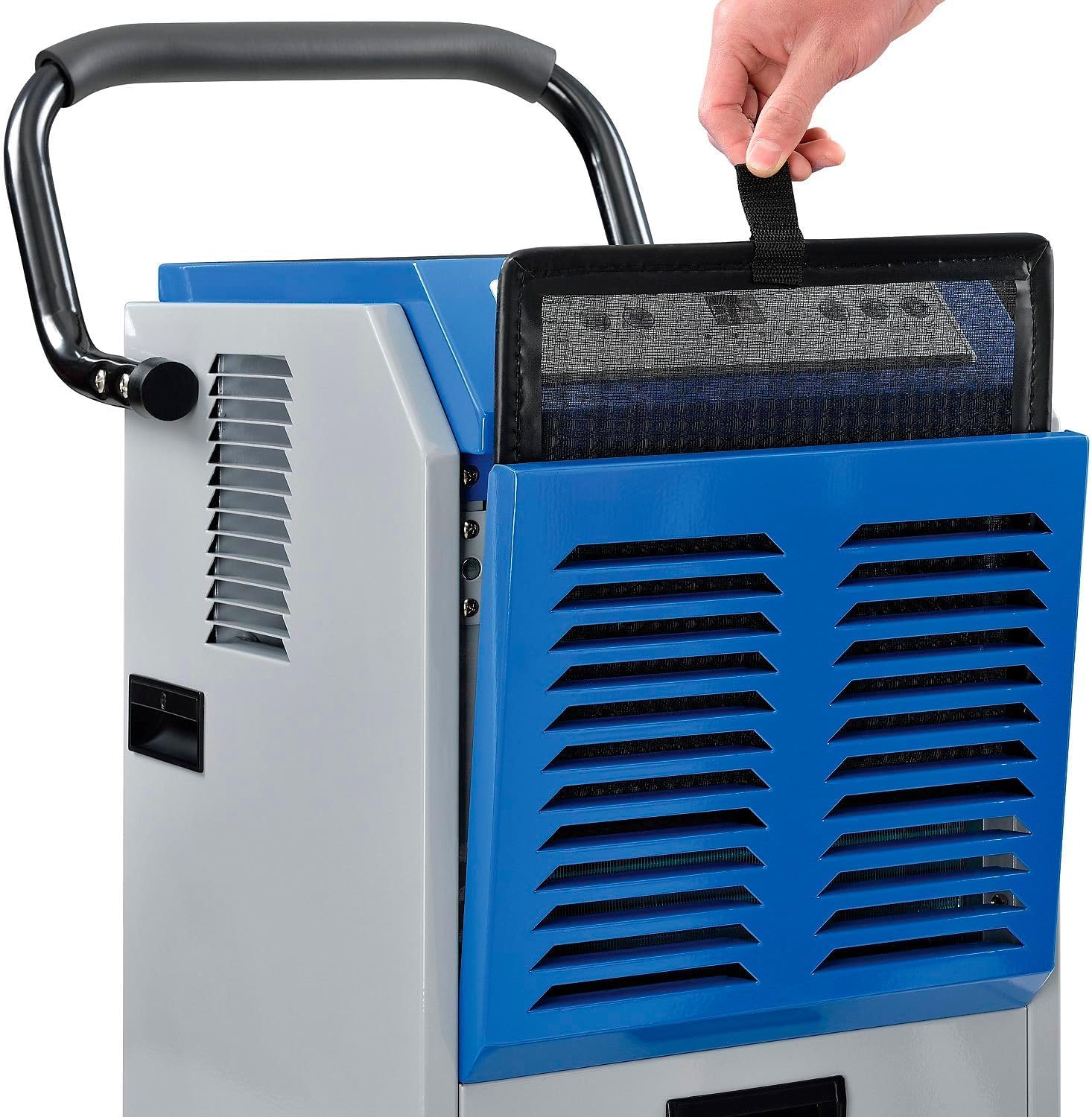
Figure 7: A hand demonstrating the removal of the washable air filter for cleaning.
3. Unit Exterior Cleaning
- Wipe the exterior of the unit with a soft, damp cloth. Do not use harsh chemicals or abrasive cleaners.
4. Storage
- If storing the unit for an extended period, ensure the water bucket is empty and the filter is clean and dry.
- Store the unit in an upright position in a cool, dry place.
Troubleshooting
Before contacting customer support, please refer to the following common issues and solutions:
- Unit does not turn on:
Check if the power cord is securely plugged into a working 115V outlet. Ensure the water bucket is correctly installed and not full. - Unit is running but not collecting water:
Verify that the air filter is clean and not obstructed. Ensure the ambient temperature and humidity are within the unit's operating range (e.g., above 41°F / 5°C). Check if the continuous drain hose is properly connected and not kinked or blocked. - Unit is making unusual noise:
Ensure the unit is placed on a stable, level surface. Check for any loose parts or obstructions in the air intake or exhaust vents. - Water is leaking from the unit:
Confirm the water bucket is correctly seated. If using continuous drainage, check the hose connection and ensure there are no leaks or blockages.
Specifications
| Feature | Specification |
|---|---|
| Brand | Global Industrial |
| Model Name | 246687 |
| Moisture Removal Capacity | 120 Pints Per Day (at 90°F, 90% RH) |
| Coverage Area | Up to 540 Square Feet |
| Voltage | 115V |
| Operation Mode | Continuous |
| Water Tank Capacity | 11.6 Pints (removable bucket) |
| Drainage Hose Length | 20 feet (included) |
| Special Features | Humidistat, LED Display, Portable, Auto Shut-off, Auto Defrost |
| Product Dimensions (D x W x H) | 20.31" x 17" x 32.5" |
| Item Weight | 79.3 Pounds |
| Material | Alloy Steel (Durable steel cabinet housing) |
| Wheels | 8" x 2" pneumatic rubber wheels |
| Air Flow Capacity | 265 Cubic Feet Per Minute |
| Upper Temperature Rating | 35 Degrees Celsius |
Warranty Information
This Global Industrial product is covered by a manufacturer's warranty. For specific details regarding warranty coverage, duration, and terms, please refer to the warranty card included with your product or visit the official Global Industrial website. Keep your purchase receipt as proof of purchase for any warranty claims.
Customer Support
If you require further assistance, have questions not covered in this manual, or need to report a problem, please contact Global Industrial customer support.
- Phone: 1-800-645-1232
- Website: globalindustrial.com
Please have your model number (246687) and purchase date available when contacting support.