
BG NEXUS NMB21U2B-01
Instruction Manual for BG NEXUS 13A Switched Socket with USB Charger
Model: NMB21U2B-01
Introduction
This manual provides essential information for the safe installation, operation, and maintenance of your BG NEXUS 13A Single Gang Switched Socket with integrated 2.1A USB Charger. Please read these instructions carefully before installation and retain them for future reference.
Safety Information
WARNING: Electricity can be dangerous. This product must be installed by a competent person in accordance with the current wiring regulations (e.g., BS 7671 in the UK). If in doubt, consult a qualified electrician.
- Always isolate the mains supply before commencing any electrical work.
- Ensure the circuit is adequately protected by a suitable RCD (Residual Current Device) and circuit breaker.
- Do not exceed the rated current of 13A for the AC socket or 2.1A for the USB ports.
- This product is designed for indoor use only.
- Keep away from water and moisture.
- Do not attempt to repair or modify the unit. Refer servicing to qualified personnel.
Setup and Installation
The BG NEXUS 13A Switched Socket with USB Charger is designed for flush mounting into a standard wall box.
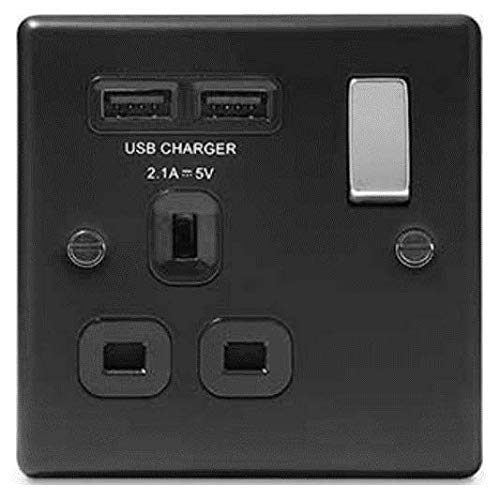
This image displays the front view of the BG NEXUS NMB21U2B-01 wall socket. It features a single 13A AC power outlet, two USB-A charging ports labeled 'USB CHARGER 2.1A = 5V', and a silver-colored on/off switch for the AC socket. The unit is black with visible mounting screws.
Installation Steps:
- Isolate Power: Before starting, ensure the mains electricity supply to the circuit is completely isolated at the consumer unit/fuse box. Use a voltage tester to confirm the circuit is dead.
- Prepare Wiring: Carefully strip the insulation from the circuit cables (Live, Neutral, Earth) to the appropriate length for connection to the terminal block.
- Connect Wires: Connect the Live wire to the 'L' terminal, the Neutral wire to the 'N' terminal, and the Earth wire to the 'E' terminal on the back of the socket. Ensure all connections are secure and no bare wires are exposed.
- Mount Socket: Gently push the socket into the wall box, ensuring no wires are trapped. Secure the socket to the wall box using the provided screws.
- Restore Power: Once securely mounted, restore the mains electricity supply at the consumer unit/fuse box.
- Test Functionality: Test the AC socket and USB ports to ensure they are functioning correctly.
Operating Instructions
Using the AC Socket:
- Insert a standard 13A UK plug into the socket.
- Use the silver switch on the right side of the socket to turn the power ON (switch up) or OFF (switch down) to the connected appliance.
- Ensure the appliance's power consumption does not exceed 13 Amps.
Using the USB Charging Ports:
- Connect your USB-powered device (e.g., smartphone, tablet) to either of the two USB-A ports.
- The USB ports provide a combined output of 2.1 Amps at 5 Volts, suitable for charging most mobile devices.
- The USB charging function is independent of the AC socket switch and is always active when mains power is supplied to the unit.
Maintenance
- To clean the socket, wipe the surface with a soft, dry cloth. Do not use abrasive cleaners or solvents.
- Ensure the power is off before cleaning.
- Regularly check for any signs of damage or loose connections. If any issues are found, isolate the power and consult a qualified electrician.
Troubleshooting
| Problem | Possible Cause | Solution |
|---|---|---|
| No power from AC socket | Switch is OFF; Circuit breaker tripped; Loose wiring connection. | Ensure switch is ON; Reset circuit breaker; Consult electrician for wiring check. |
| USB ports not charging | Device cable faulty; Device not compatible; No mains power to unit. | Try a different USB cable/device; Ensure mains power is supplied to the socket. |
| Socket feels warm | Normal operation under load; Overload. | Slight warmth is normal. If excessively hot, disconnect appliances and consult electrician for potential overload or wiring issue. |
Specifications
| Brand | BG NEXUS |
| Model Number | NMB21U2B-01 |
| Type | 13A Single Gang Switched Socket with USB Charger |
| AC Socket Rating | 13A, 250V~ |
| USB Output | 5V DC, 2.1A (shared across 2 ports) |
| ASIN | B07L8MKSX2 |
Warranty and Support
Information regarding specific warranty terms and customer support contact details for this product is not available in the provided data. Please refer to the manufacturer's official website or your point of purchase for warranty claims and technical assistance.
Ask a question about this manual
Ask about setup, troubleshooting, compatibility, parts, safety, or missing instructions. Manuals+ will review the question and use this page’s manual context to help answer it.