
1. Introduction
This manual provides detailed instructions for the SHANG TONG N98 Smartwatch. It covers setup, operation, maintenance, and troubleshooting to ensure optimal use of your device. The N98 Smartwatch features a colorful screen, IP67 waterproofing, and various health monitoring functions compatible with Android and iOS devices.
2. Product Overview
The SHANG TONG N98 Smartwatch is designed to assist with daily fitness tracking and smart notifications. Key features include:
- Heart Rate Monitor: Provides real-time heart rate feedback.
- Sleep Monitor: Tracks sleep quality, including deep sleep, non-REM sleep, and waking conditions.
- Sedentary and Drinking Reminders: Alerts you to move or drink water after preset durations.
- Alarm Reminders: Vibrates to notify you of alarms set on your phone.
- Remote Camera Control: Allows you to control your smartphone camera from your wrist.
- Call/Message Reminders: Vibrates and lights up for incoming calls and messages.
- IP67 Waterproof Rating: Resistant to dust and temporary immersion in water.

Figure 1: Front view of the SHANG TONG N98 Smartwatch displaying various metrics.
3. Setup
3.1. Charging the Smartwatch
Before initial use, fully charge your N98 Smartwatch. Connect the charging cable to the charging contacts on the back of the watch and to a USB power source. A full charge typically takes approximately 2 hours. The battery capacity is 180mAh, providing a standby time of 5-7 days.
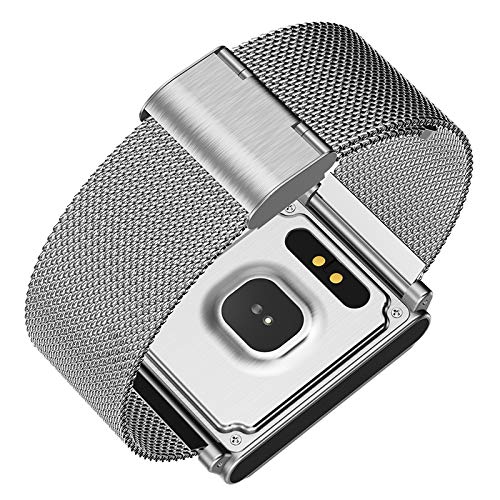
Figure 2: Underside of the smartwatch with charging contacts and health sensor.
3.2. Pairing with Your Smartphone
- Download the App: Search for the companion application (refer to the packaging or quick start guide for the specific app name) on your smartphone's app store (Google Play Store for Android, Apple App Store for iOS).
- Install and Open: Install the app and open it. Ensure your phone's Bluetooth is enabled.
- Pair Device: Within the app, navigate to the device pairing section. Select the N98 Smartwatch from the list of available Bluetooth devices.
- Confirm Pairing: Follow any on-screen prompts on both your phone and the smartwatch to confirm the pairing. The smartwatch uses Bluetooth 4.0 and is compatible with Android 4.4 / iOS 8.0 or above.
4. Operating Instructions
4.1. Basic Navigation
The N98 Smartwatch operates using a touch key interface. Tap the touch key to cycle through different screens and functions. Long-press the touch key to select or activate certain features.
4.2. Health Tracking Functions
- Heart Rate Monitoring: Navigate to the heart rate screen. The watch will automatically begin measuring your heart rate. Ensure the watch is snug on your wrist for accurate readings.
- Sleep Monitoring: Wear the smartwatch to bed. It will automatically monitor your sleep patterns, including deep sleep, light sleep, and awake times. Data can be viewed in the companion app.
- Pedometer: The watch automatically tracks your steps, distance, and calories burned throughout the day.
- Blood Pressure: Navigate to the blood pressure screen to initiate a measurement.
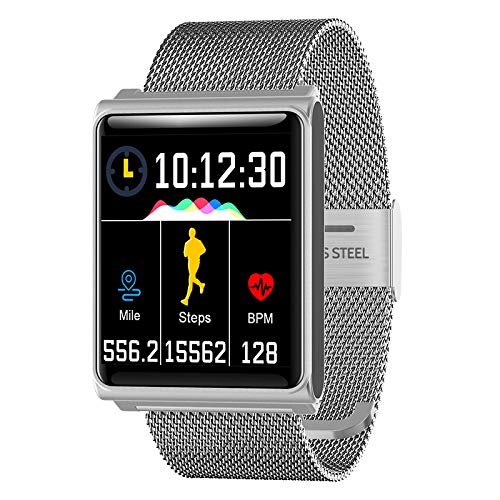
Figure 3: Smartwatch display showing activity metrics such as miles, steps, and beats per minute (BPM).
4.3. Smart Reminders and Notifications
- Sedentary and Drinking Reminders: Set your desired duration in the app. The watch will vibrate or ring to remind you to move or drink water.
- Alarm Reminders: Set alarms through the companion app on your phone. The smartwatch will vibrate at the scheduled time.
- Call/Message Notifications: When connected to your phone, the watch will vibrate and display caller ID or message content for incoming calls and messages. Supported notification types include Facebook, WhatsApp, Twitter, WeChat, QQ, Skype, Messenger, and Instagram.
4.4. Remote Camera Control
Open the camera function within the companion app on your smartphone. On the smartwatch, navigate to the remote camera control interface. Tap the touch key on the watch to remotely trigger your phone's camera shutter.
5. Maintenance
5.1. Cleaning
Wipe the smartwatch and strap regularly with a soft, dry cloth. For stubborn dirt, a slightly damp cloth can be used, followed by immediate drying. Avoid using harsh chemicals or abrasive materials.
5.2. Water Resistance (IP67)
The N98 Smartwatch has an IP67 rating, meaning it is protected from dust and can withstand immersion in water up to 1 meter for up to 30 minutes. It is suitable for daily use, such as hand washing or exposure to rain. However, it is not recommended for swimming, showering, or diving, as prolonged exposure to water pressure or hot water may compromise the seal.
6. Troubleshooting
- Watch not turning on: Ensure the watch is fully charged. Connect it to the charger for at least 30 minutes.
- Unable to pair with phone: Make sure Bluetooth is enabled on your phone and the smartwatch is within range. Restart both devices and try pairing again through the app.
- Inaccurate heart rate/blood pressure readings: Ensure the watch is worn snugly on your wrist, not too tight or too loose. Avoid excessive movement during measurement.
- Notifications not appearing: Check if the smartwatch is properly connected to the app. Verify that notification permissions are granted to the app in your phone's settings.
- Short battery life: Reduce screen brightness, disable unnecessary notifications, and ensure the watch is fully charged before use.
7. Specifications
| Feature | Detail |
|---|---|
| Brand | SHANG TONG |
| Model | N98 |
| Screen Size | 1.3 inches |
| Operating Mode | Touch Key |
| Bluetooth Version | Bluetooth 4.0 |
| Chip Type | Nordic 52832 |
| IP Rating | IP67 (Waterproof) |
| RAM | 64K |
| ROM | 512K |
| Battery Capacity | 180mAh |
| Charging Time | Approximately 2 hours |
| Standby Time | 5-7 days |
| Compatibility | Android 4.4 / iOS 8.0 or above |
| Band Material | Stainless Steel, Zinc Alloy |
| Case Material | Silicone |
8. Warranty and Support
For warranty information and customer support, please refer to the documentation provided with your purchase or contact the retailer. You may also visit the official SHANG TONG website for further assistance.