
Introduction
This manual provides detailed instructions for the setup, operation, and maintenance of your Swthlge 3D Moon Quran Speaker Light (Model SQ-168). Please read this manual thoroughly before using the product to ensure proper function and longevity.
Package Contents
- 3D Moon Quran Speaker Light
- Wooden Stand
- Remote Control
- USB Power Cable
Setup
1. Assembling the Wooden Stand
The wooden stand consists of several interlocking pieces. Carefully connect the pieces to form a stable base for the moon lamp. Refer to the image below for guidance.

Image: Step-by-step assembly of the wooden stand.
2. Charging the Device
Connect the provided USB power cable to the Type-C charging interface located at the bottom of the moon lamp. Plug the other end into a compatible USB power adapter (not included), computer, or mobile power bank. The device can be fully charged in approximately 3-4 hours and provides 6-7 hours or more of use depending on brightness settings.

Image: Location of the charging port and touch switch.
3. Initial Power On
To activate the light, touch the Type-C charging interface for 3-5 seconds. To activate the Quran speaker, press the power button on the remote control.
Operating Instructions
1. Remote Control Functions
The included remote control allows for comprehensive operation of the device. Functions include power on/off, volume control, changing Quran reciters, selecting Surahs, and adjusting light settings. The remote also provides access to various modes such as FM radio, Quran reading, Bluetooth, and TF card playback.

Image: The moon lamp with its remote control.
2. Touch Control for Lighting
The moon lamp features a metal touch switch at the top. A short touch will switch the light on/off and cycle between warm and cool white light. A long touch will adjust the brightness of the light.

Image: Dimmable touch control for the light.
3. Bluetooth Connection
The speaker supports Bluetooth connectivity for playing audio from your smartphone or tablet. To connect, ensure Bluetooth is enabled on your device and select the speaker from the list of available devices. The speaker will automatically connect to the most recently paired device.

Image: Wireless Bluetooth connection feature.
4. APP Control
For extended functionality, download the dedicated APP. Open the APP and enable Bluetooth connection within the application to access additional features, including selecting from 16 reciters and 16 language translators.

Image: QR codes for downloading the Koran Player APP.
Android App: https://equantu.com/uploads/KoranPlayer.apk
iOS App: https://apps.apple.com/cn/app/id1525651222
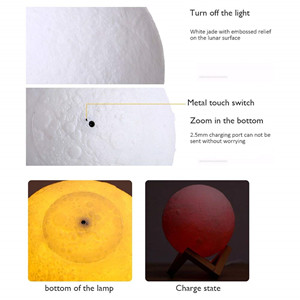
Image: App control interface for the moon lamp.
5. Quran Learning Features
The device is designed as a study helper for the Quran, featuring built-in reciters and language translators. You can select from 16 reciters and 16 languages to enhance your learning experience.

Image: Quran learning with the moon lamp.
6. Light Color Modes
The moon lamp offers various light colors, including warm white, cool white, and multiple colorful light modes. These can be adjusted via the touch control or the remote control.

Image: The moon lamp displaying various light colors.
7. Additional Features
The device includes a built-in FM radio mode and supports TF card playback for additional audio options.
Maintenance
1. Cleaning
To clean the moon lamp, gently wipe its surface with a soft, dry cloth. Avoid using abrasive cleaners or excessive moisture, as this may damage the product.
2. Battery Care
The device uses a Lithium Polymer battery. For optimal battery life, avoid fully discharging the battery frequently. Charge the device when the low power indication is active. Do not expose the device to extreme temperatures.
Troubleshooting
- Device not turning on: Ensure the device is charged. Connect the USB cable and allow it to charge for at least 30 minutes before attempting to power on again.
- Remote control not working: Check if the remote control has working batteries. Ensure there are no obstructions between the remote and the device.
- Bluetooth connection issues: Ensure Bluetooth is enabled on both the speaker and your mobile device. Try unpairing and re-pairing the device.
- Sound quality issues: Ensure the device is not placed in an enclosed space that might obstruct sound. Adjust volume levels.
If issues persist, refer to the APP for further diagnostic tools or contact customer support.
Specifications
| Material | Plastic |
| Model Name | SQ-168 |
| Item Model Number | sq510 |
| Speaker Type | 3D, Computer |
| Connectivity Technology | Bluetooth, USB |
| Power Source | Battery Powered |
| Battery Type | 1 Lithium Polymer (included) |
| Battery Capacity | 1200 Milliamp Hours |
| Charging Time | 3-4 Hours |
| Working Time | 6-7 Hours (or more, depending on brightness) |
| Speaker Maximum Output Power | 10 Watts |
| Bluetooth Range | 10 Meters |
| Product Dimensions | 5.9"D x 5.9"W x 5.9"H |
| Item Weight | 0.282 ounces (approx. 8 Grams) |
| Control Method | Remote, APP, Touch |
Image: Product specification parameters.
Official Product Videos
Video: Demonstrates the 3D moon Quran speaker, showing app control for changing light colors and selecting from 18 languages and 14 reciters. This video highlights the interactive features of the device.
Warranty and Support
This product comes with an 18-month warranty against manufacturing defects from the date of purchase. For support or warranty claims, please contact the seller or refer to the product's official website for contact information.